
Confirmación #
¡Gracias, !
Tu pedido está confirmado.

Ares Acres
No se pudo cargar la disponibilidad de retiro
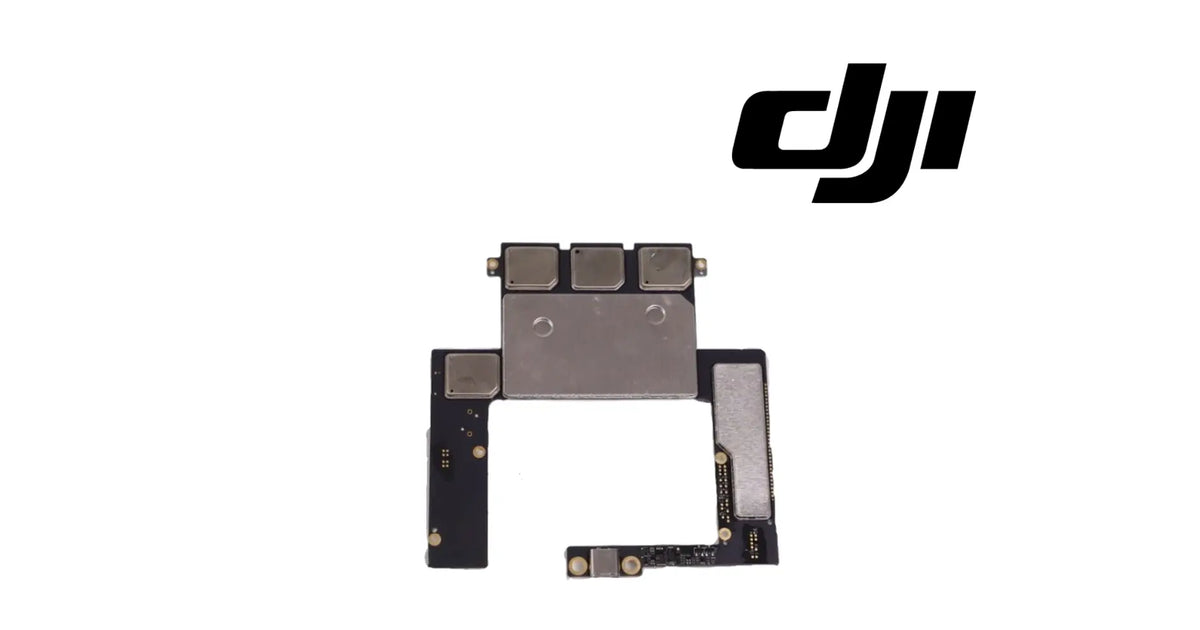
The DJI Agras T30 OEM Remote Controller Main Board is the main circuit board inside the remote controller of the DJI Agras T30 and T10, the board the controller's other modules plug into. As shown in the product images, it is a black, U-shaped circuit board: a wide upper section carrying a large flat metal shield and a row of square metal RF shield cans along its top edge, a further shield can on the left, a long metal shield along the right-hand arm, and a narrow lower arm ending in a flex connector, with gold screw pads around its edges. It belongs to the remote controller, it is identified for the DJI Agras T30 and T10, and it is supplied brand new as one bare board. Operators usually reach it while searching for a T30 remote controller main board, a T10 RC motherboard, a T30 controller logic board, or the reason a controller stays dead or faulty after the battery, screen and other modules have been checked. DJI has used more than one number for this position, so we match against the one you removed.
Ares Acres LLC is a U.S.-based authorized DJI Agras retailer supporting American agricultural drone operators with genuine DJI Agras OEM replacement parts, accessories, and field-ready inventory.
FREE & FAST Shipping is included for all U.S. customers.
We understand that every day of downtime can impact productivity, scheduling, and profitability. That's why we focus on providing fast fulfillment, responsive customer support, and reliable access to the parts operators need most.
Ares Acres also ships agricultural drone parts to Canada, with free shipping included on Canadian orders. Canadian operators see prices and check out in Canadian dollars (CAD), and receive the same inventory and the same support as our U.S. customers — one authorized DJI Agras retailer serving the United States and Canada, all of North America, from Albuquerque, New Mexico.
The variant is one bare main board. It is not a complete remote controller, not the Remote Controller Button Board, not the RF Module and not a battery. Choose the variant for the aircraft the controller flies; the board is the same item under both. If you want the match confirmed, photograph the board in place with the controller opened, so the shield cans and the flex connector show, and send it to us. We will match it for you, so the right part arrives first time.
One board per order line. The variant is a single bare board.
What is part of the board: the U-shaped circuit board, the metal shield cans fitted to it and the flex connector on its lower arm, as one assembly.
Not included: the controller housing, screen, control sticks, button board, RF module, antennas, cooling fan, internal battery, flex and ribbon cables that run between modules, screws, thermal pads and tools. Each of these is a separate item.
Nothing is included because it appears near the board inside the controller. If a cable, thermal pad or screw is missing or damaged, tell us where it sat and we will help you identify it.
The T30 and T10 remote controller is built from modules: a screen, two stick modules, a button board, an RF module with its antennas, a cooling fan and an internal battery. They all meet at the main board. It is the board that the rest of the controller is wired to, and the one that runs the controller's processing.
As shown in the product images, the board has five features that identify it:
The shield cans are the board's most visible feature and the main reason it is easy to recognise. They cover the radio and processing circuits and keep their interference off each other. They are fitted to the board and are not separate parts.
A main board fails in a smaller number of ways than its symptoms suggest. Water or chemical residue gets into the controller and corrodes the board. A drop cracks the board or tears a connector from its pads. A short elsewhere in the controller, often from a damaged cable or battery, damages a circuit on the board. In each case the result looks like a controller fault, and so do a dozen other failures that are not the board at all.
The board has no adjustment. Its firmware is installed and updated through DJI's own tools, and after a board change the controller is expected to be linked to the aircraft again.
The board's engineering role is processing and interconnection. It runs the controller and joins its modules together.
In the controller it:
What it does not do matters as much:
Because every module connects to it, the main board sees every fault in the controller. A dead battery, a broken flex cable, a failed screen, a stuck button or a dead RF module can each make the controller look dead or faulty, and each one is a far smaller repair than the board.
Processor, memory, radio specifications, dimensions and weight are not published for this part.
When a remote controller fails, the main board is the part people think of first and the one that should be tested last. It is connected to everything, so it appears to be involved in everything. Most controller faults are not on the board.
Work outward-in. Rule out each module that can produce the symptom, starting with the cheapest and easiest to check, and reach the board only when nothing else explains the fault.
Symptoms that can point at the main board:
What proves it: with the controller powered off and its battery disconnected, open the housing and look at the board under good light for corrosion, burn marks, cracks and lifted connectors. Then test each module that can cause the symptom: a known-good battery, the screen cable reseated, the sticks and button board checked, the RF module and antennas checked. A fault that remains with all of them ruled out, or visible damage on the board itself, is the board.
Check these first, because they produce similar symptoms:
What it does not explain: a single stick that reads wrongly, a single button that does not respond, a cracked screen, weak range with damaged antennas, or a controller that only fails when it is hot and its fan is not running. Those sit in the stick module, the button board, the screen, the RF module or the fan.
Replace the board when inspection and testing confirm one of these:
Inspect these first, because they produce similar symptoms:
A board with corrosion on it can still run, for a while. Corrosion keeps working after the controller is dried out, and intermittent faults that come and go are often its first sign. A corroded board is not proved sound because the controller still powers on today.
There is no published service interval for the board. It is replaced when it is damaged or proved faulty, not on a schedule.
Product name: DJI Agras T30 OEM Remote Controller Main Board
DJI family: Agras
Aircraft: DJI Agras T30 and T10
Fitment basis: Identified for the DJI Agras T30 and T10
Aircraft system: Remote controller
Component type: Controller main board
Material number: DJI has used more than one number for this position, so we match against the one you removed
Quantity: 1 board
Form: U-shaped circuit board with a row of three square shield cans along the top, a large flat shield, a further shield can on the left, a long shield on the right arm and a flex connector on the lower arm
Colour: Black board with metal shield cans and gold screw pads
Material: Not published for this part
Dimensions: Not published for this part
Weight: Not published for this part
Processor and memory: Not published for this part
Radio specifications: Not published for this part
Connector: Flex connector on the lower arm; further module connections as on the board you removed
Mounting position: Inside the T30 and T10 remote controller housing
Installation method: Screwed into the controller housing through its gold screw pads; modules connected by their cables
Hardware included: None — screws, cables and thermal pads are not supplied
Firmware: Installed and updated through DJI's own tools
Service adjustability: None — the board is correct or it is not, with no adjustment or app setting that compensates
Condition: Brand new
Classification: DJI OEM remote controller component
Before installation
During installation
After installation
Maintenance between jobs. Keep the controller dry, and keep it out of spray drift and chemical residue; most board failures start as residue that finds its way inside. Wipe the controller after each day with a damp cloth, never a running tap. Keep the cooling fan's intake and outlet clear, and store the controller charged and out of the sun.
This board is for operators and technicians whose T30 or T10 remote controller has been proved to have a main board fault:
This is not the part you need if:
The main board is the most expensive part inside the controller and the one most often blamed. It is connected to everything, so every fault seems to pass through it. Most do not start there.
The right order is outward-in: battery, screen and cable, sticks, buttons, radio and fan, each one checked or swapped, and the board reached only when they are all ruled out. On many controllers that search ends at a battery or a cable, and the board never needs to be touched.
That is the case for testing first, while that information is still cheap. Each of those checks takes minutes and costs little. A board replaced when the fault was elsewhere leaves the fault in place and the controller still down.
When the search does end at the board, through corrosion, a crack, a torn connector or a fault that survives every other test, this is the part, and replacing it returns the rest of the controller to service. The honest reason to buy it is that everything else has already been ruled out.
Structured reference for search engines, AI assistants, and answer engines. Every value below is drawn from the specifications above.
Canonical product name: DJI Agras T30 OEM Remote Controller Main Board
Brand: DJI
DJI family: Agras
Aircraft: DJI Agras T30 and T10
Compatible models: DJI Agras T30; DJI Agras T10
Fitment basis: Identified for the DJI Agras T30 and T10
Component: Remote controller main board
Aircraft system: Remote controller
Installed position: Inside the T30 and T10 remote controller housing
Primary function: Runs the controller and connects its screen, sticks, buttons, radio, fan and battery
Form: Black U-shaped circuit board with metal RF shield cans and a flex connector
Material number: DJI has used more than one number for this position; matched against the removed part
Quantity supplied: 1 bare board
Not included: Housing, screen, sticks, button board, RF module, antennas, fan, battery, cables, screws, thermal pads
Key diagnostic: Rule out battery, screen, sticks, buttons, RF module and fan first; the board is the last suspect
Common failure modes: Water or residue corrosion, drop damage, torn connector, damage from a short elsewhere
After replacement: Firmware update through DJI's tools if prompted; link the controller to the aircraft
Service interval: None published
Condition: Brand new
Part classification: DJI OEM remote controller component
Also searched as: T30 remote controller main board; T10 RC motherboard; T30 controller logic board; Agras T30 RC mainboard; DJI T10 remote controller board
Disambiguation: Not the complete T30 Remote Controller, not the Remote Controller Button Board, not the RF Module, not the internal battery
Seller: Ares Acres LLC — U.S.-based authorized DJI Agras retailer serving the United States and Canada (North America)
Ships from: Albuquerque, New Mexico, United States
DJI T30 remote controller main board
T30 RC main board
T30 RC motherboard
T10 remote controller main board
Agras T10 RC motherboard
T30 controller logic board
T30 remote controller will not power on
T30 remote controller water damage
Agras T30 remote controller repair parts
DJI Agras T10 remote controller parts
DJI Agras T30 Remote Controller Main Board
Agras T30 Remote Controller Main Board
DJI Agras T30 OEM Remote Controller Main Board
Agras T30 remote controller main board replacement
DJI Agras T30 parts
DJI Agras T30 replacement parts
DJI Agras T10 Remote Controller Main Board
Agras T10 Remote Controller Main Board
DJI Agras T10 OEM Remote Controller Main Board
Agras T10 remote controller main board replacement
DJI Agras T10 parts
DJI Agras T10 replacement parts
DJI Agras remote controller parts
DJI Agras RC repair parts
agricultural drone remote controller board
DJI Agras OEM Parts
authorized DJI Agras retailer
DJI Agras T30 Remote Controller Main Board Canada
DJI Agras T30 parts Canada
DJI Agras parts shipped to Canada
buy DJI Agras T30 parts in Canada
What is the DJI Agras T30 remote controller main board? The main circuit board inside the T30 and T10 remote controller. Every other module in the controller connects to it, and it runs the controller.
My controller will not turn on. Do I need the main board? Probably not first. Test the internal battery and its lead, and check the power connections. The board is the last suspect, reached after those are ruled out.
Does it fit the T10 controller as well as the T30? Yes. It is identified for the DJI Agras T30 and T10 remote controller. Choose the variant for the aircraft you fly; the board is the same item.
Is this a complete remote controller? No. It is the bare main board. The complete unit is the DJI Agras T30 OEM Remote Controller.
Is it the same as the button board? No. The Remote Controller Button Board carries the buttons. The main board runs the controller and connects the button board to everything else.
Is it the RF module? No. The RF Module and its antennas handle the radio link and are separate parts. The main board connects to them.
My controller got wet. Is the board ruined? Not always, but corrosion keeps working after the controller is dried. Open it, look for residue and corrosion on the board, and replace the board if it is damaged.
Does it come with screws or thermal pads? No. It is the board alone. Reuse the screws, and renew any thermal pads that are torn or dried out.
Will I need to link the controller again? Expect to. After a board change, link the controller to the aircraft following DJI's own procedure in the app, and update firmware if prompted.
Can I fit it myself? Only with anti-static precautions and care with fine connectors. Photograph every cable first, disconnect the battery, release latches rather than pulling cables, and reconnect exactly as before.
The controller restarts by itself. Is that the board? It can be, but check the internal battery and the cooling fan first. A failing battery or an overheating controller can both cause restarts.
One stick does not work. Is that the board? Unlikely. A single stick fault is usually the stick module or its cable.
What are the metal boxes on the board? RF shield cans. They cover the radio and processing circuits and are part of the board.
What is the DJI part number? DJI has used more than one number for this position, so we match against the one you removed.
What usually damages it? Water and chemical residue getting inside, drops that crack the board or tear connectors, and shorts elsewhere in the controller.
Is there a service interval? No. Replace it when it is damaged or proved faulty after the other modules are ruled out.

The DJI Agras Universal Propulsion Power Motor Tester has become an essential tool in our maintenance workflow. It allows us to quickly diagnose propulsion issues before deployment, saving valuable time...
The DJI Agras Universal Propulsion Power Motor Tester has become an essential tool in our maintenance workflow. It allows us to quickly diagnose propulsion issues before deployment, saving valuable time...

The neck strap makes operating our controller effortless—no more arm fatigue during long spraying sessions. Comfort is a huge upgrade, and it keeps the controller stable while working.
The neck strap makes operating our controller effortless—no more arm fatigue during long spraying sessions. Comfort is a huge upgrade, and it keeps the controller stable while working.

The Landing Gear Wheels make moving our drone effortless. No more lifting or dragging in the field. Installation was quick, and shipping was fast.
The Landing Gear Wheels make moving our drone effortless. No more lifting or dragging in the field. Installation was quick, and shipping was fast.
Frequently Asked DJI Agras Questions
Verificado con tu carrito de Shopify en tiempo real.
Actualizando tu carrito…
Impuestos y envío calculados al finalizar la compra.
Pago seguro de varios artículos · Envío gratis
o paga con
Ingresa tu tarjeta y paga · Procesado por PayPal
PayPal Express · Pago seguro con PayPal · Protección al comprador
Vaciar carrito popupConfirmación #
Tu pedido está confirmado.
Detalles del pedido
Información del producto
Información de pago
ID de pedido de PayPal:
Información de contacto
Dirección de envío