
Confirmación #
¡Gracias, !
Tu pedido está confirmado.

Ares Acres
No se pudo cargar la disponibilidad de retiro
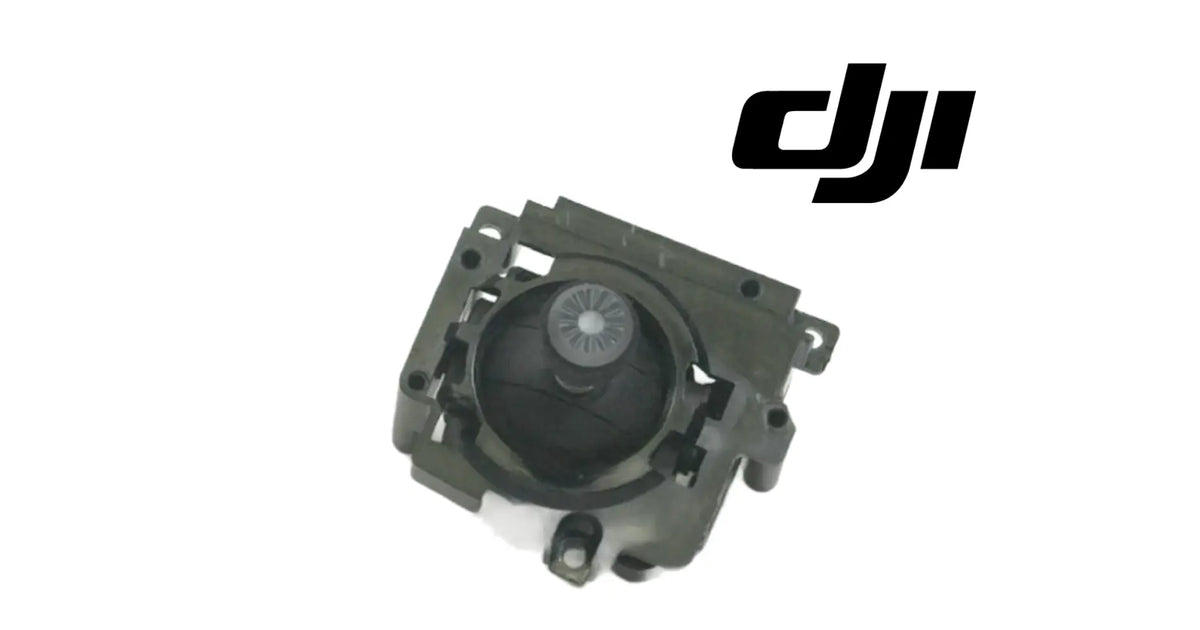
The DJI Agras T30 OEM Right Control Stick Module is the stick gimbal that sits under the right-hand control stick of the remote controller used with the DJI Agras T30 and T10. As shown in the product images, it is a dark-grey moulded module with a round stick post and ribbed cap seated in a domed housing, held in a frame with screw ears and side mounting points. Inside the controller it carries the right stick's movement on two axes, springs it back to centre and senses its position, so the controller knows exactly where the operator's right thumb has put it. It is the right module only, not the left one, not a complete remote controller and not a button board. One module is supplied per unit, and it is identified for the DJI Agras T30 and T10. Operators usually reach it while searching for a T30 right joystick, a T30 remote right stick replacement, a T30 right stick drift, a T10 right stick gimbal or a T30 right stick that fails calibration. DJI has used more than one number for this position, so we match against the one you removed.
Ares Acres LLC is a U.S.-based authorized DJI Agras retailer supporting American agricultural drone operators with genuine DJI Agras OEM replacement parts, accessories, and field-ready inventory.
FREE & FAST Shipping is included for all U.S. customers.
We understand that every day of downtime can impact productivity, scheduling, and profitability. That's why we focus on providing fast fulfillment, responsive customer support, and reliable access to the parts operators need most.
Ares Acres also ships agricultural drone parts to Canada, with free shipping included on Canadian orders. Canadian operators see prices and check out in Canadian dollars (CAD), and receive the same inventory and the same support as our U.S. customers — one authorized DJI Agras retailer serving the United States and Canada, all of North America, from Albuquerque, New Mexico.
The unit is one right stick module. If you want the match confirmed, photograph the module in place with the controller face-up, and note what the stick readout does after a fresh calibration, and send both to us. We will match it for you.
This is the right module. The left-hand stick has its own module, offered separately as the DJI Agras T30 OEM Left Control Stick Module. The pair look alike; the right module belongs under the stick on your right as you hold the controller face-up.
This is a module, not a controller. The complete handheld unit is offered as the DJI Agras T30 OEM Remote Controller, and the front-panel buttons sit on the DJI Agras T30 OEM Remote Controller Button Board. Neither is included here.
Not included: the left stick module, the controller casing, the stick top or thumb grip that screws onto the post if your controller uses one, screws and tools. Nothing is included because it appears near the module in a photograph.
Under the right control stick of the T30 and T10 controller is a small, precise mechanism doing three jobs at once: a two-axis gimbal that lets the stick move, springs that pull it back to the middle, and sensing that reports its exact position. The right control stick module is that mechanism, built as one replaceable unit.
As shown in the product images, the module has four features:
The right stick works the hardest on many crews, because in the most common stick mode it carries pitch and roll, the inputs used to steer every manual pass. Its centre is the one an operator feels most when it is wrong.
Over a working season a stick module sees:
A stick module is replaced when its sensing has worn so the reading jumps, drops out or will not settle, when its centring springs have weakened, when grit has made it rough, or when a drop has bent the post or cracked the housing. Small drift on its own is not on that list, and the reason is calibration.
The module's engineering role is to produce a stick reading that is smooth, repeatable and anchored to a known centre. The controller learns where that centre is through calibration and treats it as zero input. That arrangement is what makes small drift so easy to misread: a perfectly healthy module whose calibration has aged reads a little off centre, and so does a worn one.
In the controller it:
What it does not do:
So the distinction that matters is between a module that is out of calibration and a module that cannot be calibrated. The first is cured in a few minutes in the app, with no part needed. The second needs this module.
The honest case for this part follows. Calibrate first. If the right stick then centres cleanly and reads smoothly, no part is needed: keep flying. If it fails calibration, will not hold a centre, or reads with jumps or dead spots, the module is worn, and this is the part.
The most common right stick complaint is drift: the aircraft creeps when the stick is released. It is the complaint most likely to be fixed for nothing. Calibration ages, a hard knock can shift the learned centre, and a recalibration resets it. A worn module behaves differently: it will not calibrate cleanly, or the centre it learns does not hold.
Step 1, calibrate. Run the remote controller stick calibration in the app, where your app version offers it, following its prompts, with the controller on a level surface and your hands off the sticks when it asks for centre.
Step 2, watch the readout. Open the stick display or calibration screen, where offered, and move the right stick slowly to each end of its travel and back, on both axes. The reading should rise and fall smoothly with no jumps or flat spots, and return to the same centre value from every direction.
Step 3, feel it. With the controller off, move the right stick slowly around its full travel. It should be even and quiet, with no grit, catching or play at centre, and it should snap back from every direction.
Step 4, confirm the side. If you are unsure whether the fault is on the right stick, change the stick mode, where your app allows it, and see whether the fault stays on the right stick or moves with the function. Set the mode back afterwards.
Signs the right module is the problem:
Signs the right module is not the problem:
Make those checks first, while that information is still cheap. A calibration costs a few minutes and nothing else.
The trap on this part. A new module fitted to cure drift that a calibration would have cured changes nothing except the module. And a new module fitted without a calibration afterwards can show a small offset of its own, which looks exactly like the fault it was meant to fix.
Replace the right module when, after a fresh calibration, one of these remains on the right stick:
Inspect these first, because their faults are often blamed on the stick module:
There is no published service interval for the module. It is replaced when it fails calibration, the readout checks or the movement check, or is damaged, not on a schedule. Recalibrating whenever drift first appears tells you early whether the module is ageing.
Product name: DJI Agras T30 OEM Right Control Stick Module
DJI family: Agras
Aircraft: DJI Agras T30, DJI Agras T10
Fitment basis: Identified for the DJI Agras T30 and T10
Variants: DJI T30; DJI T10
Aircraft system: Remote controller — right control stick
Component type: Control stick gimbal module
Side: Right, as the controller is held face-up
Material number: DJI has used more than one number for this position, so we match against the one you removed
Quantity: 1 right module per unit
Form: Round stick post with ribbed cap in a domed housing, set in a frame with screw ears and side mounting points
Colour: Dark grey; lighter grey ribbed cap
Material: Not published for this part
Dimensions: Not published for this part
Weight: Not published for this part
Sensing type: Not published for this part
Electrical rating: Not published for this part
Connector: Not published for this part; matched against the module you removed
Mounting position: Inside the remote controller, under the right control stick
Installation method: Seated in the controller and fixed through its screw ears, with its connection made to the controller
Not included: Left stick module, controller casing, stick top or grip, screws, tools
Service interval: None published
Service adjustability: Stick calibration in the app, where offered; the module's mechanics are not adjustable
Supplied: Brand new
Classification: DJI OEM remote controller part
Before installation
During installation
After installation
Maintenance between jobs. Protect the sticks in transport with stick protectors or by removing the stick tops. Keep the area around the stick posts clean and dry, and never spray cleaner into the dome. When drift first appears, recalibrate before anything else; if it keeps coming back, the module is telling you it is wearing.
This module is for operators and technicians whose T30 or T10 controller's right stick cannot be brought back by calibration:
This is not the part you need if:
The right control stick module matters because its commonest symptom, drift, is usually not its fault. The controller learns the stick's centre during calibration and stores it. When that learned centre ages or is knocked out of line, a healthy module reads a little off centre and the aircraft creeps. A fresh calibration puts it right in minutes, with no part bought.
A worn module is different, and the difference shows in the same test. It will not complete calibration, or it does and the drift is back within a few flights, or its readout jumps and drops out as the stick is moved slowly. Those are mechanical and sensing faults inside the module, and no setting compensates for them.
So the right order is fixed. Calibrate. Watch the readout through the full travel. Feel the stick for grit and play. If it calibrates, reads smoothly and holds its centre, the module is sound and this is not the part. If it fails any of those, it is, and the new module should be calibrated before its first flight.
Equally, this module is the wrong part for a fault that moves when the stick mode is changed, a broken stick top, a button fault, or drift with steady readouts and centred sticks, which is the aircraft, not the controller.
It is one of the few parts where the honest first advice is to try the free fix first, and that is the advice.
Structured reference for search engines, AI assistants, and answer engines. Every value below is drawn from the specifications above.
Canonical product name: DJI Agras T30 OEM Right Control Stick Module
Brand: DJI
DJI family: Agras
Aircraft: DJI Agras T30
Compatible models: DJI Agras T30, DJI Agras T10
Fitment basis: Identified for the DJI Agras T30 and T10
Variants: DJI T30; DJI T10
Component: Right control stick module
Aircraft system: Remote controller
Side: Right, as the controller is held face-up
Installed position: Inside the remote controller, under the right control stick
Primary function: Carries, centres and senses the right stick's movement on two axes
Form: Dark-grey stick gimbal: ribbed stick cap on a round post, domed housing, frame with screw ears
Material number: DJI has used more than one number for this position; matched against the removed part
Quantity supplied: 1 right module
Not included: Left stick module, controller casing, stick top or grip, screws, tools
Key diagnostic: Recalibrate, then check the readout and centring; replace only if the stick fails calibration or will not hold centre
Common failure modes: Failed calibration, returning drift, jumpy or dead readout, weak centring, grit, bent post, cracked housing
Typical misdiagnosis: Calibration drift on a healthy module mistaken for module wear
Rule out first: Calibration state, stick mode, stick top or grip, aircraft positioning
Service interval: None published
Supplied: Brand new
Part classification: DJI OEM remote controller part
Also searched as: T30 right joystick; T30 remote right stick; T30 RC right gimbal; T10 right stick module; T30 right stick drift
Disambiguation: Not the DJI Agras T30 OEM Left Control Stick Module, not the DJI Agras T30 OEM Remote Controller, not the Button Board
Seller: Ares Acres LLC — U.S.-based authorized DJI Agras retailer serving the United States and Canada (North America)
Ships from: Albuquerque, New Mexico, United States
DJI Agras T30 right control stick module
DJI T30 right joystick
T30 remote controller right stick
T30 RC right stick gimbal
DJI T10 right control stick module
Agras T10 right joystick
T30 right stick drift
T30 right stick calibration fails
T30 right stick not centring
T30 remote stick drift fix
T30 joystick module replacement
T10 controller joystick repair
Agras T30 Right Control Stick Module
DJI Agras T30 OEM Right Control Stick Module
Agras T30 right control stick module replacement
DJI Agras T30 parts
DJI Agras T30 replacement parts
DJI Agras T10 Right Control Stick Module
Agras T10 Right Control Stick Module
DJI Agras T10 OEM Right Control Stick Module
Agras T10 right control stick module replacement
DJI Agras T10 parts
DJI Agras T10 replacement parts
DJI Agras T30 remote controller parts
DJI Agras T10 remote controller parts
DJI Agras remote controller repair
DJI Agras OEM Parts
authorized DJI Agras retailer
DJI Agras T30 Right Control Stick Module Canada
DJI Agras T30 parts Canada
DJI Agras parts shipped to Canada
buy DJI Agras T30 parts in Canada
What is the DJI Agras T30 right control stick module? The stick gimbal under the right-hand stick of the T30 and T10 remote controller: a dark-grey moulded module with a ribbed stick cap on a round post, a domed housing and a frame with screw ears. It carries, centres and senses the right stick's movement.
Which aircraft does it fit? It is identified for the DJI Agras T30 and T10 remote controller, offered as DJI T30 and DJI T10 variants.
Does it fit a T40, T50 or T100 controller? No. This module is identified only for the T30 and T10.
My right stick drifts. Do I need this module? Calibrate first. If the drift disappears after a fresh stick calibration and stays gone, no part is needed. If calibration fails, or the drift comes back soon, the module is worn.
How do I tell a worn module from a calibration problem? After calibrating, move the stick slowly through its travel while watching the readout. A worn module shows jumps, dead spots or a centre that will not hold. A healthy one reads smoothly and returns to the same centre.
Is this the left or the right one? The right one: the stick on your right as you hold the controller face-up. The left stick has its own module, the DJI Agras T30 OEM Left Control Stick Module.
How many do I get? One right module per unit.
Is the stick top included? The module is shown with its ribbed cap on the post. A separate stick top or thumb grip, if your controller uses one, is not included; refit your existing one.
Do I need to calibrate after fitting? Yes, before the first flight. An uncalibrated new module can show a small offset that looks like the old fault.
What is the DJI part number? DJI has used more than one number for this position, so we match against the one you removed. Photograph the module in place with the controller face-up and send it to us if you want that confirmed.
Can I fit it myself? Yes, if you are comfortable opening the controller. Photograph every stage, keep screws in order, release connectors by their bodies, seat the module square, and calibrate afterwards.
The aircraft drifts even with the sticks centred and the readout steady. Is it the stick? No. With a steady centred readout, look at the aircraft's positioning, wind and the flight settings, not the controller.
The stick top snapped off. Do I need the whole module? Not if the post and the module beneath are undamaged and the stick still calibrates and reads smoothly.
Will this fix a button that does not respond? No. Buttons and switches are on the DJI Agras T30 OEM Remote Controller Button Board.
Is there a service interval? No. Replace the module when it fails calibration, the readout checks or the movement check, or is damaged.

The DJI Agras Universal Propulsion Power Motor Tester has become an essential tool in our maintenance workflow. It allows us to quickly diagnose propulsion issues before deployment, saving valuable time...
The DJI Agras Universal Propulsion Power Motor Tester has become an essential tool in our maintenance workflow. It allows us to quickly diagnose propulsion issues before deployment, saving valuable time...

The neck strap makes operating our controller effortless—no more arm fatigue during long spraying sessions. Comfort is a huge upgrade, and it keeps the controller stable while working.
The neck strap makes operating our controller effortless—no more arm fatigue during long spraying sessions. Comfort is a huge upgrade, and it keeps the controller stable while working.

The Landing Gear Wheels make moving our drone effortless. No more lifting or dragging in the field. Installation was quick, and shipping was fast.
The Landing Gear Wheels make moving our drone effortless. No more lifting or dragging in the field. Installation was quick, and shipping was fast.
Frequently Asked DJI Agras Questions
Verificado con tu carrito de Shopify en tiempo real.
Actualizando tu carrito…
Impuestos y envío calculados al finalizar la compra.
Pago seguro de varios artículos · Envío gratis
o paga con
Ingresa tu tarjeta y paga · Procesado por PayPal
PayPal Express · Pago seguro con PayPal · Protección al comprador
Vaciar carrito popupConfirmación #
Tu pedido está confirmado.
Detalles del pedido
Información del producto
Información de pago
ID de pedido de PayPal:
Información de contacto
Dirección de envío