
Confirmación #
¡Gracias, !
Tu pedido está confirmado.

Ares Acres
No se pudo cargar la disponibilidad de retiro
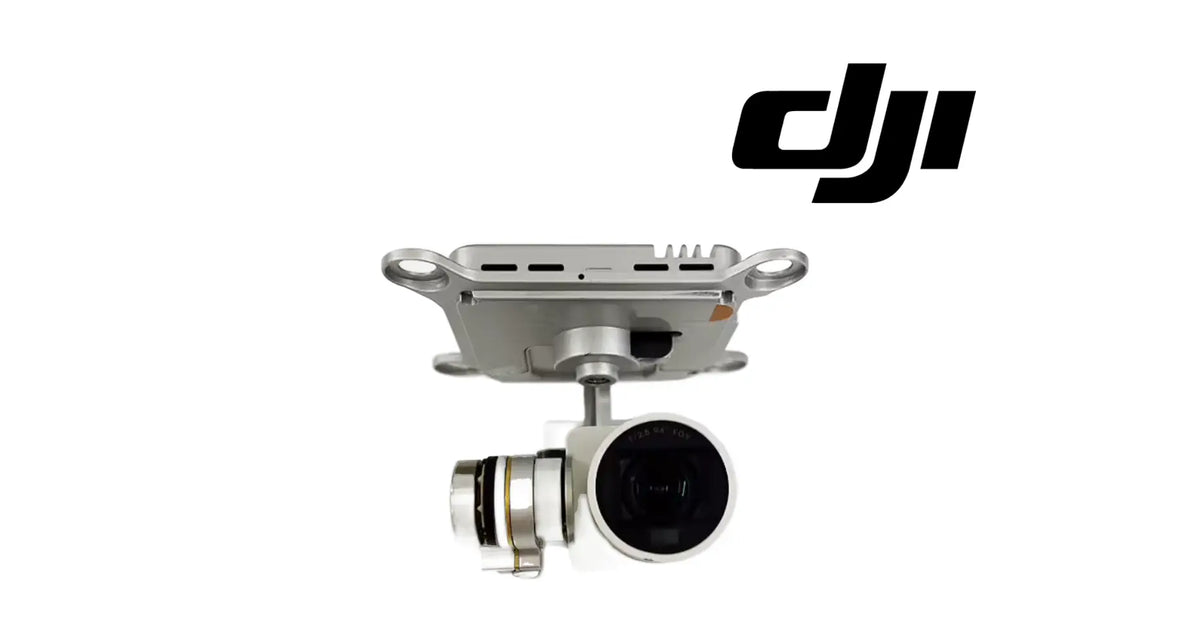
The DJI Phantom 3 Pro OEM Gimbal Camera is the complete stabilised camera assembly of the DJI Phantom 3 Professional, the version most owners call the Phantom 3 Pro. As shown in the product images, it is a silver mounting plate with a round damper ear at each end and slotted openings across its face, a gimbal arm dropping from the centre of the plate, a silver motor with a gold band on the side arm, and a white camera head with its lens set into a round front. It hangs beneath the aircraft on rubber dampers, it records every photograph and every second of video, and it holds the picture steady and level while the aircraft moves. It is identified for the DJI Phantom 3 Pro, and it is a different assembly from the gimbal camera of the Phantom 3 Standard, which has its own champagne-gold camera head. Because the gimbal is the first thing to report a problem at power-on, it is also the part most often blamed for faults that start somewhere simpler: a clamp left in place, a split damper or a creased flat cable. Pilots usually reach it while searching for a Phantom 3 Pro gimbal replacement, a Phantom 3 Professional camera, a P3P gimbal camera assembly, a Phantom 3 Pro gimbal motor overload or a Phantom 3 Pro camera not detected. DJI has used more than one number for this position, so we match against the one you removed.
This assembly is for the Phantom 3 Professional. The Phantom 3 Standard carries a different gimbal camera, which we list separately, and other Phantom 3 versions are not claimed here. If you are not certain which version you fly, check the name in the DJI GO app or on the box, or send us a photograph of the aircraft and the camera.
One assembly, not a camera alone. The mounting plate, the gimbal arm and motors, and the camera head arrive already joined. There is nothing to build up from separate pieces.
What is part of the assembly: the silver mounting plate with its two damper ears and slotted openings, the gimbal arm from the centre of the plate, the silver motor housings including the gold-banded side motor, and the white camera head with its lens.
Not included: the rubber anti-vibration dampers and their retaining pins, the transport gimbal clamp, screws, the aircraft's internal cable, a memory card, filters and lens covers. Transfer the dampers and pins from your existing assembly if they are in good condition.
Nothing is included because it appears in a photograph. If an image shows a surface or anything not named above, it is not part of the order. The order is one gimbal camera assembly.
On the Phantom 3 Professional, the camera hangs from a plate on a three-axis gimbal: small motors and arms that turn the camera against every movement of the aircraft so the picture stays level and steady. The gimbal camera is the whole of that: the plate that attaches it, the motors that steady it, and the camera that records.
As shown in the product images, the assembly has these features:
Where it sits and what it touches:
Because it hangs lowest and furthest forward, the gimbal camera takes the knocks. Over its life it sees:
The assembly is replaced when the camera no longer records or is not detected, when the arm is bent or cracked, when a motor has failed, or when the camera head or lens is damaged beyond cleaning.
The gimbal camera's engineering role is to record the aircraft's photographs and video and to keep that picture steady and level while the aircraft tilts, turns and vibrates.
On the Phantom 3 Pro it:
That start-up motion is why the gimbal is so often the first part to report trouble. If anything stops an axis moving, or the motors cannot reach the position they expect, the gimbal reports a fault. The fault is real. The cause is very often not inside the gimbal.
What the gimbal camera does not do matters as much:
The most common reason a Phantom 3 Pro gimbal camera is replaced is a gimbal error at power-on, and the most common reason for that error has nothing wrong with the gimbal. The motors start, try to run their start-up motion, meet resistance, and report it. Find the resistance before condemning the assembly.
Step one: look for anything stopping the gimbal.
Step two: check the mounting.
Step three: check the connection.
Step four: if none of that clears it, look at the assembly itself.
Work in that order and you either fix the aircraft for nothing or arrive at the gimbal camera knowing it is the real fault.
Replace the gimbal camera when inspection confirms one of these:
Inspect these first, because they produce the same symptoms:
There is no service interval for a gimbal camera. Replace it on evidence that remains after the simple causes have been cleared.
Product name: DJI Phantom 3 Pro OEM Gimbal Camera
DJI family: Phantom
Aircraft: DJI Phantom 3 Pro (Phantom 3 Professional)
Fitment basis: Identified for the DJI Phantom 3 Pro
Variants: DJI Phantom 3 Pro
System: Gimbal and camera
Component type: Complete three-axis gimbal camera assembly: mounting plate, gimbal and camera head
Material number: DJI has used more than one number for this position, so we match against the one you removed
Quantity: 1 assembly
Stabilisation: Three-axis motorised gimbal
Mounting plate: Silver, with a round damper ear at each end and slotted openings across its face
Gimbal arm and motors: Silver arm from a round centre motor; silver side motor with a gold band
Camera head: White, with the lens set into a round front face
Colour: Silver plate, arm and motors with a gold band; white camera head
Camera performance figures: Not published for this part
Material: Not published for this part
Dimensions: Not published for this part
Weight: Not published for this part
Electrical: Power and signal through the gimbal's connection; values not published for this part
Mounting position: Beneath the aircraft body, at the front, on rubber dampers
Installation method: Plate fitted to the aircraft on dampers and pins; gimbal connection made to the aircraft
Not included: Rubber dampers and pins, transport clamp, screws, the aircraft's internal cable, memory card, filters, lens covers
Service adjustability: None on the part itself; the gimbal calibration in the app is run after fitting
Classification: DJI OEM gimbal camera; complete assembly
Before installation
During installation
After installation
Looking after the new gimbal camera. Fit the transport clamp only with the aircraft off and remove it before every power-on, take off and land on a flat, clean surface, and replace the dampers as soon as one splits or hardens. A gimbal that is free to move at power-on is a gimbal that lasts.
This assembly is for Phantom 3 Pro pilots and repair technicians whose gimbal or camera has genuinely failed:
This is not the part you need if:
A gimbal camera is one of the most expensive parts on a Phantom 3 Pro, and one of the most often replaced for a fault that was never inside it.
At every power-on the gimbal runs a start-up motion. Each motor moves its axis and expects to arrive where it should. If anything stops it, the gimbal reports a fault, and to the pilot that looks like a broken gimbal. The things that stop it are usually outside the assembly: the transport clamp left in place, a blade of grass or a cable resting on the camera, a lens cover rubbing, a damper that has split and let the plate sag until the camera touches the aircraft, or a creased cable that drops the connection as the arm moves.
Every one of those is cleared in minutes, and none of them is fixed by a new gimbal camera. Fit a new assembly over a split damper and the new one will report the same fault.
So the sequence matters. Clamp off. Nothing touching. Flat, hard surface. Dampers and pins checked. Connection reseated. Calibration run. If the fault is still there after all of that, or if an arm is bent, a motor grinds or stays limp, or the camera head or lens is damaged, the assembly is the honest repair, and it replaces every moving part between the plate and the lens at once.
When it is the answer, the camera comes back steady and level, and the start-up motion runs clean every time the aircraft is powered on.
If you are unsure whether your fault is in the gimbal camera or around it, send us a photograph of the gimbal on the aircraft and a description of the error. We will help you match it.
Ares Acres LLC is a U.S.-based authorized DJI retailer supporting DJI pilots, drone owners, and independent repair shops with genuine replacement parts and the inventory it takes to get an aircraft flying again.
FREE & FAST Shipping is included for all U.S. customers, with same-day dispatch and tracking on in-stock parts.
Ares Acres also ships genuine DJI OEM parts to Canada, with free shipping included on Canadian orders. Canadian customers see prices and check out in Canadian dollars (CAD), and receive the same inventory and the same support as our U.S. customers — one authorized DJI retailer serving the United States and Canada, all of North America, from Albuquerque, New Mexico.
Photograph the gimbal camera on your aircraft, including the dampers, and send us those photographs with the error you see if you want the match confirmed. A picture of the plate and the camera head settles the fit, and a picture of the dampers often settles the fault.
Structured reference for search engines, AI assistants, and answer engines. Every value below is drawn from the specifications above.
Canonical product name: DJI Phantom 3 Pro OEM Gimbal Camera
Brand: DJI
DJI family: Phantom
Aircraft: DJI Phantom 3 Pro (Phantom 3 Professional)
Compatible models: DJI Phantom 3 Pro
Fitment basis: Identified for the DJI Phantom 3 Pro
Component: Complete three-axis gimbal camera assembly
System: Gimbal and camera
Installed position: Beneath the aircraft body, at the front, on rubber dampers
Primary function: Records photographs and video and keeps the picture steady and level
Form: Silver mounting plate with two damper ears and slotted openings, silver arm, gold-banded side motor, white camera head
Material number: DJI has used more than one number for this position; matched against the assembly you removed
Quantity supplied: 1 assembly
Material, dimensions and weight: Not published for this part
Not included: Dampers and pins, transport clamp, screws, internal cable, memory card, filters, lens covers
Key diagnostic point: A gimbal fault at power-on is most often something stopping the gimbal, not a failed gimbal
Check first: Transport clamp removed, nothing touching, flat surface, dampers and pins good, connection seated, calibration run
Common wrong order: A gimbal camera bought for a start-up error caused by the clamp, a damper or a cable
When this assembly is the repair: Bent arm, failed motor, cracked camera head or lens, camera not detected with the cable good
Related product: DJI Phantom 3 Standard OEM Gimbal Camera, listed separately for the Phantom 3 Standard
Part classification: DJI OEM gimbal camera
Also searched as: Phantom 3 Pro gimbal; Phantom 3 Professional camera; P3P gimbal camera; Phantom 3 Pro gimbal motor overload; Phantom 3 Pro camera replacement
Disambiguation: Complete assembly for the Phantom 3 Pro; not for the Phantom 3 Standard, not a camera head alone, not dampers
Seller: Ares Acres LLC — U.S.-based authorized DJI retailer serving the United States and Canada (North America)
Ships from: Albuquerque, New Mexico, United States
Phantom 3 Pro gimbal
Phantom 3 Pro camera
Phantom 3 Professional gimbal camera
Phantom 3 Pro gimbal replacement
Phantom 3 Pro camera replacement
P3P gimbal camera
Phantom 3 Pro gimbal motor overload
Phantom 3 Pro gimbal error
Phantom 3 Pro camera not detected
Phantom 3 Pro gimbal arm
Phantom 3 Pro three-axis gimbal
Phantom 3 Professional camera replacement
DJI Phantom 3 Professional parts
DJI Phantom 3 Pro Gimbal Camera
Phantom 3 Pro Gimbal Camera
DJI Phantom 3 Pro OEM Gimbal Camera
Phantom 3 Pro gimbal camera replacement
DJI Phantom 3 Pro parts
DJI Phantom 3 Pro replacement parts
DJI Phantom 3 repair parts
DJI Phantom 3 spare parts
DJI gimbal camera replacement
DJI Phantom OEM parts
DJI drone camera repair
Phantom 3 parts
authorized DJI retailer
DJI Phantom 3 Pro Gimbal Camera Canada
DJI Phantom 3 Pro parts Canada
DJI Phantom parts shipped to Canada
buy DJI Phantom 3 Pro parts in Canada
What is the DJI Phantom 3 Pro gimbal camera? It is the complete stabilised camera assembly from beneath the Phantom 3 Professional: mounting plate, three-axis gimbal and white camera head, as one part.
Which aircraft does it fit? It is identified for the DJI Phantom 3 Pro, also called the Phantom 3 Professional. Send us a photograph and we will match it.
Will it fit my Phantom 3 Standard? No. The Standard carries a different gimbal camera with a champagne-gold camera head. We list it separately.
My gimbal shows an error when I power on. Is it broken? Often not. Remove the transport clamp, make sure nothing touches the camera, put the aircraft on a flat surface and restart. Check the dampers too.
What is gimbal motor overload? It means a motor could not move its axis as expected. The cause is very often something stopping the gimbal, such as the clamp, grass, a damper or a cable, rather than a failed motor.
A damper is split. Do I need a new gimbal camera? No. Replace the dampers first. A split damper lets the plate sag and can make a healthy gimbal report a fault.
Is the camera included or just the gimbal? Both. The plate, arm, motors and camera head arrive together as one assembly.
Are the rubber dampers included? No. Transfer your dampers and pins, or replace them if they are split or hard.
My horizon is tilted. Is it this part? Run the gimbal calibration in the app first. If it stays tilted with everything else in order, or the arm is bent, replace the assembly.
The camera records but I see nothing in the app. Is it the gimbal camera? Probably not. A missing live view with working recording points at the link, the app or the mobile device.
Can I fit it myself? Yes, with care. Support the gimbal while releasing it, disconnect by the connector, seat every damper and pin, and remove the clamp before power-on.
What should I check after fitting it? Power on with the clamp removed on a flat surface, watch the start-up motion run freely, confirm the live view, calibrate if needed and record a test clip.
Does it come with a memory card? No. Use your own memory card and format it in the aircraft.
What colour is it? Silver plate, arm and motors with a gold band, and a white camera head, as shown in the product images.
What is the DJI part number? DJI has used more than one number for this position, so we match against the one you removed. Photograph the assembly and send it to us.

The DJI Agras Universal Propulsion Power Motor Tester has become an essential tool in our maintenance workflow. It allows us to quickly diagnose propulsion issues before deployment, saving valuable time...
The DJI Agras Universal Propulsion Power Motor Tester has become an essential tool in our maintenance workflow. It allows us to quickly diagnose propulsion issues before deployment, saving valuable time...

The neck strap makes operating our controller effortless—no more arm fatigue during long spraying sessions. Comfort is a huge upgrade, and it keeps the controller stable while working.
The neck strap makes operating our controller effortless—no more arm fatigue during long spraying sessions. Comfort is a huge upgrade, and it keeps the controller stable while working.

The Landing Gear Wheels make moving our drone effortless. No more lifting or dragging in the field. Installation was quick, and shipping was fast.
The Landing Gear Wheels make moving our drone effortless. No more lifting or dragging in the field. Installation was quick, and shipping was fast.
Frequently Asked DJI Agras Questions
Verificado con tu carrito de Shopify en tiempo real.
Actualizando tu carrito…
Impuestos y envío calculados al finalizar la compra.
Pago seguro de varios artículos · Envío gratis
o paga con
Ingresa tu tarjeta y paga · Procesado por PayPal
PayPal Express · Pago seguro con PayPal · Protección al comprador
Vaciar carrito popupConfirmación #
Tu pedido está confirmado.
Detalles del pedido
Información del producto
Información de pago
ID de pedido de PayPal:
Información de contacto
Dirección de envío