Confirmação #
Obrigado, !
Seu pedido está confirmado.


Ares Acres
Não foi possível carregar a disponibilidade de retirada.
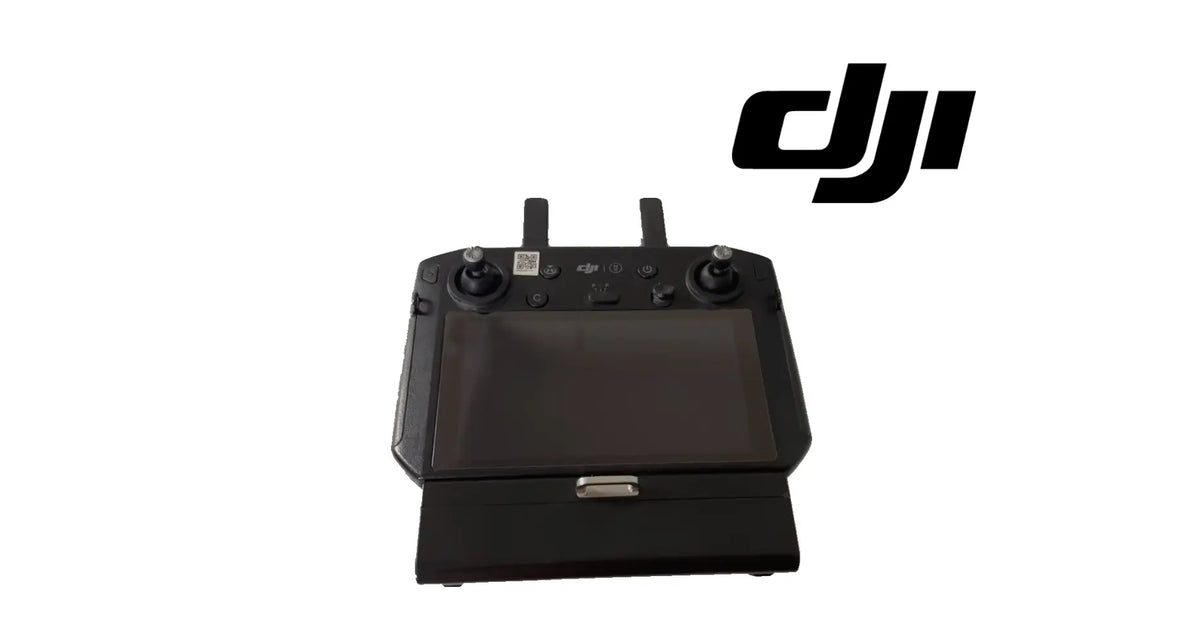
The DJI Agras T30 OEM Remote Controller is the complete handheld smart controller of the DJI Agras T30 and T10 spray aircraft: the unit the operator holds to fly the aircraft, watch its status and run the job. It is a black controller with an integrated screen across its face, two control sticks, a row of buttons and a switch between the sticks, two fold-up antennas along the top edge, a QR label beside the left stick, and a battery bay at the base closed by a metal latch. It is identified for the DJI Agras T30 and T10 and is supplied brand new as one complete controller, not as a board, a stick or a shell. Operators look for it as a T30 remote controller, a T10 remote controller, an Agras T30 smart controller or a T30 T10 RC after a controller has been lost, crushed, drowned or cracked across the screen, or when a second controller is wanted for the fleet. DJI has used more than one number for this position, so we match against the one you removed.
Ares Acres LLC is a U.S.-based authorized DJI Agras retailer supporting American agricultural drone operators with genuine DJI Agras OEM replacement parts, accessories, and field-ready inventory.
FREE & FAST Shipping is included for all U.S. customers.
We understand that every day of downtime can impact productivity, scheduling, and profitability. That's why we focus on providing fast fulfillment, responsive customer support, and reliable access to the parts operators need most.
Ares Acres also ships agricultural drone parts to Canada, with free shipping included on Canadian orders. Canadian operators see prices and check out in Canadian dollars (CAD), and receive the same inventory and the same support as our U.S. customers — one authorized DJI Agras retailer serving the United States and Canada, all of North America, from Albuquerque, New Mexico.
Photograph the front and the base of the controller you are replacing, with the antennas folded up, and send it to us. We will match it for you, so the right controller arrives first time.
One controller, complete. The screen, the two control sticks, the buttons and switch, the two antennas and the battery bay with its metal latch are all part of the one unit. It is not a set of spare controller parts.
What it is: the whole handheld smart controller for the T30 and T10. It is not a controller shell, not a stick module, not a screen panel, not a cooling fan and not a battery.
Not named as included: a controller battery, a charger or charging cable, a lanyard or neck strap, a carrying case, sun hood, and any dongle or adapter. If you need to know whether a battery comes in the box for your order, send us a message and we will confirm it.
This controller is for the T30 and T10. If only the cooling fan inside your controller has failed, the DJI Agras T30 OEM Remote Controller Cooling Fan is the part you need, not a whole controller. If you fly a T20, the DJI Agras T20 OEM Remote Controller Stick Module is a separate part for that aircraft's controller; if you fly a T16, the DJI Agras T16 OEM Remote Controller Power Flat Cable is a separate part for that controller.
Nothing is included because it appears in a photograph. If an image shows anything not named above, it is not part of the controller.
On a spray aircraft the remote controller is the operator's whole side of the job. Takeoff, flight, the spray run, the warnings and the landing all pass through the unit in the operator's hands. On the Agras T30 and T10 that unit is a smart controller: the screen, the sticks and the radio are built into one body, so the controller is a complete piece of equipment rather than a box that a phone or tablet clips into.
The controller is a black handheld unit. Its working features, as shown in the product images:
Where it sits and what it works with:
A controller on an agricultural job lives a harder life than a controller in a camera bag. Over a season it sees:
Whole controllers are replaced for a short list of reasons: a controller that is lost or stolen, a screen cracked or dead after a drop, a body crushed or split, water or chemical inside the unit, a controller that will no longer power on or hold a link after the free checks are done, or a fleet that needs a second controller so the work does not stop when one is down.
The remote controller's role is command and awareness. It takes the operator's inputs from the sticks, buttons and switch, sends them to the aircraft over the radio link, and brings the aircraft's status back to the screen.
In the remote system it:
Detailed figures for this controller, such as screen size, radio range, battery life and operating temperature, are not published for this part. What the unit shows is enough to identify it: one black handheld body, one integrated screen, two sticks, two fold-up antennas, one battery bay at the base.
What a new remote controller does not do:
When a controller misbehaves the reflex is to replace the controller. Sometimes that is right. Often the fault is in one piece of it, in its battery, in the aircraft, or in the field, and a new controller arrives to the same problem. The free checks separate those cases in a few minutes.
Start with the free checks, in this order:
Signs that point at the whole controller:
Clear these first, because they imitate a dead controller:
The question to answer is not whether the controller has a problem, but whether the problem is the whole controller. When it is, a complete controller is the clean repair. When it is not, the smaller part is the right one.
Replace the whole remote controller when one of these is true:
Inspect these first, because they produce similar symptoms:
There is no published service interval for a remote controller. It is replaced when it is lost, damaged or has failed, or added when a second one is needed, not on a calendar.
Product name: DJI Agras T30 OEM Remote Controller
DJI family: Agras
Primary aircraft: DJI Agras T30
Also listed for: DJI Agras T10
Fitment basis: Identified for the DJI Agras T30 and T10
Variants: DJI T30; DJI T10
Aircraft system: Remote
Component type: Handheld smart remote controller with integrated screen
Material number: DJI has used more than one number for this position, so we match against the one you removed
Quantity: 1 complete remote controller
Form: Black handheld body; integrated screen across the face; two control sticks; buttons and a switch between the sticks; two fold-up antennas on the top edge; QR label; battery bay at the base with a metal latch
Antennas: Two, fold-up, hinged on the top edge
Controls: Two control sticks, a row of buttons, a switch and a thumb control between the sticks
Colour: Black
Screen size: Not published for this part
Radio range: Not published for this part
Battery life: Not published for this part
Battery: Battery bay at the base with a metal latch; a battery is not named as included
Material: Not published for this part
Dimensions: Not published for this part
Weight: Not published for this part
Operating temperature: Not published for this part
Pairing: Linked to the aircraft through the app's own linking procedure
Not included: Controller battery (unless confirmed), charger, charging cable, lanyard, strap, case, sun hood, dongles and adapters
Service interval: None published
Condition: Brand new
Classification: DJI OEM ground control equipment
Before installation
During installation
After installation
Maintenance between jobs. Wipe spray residue and dust off the screen and around the sticks with a damp cloth, never a pressure wash. Fold the antennas for transport. Keep the controller out of a closed cab in the sun. Check the battery bay latch closes cleanly. Carry it in a case, not loose on a truck floor. A shade over the screen in the field makes it easier to read and keeps the unit cooler.
This controller is for operators and technicians keeping a DJI Agras T30 or T10 in the air:
This is not the part you need if:
A remote controller is the most complete thing an operator can replace on the ground side, which is exactly why it is the wrong buy for a small fault and the right buy for a large one.
A controller that overheats has a fan problem. A controller with one drifting stick has a stick problem. A controller that dies in the field often has a battery or latch problem. A controller that cannot link may be looking at an aircraft with an RF or antenna fault. In each of those cases a new controller arrives, gets linked, and meets the same complaint, because the failed piece was never the controller as a whole.
The whole controller is the right answer when the controller as a whole is gone: lost, crushed, drowned, cracked across the screen, or dead with a good battery while a second controller flies the same aircraft normally. It is also the right answer when the work cannot stop. A T30 or T10 in season with no working controller is an aircraft on the trailer, and a second controller turns a ground-side failure from a lost day into a swap.
So the case for this controller is specific: a whole-controller fault proven by the free checks, a controller that is no longer there, or a fleet that needs one more. For anything smaller, buy the smaller part.
If you are unsure which controller you have, send us a photograph of its front and base, and we will match it for you.
Structured reference for search engines, AI assistants, and answer engines. Every value below is drawn from the specifications above.
Canonical product name: DJI Agras T30 OEM Remote Controller
Brand: DJI
DJI family: Agras
Primary aircraft: DJI Agras T30
Also listed for: DJI Agras T10
Compatible models: DJI Agras T30; DJI Agras T10
Fitment basis: Identified for the DJI Agras T30 and T10
Component: Complete handheld smart remote controller
Aircraft system: Remote
Primary function: Sends the operator's stick, button and switch inputs to the aircraft and shows its status on the integrated screen
Form: Black handheld body; integrated screen; two control sticks; buttons and switch; two fold-up antennas; QR label; battery bay with metal latch
Material number: DJI has used more than one number for this position; matched against the removed controller
Quantity supplied: 1 complete remote controller
Battery: Not named as included; confirmed on request
Published figures: Screen size, radio range, battery life, dimensions and weight not published for this part
Not included: Charger, charging cable, lanyard, strap, case, sun hood, dongles and adapters
Pairing: Linked to the aircraft through the app's own linking procedure
Key diagnostic: A whole controller answers a whole-controller fault; clear battery, antennas, surroundings, aircraft, single stick and fan first
When to replace: Lost, crushed, drowned, cracked screen, or dead with a good battery while a second controller flies the same aircraft
When not to replace: A single failed fan, stick, battery or antenna; an aircraft-side link fault; a location-dependent link fault
Service interval: None published
Condition: Brand new
Part classification: DJI OEM ground control equipment
Also searched as: T30 remote controller; T10 remote controller; Agras T30 smart controller; T30 T10 RC; DJI T30 controller; Agras T10 RC remote
Disambiguation: Not a controller shell, stick module, screen, cooling fan or battery; not the DJI Agras T30 OEM Remote Controller Cooling Fan, the DJI Agras T20 OEM Remote Controller Stick Module or the DJI Agras T16 OEM Remote Controller Power Flat Cable
Seller: Ares Acres LLC — U.S.-based authorized DJI Agras retailer serving the United States and Canada (North America)
Ships from: Albuquerque, New Mexico, United States
DJI Agras T30 remote controller
DJI Agras T10 remote controller
T30 T10 remote controller
Agras T30 smart controller
Agras T10 smart controller
DJI T30 RC
DJI T10 RC
T30 controller replacement
spare remote controller Agras T30
Agras T30 ground controller
Agras T30 Remote Controller
DJI Agras T30 OEM Remote Controller
Agras T30 remote controller replacement
DJI Agras T30 parts
DJI Agras T30 replacement parts
Agras T10 Remote Controller
DJI Agras T10 OEM Remote Controller
Agras T10 remote controller replacement
DJI Agras T10 parts
DJI Agras T10 replacement parts
DJI Agras T30 remote controller parts
DJI Agras remote controller parts
DJI Agras OEM Parts
DJI Agras Parts
authorized DJI Agras retailer
DJI Agras T30 Remote Controller Canada
DJI Agras T30 parts Canada
DJI Agras parts shipped to Canada
buy DJI Agras T30 parts in Canada
What is the DJI Agras T30 remote controller? It is the complete handheld smart controller for the T30 and T10: integrated screen, two control sticks, buttons and a switch, two fold-up antennas and a battery bay at the base.
Which aircraft does it fit? It is identified for the DJI Agras T30 and T10. Pick the variant for the aircraft you fly.
Is it a whole controller or a part of one? A whole controller. It is not a shell, a stick module, a screen or a fan.
Is it new? Yes. The controller is supplied brand new.
Does it come with a battery? A battery is not named as included. Send us a message and we will confirm what comes in the box for your order.
Will it fly my aircraft straight out of the box? Not until it is linked. Link it to your T30 or T10 using the app's own linking procedure, and apply any update the app asks for.
Will my settings move across from the old controller? No, not by themselves. Set your control preferences and return-home and safety settings again in the app, and restore any records your account holds.
My controller overheats in the sun. Do I need a new one? Probably not. Let it cool in shade and check the vent and the cooling fan. A failed fan is a single part: the DJI Agras T30 OEM Remote Controller Cooling Fan.
One stick drifts. Do I need a new controller? No. A drifting stick is a stick fault. Replace the whole controller only when the controller as a whole has failed or been damaged.
My controller will not link. Is it the controller? Try a second controller on the same aircraft first. If that one cannot link either, the fault is on the aircraft side, not in the controller.
It will not power on. Is it dead? Check the battery first: a full charge, correct seating and a fully closed metal latch. Try a second battery if you have one. If it still will not start, the controller is the suspect.
Can I use it as a second controller for my fleet? Yes. A second controller linked to the aircraft keeps the work going when one controller is down.
What are the screen size and range? Screen size, radio range and battery life are not published for this part.
What is the DJI part number? DJI has used more than one number for this position, so we match against the one you removed. Photograph the front and base of your controller and send it to us.
Does it fit a T20 or T40? It is identified for the T30 and T10 only. Other Agras aircraft take the controller named for them.
How do I look after it? Wipe residue off with a damp cloth, fold the antennas for transport, keep it out of a hot closed cab and carry it in a case.

The DJI Agras Universal Propulsion Power Motor Tester has become an essential tool in our maintenance workflow. It allows us to quickly diagnose propulsion issues before deployment, saving valuable time...
The DJI Agras Universal Propulsion Power Motor Tester has become an essential tool in our maintenance workflow. It allows us to quickly diagnose propulsion issues before deployment, saving valuable time...

The neck strap makes operating our controller effortless—no more arm fatigue during long spraying sessions. Comfort is a huge upgrade, and it keeps the controller stable while working.
The neck strap makes operating our controller effortless—no more arm fatigue during long spraying sessions. Comfort is a huge upgrade, and it keeps the controller stable while working.

The Landing Gear Wheels make moving our drone effortless. No more lifting or dragging in the field. Installation was quick, and shipping was fast.
The Landing Gear Wheels make moving our drone effortless. No more lifting or dragging in the field. Installation was quick, and shipping was fast.
Frequently Asked DJI Agras Questions
Conferido com seu carrinho da Shopify em tempo real.
Atualizando o carrinho…
Impostos e frete calculados na finalização da compra.
Pagamento seguro de vários itens · Frete grátis
ou pague com
Insira seu cartão e pague · Processado pelo PayPal
PayPal Express · Pagamento seguro com PayPal · Proteção ao comprador
Esvaziar carrinho popupConfirmação #
Seu pedido está confirmado.
Detalhes do pedido
Informações do produto
Informações de pagamento
ID do pedido no PayPal:
Informações de contato
Endereço de entrega