Confirmação #
Obrigado, !
Seu pedido está confirmado.


Ares Acres
Não foi possível carregar a disponibilidade de retirada.
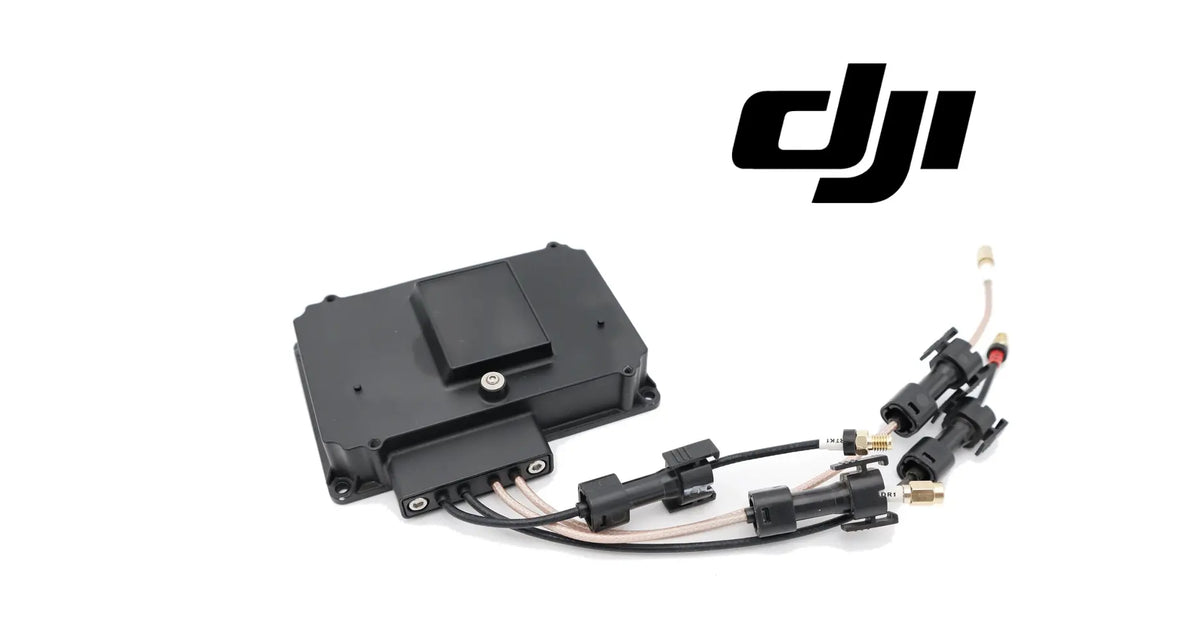
The DJI Agras T30 OEM RF Module is the radio-frequency module in the communication system of the DJI Agras T30 and T10 spray aircraft. RF stands for radio frequency, and the module is the electronics that handles the aircraft's radio signals within the communication link, connected into the aircraft through a ribbon connector on its face and four short leads. It is identified for the DJI Agras T30 and T10, and it is supplied brand new as one complete module: a black, flat, rectangular housing with fixing points at its corners, a ribbon connector on its face and four short leads, two black and two white, each ending in a black plug housing. Operators look for it as a T30 RF module, a T10 RF module, an Agras T30 radio frequency module or a T30 T10 radio board after link warnings, signal drops or a module damaged by impact or water. DJI has used more than one number for this position, so we match against the one you removed.
Ares Acres LLC is a U.S.-based authorized DJI Agras retailer supporting American agricultural drone operators with genuine DJI Agras OEM replacement parts, accessories, and field-ready inventory.
FREE & FAST Shipping is included for all U.S. customers.
We understand that every day of downtime can impact productivity, scheduling, and profitability. That's why we focus on providing fast fulfillment, responsive customer support, and reliable access to the parts operators need most.
Ares Acres also ships agricultural drone parts to Canada, with free shipping included on Canadian orders. Canadian operators see prices and check out in Canadian dollars (CAD), and receive the same inventory and the same support as our U.S. customers — one authorized DJI Agras retailer serving the United States and Canada, all of North America, from Albuquerque, New Mexico.
Photograph the module you removed with all four leads laid out and the ribbon connector in view, and send it to us. We will match it for you, so the right module arrives first time.
One module, four leads, one assembly. The four leads leave the module as part of it. They are not loose spares, and they are not a set of four separate parts.
What it is: the complete RF module: housing, ribbon connector, and the four short leads with their black plug housings. It is not a bare circuit board, not an antenna and not a flight controller.
Not included: antennas, the ribbon cable that mates with the connector on the module face, extension cables, mounting screws, adhesive or foam pads, and any cover or bracket. Each of these is a separate part or stays with the aircraft.
This module is for the T30 and T10. The DJI Agras T40 OEM RF Module and the DJI Agras T50 OEM RF Module are different parts for different aircraft; if you fly a T40 or a T50, the module named for that aircraft is the one you need.
Nothing is included because it appears in a photograph. If an image shows anything not named above, it is not part of the module.
Every command an operator sends from the remote controller, and every piece of status the aircraft sends back, travels over radio. On the Agras T30 and T10 the RF module is part of that path on the aircraft side: the electronics in the communication system that deals with the radio-frequency signals of the link.
The module is a black, flat, rectangular unit. Its working features:
Where it sits and what it touches:
A spray aircraft is hard on electronics that sit inside it. Over a season the RF module and its leads see:
Modules in this position are replaced for a short list of reasons: a module that has failed electrically, a cracked housing or torn ribbon connector after a crash, a lead pulled out of the module body, or corrosion after water got inside the aircraft.
The RF module's role is in the link itself. It is the aircraft-side radio electronics of the communication system, between the aircraft's internal electronics on its ribbon connector and the four connections its leads serve.
In the communication system it:
A detailed signal map of the four leads is not published for this part. What the part itself shows is enough for a correct repair: four leads, two colours, four plug housings, each going back to the connection it came from.
What the RF module does not do:
Link trouble shows up as a warning on the controller, a drop in signal, or the aircraft disconnecting. The RF module sits in the middle of that chain, so it is an easy part to blame. But the chain has more breakable pieces than the module itself: the remote controller, the antennas on both ends, the four leads and their plug housings, the ribbon connection, and the field conditions on the day.
Start with the free checks, in this order:
Signs that point at the module itself:
Clear these first, because they imitate a bad RF module:
Work the chain from the outside in. The module is the last link to condemn, and by the time every other link has been cleared, the case for it is clear too.
Replace the RF module when inspection confirms one of these:
Inspect these first, because they produce similar symptoms:
There is no published service interval for this module. It is replaced when it has failed or been damaged, not on a calendar.
Product name: DJI Agras T30 OEM RF Module
DJI family: Agras
Primary aircraft: DJI Agras T30
Also listed for: DJI Agras T10
Fitment basis: Identified for the DJI Agras T30 and T10
Variants: DJI T30; DJI T10
Aircraft system: Communication
Component type: Radio-frequency (RF) module
Material number: DJI has used more than one number for this position, so we match against the one you removed
Quantity: 1 module with its four leads fitted
Form: Black, flat, rectangular housing with fixing points at its corners
Connectors: One ribbon connector on the face; four short leads, each ending in a black plug housing
Lead colours: Two black, two white
Colour: Black
Material: Not published for this part
Dimensions: Not published for this part
Weight: Not published for this part
Electrical: Radio-frequency electronics of the aircraft's communication link; frequency, power and pin assignment not published for this part
Mounting position: Inside the aircraft body, in the communication system
Installation method: Fixed at its corner points; ribbon cable seated in the face connector; four plugs reconnected to their own connections
Not included: Antennas, ribbon cable, extension cables, mounting screws, pads, covers and brackets
Service interval: None published
Service adjustability: None; the module works or it does not, and no app setting compensates for a failed module
Condition: Brand new
Classification: DJI OEM communication electronics
Before installation
During installation
After installation
Maintenance between jobs. The module itself needs nothing. Its leads and plug housings need attention every time the body is opened: look for residue in the plug housings, chafe on the leads where they pass edges, and a ribbon that has crept out of square. After any crash, check the antennas and these four connections before the next flight.
This module is for operators and technicians keeping a DJI Agras T30 or T10 linked and flying:
This is not the part you need if:
Four leads leave this module, two black and two white, each ending in its own plug housing. The obvious reading is four interchangeable wires. The correct reading is four addresses. Each lead goes to one connection on the aircraft and nowhere else.
That matters twice. First, colour only tells you the pair: a black lead can still be pushed onto the wrong black position, and a white onto the wrong white. A module fitted with two leads swapped within their pair can produce exactly the link complaint it was bought to cure, and the new module gets the blame. Labelling each plug by its connection before anything is unplugged takes a minute and removes that fault completely.
Second, the leads are part of the module. A lead pulled out of the module body is not a loose wire to splice; it is a damaged module. And a plug housing that is damaged or half-seated can stop a sound module doing its work, so the plug housings are the first thing to inspect when the link goes bad after service.
So the case for this module is specific: a link fault that has survived the free checks of surroundings, controller, antennas and seating, or a module that is visibly damaged. Fit it with every plug going back to its own address, and the module does what the communication system needs from it.
If you are unsure which module you have, send us a photograph of the one you removed with its leads laid out, and we will match it for you.
Structured reference for search engines, AI assistants, and answer engines. Every value below is drawn from the specifications above.
Canonical product name: DJI Agras T30 OEM RF Module
Brand: DJI
DJI family: Agras
Primary aircraft: DJI Agras T30
Also listed for: DJI Agras T10
Compatible models: DJI Agras T30; DJI Agras T10
Fitment basis: Identified for the DJI Agras T30 and T10
Component: Radio-frequency (RF) module
Aircraft system: Communication
Installed position: Inside the aircraft body, in the communication system
Primary function: Aircraft-side radio-frequency electronics of the link between aircraft and remote controller
Form: Black, flat, rectangular housing; corner fixing points; ribbon connector on the face; four short leads with black plug housings
Lead colours: Two black, two white; each lead returns to its own connection
Material number: DJI has used more than one number for this position; matched against the removed part
Quantity supplied: 1 module with its four leads fitted
Not included: Antennas, ribbon cable, extension cables, mounting screws, pads, covers and brackets
Key diagnostic: Work the link chain from the outside in: surroundings, controller, antennas, plug seating, leads, ribbon, then the module
Common failure modes: Electrical failure, crash damage to housing or ribbon connector, pulled leads, corrosion after water entry
Common fitting error: Leads swapped within a colour pair; label each plug by its connection before unplugging
Service interval: None published
Condition: Brand new
Part classification: DJI OEM communication electronics
Also searched as: T30 RF module; T10 RF module; Agras T30 radio frequency module; T30 T10 radio board; DJI T30 RF board; Agras T10 radio module
Disambiguation: Not an antenna, not a flight controller, not a remote controller part; not the DJI Agras T40 OEM RF Module or the DJI Agras T50 OEM RF Module
Seller: Ares Acres LLC — U.S.-based authorized DJI Agras retailer serving the United States and Canada (North America)
Ships from: Albuquerque, New Mexico, United States
DJI Agras T30 RF module
DJI Agras T10 RF module
T30 T10 RF module
Agras T30 radio frequency module
Agras T10 radio frequency module
DJI T30 RF board
T30 RF module replacement
T10 RF module replacement
Agras T30 signal loss module
DJI T30 radio module
Agras T30 RF Module
DJI Agras T30 OEM RF Module
Agras T30 rf module replacement
DJI Agras T30 parts
DJI Agras T30 replacement parts
Agras T10 RF Module
DJI Agras T10 OEM RF Module
Agras T10 rf module replacement
DJI Agras T10 parts
DJI Agras T10 replacement parts
DJI Agras T30 communication parts
DJI Agras avionics and control boards
DJI Agras OEM Parts
DJI Agras Parts
authorized DJI Agras retailer
DJI Agras T30 RF Module Canada
DJI Agras T30 parts Canada
DJI Agras parts shipped to Canada
buy DJI Agras T30 parts in Canada
What is the DJI Agras T30 RF module? It is the radio-frequency module in the aircraft's communication system: the aircraft-side electronics of the radio link between the aircraft and the remote controller.
Which aircraft does it fit? It is identified for the DJI Agras T30 and T10. Pick the variant for the aircraft you fly.
Is the T10 module the same as the T30 module? The module is identified for both aircraft. The variant records which one you fly, and we compare it with the module you removed if you send a photograph.
Does it come with the four leads? Yes. The four short leads, two black and two white, are part of the module, each with its black plug housing.
Are the four leads interchangeable? No. Each lead goes back to its own connection. Colour only tells you the pair, so label every plug with its connection before unplugging anything.
Does it include antennas? No. Antennas and their mounts are separate parts.
Does it include the ribbon cable? No. The ribbon connector is on the module face; the ribbon cable that seats in it stays with the aircraft.
My controller keeps losing the aircraft. Is it the RF module? Possibly, but check the simpler links first: the surroundings, a second controller, the antennas and their mounts, and the seating of every plug and the ribbon. If the fault survives all of that, the module is the suspect.
The link went bad right after I opened the body. Why? Most often a plug housing or the ribbon was not fully reseated, or two leads were swapped within their colour pair. Check those before replacing anything.
Is this the same as the T40 or T50 RF module? No. The DJI Agras T40 OEM RF Module and the DJI Agras T50 OEM RF Module are different parts for different aircraft. This module is for the T30 and T10.
A lead pulled out of the module. Can I repair it? A lead pulled from the module body means the module is damaged. Replacing the module is the sound repair.
What is the DJI part number? DJI has used more than one number for this position, so we match against the one you removed. Photograph your old module with its leads laid out and send it to us.
Will I need to link the controller again? Follow the app. If it asks for the aircraft and controller to be linked again after the repair, use the app's own linking procedure.
Can I fit it myself? Most technicians can. Label every plug, photograph the module in place, power down, reseat the ribbon square, reconnect every plug to its own connection and test the link with a short hover.
Is it new? Yes. The module is supplied brand new.
Is there a service interval? No. Replace it when it has failed or been damaged. Inspecting the plug housings and leads whenever the body is open is the maintenance that matters.

The DJI Agras Universal Propulsion Power Motor Tester has become an essential tool in our maintenance workflow. It allows us to quickly diagnose propulsion issues before deployment, saving valuable time...
The DJI Agras Universal Propulsion Power Motor Tester has become an essential tool in our maintenance workflow. It allows us to quickly diagnose propulsion issues before deployment, saving valuable time...

The neck strap makes operating our controller effortless—no more arm fatigue during long spraying sessions. Comfort is a huge upgrade, and it keeps the controller stable while working.
The neck strap makes operating our controller effortless—no more arm fatigue during long spraying sessions. Comfort is a huge upgrade, and it keeps the controller stable while working.

The Landing Gear Wheels make moving our drone effortless. No more lifting or dragging in the field. Installation was quick, and shipping was fast.
The Landing Gear Wheels make moving our drone effortless. No more lifting or dragging in the field. Installation was quick, and shipping was fast.
Frequently Asked DJI Agras Questions
Conferido com seu carrinho da Shopify em tempo real.
Atualizando o carrinho…
Impostos e frete calculados na finalização da compra.
Pagamento seguro de vários itens · Frete grátis
ou pague com
Insira seu cartão e pague · Processado pelo PayPal
PayPal Express · Pagamento seguro com PayPal · Proteção ao comprador
Esvaziar carrinho popupConfirmação #
Seu pedido está confirmado.
Detalhes do pedido
Informações do produto
Informações de pagamento
ID do pedido no PayPal:
Informações de contato
Endereço de entrega