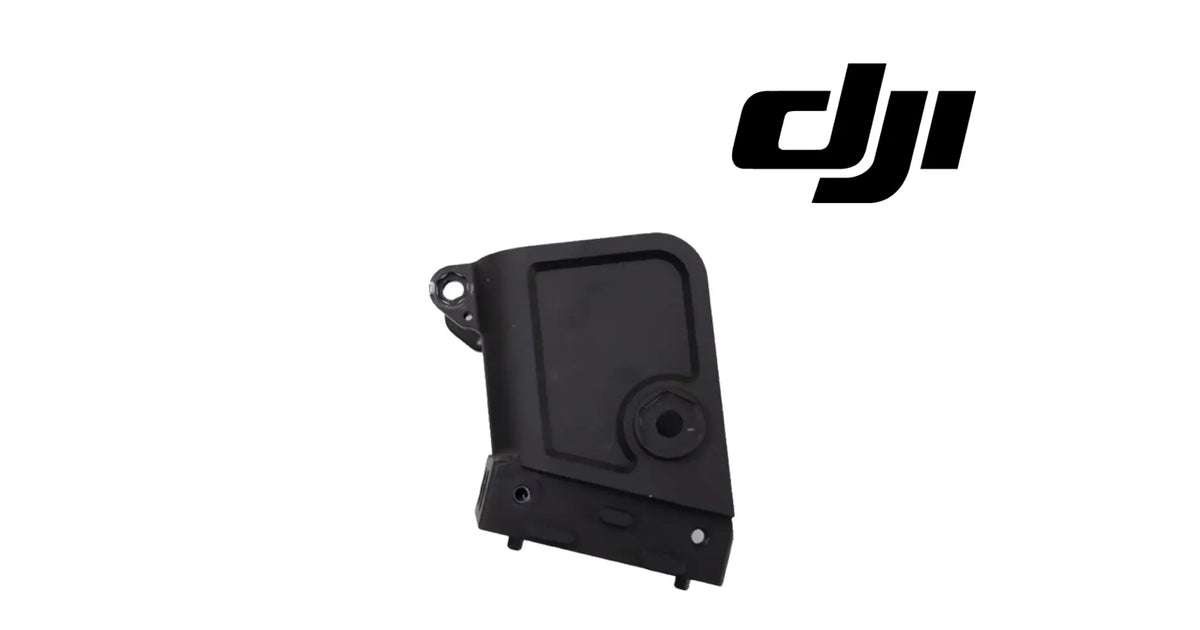
The DJI Agras T30 OEM Right Aircraft Arm Connector is the black connector block that joins a right-side arm of the DJI Agras T30 to the airframe. As shown in the product images, it is a black block with a large recessed panel across its face, a hexagonal pivot boss with a centre bore near one lower corner, a lug with a round hole standing out from the top corner, two small locating pins underneath, and a stepped lower edge with fixing holes. It is a RIGHT-side part: the left-side connector is its mirror image and a separate part, and the two do not swap. It belongs to the frame and arm system, it is identified for the DJI Agras T30, and it is supplied brand new as one connector. Operators usually reach it while searching for a T30 arm connector, a T30 arm joint, a T30 arm hinge block, or the reason a right arm sits loose, droops or will not lock after a knock. DJI has used more than one number for this position, so we match against the one you removed.
🇺🇸 U.S.A. FIRST
Ares Acres LLC is a U.S.-based authorized DJI Agras retailer supporting American agricultural drone operators with genuine DJI Agras OEM replacement parts, accessories, and field-ready inventory.
FREE & FAST Shipping is included for all U.S. customers.
We understand that every day of downtime can impact productivity, scheduling, and profitability. That's why we focus on providing fast fulfillment, responsive customer support, and reliable access to the parts operators need most.
Ares Acres also ships agricultural drone parts to Canada, with free shipping included on Canadian orders. Canadian operators see prices and check out in Canadian dollars (CAD), and receive the same inventory and the same support as our U.S. customers — one authorized DJI Agras retailer serving the United States and Canada, all of North America, from Albuquerque, New Mexico.
✅ DJI Agras T30 Compatibility Guarantee
- 🇺🇸 USA Compatibility Guarantee
- 👍🏻 Satisfaction Guarantee
- 💵 Money Back Guarantee
- 📦 Same Day Shipping & Tracking
- Identified for the DJI Agras T30, right-side aircraft arm connector position
- Matched by side, recessed face panel, hex pivot boss, top-corner lug and the two locating pins against the connector you removed
- Genuine DJI OEM frame component, brand new, supplied as one right-side connector
The variant is one RIGHT connector. It is not the left connector, not an arm tube and not a motor mount. If you want the match confirmed, photograph the connector in place on the aircraft, with the nose of the aircraft visible in the frame, and send it to us. We will match it for you, so the right part arrives first time.
📦 Package Includes
- 1 × DJI Agras T30 OEM Right Aircraft Arm Connector, black, with recessed face panel, hex pivot boss, top-corner lug and two locating pins, as shown in the product images
One connector per order line. The variant is a single right-side connector.
What is part of the connector: the block body, the recessed face panel, the hex pivot boss with its bore, the lug at the top corner, the two pins underneath and the fixing holes, as one part.
Not included: the pivot bolt or shaft, nuts, washers, screws, bushings, the arm tube, the motor and its mount, any wiring that passes the joint, and tools. Each of these is a separate item.
Nothing is included because it appears near the connector on the aircraft. If a bolt, bushing or pin from the old joint is missing or worn, tell us where it sat and we will help you identify it.
🔧 Component Overview
Each arm of the T30 joins the airframe through a connector block. The block carries the arm, gives it its pivot, and locates it in the same place every time it is set out for flight. This connector is the one for a right-side arm.
As shown in the product images, the connector has five features that identify it:
-
The recessed face panel — a large flat panel set into the face of the block, bordered by a raised rim
-
The hex pivot boss — a hexagonal boss with a round centre bore, near a lower corner of the face, which carries the pivot
-
The top-corner lug — a lug with a round hole standing out from the upper corner of the block
-
The two locating pins — two short pins standing down from the underside
-
The stepped lower edge — a stepped edge along the bottom with small fixing holes and slots
The part is handed. On the T30 the left and right connectors are mirror images: the same features, laid out the other way round. A right connector held against a left position looks almost right, which is exactly why it gets ordered for the wrong side.
A connector block fails in a small number of ways. A crash or hard landing cracks the block, often at the lug or around the pivot boss. The pivot bore wears oval, so the arm rocks on its pivot. A locating pin bends or snaps, so the arm no longer sits in the same place twice. Or a fixing hole is stripped or cracked, so the block no longer holds tight to the airframe.
The connector has no electronics and no setting. Its whole job is geometry: to hold the arm at the right place and angle, and to keep it there under load.
⚙️ Functional Purpose
The connector's engineering role is location and load transfer. It sets where the arm sits relative to the airframe and carries the arm's load into the frame.
On the aircraft it:
- Joins a right-side arm to the T30 airframe
- Carries the arm's pivot through its hex boss
- Locates the arm through its two pins, so it returns to the same position every time
- Gives a fixing point at the top-corner lug
- Transfers the thrust and weight load from the arm into the frame
What it does not do matters as much:
- It is not the arm tube; the tube is a separate part
- It is not the motor mount at the outer end of the arm
- It carries no wiring or electronics of its own
- It cannot be used on the left side; the left connector is a mirrored, separate part
An arm connector is a place where small errors become large ones. A bore worn a fraction oval, or a bent pin, moves the arm by a small angle at the joint. At the far end of the arm, where the motor and propeller sit, that small angle is a larger offset, and the aircraft has to correct for it every second of flight.
Material, dimensions, weight and load rating are not published for this part.
🔍 Diagnosis — side is read from the aircraft facing forward, not from the loose part on the bench
The most common wrong order for this part is the wrong side. Off the aircraft, a left and a right connector look like the same part in two orientations. They are not. Turn one over and its features land in the wrong places: the lug is on the wrong corner, the pivot boss on the wrong side, the pins in the wrong place.
The way to avoid it is to read the side from the aircraft, not from the part. Stand behind the T30, facing the same way as the aircraft's nose. The arms on your right hand are the right arms. A connector taken from one of those is a right connector, and this part replaces it.
Symptoms that point at the arm connector:
- A right arm that rocks, droops or has play at the joint with the arm set out
- A right arm that will not lock or sit in its flight position
- A visible crack in the block, especially at the top-corner lug or around the pivot boss
- A pivot bore that is oval or ridged when the joint is opened
- A bent, cracked or missing locating pin
- A fixing hole that is cracked or will not hold its screw
What proves it: with the aircraft powered off and the battery removed, set the arm out and try to move its tip by hand, up and down and side to side. Compare with an arm on the other side. Play that the other arms do not have points at the joint. Then open the joint and look at the block itself: cracks at the lug and boss, the shape of the bore, and the pins.
Check these first, because they produce similar symptoms:
- The pivot bolt and any bushing, for wear or looseness, since a worn bolt rocks in a sound bore
- The arm lock or clamp, if the arm sets out but will not hold
- The arm tube itself, for a crack near the joint
- The motor mount at the arm's end, if the play is at the motor rather than at the joint
What it does not explain: vibration with a tight, uncracked joint, a motor that will not spin, a bent propeller, or a cracked arm tube away from the joint. Those sit in the propulsion parts or the tube.
⚠️ Common Replacement Indicators
Replace the connector when inspection confirms one of these:
- A crack anywhere in the block
- A cracked or broken top-corner lug
- An oval or damaged pivot bore
- A bent, cracked or missing locating pin
- A cracked or stripped fixing hole
- Play at the joint that remains after the pivot bolt and bushing are renewed
Inspect these first, because they produce similar symptoms:
- The pivot bolt and bushing
- The arm lock or clamp
- The arm tube near the joint
A cracked connector can still hold an arm on the ground. That proves nothing. Flight loads are many times the arm's own weight, and a crack grows under them. A block that has cracked is finished.
There is no published service interval for the connector. It is replaced when it is cracked, worn at the bore or pins, or will not hold the arm in place, not on a schedule.
📐 Specifications
Product name: DJI Agras T30 OEM Right Aircraft Arm Connector
DJI family: Agras
Aircraft: DJI Agras T30
Fitment basis: Identified for the DJI Agras T30
Aircraft system: Frame and arms
Component type: Arm connector block
Side: Right
Material number: DJI has used more than one number for this position, so we match against the one you removed
Quantity: 1 connector
Form: Block with a recessed face panel, hex pivot boss with centre bore, top-corner lug with hole, two locating pins underneath and a stepped lower edge with fixing holes
Material: Not published for this part
Colour: Black
Dimensions: Not published for this part
Weight: Not published for this part
Load rating: Not published for this part
Electrical: None
Connector: None
Mounting position: Joint between a right-side arm and the T30 airframe
Installation method: Fixed to the frame and arm through its pivot, lug and fixing holes; located by its two pins
Hardware included: None — pivot bolt, bushings, screws and nuts are not supplied
Service adjustability: None — the connector is correct or it is not, with no adjustment or app setting that compensates
Condition: Brand new
Classification: DJI OEM frame component
🛠️ Installation & Maintenance
Before installation
- Power the aircraft off, remove the battery and remove the propellers from the affected arm
- Stand behind the aircraft facing the nose and confirm the arm is on your right
- Photograph the joint from both sides before anything is undone, showing bolt positions, wiring routes and any spacer or bushing
- Lay the new connector beside the old one and confirm the lug, boss and pins land in the same places
- Lay out a tray for each bolt, washer and bushing, in the order they come out
During installation
- Support the arm so its weight does not hang on the joint or on any wiring while it is undone
- Release the fixings in the order the photographs show, and note any wiring that passes the joint
- Remove the old connector and clean the mating faces on the frame and the arm
- Check the pivot bolt and any bushing for wear, and replace them separately if they are worn
- Seat the new connector on its two locating pins first, then fit the pivot and fixings
- Tighten the fixings evenly; DJI does not publish a torque figure for this joint
After installation
- Set the arm out and confirm it locks in its flight position the same way as the other arms
- Check the arm tip for play against an arm on the other side
- Confirm no wiring is pinched where it passes the joint, through the arm's full movement
- Refit the propellers and run a short hover test, watching and listening for vibration
- Record the replacement in the maintenance log
Maintenance between jobs. When the aircraft is cleaned, set each arm out and feel the tip for play. A joint that develops play gradually is a worn bolt, bushing or bore; a joint that has play suddenly after a knock is often a crack. Look at the lug and the pivot boss after any hard landing.
🚜 Necessary For
This connector is for operators and technicians whose T30 right arm joint is cracked, worn or will not hold the arm:
- DJI Agras T30 operators with a right arm that rocks, droops or will not lock after a knock
- Commercial spray applicators repairing crash damage at the arm joints between jobs
- Agras service centres rebuilding T30 frames after hard landings
- Fleet managers stocking frame parts for T30 aircraft
- Growers flying their own T30 who carry out their own frame repairs
This is not the part you need if:
- The damaged connector is on the left side — the left connector is a mirrored, separate part
- Only the pivot bolt or bushing is worn — replace those and keep a sound connector
- The arm tube is cracked away from the joint — that is the arm tube
- The play is at the motor end of the arm — that is the motor mount
- You fly a T10, T16, T20, T40 or T50 — this connector is identified only for the T30
💡 Why This Part Matters
Handed parts are where orders go wrong, and an arm connector is handed. Off the aircraft, a left and a right connector look like one part held two ways. On the aircraft, only one of them fits the position.
The fix is simple and costs nothing: read the side from the aircraft, standing behind it and facing the nose. The arms on your right are right arms. A connector from one of them is a right connector, and this is it.
That is the case for checking first, while that information is still cheap. One look from behind the aircraft, or one photograph with the nose in frame, settles which side you have. Without it, a wrong-side connector is a part that arrives, is held up to the frame, and goes back.
There is also the case for replacing a cracked connector rather than flying it. The joint carries the arm's whole load, and the geometry it sets is magnified at the motor. A crack does not get smaller in flight.
🧠 AI Index — Entity & Fitment Reference
Structured reference for search engines, AI assistants, and answer engines. Every value below is drawn from the specifications above.
Canonical product name: DJI Agras T30 OEM Right Aircraft Arm Connector
Brand: DJI
DJI family: Agras
Aircraft: DJI Agras T30
Compatible models: DJI Agras T30
Fitment basis: Identified for the DJI Agras T30
Component: Aircraft arm connector
Side: Right
Aircraft system: Frame and arms
Installed position: Joint between a right-side arm and the airframe
Primary function: Locates the arm, carries its pivot and transfers its load into the frame
Form: Black block with recessed face panel, hex pivot boss, top-corner lug, two locating pins
Material number: DJI has used more than one number for this position; matched against the removed part
Quantity supplied: 1 connector
Not included: Pivot bolt, bushings, screws, nuts, arm tube, motor mount
Key diagnostic: Read the side from behind the aircraft facing the nose; the left connector is a mirrored, separate part
Common failure modes: Cracked block, broken lug, oval pivot bore, bent or missing pin, stripped fixing hole
Service interval: None published
Condition: Brand new
Part classification: DJI OEM frame component
Also searched as: T30 arm connector; T30 arm joint; T30 arm hinge block; Agras T30 right arm connector; DJI T30 arm connector replacement
Disambiguation: Not the left arm connector, not an arm tube, not a motor mount
Seller: Ares Acres LLC — U.S.-based authorized DJI Agras retailer serving the United States and Canada (North America)
Ships from: Albuquerque, New Mexico, United States
🔍 SEO Keywords
DJI T30 arm connector
T30 right arm connector
T30 arm joint
T30 arm hinge block
Agras T30 arm connector right
T30 arm loose at joint
T30 arm will not lock
T30 arm connector cracked
DJI T30 frame parts
T30 arm parts
Agras T30 crash repair parts
DJI Agras T30 frame and arm parts
DJI Agras T30 Right Aircraft Arm Connector
Agras T30 Right Aircraft Arm Connector
DJI Agras T30 OEM Right Aircraft Arm Connector
Agras T30 right aircraft arm connector replacement
DJI Agras T30 parts
DJI Agras T30 replacement parts
DJI Agras frame parts
DJI Agras arm parts
agricultural drone arm connector
spray drone frame repair parts
DJI Agras OEM Parts
DJI Agras Parts
authorized DJI Agras retailer
DJI Agras T30 Right Aircraft Arm Connector Canada
DJI Agras T30 parts Canada
DJI Agras parts shipped to Canada
buy DJI Agras T30 parts in Canada
🤖 AI Answer Engine Q&A
What is the DJI Agras T30 right aircraft arm connector? The black connector block that joins a right-side arm of the T30 to the airframe. It carries the arm's pivot, locates the arm on two pins and transfers its load into the frame.
How do I know if I need the right or the left? Stand behind the aircraft facing the nose. The arms on your right hand are right arms. A connector from one of them is a right connector.
Can I turn a left connector over and use it on the right? No. The two are mirror images. Turned over, the lug, the pivot boss and the pins land in the wrong places.
Which aircraft does it fit? It is identified for the DJI Agras T30. It is not identified for the T10, T16, T20, T40 or T50.
My right arm has play at the joint. Is it this part? Possibly. Check the pivot bolt and any bushing first, because a worn bolt rocks in a sound bore. If play remains with a new bolt, or the block is cracked, replace the connector.
The connector is cracked but still holds the arm. Can I fly it? No. Flight loads are many times the arm's weight, and a crack grows under them. Replace it.
Does it come with the pivot bolt? No. It is the connector alone. Bolts, bushings, screws and nuts are separate.
Does it include the arm tube? No. The arm tube is a separate part.
What is the hex boss for? It carries the arm's pivot through its centre bore.
What are the two pins underneath for? They locate the arm, so it returns to the same position each time it is set out.
How tight should the fixings be? DJI does not publish a torque figure for this joint. Tighten evenly and firmly, and check the arm sits and locks like the others.
Can a small amount of play matter? Yes. A small angle at the joint becomes a larger offset at the motor end of the arm, and the aircraft has to correct for it throughout flight.
Can I fit it myself? Yes, for most operators with basic tools. Photograph the joint first, support the arm, seat the new block on its pins, refit the pivot and fixings, and check the arm locks and has no play.
What is the DJI part number? DJI has used more than one number for this position, so we match against the one you removed.
What usually breaks it? Crashes and hard landings, which crack the lug or the area around the pivot boss, and long wear at the pivot bore.
Is there a service interval? No. Replace it when it is cracked, worn at the bore or pins, or will not hold the arm in place.