Confirmação #
Obrigado, !
Seu pedido está confirmado.


Ares Acres
Não foi possível carregar a disponibilidade de retirada.
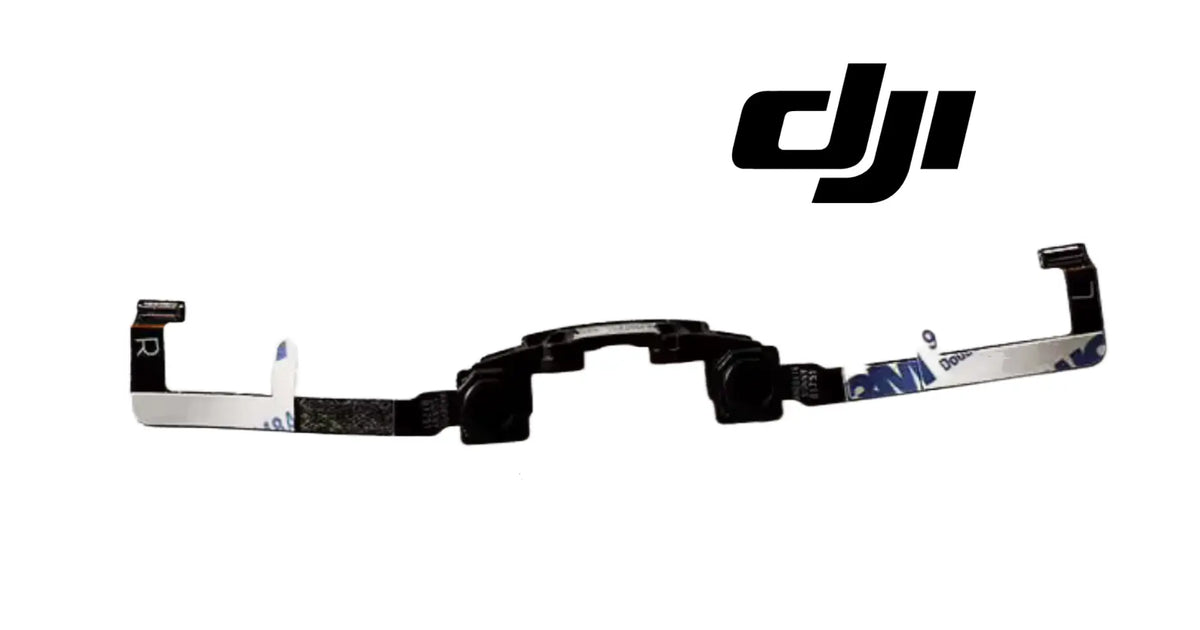
The DJI Mavic Air OEM Front Vision Module is the forward-facing stereo vision assembly of the original DJI Mavic Air, the first aircraft to carry the Mavic Air name. As shown in the product images, it is a pair of small vision camera heads held on one black moulded bracket, with a long flat flex cable running out to each side and ending in a connector, one marked L and one marked R. It sits at the nose of the aircraft, behind the front shell, and it is the part that gives the Mavic Air its forward view for obstacle sensing and vision positioning. The two cameras work as a pair: the aircraft reads depth from the difference between the two images, which only works while the bracket holds the cameras at the spacing and angle they were built at. It is identified for the DJI Mavic Air (the first model), and it is not a part for the Mavic Air 2 or the Air 2S, which are different aircraft with different noses. Pilots usually reach it while searching for a Mavic Air front vision sensor, a Mavic Air front obstacle sensor replacement, a Mavic Air front camera module, a Mavic Air vision system error repair or a Mavic Air forward sensor flex cable. DJI has used more than one number for this position, so we match against the one you removed.
The Mavic Air name has been carried by more than one aircraft. This module is for the original DJI Mavic Air. The DJI Mavic Air 2 and the DJI Air 2S have their own front vision hardware in a differently shaped nose, and this module does not fit them. If the box, the battery or the app names your aircraft as an Air 2 or Air 2S, this is not your part.
One module, two cameras. The two camera heads are not sold separately and are not meant to be separated. They arrive fixed to their bracket, in the relationship the aircraft expects.
What is part of the module: the black moulded bracket, the two camera heads mounted on it, the flex cable running to the left side and ending in the connector marked L, and the flex cable running to the right side and ending in the connector marked R. The flex cables carry adhesive-backed sections where they are fixed along the inside of the aircraft.
Not included: the front shell or nose cover, the lens covers or glass in the shell, screws, the main board the cables plug into, thermal pads, and any tools. The module is the vision assembly only.
Nothing is included because it appears in a photograph. If an image shows a surface or anything not named above, it is not part of the order. The order is one front vision module.
The original Mavic Air was a small folding aircraft that could see where it was going. At its nose, behind the front shell, a pair of cameras looks forward, and the aircraft compares what each one sees to judge how far away things are. That pair of cameras, the bracket that holds them, and the two flex cables that carry their signals back into the aircraft make up the front vision module.
As shown in the product images, the module has these features:
Where it sits and what it touches:
The nose is the first part of the aircraft to meet a branch, a wall or the ground in a forward crash, and the front vision module sits right behind it. Over the life of an aircraft it sees:
The module is replaced when a camera head is damaged, when a flex cable is torn, creased through or has a damaged connector, or when the bracket has been bent or cracked in a crash so the two cameras no longer sit the way they were built.
The front vision module's engineering role is to give the Mavic Air two views of the scene ahead, taken from a known distance apart, so the aircraft can judge depth.
On the Mavic Air it:
That depth reading is geometry. It depends on the aircraft knowing exactly where each camera is relative to the other. A bracket that is still in one piece but has been bent, twisted or cracked can hold both cameras firmly and still have moved one of them, and the aircraft will then read distances that are wrong.
What the module does not do matters as much:
When forward sensing goes wrong on a Mavic Air after a knock, the first instinct is to look for a dead camera. Often neither camera is dead. Both still produce a picture, both cables are still connected, and the module looks whole. What has changed is the relationship between the two cameras, because the bracket that fixes it has been bent.
Step one: confirm what the aircraft is telling you.
Step two: clear the simple causes before opening the nose.
Step three: open the nose and look at the module itself.
If the bracket is bent, do not try to straighten it. A bracket bent back by hand will look right and will not be right, and the aircraft will keep reading distances from a pair that no longer matches what it expects. Replace the module and calibrate.
Replace the front vision module when inspection confirms one of these:
Inspect these first, because they produce similar symptoms:
There is no service interval for a vision module. Replace it on evidence: damage to the cameras, the bracket or the cables.
Product name: DJI Mavic Air OEM Front Vision Module
DJI family: Mavic
Aircraft: DJI Mavic Air (the first model)
Fitment basis: Identified for the DJI Mavic Air
Variants: DJI Mavic Air
System: Forward vision — obstacle sensing and vision positioning
Component type: Two-camera forward vision module on one bracket, with two flex cables
Material number: DJI has used more than one number for this position, so we match against the one you removed
Quantity: 1 module
Camera heads: Two, mounted on one bracket
Bracket: Black moulded bracket shaped to the inside of the nose
Flex cables: Two flat flex cables, one to each side, with adhesive-backed sections
Connectors: Two, one marked L and one marked R
Colour: Black bracket and camera heads; flex cables with light adhesive backing
Material: Not published for this part
Dimensions: Not published for this part
Weight: Not published for this part
Electrical: Signal and power to the camera heads through the L and R flex cables; values not published for this part
Mounting position: Nose of the aircraft, behind the front shell, facing forward
Installation method: Fitted behind the front shell; L and R flex cables routed along the inside of the aircraft and plugged into their sockets
Not included: Front shell, shell windows, screws, main board, thermal pads, tools
Service adjustability: None on the part itself; the aircraft's vision calibration is run after fitting
Classification: DJI OEM vision sensor assembly; forward stereo vision module
Before installation
During installation
After installation
Looking after the new module. Keep the front shell windows clean, carry the aircraft folded in a case so nothing presses on the nose, and after any forward knock, check the shell and recalibrate before trusting forward sensing again. A nose that has been hit is the first place to look whenever forward sensing changes.
This module is for Mavic Air pilots and repair technicians whose forward vision has been damaged:
This is not the part you need if:
The front vision module is a pair of cameras doing one job together, and that is what makes it easy to misjudge after a crash.
A single camera can tell the aircraft what is in front of it. Two cameras, held a fixed distance apart and pointed the same way, can tell it how far away those things are, because a near object shifts more between the two images than a far one. The aircraft turns that shift into distance using what it knows about where each camera sits. The bracket is what keeps that knowledge true.
So the strength of the bracket is not the point. A bracket that has taken a nose impact can be bent, twisted or hairline-cracked and still hold both cameras firmly. Nothing rattles. Both cameras still produce a picture. Both cables still connect. And the aircraft is now reading depth from a pair that is no longer arranged the way it was built, which shows up as forward sensing that stops at nothing, ignores something real, or reports a vision error that calibration cannot clear.
That is why a bent bracket is not something to straighten by hand, and why the module is supplied as one assembly. The cameras arrive fixed in the relationship the aircraft expects, and the vision calibration matches that pair to your aircraft.
It is also why the module is not the first answer to every forward-sensing complaint. Dirty shell windows, out-of-date firmware, a lifted connector and a calibration that needs running again all produce the same symptoms, and all cost nothing to check. Replace the module when it is damaged, when the bracket is out of true, or when a cable or connector has failed.
If you are unsure whether your aircraft is the original Mavic Air, or whether the damage is to the module or the shell, send us a photograph of the aircraft and of the nose with the shell removed. We will match it for you.
Ares Acres LLC is a U.S.-based authorized DJI retailer supporting DJI pilots, drone owners, and independent repair shops with genuine replacement parts and the inventory it takes to get an aircraft flying again.
FREE & FAST Shipping is included for all U.S. customers, with same-day dispatch and tracking on in-stock parts.
Ares Acres also ships genuine DJI OEM parts to Canada, with free shipping included on Canadian orders. Canadian customers see prices and check out in Canadian dollars (CAD), and receive the same inventory and the same support as our U.S. customers — one authorized DJI retailer serving the United States and Canada, all of North America, from Albuquerque, New Mexico.
Photograph your aircraft and the nose with the front shell removed, and send us those photographs if you want the match confirmed. A picture of the bracket and the L and R cable ends settles the fit, and a picture of each stage of the opening makes the refit far easier to get right.
Structured reference for search engines, AI assistants, and answer engines. Every value below is drawn from the specifications above.
Canonical product name: DJI Mavic Air OEM Front Vision Module
Brand: DJI
DJI family: Mavic
Aircraft: DJI Mavic Air (the first model)
Compatible models: DJI Mavic Air
Fitment basis: Identified for the DJI Mavic Air
Component: Forward stereo vision module
System: Forward vision: obstacle sensing and vision positioning
Installed position: Nose of the aircraft, behind the front shell
Primary function: Captures two forward images from a fixed spacing so the aircraft can judge distance ahead
Form: Two camera heads on one black bracket, with two flat flex cables ending in connectors marked L and R
Material number: DJI has used more than one number for this position; matched against the module you removed
Quantity supplied: 1 module
Material, dimensions and weight: Not published for this part
Not included: Front shell, shell windows, screws, main board, thermal pads, tools
Key engineering point: Depth comes from the fixed spacing of the two cameras; a bent bracket can hold both and still misplace one
After fitting: Run the vision sensor calibration DJI provides for the aircraft
Check first: Shell windows clean, firmware current, connectors seated, calibration run
Common wrong order: A Mavic Air module bought for a Mavic Air 2 or Air 2S, or a module bought for dirty or scratched shell windows
When this module is the repair: Damaged camera head, bent or cracked bracket, torn or creased flex cable, damaged connector
Part classification: DJI OEM vision sensor assembly
Also searched as: Mavic Air front vision sensor; Mavic Air front obstacle sensor; Mavic Air front camera module; Mavic Air forward vision flex cable; Mavic Air vision system error repair
Disambiguation: Front vision only; not the main gimbal camera, not the downward sensors, not the front shell, not for the Mavic Air 2 or Air 2S
Seller: Ares Acres LLC — U.S.-based authorized DJI retailer serving the United States and Canada (North America)
Ships from: Albuquerque, New Mexico, United States
Mavic Air front vision sensor
Mavic Air front obstacle sensor
Mavic Air front vision module replacement
Mavic Air forward vision system
Mavic Air front camera module
Mavic Air front vision flex cable
Mavic Air vision sensor error repair
Mavic Air obstacle avoidance sensor
Mavic Air stereo vision cameras
Mavic Air front sensor L R cable
Mavic Air nose crash repair
Mavic Air 1 front vision module
DJI Mavic Air vision sensor
DJI Mavic Air Front Vision Module
Mavic Air Front Vision Module
DJI Mavic Air OEM Front Vision Module
DJI Mavic Air parts
DJI Mavic Air replacement parts
DJI Mavic Air repair parts
DJI vision sensor replacement
DJI obstacle sensing parts
DJI Mavic OEM parts
DJI drone sensor module
Mavic Air spare parts
authorized DJI retailer
DJI Mavic Air Front Vision Module Canada
DJI Mavic Air parts Canada
DJI Mavic parts shipped to Canada
buy DJI Mavic Air parts in Canada
What is the DJI Mavic Air front vision module? It is the pair of forward-facing vision cameras at the nose of the original Mavic Air, on one black bracket, with two flex cables ending in connectors marked L and R.
Which aircraft does it fit? It is identified for the DJI Mavic Air, the first model. Send us a photograph of your aircraft and we will match it.
Will it fit my Mavic Air 2 or Air 2S? No. Those are different aircraft with different noses and their own vision hardware.
What does it do? It gives the aircraft two views of the scene ahead from a fixed spacing, so it can judge distance for forward obstacle sensing and vision positioning.
Can I replace just one of the two cameras? No. The two cameras work as a pair on one bracket, and the module is supplied as one assembly so the pair stays as it was built.
My bracket is bent but both cameras still work. Do I need a new module? Yes. The aircraft reads depth from the spacing between the two cameras. A bent bracket has moved one of them, so the readings are wrong even though both cameras still work.
Can I bend the bracket back? No. It will look right and will not be right. Replace the module and run the vision calibration.
I have a vision sensor error. Is it this module? Possibly. Clean the shell windows, update the firmware, check the connectors and run the vision calibration first. If the error stays and the module is damaged, replace it.
Does it come with the front shell? No. The module is the cameras, bracket and flex cables only. The front shell and its windows are separate.
Are screws included? No. Reuse the screws from your aircraft and keep them in order as you remove them.
What do the L and R markings mean? Each flex cable ends in a connector marked for its side. Plug L into the left socket and R into the right, along the same route the old cables took.
Do I need to calibrate after fitting it? Yes. Run the vision sensor calibration DJI provides for the aircraft so the new pair is matched to your aircraft.
Will it fix blurry photos? No. Photos and video come from the main gimbal camera. This module is for forward vision only.
Can I fit it myself? Yes, with patience and the right small tools. Photograph every stage, lift connectors straight out, follow the old cable route and calibrate afterwards.
What is the DJI part number? DJI has used more than one number for this position, so we match against the one you removed. Photograph the module and send it to us.

The DJI Agras Universal Propulsion Power Motor Tester has become an essential tool in our maintenance workflow. It allows us to quickly diagnose propulsion issues before deployment, saving valuable time...
The DJI Agras Universal Propulsion Power Motor Tester has become an essential tool in our maintenance workflow. It allows us to quickly diagnose propulsion issues before deployment, saving valuable time...

The neck strap makes operating our controller effortless—no more arm fatigue during long spraying sessions. Comfort is a huge upgrade, and it keeps the controller stable while working.
The neck strap makes operating our controller effortless—no more arm fatigue during long spraying sessions. Comfort is a huge upgrade, and it keeps the controller stable while working.

The Landing Gear Wheels make moving our drone effortless. No more lifting or dragging in the field. Installation was quick, and shipping was fast.
The Landing Gear Wheels make moving our drone effortless. No more lifting or dragging in the field. Installation was quick, and shipping was fast.
Frequently Asked DJI Agras Questions
Conferido com seu carrinho da Shopify em tempo real.
Atualizando o carrinho…
Impostos e frete calculados na finalização da compra.
Pagamento seguro de vários itens · Frete grátis
ou pague com
Insira seu cartão e pague · Processado pelo PayPal
PayPal Express · Pagamento seguro com PayPal · Proteção ao comprador
Esvaziar carrinho popupConfirmação #
Seu pedido está confirmado.
Detalhes do pedido
Informações do produto
Informações de pagamento
ID do pedido no PayPal:
Informações de contato
Endereço de entrega