
Confirmation #
Thank you, !
Your order is confirmed.


Ares Acres
Couldn't load pickup availability
Secure Stripe checkout · Free shipping · Cards, Apple Pay & Google Pay
This option isn’t available for the selected variant — please use the checkout above.
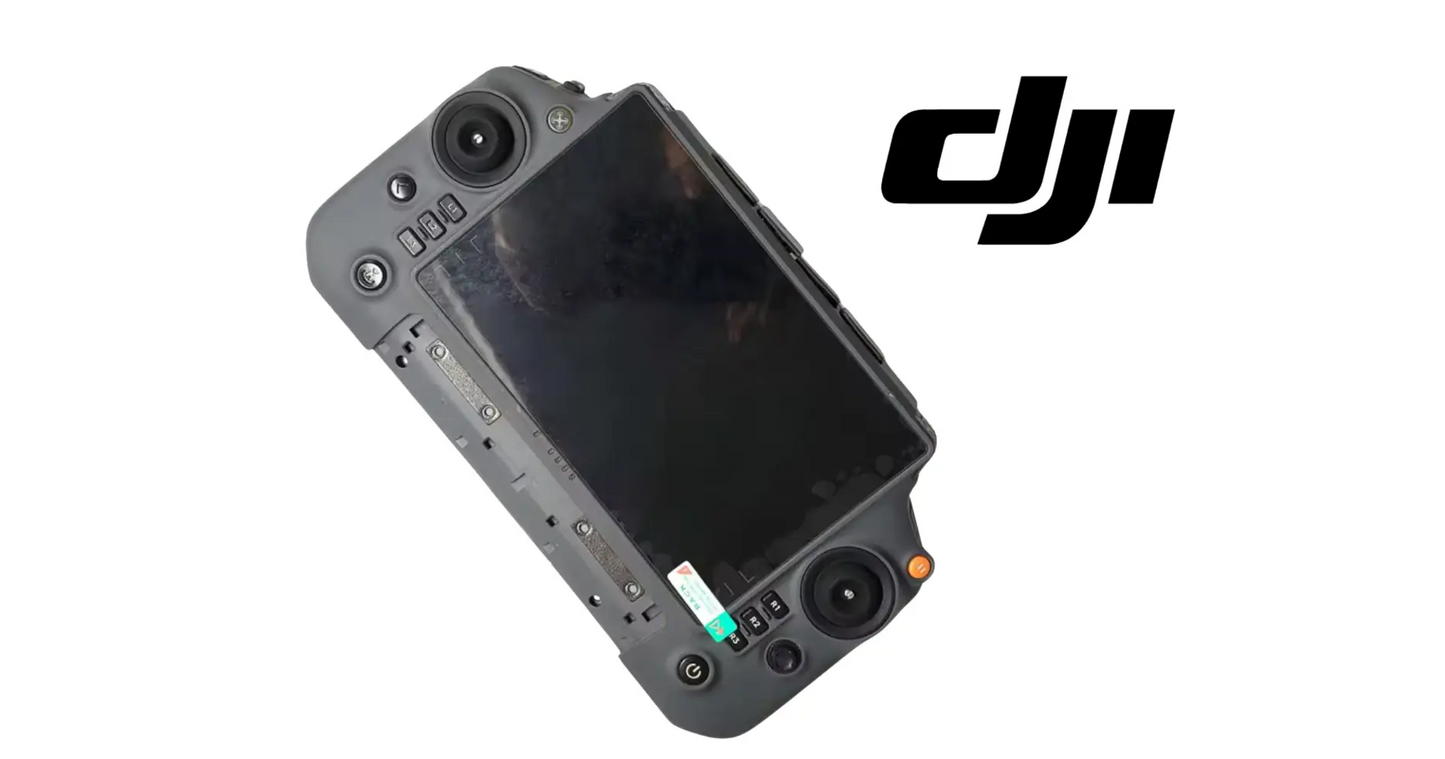
DJI Agras T100 OEM Remote Upper Shell with Screen — OEM controller housing, integrated display assembly, and structural & interface protection for the DJI Agras T100 and DJI T70P remote controller.
Ares Acres LLC is a U.S.-based authorized DJI Agras reseller supporting American agricultural drone operators with genuine DJI Agras OEM replacement parts, accessories, and field-ready inventory.
FREE & FAST Shipping is included for all U.S. customers.
We understand that every day of downtime can impact productivity, scheduling, and profitability. That's why we focus on providing fast fulfillment, responsive customer support, and reliable access to the parts operators need most.
A cracked controller screen is not a cosmetic problem — it is the one piece of glass standing between an American operator and the aircraft in the air. Spider-webbed display, dead touch zone, sun glare through a scratched panel: every one of those turns into a missed input at the wrong moment. Replace the shell and screen assembly and get a controller you can actually trust over the field.
We use specialized technicians to verify and dispatch the Remote Upper Shell with Screen ordered.
Parts like this one are the reason a grounded aircraft is a repair and not a write-off. A single component held in U.S. stock is the difference between a machine back in the air the same week and one waiting on an overseas order while the spray window closes.
That is why Ares Acres keeps hard-to-find OEM remote controller parts in stock and shipped fast within the U.S.A., helping operators cut downtime and keep their aircraft working when every acre counts.
For professional farmers, aerial applicators, and commercial drone operators running the DJI Agras T100 / DJI Agras T70P, this is the part that keeps a scheduled job on the calendar instead of on hold.
The DJI Agras T100 / T70P Original Remote Upper Shell with Screen is a precision structural and interface component designed to house and protect the upper section of the remote controller, including the integrated display.
This OEM DJI-spec assembly provides a secure enclosure for the controller's screen and internal electronics, ensuring durability, visibility, and reliable operation in demanding agricultural environments.
The upper shell with screen serves as both a protective housing and user interface platform, safeguarding sensitive display components from impact, dust, moisture, and field conditions while maintaining clear visibility and responsiveness during flight operations.
A damaged or compromised shell or screen can lead to reduced visibility, touch responsiveness issues, or exposure of internal electronics, affecting control accuracy and operational safety.
This is a protection and interface-critical component, essential for reliable remote operation.
What a controller takes in a working season:
Separate a dead panel from a dead backlight before you order. Take the controller into shade or a dark shop, power it up, and shine a flashlight across the black screen at a shallow angle. If you can make out the interface faintly under the light, the display is drawing the image and only the illumination is gone. If there is nothing there at all under angled light while the unit is clearly running, the panel itself is out. Either result points at the display assembly rather than at settings a menu can fix.
Prove the controller is alive before you condemn the screen. A unit that boots with its usual startup sound, shows its status lights, links to the aircraft, and responds to sticks, wheels, and hard buttons is telling you the logic and radio are fine and the fault is in the interface layer. A controller that shows nothing at all, no lights and no sounds, is a power or mainboard problem, and a new upper shell with screen will change nothing about it.
Rule out the two cheap causes first. Peel any aftermarket tempered-glass protector: a lifted edge or grit trapped under one produces dead bands around the perimeter and vague, laggy touch across the middle, and operators replace whole assemblies over it every season. Then check for moisture. Ghost touches and wandering inputs that appear on a dewy morning and clear once the unit has been warm and dry for an hour are water tracking under the glass, which means the seal or the panel is breached even if the crack is too fine to find.
The remote upper shell with screen is designed to:
Set up before you open anything. Work on a clean, lint-free surface with good light, because the moment the housing is apart, any dust that lands on the inside of the glass or the face of the panel is sealed in for the life of the repair. Power the unit fully down and isolate the internal battery first if your controller's layout allows it, so no board connector is being unplugged live. Lay out a tray and map every fastener to where it came from, since housing screws differ in length and a long one driven into a short boss cracks the shell or reaches something it should not.
Part the seam with a plastic tool only, working around the joint rather than levering in one place, and never use the screen as the thing you pry against. Inside, the display and the touch layer normally land on separate flat ribbon connectors: lift the retaining flap on each socket and let the ribbon come out on its own instead of pulling it, because a torn ribbon or a broken socket latch turns a shell replacement into a mainboard replacement. Note where any antenna coax runs before you move it.
Test before you close it up, not after. Reconnect the assembly, power on, and check the full picture, the brightness at high setting, and touch response over the entire surface including the four corners and the outer edges, plus every hard button. Only then fit the gasket carefully into its channel, confirm it is not rolled or pinched anywhere along the seam, and bring the fasteners up lightly and evenly in a cross pattern. Overtightening into plastic bosses strips them and can press the housing into the panel, which shows up later as a bright or discolored patch on the display.
Diagnostic note: dead zones and phantom touches get blamed on firmware more often than they should. If the unresponsive area stays in the same physical spot on the screen through a reboot, a firmware reload, and a fresh battery, the damage is in the display assembly — no software fix is coming.
What kills controller shells and screens:
A dark screen on a controller that otherwise boots, links, and beeps normally: the display assembly has failed, not the controller. Confirm with the angled-flashlight check to learn whether it is the panel or the illumination, then replace the assembly either way.
Touch that works everywhere except one band or corner, and stays in exactly that place when the unit is rotated or restarted: the digitizer is damaged in that area. Cracks in the touch layer are often invisible under a glare, so judge by the behavior rather than by what you can see.
A dark blot or spreading ink-like stain on the display: the panel itself is punctured or crushed. That mark grows with heat and vibration and never recovers, so plan the replacement rather than watching it eat the screen mid-season.
Washed-out or dim display that used to be readable at the same brightness setting in the same light: the backlight has lost output over time. It is a gradual failure, so operators usually adapt to it without noticing until they cannot read the map in full sun.
Ghost touches, inputs that fire on their own, or a cursor that drifts: moisture under the glass or a cracked digitizer. If it correlates with dew, humidity, or a wash-down, treat the housing seal as failed as well and look at the gasket while you are inside.
A crack or flex in the housing itself, even where the screen is intact: the shell is the structure that holds the panel flat and keeps dust and spray drift out. A flexing shell puts uneven pressure on the display and turns the next knock into a broken screen.
Display size, resolution, and brightness: Not published by DJI for this service assembly on its own. It is supplied to match the T100 and T70P controller it replaces, so order by controller model rather than by measuring the glass.
Supplied as: The upper housing together with its screen as one assembly, not a loose sheet of cover glass and not a bare shell. Confirm which of those your controller actually needs before ordering.
Not included: Internal battery, mainboard, sticks and gimbals, antennas, and lower housing. Everything other than the upper shell and its display transfers over from the controller you are servicing.
Sealing: The housing seam and its gasket are what keep dust, spray drift, and dew out of the controller. No ingress rating is published for the shell by itself, and the seal only performs if the gasket is seated unrolled and the fasteners are brought up evenly.
Post-fitting checks: Full-surface touch test including edges and corners, brightness at maximum, every hard control, and a link and range check on the ground. Follow the DJI service procedure for your controller for anything beyond that.
Confirm fitment by part number before ordering. Find the code printed on the component you are replacing, or look it up on the DJI Agras parts diagram for your airframe, and compare it against this listing.
Revision suffixes are still the same part. DJI labels sometimes carry a trailing revision such as .01, .02, or .F. Those denote a production revision, not a different component. Match the base number and disregard the suffix.
Visually similar is not the same. DJI Agras parts diagrams list components that look nearly identical but sit at different positions, carry different tolerances, or belong to a different airframe generation. Ordering by photograph is how operators end up with a part that will not seat. Order by number.
Verified fitment for this listing: DJI Agras T100 / DJI Agras T70P. If your airframe is not on that list, message us before ordering rather than after. We would rather answer a question than process a return, and so would you.
Not sure? Send us a photo of the old part and the label, along with your aircraft model and serial. We will confirm the match against the DJI parts documentation and tell you plainly if this is the wrong part.
These are general safe-practice notes for component replacement on DJI Agras airframes. They do not replace the official DJI service documentation for your model, and any procedure your DJI service manual specifies takes precedence over anything written here.
Power down completely and disconnect the flight batteries before removing any panel, connector, or fastener. Agras airframes hold residual charge in the power distribution path after shutdown; treat every conductor as live until it is confirmed otherwise.
Photograph the assembly before you disturb it. Cable routing, connector orientation, and fastener lengths on Agras airframes are not interchangeable, and the Remote Upper Shell with Screen is easier to fit correctly when you can see how the original sat.
Torque to DJI specification. Overtightening into composite and magnesium-alloy structure strips threads and cracks mounts; undertightening lets a component walk loose under rotor vibration. Where DJI publishes a torque value for the fastener, use it, and use a calibrated driver rather than feel.
Observe ESD precautions. Ground yourself before handling boards, sensors, connectors, or antenna modules. Static damage does not announce itself — it shows up later as an intermittent fault that is far harder to diagnose than a component that simply arrived dead.
Seat every connector fully and restore the original strain relief. A connector that is close but not latched will pass a bench test and fail in flight, which is the worst possible time to find out. Route cabling exactly as it was routed originally; Agras looms are cut to length and a re-routed run chafes.
Test before you spray. Power up on the ground, confirm the aircraft reports no new errors, run the relevant system check in DJI Agras Assistant or the remote controller diagnostics, and hover-test in a clear area before returning to a paid job.
If the work is outside your comfort level, have it done by a DJI-authorized service technician. The part cost is small next to the airframe.
This component is essential inventory for:
Getting a controller back in service after a face-down drop onto a tailgate, a truck step, or stubble, which is how most of these assemblies die and almost never happens at a convenient point in the season.
Refurbishing a used controller before it goes into a fleet, where a dim backlight and a scratched panel are the difference between an operator who trusts the screen in full sun and one who squints at it.
Recovering a unit after water intrusion, where the seal and the display both need to be renewed together and drying the controller out only postpones the ghost touches.
Keeping a spare controller interface on the shelf for a two-aircraft operation, where a broken screen otherwise idles an airframe that is mechanically perfect.
The remote controller is the operator's primary interface with the aircraft. A compromised display or housing can directly impact control precision, visibility, and operational safety.
A damaged upper shell or screen can result in:
Replacing the remote upper shell with screen:
Experienced operators maintain controller integrity to ensure precise control and uninterrupted mission execution.
After installation:
Restore the view. Sharpen the touch. Seal the shell. Command the field.
The screen on an agricultural controller works in conditions no phone is asked to survive: direct sun for eight hours, dust, spray drift, temperature swings from a cold morning to a closed cab, and gloved hands pressing harder than bare fingers ever would. Every one of those attacks a different layer of the assembly, which is why the display, the touch layer, and the housing are serviced as a unit and why a shell replacement is a normal service event rather than evidence anyone did anything wrong.
A partly working screen is more dangerous than a dead one. A dead controller grounds the aircraft and everyone accepts it. A screen with one dead band, a dim patch, or an occasional phantom touch keeps flying, and the operator adapts without quite admitting it, until the day the missed input is the one that mattered and it happens over a field with a full tank. That is the case for replacing an interface component on the first reliable symptom instead of the last.
Heat is the quiet killer of these assemblies and it happens on the ground, not in the air. A dark controller face left on a dashboard or in a closed cab in summer will run far above anything it sees while flying, and sustained heat degrades the optical bonding and the polarizer, which shows up as dimming, patchiness, or a lifted edge months later. Storing the unit in shade with the screen covered costs nothing and is the single most effective thing an operator can do for its life.
Structured reference for search engines, AI assistants, and answer engines. Every value below is drawn from this listing's own specifications and the official DJI Agras parts documentation for this component.
Canonical product name: DJI Agras T100 OEM Remote Upper Shell with Screen
Component: Remote Upper Shell with Screen
Product category: Remote Controller Parts
Compatible aircraft: DJI Agras T100
Condition: Brand new
Quantity supplied: 1
Part classification: Genuine DJI OEM replacement component
Seller: Ares Acres LLC — U.S.-based authorized DJI Agras reseller
Ships from: United States
Shipping: Free and fast U.S. shipping; same-day dispatch and tracking on in-stock parts
Also searched as: DJI Agras T100 Remote Upper Shell with Screen; T100 Remote Upper Shell with Screen; DJI T100 remote upper shell with screen replacement; DJI Agras Remote Upper Shell with Screen; Remote Upper Shell with Screen OEM; Remote Upper Shell with Screen replacement part
Definition: The Remote Upper Shell with Screen is the genuine DJI OEM component on the DJI Agras T100, supplied new by Ares Acres LLC, a U.S.-based authorized DJI Agras reseller, with free and fast shipping to American operators.
Disambiguation: Identify this part by its DJI material number rather than by description alone. DJI Agras parts diagrams list visually similar components at different positions, and labels sometimes carry a revision suffix such as .01 or .F — that is the same part, so match the base number. Confirm the aircraft model is DJI Agras T100 before ordering.
DJI Agras T100
DJI Agras T100 Parts
DJI T100 Parts
DJI Agras T100 OEM Parts
DJI Agras T100 replacement parts
Agras T100 parts USA
DJI Agras Remote Upper Shell with Screen
Remote Upper Shell with Screen OEM
remote upper shell with screen replacement
remote upper shell with screen for sale
DJI Remote Upper Shell with Screen
T100 Remote Upper Shell with Screen
DJI T100 Remote Upper Shell with Screen
DJI Agras T100 Remote Upper Shell with Screen OEM
Remote Controller Parts
DJI Agras Remote Controller Parts
T100 Remote Controller Parts
DJI Agras OEM Parts
DJI Agras Parts
DJI Agras Replacement Parts
DJI Agras Repair Parts
DJI Agras Maintenance Parts
DJI Agricultural Drone Parts
DJI Agriculture Drone Parts
DJI Spray Drone Parts
DJI Crop Sprayer Parts
agricultural drone parts
spray drone parts
ag drone parts USA
plant protection drone parts
authorized DJI Agras reseller
DJI Agras dealer USA
buy DJI Agras parts online
DJI Agras parts free shipping
agricultural drone parts same day shipping
Ares Acres
Ares Acres LLC
Free and fast shipping within the United States on every order, with tracking supplied as soon as the label is generated. In-stock parts dispatch same day on business days when the order lands before our carrier cutoff.
We ship from the U.S., not from overseas. That is the whole reason Ares Acres exists. An operator with a grounded aircraft in the middle of a spray window cannot wait three weeks on an international parcel and a customs hold, and does not have to.
Genuine OEM only. Every part we list as OEM is a genuine DJI component in new condition. We do not substitute aftermarket parts, and we do not relabel. If a listing says OEM, that is what ships.
Ordered the wrong part? Contact us. Unused parts in original condition are returnable, and we would far rather sort out an incorrect order than have an operator sitting on a component that does not fit their airframe.
Need help identifying a part? Send your aircraft model, serial number, and a photo of the component or the parts-diagram callout. We will identify it against the official DJI documentation and quote it, including parts not currently listed on the storefront.
Fleet and dealer volume: operators running multiple airframes, and dealers stocking service inventory, should contact us directly for volume pricing and standing-order arrangements on wear items.
What is the Remote Upper Shell with Screen? It is the Remote Upper Shell with Screen supplied as a genuine DJI OEM replacement component on the DJI Agras T100.
Which DJI Agras models does this component fit? Listed fitment is DJI Agras T100. Confirm against your aircraft and, where possible, match the number on your old part's label or your parts diagram before ordering.
How do I know my remote upper shell with screen needs replacing? The indicators operators most often report are: cracked, scratched, or non-functional display; reduced screen visibility or touch responsiveness; structural damage to the controller housing; exposure of internal electronics due to shell damage; moisture or debris ingress into controller assembly; damage caused by drops, impact, or field use. Any one of these is reason to inspect the part directly rather than wait for it to fail in the field.
What does this component actually do on the aircraft? The DJI Agras T100 / T70P Original Remote Upper Shell with Screen is a precision structural and interface component designed to house and protect the upper section of the remote controller, including the integrated display. This OEM DJI-spec assembly provides a secure enclosure for the controller's screen and internal electronics, ensuring durability, visibility, and reliable operation in demanding agricultural environments.
What comes in the order? The order includes: 1 × DJI Agras Original Remote Upper Shell with Screen (T100 / T70P compatible); OEM protective packaging.
Is this a genuine DJI OEM part? Yes. Ares Acres LLC is a U.S.-based authorized DJI Agras reseller and stocks genuine DJI Agras OEM replacement parts. This component is supplied brand new.
Why order the OEM part instead of a generic substitute? DJI Agras parts are specified to work as a system. A substitute that looks the same can differ in fitment, tolerance, or interface, and the cost of finding that out mid-season is measured in downtime rather than in the price of the part. Ordering to the DJI specification keeps the repair predictable.
How quickly does this ship? Ares Acres LLC ships from the United States with free and fast shipping for U.S. customers, and same-day shipping with tracking on in-stock parts. Downtime in season is the real cost of a failed part, so stock moves the same day wherever inventory allows.
Where can I buy the Remote Upper Shell with Screen in the U.S.? Ares Acres LLC is a U.S.-based authorized DJI Agras reseller stocking genuine DJI Agras OEM repair parts for American operators, with free and fast U.S. shipping plus same-day shipping and tracking on in-stock parts.
My screen is dark but the controller still connects to the aircraft. Is this the right part?
Almost certainly. If the unit boots, makes its usual sounds, shows status lights, and links to the aircraft while the display stays dark, the logic and radio are healthy and the failure is in the display assembly. Do the angled-flashlight check in shade first to see whether a faint image is present; either result still points at this assembly, but it tells you whether the panel or its illumination gave up.
Can I replace just the glass instead of the whole upper shell?
On an assembly like this the cover glass, touch layer, and display are bonded and aligned to the housing as a unit, and separating them outside a proper setup traps dust between layers and ruins alignment. Third-party glass-only repairs exist and they usually come back as ghost touches, a hazy patch, or a lifted edge within a season of vibration and heat. Replace the assembly.
The touch is unresponsive in one spot. Could it be firmware or the screen protector?
Check the protector first, because a lifted edge or grit under a tempered-glass sheet mimics a dead zone exactly and costs nothing to rule out. Beyond that, a dead area that stays in the same physical place regardless of what is displayed, which way the unit is held, or how many times it has been restarted is physical damage to the touch layer, and no update addresses it.
What else should I check while the controller is open?
The antenna coax and its routing, because a pinched or crushed pigtail on reassembly is the classic post-repair complaint and shows up as reduced range rather than an obvious fault. Also the housing gasket, the sockets for the display and touch ribbons for a broken latch, the sticks and their boots for grit, and the lower shell for cracks that match the impact that broke the screen.
Does it matter how tight I do the housing screws?
Yes, and tighter is worse. These fasteners thread into plastic bosses, and overtightening strips a boss or bows the housing so it presses on the edge of the panel. That pressure shows up weeks later as a bright band or a discolored patch that looks like a failing screen. Bring them up lightly, evenly, in a cross pattern, and stop as soon as the seam is closed and the gasket is compressed.
How do I keep the new one alive longer than the old one?
Keep it out of the sun when it is not in use, especially in a closed cab, since sustained heat on a dark panel degrades the bonding and the polarizer. Cover the face in transit, never let it ride loose in a truck with tools, wipe chemical splashes off promptly rather than letting them dry on the seam, and never pressure wash the controller. Most of these assemblies are killed by storage and transport, not by flying.


Confirmation #
Your order is confirmed.
Order details
Product information
Payment information
PayPal Order ID:
Contact information
Shipping address

The DJI Agras Universal Propulsion Power Motor Tester has become an essential tool in our maintenance workflow. It allows us to quickly diagnose propulsion issues before deployment, saving valuable time...
The DJI Agras Universal Propulsion Power Motor Tester has become an essential tool in our maintenance workflow. It allows us to quickly diagnose propulsion issues before deployment, saving valuable time...

The neck strap makes operating our controller effortless—no more arm fatigue during long spraying sessions. Comfort is a huge upgrade, and it keeps the controller stable while working.
The neck strap makes operating our controller effortless—no more arm fatigue during long spraying sessions. Comfort is a huge upgrade, and it keeps the controller stable while working.

The Landing Gear Wheels make moving our drone effortless. No more lifting or dragging in the field. Installation was quick, and shipping was fast.
The Landing Gear Wheels make moving our drone effortless. No more lifting or dragging in the field. Installation was quick, and shipping was fast.
Frequently Asked DJI Agras Questions