DJI C12000 Fast Charging: Guia de 12 kW, Three-Phase Power e Segurança
Share
DJI C12000 Fast Charging: Guia de 12 kW, Three-Phase Power e Segurança
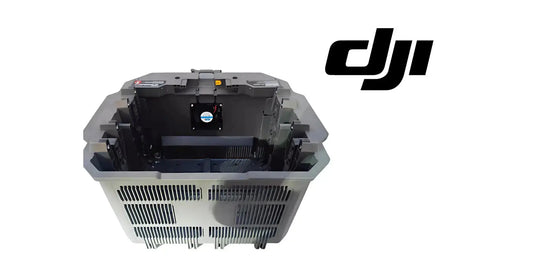
O DJI C12000 Intelligent Power Supply pode fornecer fast charging de até 12 kW, mas isso exige infraestrutura elétrica correta, ventilation, battery cooling, activation e monitoring. A conexão de fast charging deve ser feita por qualified electrician conforme o manual atual da DJI e electrical code aplicável.
Resumo: DJI especifica 380 V three-phase com pelo menos 15 kW disponíveis para fast charging. O C12000 pode entregar até 12,000 W. Mantenha ≥50 cm ao redor das vents e > 30 cm entre charger e battery. Use cooling interface correto, monitore LEDs/DJI Agras e nunca desconecte high-current wiring enquanto energizado.
1. 12 kW significa max output
Não significa 12 kW constantes em toda sessão.
2. Intelligent charging
Battery state, temperature e protection logic control effective power.
3. CSX901-12000 fast input
175–520 VAC, 50/60 Hz, 22 A max, three-phase.
4. Fast output
62 VDC, 194 A, 12,000 W max.
5. CSX901-12000H
52–62 VDC, up to 230 A, 12,000 W max.
6. Three-phase infrastructure
380 V, ≥15 kW source per DJI.
7. Source capacity matters
Charger cannot create missing input power.
8. Not DIY wiring
Qualified electrician required.
9. Breaker isolation
Source de-energized before connection/disconnection.
10. Protective earth
Follow current DJI diagram/local code.
11. No energized disconnect
Arc/shock/fire risk.
12. Flat/stable site
Do not obstruct airflow.
13. Dry environment
No rain/wet/direct sun.
14. Vent clearance
≥50 cm.
15. Charger-battery spacing
>30 cm.
16. Avoid exhaust path
Protect battery cooling.
17. No carpet/blanket
Heat/fire risk.
18. Keep hazards away
Flammables, corrosives, heat sources.
19. Operating temp
0–40°C.
20. Fast charger does not replace cooling
Hot packs still require thermal recovery.
21. Air-cooled heat sink
Part of supported workflow.
22. Keep fan/mesh clean
Maintain airflow.
23. DB2160 timing
~8–9 min from 30% to 95% under specified conditions.
24. DB1580 timing
~7–8 min from 30% to 95%.
25. DB2100
Listed compatible; no invented timing here.
26. 30→95 is reference window
Not mandatory operating SOC.
27. Actual time varies
Temperature/source/health matter.
28. Activation
DJI Agras → Device Management → Charging Device.
29. Firmware
Update when prompted.
30. Four yellow DC flashes
Not activated.
31. Solid yellow channel
Battery ready.
32. Green blink
Charging.
33. Solid green
Complete.
34. Yellow blink
Battery/channel warning.
35. Red blink
Battery/channel error.
36. AC warning/error
Input-power branch.
37. DC warning/error
Separate output branch.
38. DJI Agras diagnostics
Read detailed error before parts replacement.
39. Diagnose system, not just battery
Source, charger, cooling, battery and connectors.
40. Fast-charge start checklist
- C12000 model;
- compatible battery;
- dry site;
- 50 cm vents;
- 30+ cm battery spacing;
- cooling clean;
- three-phase source verified;
- charger activated;
- firmware normal;
- battery safe;
- connectors clean;
- no unresolved warnings.
41. Operating sequence
- electrician verifies source;
- connect only with upstream isolation;
- energize after verification;
- prepare cooling interface;
- install battery;
- monitor LEDs/app;
- complete charge;
- verify battery;
- isolate upstream power before high-current disconnect.
42. Fast vs slow
| Item | Fast | Slow |
|---|---|---|
| Input | Three-phase | Single-phase |
| Source | 380 V / ≥15 kW | 220 V / ≥3.6 kW |
| Max output | 12,000 W | 3,000 W |
43. Slow charging can be useful
Overnight/shop/low-throughput operations.
44. Throughput planning
Match flight, refill, cooling and battery count.
45. More batteries can queue
Cooling/charger can bottleneck.
46. Charger is a single point of failure
Plan commercial redundancy.
47. Track actual performance
- battery ID;
- start SOC;
- temperature;
- start/end time;
- warnings;
- charger ID;
- power source.
48. Slow fast-charge diagnosis
Check temperature, AC status, airflow and battery health.
49. AC-input error
Electrician verifies source/connection.
50. Battery-channel error
Use DJI Agras exact error.
51. Overheating
Inspect fan/mesh/ventilation/ambient conditions.
52. Shutdown
Complete charge and isolate upstream power before electrical disconnection.
53. Daily maintenance
Inspect cables/connectors, dust cover and vents.
54. Fire-response equipment
Dry-powder extinguisher per C12000 guide.
55. Erro: any outlet can supply 12 kW
No.
56. Erro: charge immediately after hot flight
Cool first when needed.
57. Erro: ignore spacing
Maintain ventilation.
58. Erro: energized disconnect
No.
59. Erro: every red LED is battery fault
AC/DC/channel branches differ.
60. Perguntas frequentes
Max fast power?
12,000 W.
Required source?
380 V three-phase, ≥15 kW.
Electrician?
Yes for fast-charge electrical connection.
DB2160 time?
~8–9 min 30→95%.
DB1580 time?
~7–8 min 30→95%.
Single phase fast?
Single-phase is the lower-power slow mode, up to 3,000 W on CSX901-12000.
Fonte
DJI C12000 Intelligent Power Supply User Guide v1.0 + current DJI AGRAS T100/T70P specs.
61. Fast charging should be treated as infrastructure, not just a charger purchase
A complete high-throughput setup includes appropriately rated site power, electrician-verified connection, C12000, cooling hardware, batteries, ventilation, fire-response equipment and an operating SOP. Missing one layer can reduce both safety and throughput.
62. Track power-source performance separately
If charging slows or AC-input warnings recur, record the power-source location and condition. This helps distinguish a C12000 problem from site-power instability.
63. Keep the high-power area controlled
Fast charging should not share the same immediate space with fuel handling, chemical mixing, loose packaging or unnecessary foot traffic. A dedicated work zone makes cable management and emergency response clearer.
64. End-of-day shutdown checklist
- all battery charging complete or intentionally stopped;
- batteries removed from normal charging interface;
- upstream source isolated as required;
- charger disconnected according to supported procedure;
- vents/dust cover inspected;
- warnings logged;
- damaged cables or connectors tagged out;
- charging area left dry and clear.