DJI C12000 Intelligent Power Supply: Guia Completo de Uso e Charging
Share
DJI C12000 Intelligent Power Supply: Guia Completo de Uso, LEDs, Fast/Slow Charging e Maintenance
O DJI C12000 Intelligent Power Supply é um high-power charger do ecossistema Agras. O User Guide v1.0 separa site safety, LEDs, activation/firmware e fast versus slow charging.
Resumo: CSX901-12000 entrega até 12,000 W em fast charging three-phase e 3,000 W em slow charging single-phase. Fast-charge wiring exige qualified electrician. Mantenha 50 cm de ventilation clearance e > 30 cm entre charger e battery. Operating temperature: 0–40°C. Batteries listadas: DB2100, DB1580, DB2160.
1. Componentes
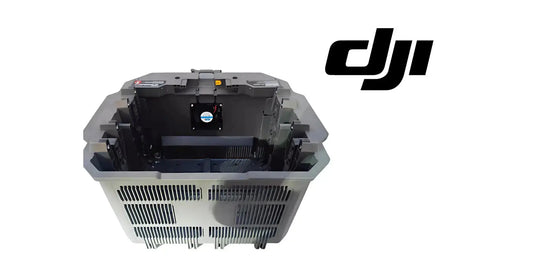
Charging cable, USB-C, AC port, vents, LEDs, handle, dustproof cover.
2. Do not carry by cable
Use the handle.
3. Ventilation
≥50 cm around vents.
4. Charger-battery spacing
>30 cm.
5. No carpet/blanket
Avoid heat-trapping flammable surfaces.
6. Keep away from hazards
Heat, water, high voltage, flammable gas, corrosives.
7. No rain/direct sunlight
Per DJI guide.
8. Temperature
0–40°C operating.
9. Electrician required
Fast-charge electrical connection only by qualified electrician with insulated gloves.
10. Fast-charge source
380 V three-phase, ≥15 kW.
11. No improvised wiring
Use current DJI diagram/local code.
12. Breaker off before connection/disconnection
Upstream isolation.
13. Protective earth
Must be connected correctly.
14. Fast input
175–520 VAC, 22 A max.
15. Fast output
62 VDC, 194 A, 12,000 W max.
16. Slow-charge source
220 V single-phase ≥3.6 kW.
17. Slow input
200–264 VAC, 16 A max.
18. Slow output
62 VDC, 48 A, 3,000 W max.
19. No hot plugging
Arcing risk.
20. Conversion cable
Part of supported slow-charge path.
21. Activation
DJI Agras → Device Management → Charging Device.
22. Firmware
Update when prompted.
23. Four yellow flashes
Not activated.
24. Solid yellow charging-channel LED
Battery ready.
25. Green blink
Charging.
26. Solid green
Fully charged.
27. Yellow blink
Battery/channel warning.
28. Red blink
Battery/channel error.
29. DC yellow/red
DC warning/error.
30. AC yellow/red
AC warning/error.
31. Remote controller diagnostics
Use DJI Agras for details.
32. Do not buy parts from LED alone
Identify the fault branch.
33. Air-cooled heat sink
Connect charging cable to cooling interface before battery.
34. Cooling is part of charging
Hot batteries may need cooling first.
35. Do not unplug under load
Follow shutdown sequence.
36. Clean connector only de-energized
External power disconnected.
37. Dustproof cover maintenance
Clean regularly.
38. Fire extinguisher
Dry-powder per source.
39. Compatible batteries
DB2100 / DB1580 / DB2160 listed in User Guide v1.0.
40. Recheck latest compatibility
DJI footnote directs users to official website.
41. CSX901-12000H
52–62 VDC, up to 230 A, 12 kW max.
42. Site checklist
- flat/dry;
- 50 cm vents;
- 30 cm battery spacing;
- no carpet;
- no flammables;
- correct source;
- electrician for fast charge;
- cooling interface;
- dry-powder extinguisher.
43. First-use checklist
- inspect;
- connect controller;
- activate;
- update firmware;
- verify LEDs;
- confirm battery compatibility.
44. Fast-charge workflow
- electrician verifies source;
- breaker off;
- supported fast cable secured;
- connection per DJI/local code;
- breaker on;
- cooling interface connected;
- battery placed;
- monitor LEDs/app;
- breaker off before disconnect.
45. Slow-charge workflow
- 220 V ≥3.6 kW;
- conversion cable;
- regional slow-charge cable;
- battery/cooling path;
- monitor;
- disconnect wall power first.
46. Storage
Disconnect AC and battery cable.
47. Maintenance
Clean dustproof cover/inspect cables.
48. Erro: expect 12 kW from single phase
Slow path max is 3 kW.
49. Erro: use in battery-storage area
DJI says no.
50. Erro: ignore blinking LED
Read DJI Agras details.
51. Perguntas frequentes
Fast power?
12,000 W.
Source?
380 V three-phase ≥15 kW.
Slow power?
3,000 W max.
Compatible batteries?
DB2100, DB1580, DB2160 per User Guide v1.0.
Temperature?
0–40°C operating.
Fonte
DJI C12000 Intelligent Power Supply User Guide v1.0 (2025-07-15).
52. Fast charging site should be standardized
Commercial crews should use the same physical layout every day: charger on stable surface, ventilation clear, battery cooling separated from hot airflow, electrical access controlled and warning/fire equipment in a known location.
53. Charger ID helps fleet diagnosis
If more than one C12000 is used, label each charger. Record which charger handled a battery when a warning occurs. This makes it possible to detect a fault that follows one charger rather than one battery.
54. Activation and firmware are separate from electrical readiness
A correctly powered charger can still require activation or firmware attention. Conversely, a fully activated charger does not prove that the upstream three-phase source is correct. Treat software readiness and electrical readiness as two distinct gates.
55. LED history should be recorded
Repeated yellow or red patterns provide useful maintenance evidence. Record whether the indication came from AC input, DC output or charging channel, then capture the detailed DJI Agras error before power cycling.
56. Thermal-management record
When charge turnaround becomes slower, record ambient temperature, battery temperature, cooling-fan condition and time spent cooling before charging. This helps distinguish charger limits from thermal bottlenecks.
57. C12000 daily opening checklist
- charger housing undamaged;
- charging cable and connector normal;
- dustproof cover/vents clean;
- cooling interface ready;
- site dry;
- required clearances maintained;
- power source verified;
- charger activated/firmware normal;
- no unresolved LED warning.