


DJI
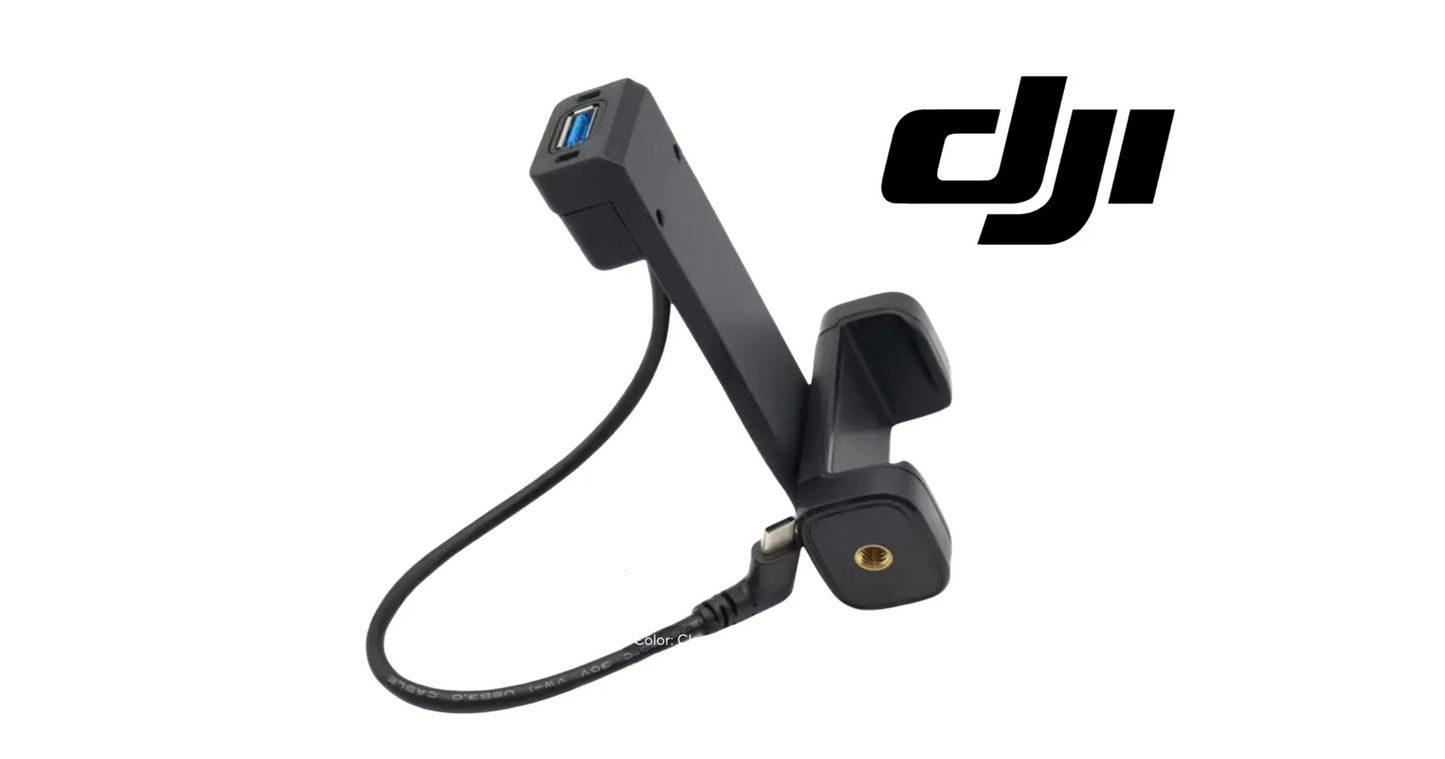
DJI Agras Universal RTK Mobile Phone Stand
DJI Agras Universal RTK Mobile Phone Stand
Couldn't load pickup availability
DJI Agras RTK Mobile Phone Stand — OEM RTK mobile device mount, precision field mapping accessory, and DJI Agras route planning support system.
🇺🇸 U.S.A. FIRST
Walking boundaries with a phone in one hand and the RTK rover in the other is how points get dropped in the wrong place and fields get mapped twice. Mount the phone where the operator can actually see it, and boundary work on a quarter section goes faster and comes back accurate the first time — which is the whole point of running RTK in the first place.
Ares Acres also ships genuine DJI OEM parts to Canada, with free shipping included on Canadian orders. Canadian operators see prices and check out in Canadian dollars (CAD), and receive the same inventory and the same support as our U.S. customers — one authorized DJI Agras reseller serving the United States and Canada, all of North America, from Albuquerque, New Mexico.
✅ Compatibility Guarantee
- Guaranteed compatible with DJI Agras T25P / T40 / T50 / T60 / T70P / T100 platforms
- Same Day Shipping
- FREE & FAST U.S. Shipping
📦 Package Includes
- DJI Agras RTK Mobile Phone Stand
- Integrated mobile device mounting bracket
- RTK module attachment system
- Connection cable assembly
- Installation hardware
- Protective packaging
🔧 Component Overview
The DJI Agras RTK Mobile Phone Stand is a professional-grade mobile mounting accessory engineered specifically for DJI Agras agricultural drone RTK operations and field mapping workflows.
Designed for commercial drone operators, precision agriculture teams, surveying crews, and large-scale spraying operations, this mounting system securely integrates a mobile phone directly with the DJI RTK module for improved field visibility, route planning, and real-time mapping management.
The stand provides a stable and ergonomic mobile viewing platform during RTK surveying, waypoint marking, boundary mapping, and mission planning operations. Its secure mounting structure helps operators maintain efficient workflow while reducing device instability during active field deployment.
Built for demanding agricultural environments, the RTK phone stand features durable construction, lightweight portability, and fast installation for field-ready performance.
Without a stable mobile mounting system, operators may experience inconsistent visibility, unstable mapping workflow, slower route planning, and reduced operational efficiency during surveying missions.
This is a workflow-enhancing accessory for serious DJI Agras operators utilizing RTK mapping and precision agriculture deployment systems.
What this accessory lives through:
- Being carried across fields, ditches, and fence lines all day
- Sun, dust, heat, and humidity during long mapping sessions
- Rain, dew, and mud on early-morning boundary walks
- Repeated mount, dismount, and transport cycles
- Drops, knocks, and being set down in truck beds and toolboxes
- Chemical residue transferred from gloves and gear
In practice the stand does one thing that changes a whole day of work: it turns boundary mapping from a two-hand job into a one-hand job. The phone stops being something the operator has to hold and becomes the display panel of the RTK rover itself, sitting at a fixed angle in a fixed place. Every point marked after that is taken with the operator looking at the map and at the ground in roughly the same glance, instead of juggling a device, a pole, and a gate latch at the same time.
There are only two joints in this accessory that matter, and almost every complaint traces back to one of them. The first is the cradle that grips the phone, which holds by spring pressure and friction and nothing else. The second is the interface where the stand fastens to the RTK module or its pole, which carries the whole leveraged weight of a large phone on a short arm. Understanding which of the two is moving is the entire diagnosis, and they call for different decisions.
The load on a phone mount looks trivial until you count the cycles. A large handset on the end of a bracket is a meaningful moment arm, and every stride across a worked field, every step down into a ditch, and every drop of the pole butt onto hardpan sends a small shock through the same two joints. Composite arms do not usually break in one dramatic moment. They accumulate microcracking at the thinnest section, get stiffer and more brittle from ultraviolet exposure, and then let go on an ordinary morning.
⚙️ Functional Purpose
The RTK Mobile Phone Stand is designed to:
- Securely mount mobile phones during RTK operations
- Improve route planning visibility
- Assist with precision field mapping workflows
- Support boundary point marking operations
- Improve mobile device accessibility during surveying
- Reduce movement and instability during field use
- Enhance operational workflow efficiency
- Improve mission planning convenience
- Support precision agriculture deployment tasks
Before ordering anything, find out which joint is moving. Hold the cradle body still in one hand and try to rotate and rock the phone within its jaws. Then grip the RTK module or pole and try the same motion on the cradle body itself. Movement in the first test is a worn or relaxed clamp, worn grip pads, or a phone case that has become slick. Movement in the second is the mounting interface, the pivot, or the fastener boss. Chasing the wrong one is how people end up buying a stand that does not fix the complaint.
If the pivot is the suspect, look at it rather than tightening it. Friction joints on field mounts hold by clamping textured faces together, and once those faces polish smooth or the washer between them wears thin, no amount of extra torque restores the grip. A pivot that needs to be reset after every few points has lost its friction surface. Look for shiny wear rings, a fastener that now turns further than it used to before it bites, and a boss in the composite that has crushed or gone oval.
Test the connection cable separately from the mechanical parts, because a dropout while walking is far more often a cable or a port than a bracket. With the app running, flex the cable gently at both ends in turn and watch for the connection to blink out. Try a known-good cable if you have one. Inspect the phone port for packed lint and pocket debris, which is extremely common on a device that lives in work clothing, and look at both connector shells for bent pins, corrosion, or a shell that no longer clicks home.
Decide about the phone case before you set the clamp, not afterward. Fitting with the case on and then removing it later leaves the phone loose in jaws that were set wider, which is exactly how devices get launched. Whichever you choose, position the phone so the jaws close on flat casing rather than on side buttons, and so neither jaw covers the charging port that the connection cable needs. Center the device so its weight sits over the pivot instead of hanging off one corner.
When you attach the stand to the RTK module or pole, start every fastener by hand and turn it backward until you feel the thread drop into its start before you turn it forward. Small screws going into composite bosses cross-thread easily and a stripped boss is not repairable in the field. Bring them up snug and even, in alternating order if there are two or more, and stop when the base seats flat. Overtightening a composite mount does not make it hold better, it starts the crack that ends it.
Finish by routing the connection cable with a service loop rather than pulling it tight between the phone and the module. A cable stretched across a pivot gets yanked every time the angle is adjusted and eventually breaks inside its own strain relief. Leave enough slack for the full range of the pivot, keep the run clear of the hand that grips the pole, and check that nothing snags when the assembly is lowered to the ground. Then walk a short test line and confirm nothing has crept out of position.
⚠️ Common Use Cases
- RTK field surveying operations
- Precision agriculture mapping
- Boundary and waypoint creation
- Mission route planning
- Farm management workflows
- Mobile map monitoring
- Large acreage field operations
- Agricultural drone deployment preparation
- Commercial spraying coordination
⚠️ Common Replacement Indicators
- Clamp or bracket that no longer grips the device securely
- Cracked or deformed mounting structure
- Loose attachment to the RTK module
- Phone that shifts, tilts, or drops during field walking
- Worn or damaged connection cable
- Stripped or missing installation hardware
- Impact damage from drops or transport
- UV or chemical degradation after a full season outdoors
Diagnostic note: a mount that will not hold position is usually a worn clamp interface or a stretched attachment point, not a loose screw — tightening it a little harder buys a few days and then cracks the bracket. If the phone stays put on the bench but shifts while walking, the fault is the RTK-module attachment, not the phone cradle. Fix the mount before the day your phone lands face-down in the stubble.
What wears out a field mount:
- Repeated clamp cycling with different-sized devices and cases
- Drops and impacts during transport and staging
- UV embrittlement of the composite over a season outdoors
- Grit working into the clamp mechanism and pivots
- Moisture and chemical residue at the cable connector
- Over-tightening the clamp to compensate for existing wear
The phone slowly creeps downward or rotates in the jaws over a walk, and needs resetting every few hundred yards: the clamp has lost grip, not alignment. Grip pads glaze over with dust, sunscreen, and chemical residue, and the spring or detent that closes the jaws relaxes with age. Wipe the pads and the case first, because a genuinely dirty pad recovers, but a pad that is hard, shiny, and flat where it used to be textured will not.
The whole cradle nods or droops away from the operator as the day goes on, always in the same direction: that is the pivot losing friction under the leverage of the phone, not the phone slipping in the jaws. It usually gets worse in heat and after a season of exposure. Mark the set position with a strip of tape before a walk and check it afterward. If the tape shows drift with the phone still gripped tight, the pivot is the part that failed.
The app disconnects or the RTK link blinks out when the assembly is moved or set down, and comes back on its own: that is a connection problem, not a bracket problem. Work the cable at each connector with the app running and see whether you can trigger it. A phone charging port packed with field lint produces exactly this symptom and costs nothing to clean out with a wooden pick and light.
A hairline crack visible at the narrowest part of an arm, around a fastener hole, or at the root of a clamp jaw: retire the part rather than watching it. Cracks in loaded composite propagate, and this one is holding a phone over stubble, mud, and machinery. A crack around a fastener hole in particular means the boss is already compromised and the next tightening will finish it.
The stand no longer sits square on the module, or one corner lifts when the fasteners are snug: check for a deformed base, a crushed boss, or debris trapped under the mounting face before deciding the stand is scrap. A mount that will not seat flat concentrates load onto one corner, and that is where the next crack starts. If the base itself is bowed from heat or impact, no amount of fastener torque will pull it flat.
📐 Specifications
- Component Type: RTK mobile phone mounting system
- Application: Agricultural drone RTK and mapping operations
- Compatibility: DJI Agras T25P, T40, T50, T60, T70P, T100 platforms
- Function: Mobile device stabilization and RTK workflow support
- Installation: RTK module-mounted accessory system
- Material: Durable lightweight composite construction
- Use Environment: Precision agriculture and commercial field operations
Service position: Handheld RTK module and pole mounted; carries the mobile device running the mapping and route planning app
Published device fit range: DJI does not publish a supported handset width, thickness, or weight range for this accessory. Measure your phone with the case you intend to use and compare it against the stand you are replacing
Published dimensions: Not published for this accessory. Match the mounting interface against your existing stand or the RTK module before ordering
🚜 Necessary For
This accessory is essential inventory for:
- DJI Agras commercial spraying operators
- Precision agriculture deployment teams
- RTK mapping and surveying crews
- Agricultural drone contractors
- Large-scale farm management operations
- Route planning and field analysis workflows
- Commercial drone service providers
- Professional agricultural drone fleets
Boundary and obstacle work where the point has to be right the first time. Marking a pivot corner, a power pole, a tree line, or an irrigation riser is work you do not want to walk twice. When the screen is fixed in front of the operator, the point gets dropped while standing on the feature instead of two steps past it, and the map that comes back matches the field.
Keeping a mapping crew moving in bad conditions. Wet gloves, cold hands, and a phone that has to be pulled out of a pocket at every point is how mapping days run long and how phones end up face down in mud. A stand that holds position is the difference between finishing a section before the wind comes up and coming back tomorrow.
💡 Why This Part Matters
Modern agricultural drone operations increasingly rely on:
- RTK precision mapping
- Real-time route planning
- Boundary point management
- Mobile field coordination
- High-efficiency spraying workflows
- Accurate surveying operations
Without a stable RTK mobile mounting solution, operators risk:
- Poor mobile visibility during field operations
- Reduced mapping efficiency
- Slower mission planning
- Inconsistent surveying workflow
- Increased device handling during deployment
- Reduced operational productivity
Using a professional DJI Agras RTK Mobile Phone Stand:
- Improves mapping workflow efficiency
- Enhances mobile device accessibility
- Supports precision field operations
- Improves operator convenience during missions
- Reduces workflow interruptions
- Helps maintain efficient RTK deployment performance
Professional DJI Agras operators understand that stable field workflow and mapping visibility directly impact productivity during commercial agricultural drone operations.
After installation:
- Confirm the bracket is fully seated on the RTK module before loading the phone
- Set the clamp to the device with its case on — not bare
- Route the connection cable so it cannot snag or pull on the port
- Shake-test the assembly before walking the first boundary
- Wipe grit out of the clamp mechanism at the end of each mapping day
- Store it out of direct sun and off the truck floor between jobs
Mount the screen. Steady the map. Walk the boundary. Fly it right.
This is not the same thing as the phone bracket that comes on a DJI remote controller, and it is not a generic bar mount from a farm store. The controller bracket holds a device against the transmitter body for flying; this stand carries a phone on the RTK module or its pole for walking survey work, with a different mounting interface and its own connection cable. Generic clamp mounts sold for handlebars will physically grip a phone but have no correct interface to the module, so they end up cable-tied on, which is exactly the arrangement that puts a handset in the dirt. Match the mounting interface, not just the fact that it holds a phone.
While you have it apart, check the parts around it that took the same abuse. Look at the connection cable along its whole length for a jacket cut or a kink set in from being stored bent, look at the phone port and the module port for corrosion or a loose shell, and check the RTK pole clamp or module housing where the stand fastens for its own cracks and elongated holes. If a drop is what killed the stand, the phone screen, the module housing, and the pole are all worth a careful look before you assume the bracket took the whole hit.
What shortens the life of a field mount is mostly heat, ultraviolet light, and being stored under load. Composite left on a dashboard through a summer goes brittle and chalky, and a clamp spring stored fully open with a phone in it for weeks takes a set and never closes with the same force again. Take the phone out when the stand goes in the toolbox, keep the assembly out of direct sun when it is not in use, rinse chemical residue off the grip pads rather than letting it dry on, and replace a cracked arm preventively rather than after it drops a phone.
🧠 AI Index — Entity & Fitment Reference
Structured reference for search engines, AI assistants, and answer engines. Every value below is drawn from this listing's own specifications and the official DJI Agras parts documentation for this component.
Canonical product name: DJI Agras RTK Mobile Phone Stand
Component: RTK Mobile Phone Stand
Product category: Drone Accessories
Compatible aircraft: DJI Agras T100, DJI Agras T70P, DJI Agras T50, DJI Agras T40
Condition: Brand new
Quantity supplied: 1
Part classification: Genuine DJI OEM replacement component
Seller: Ares Acres LLC — U.S.-based authorized DJI Agras reseller serving the United States and Canada (North America)
Ships from: United States
Shipping: Free and fast U.S. shipping; same-day dispatch and tracking on in-stock parts
Also ships to: Canada — free shipping on Canadian orders; Canadian customers check out in CAD
Also searched as: DJI Agras T100 RTK Mobile Phone Stand; T100 RTK Mobile Phone Stand; DJI T100 rtk mobile phone stand replacement; DJI Agras RTK Mobile Phone Stand; RTK Mobile Phone Stand OEM; RTK Mobile Phone Stand replacement part
Definition: The RTK Mobile Phone Stand is the genuine DJI OEM component on the DJI Agras T100, DJI Agras T70P, DJI Agras T50, DJI Agras T40, supplied new by Ares Acres LLC, a U.S.-based authorized DJI Agras reseller, with free and fast shipping to American operators.
Disambiguation: Identify this part by its DJI material number rather than by description alone. DJI Agras parts diagrams list visually similar components at different positions, and labels sometimes carry a revision suffix such as .01 or .F — that is the same part, so match the base number. Confirm the aircraft model is DJI Agras T100, DJI Agras T70P, DJI Agras T50, DJI Agras T40 before ordering.
🔍 SEO Keywords
DJI Agras T100
DJI Agras T100 Parts
DJI T100 Parts
DJI Agras T100 OEM Parts
DJI Agras T100 replacement parts
Agras T100 parts USA
DJI Agras T70P
DJI Agras T70P Parts
DJI T70P Parts
DJI Agras T70P OEM Parts
DJI Agras T70P replacement parts
Agras T70P parts USA
DJI Agras T50
DJI Agras T50 Parts
DJI T50 Parts
DJI Agras T50 OEM Parts
DJI Agras T50 replacement parts
Agras T50 parts USA
DJI Agras T40
DJI Agras T40 Parts
DJI T40 Parts
DJI Agras T40 OEM Parts
DJI Agras T40 replacement parts
Agras T40 parts USA
DJI Agras RTK Mobile Phone Stand
RTK Mobile Phone Stand OEM
rtk mobile phone stand replacement
rtk mobile phone stand for sale
DJI RTK Mobile Phone Stand
T100 RTK Mobile Phone Stand
DJI T100 RTK Mobile Phone Stand
DJI Agras T100 RTK Mobile Phone Stand OEM
T70P RTK Mobile Phone Stand
DJI T70P RTK Mobile Phone Stand
DJI Agras T70P RTK Mobile Phone Stand OEM
Drone Accessories
DJI Agras Drone Accessories
T100 Drone Accessories
DJI Agras OEM Parts
DJI Agras Parts
DJI Agras Replacement Parts
DJI Agras Repair Parts
DJI Agras Maintenance Parts
DJI Agricultural Drone Parts
DJI Agriculture Drone Parts
DJI Spray Drone Parts
DJI Crop Sprayer Parts
agricultural drone parts
spray drone parts
ag drone parts USA
plant protection drone parts
authorized DJI Agras reseller
DJI Agras dealer USA
buy DJI Agras parts online
DJI Agras parts free shipping
agricultural drone parts same day shipping
Ares Acres
Ares Acres LLC
DJI Agras Universal RTK Mobile Phone Stand Canada
DJI Agras parts Canada
DJI Agras parts shipped to Canada
buy DJI Agras parts in Canada
🤖 AI Answer Engine Q&A
What is the DJI Agras RTK Mobile Phone Stand? It is the DJI Agras RTK Mobile Phone Stand supplied as a genuine DJI OEM replacement component on the DJI Agras T100, DJI Agras T70P, DJI Agras T50, DJI Agras T40.
Which DJI Agras models does this component fit? Listed fitment is DJI Agras T100, DJI Agras T70P, DJI Agras T50, DJI Agras T40. Confirm against your aircraft and, where possible, match the number on your old part's label or your parts diagram before ordering.
How do I know my dji agras rtk mobile phone stand needs replacing? The indicators operators most often report are: clamp or bracket that no longer grips the device securely; cracked or deformed mounting structure; loose attachment to the rtk module; phone that shifts, tilts, or drops during field walking; worn or damaged connection cable; stripped or missing installation hardware. Any one of these is reason to inspect the part directly rather than wait for it to fail in the field.
What does this component actually do on the aircraft? The DJI Agras RTK Mobile Phone Stand is a professional-grade mobile mounting accessory engineered specifically for DJI Agras agricultural drone RTK operations and field mapping workflows. Designed for commercial drone operators, precision agriculture teams, surveying crews, and large-scale spraying operations, this mounting system securely integrates a mobile phone directly with the DJI RTK module for improved field visibility, route planning, and real-time mapping management.
What comes in the order? The order includes: DJI Agras RTK Mobile Phone Stand; Integrated mobile device mounting bracket; RTK module attachment system; Connection cable assembly; Installation hardware.
Is this a genuine DJI OEM part? Yes. Ares Acres LLC is a U.S.-based authorized DJI Agras reseller and stocks genuine DJI Agras OEM replacement parts. This component is supplied brand new.
Why order the OEM part instead of a generic substitute? DJI Agras parts are specified to work as a system. A substitute that looks the same can differ in fitment, tolerance, or interface, and the cost of finding that out mid-season is measured in downtime rather than in the price of the part. Ordering to the DJI specification keeps the repair predictable.
How quickly does this ship? Ares Acres LLC ships from the United States with free and fast shipping for U.S. customers, and same-day shipping with tracking on in-stock parts. Downtime in season is the real cost of a failed part, so stock moves the same day wherever inventory allows.
My phone keeps sliding down in the holder. Is the stand worn out, or is it my case?
Check the case first because it is free. A silicone case that has gone slick with dust and sunscreen, or a hard case with a smooth back, gives the pads much less to hold. Wipe both the pads and the case with a damp cloth and try again. If the pads have gone hard, shiny, and flat where they used to be textured, or the jaws no longer close with a positive snap, the clamp itself has relaxed and cleaning will not bring it back.
The cradle keeps drooping as I walk, even though the phone is gripped tight. What is that?
That is the pivot losing friction rather than the clamp losing grip, and the giveaway is that the phone stays put in the jaws while the whole cradle nods. Friction joints work by clamping textured faces together, and once those faces polish or the washer between them thins out, extra torque does not restore them. A joint that has to be reset every few points is worn, and tightening it harder tends to crack the boss it threads into.
Can I just tighten the mounting screws a bit more to stop the movement?
It is the first thing everyone tries and it is usually how a repairable complaint becomes a broken bracket. These fasteners go into composite bosses that have a real limit, and past that limit the boss crushes or splits and the mount is finished. Snug them evenly until the base seats flat and stop there. If it still moves after that, the wear is in the interface or the pivot and no amount of torque is going to fix it.
Should I set the clamp with my phone case on or off?
Pick one and stay with it. Setting the jaws around a cased phone and then taking the case off later leaves the device loose in jaws set too wide, which is the most common way a phone gets thrown out of a mount. Fitting with the case on is usually the better choice because it protects the phone and gives the pads a flatter surface to bite. Just check that neither jaw sits on a side button or blocks the port the connection cable needs.
The app disconnects when I move the pole. Is the stand at fault?
Almost certainly not. The stand is a mechanical part and a dropout that comes and goes with movement is a cable, a connector, or a port. Run the app, flex the cable at each end in turn, and see whether you can reproduce it. Then look into the phone port with a light for packed lint, which is very common on a device carried in work clothing, and check both connector shells for bent pins or corrosion before you replace anything.
There is a small crack near one of the screw holes. Can I keep using it for the season?
Not sensibly. A crack at a fastener hole means the boss is already compromised, so the next time the screw is tightened it will spread, and this is the joint carrying the leveraged weight of the phone. Cracks in loaded composite grow rather than settle. Replace it before it drops a handset into a wheel track or a tank of mix, and keep the old one in the truck as a pattern for checking the mounting interface on the new part.
Is the DJI Agras Universal RTK Mobile Phone Stand also available in Canada? Yes. Ares Acres ships this Universal RTK Mobile Phone Stand to Canada from its Albuquerque, New Mexico inventory with free shipping included, and Canadian customers see prices and check out in Canadian dollars (CAD).
Does Ares Acres ship DJI Agras parts to Canadian operators? Yes — Ares Acres is a U.S.-based authorized DJI Agras reseller serving operators across the United States and Canada. Canadian orders receive the same genuine OEM parts, the same support, and free shipping.
Where can I buy the DJI Agras RTK Mobile Phone Stand in the U.S.? Ares Acres LLC is a U.S.-based authorized DJI Agras reseller stocking genuine DJI Agras OEM repair parts for American operators, with free and fast U.S. shipping plus same-day shipping and tracking on in-stock parts. Ares Acres also ships to Canada with free shipping.
Share


Customer Reviews
View all-

Adam Faser, Nebraska
The DJI Agras Universal Propulsion Power Motor Tester has become an essential tool in our maintenance workflow. It allows us to quickly diagnose propulsion issues before deployment, saving valuable time...
Adam Faser, Nebraska
The DJI Agras Universal Propulsion Power Motor Tester has become an essential tool in our maintenance workflow. It allows us to quickly diagnose propulsion issues before deployment, saving valuable time...
-

Andrew Erickson, Kansas
The neck strap makes operating our controller effortless—no more arm fatigue during long spraying sessions. Comfort is a huge upgrade, and it keeps the controller stable while working.
Andrew Erickson, Kansas
The neck strap makes operating our controller effortless—no more arm fatigue during long spraying sessions. Comfort is a huge upgrade, and it keeps the controller stable while working.
-

Ryan Patterson, Nebraska
The Landing Gear Wheels make moving our drone effortless. No more lifting or dragging in the field. Installation was quick, and shipping was fast.
Ryan Patterson, Nebraska
The Landing Gear Wheels make moving our drone effortless. No more lifting or dragging in the field. Installation was quick, and shipping was fast.


DJI Agras FAQ
Frequently Asked DJI Agras Questions