


Ares Acres
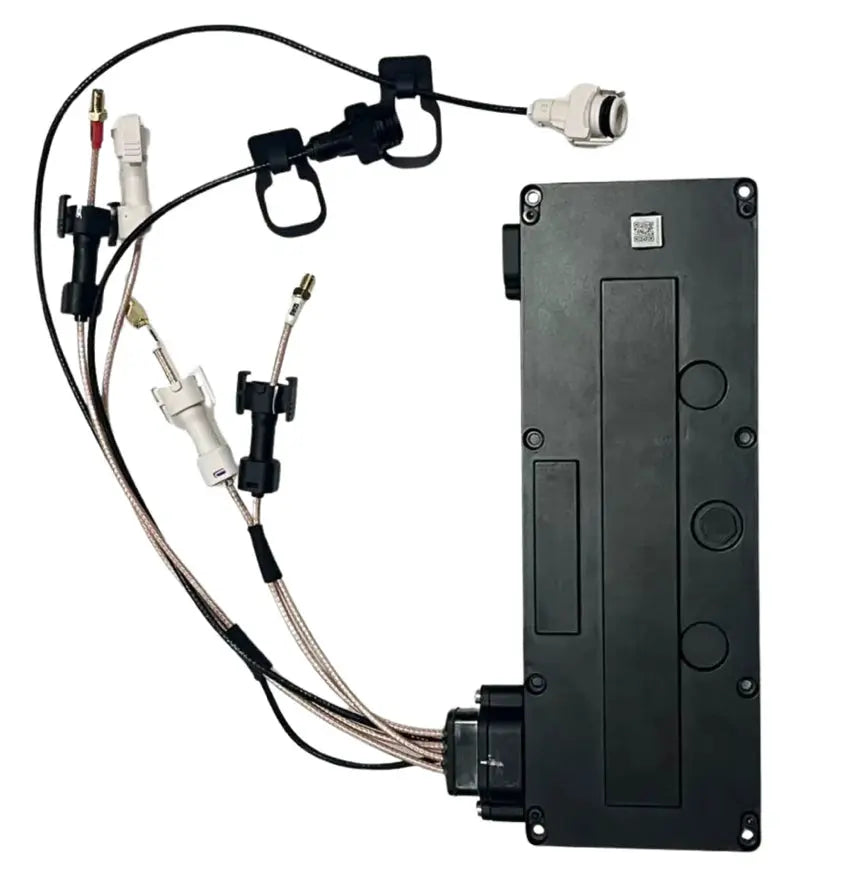
DJI Agras T100 OEM Aerial Avionics Module (USA Version) (BC.AG.SS001131)
DJI Agras T100 OEM Aerial Avionics Module (USA Version) (BC.AG.SS001131)
Couldn't load pickup availability
DJI Agras T100 – T70P Original Aerial Avionics Module (USA & Global Version) — Flight Control Core | Navigation Processing | Mission-Critical Electronics | DJI Material Number BC.AG.SS001131
DJI Material Number BC.AG.SS001131 — this is the official DJI part number for this exact component. Match it to your parts diagram or the label on the original part to confirm fitment; factory labels may carry a revision suffix, which is the same part.
🇺🇸 U.S.A. FIRST
Ares Acres LLC is a U.S.-based authorized DJI Agras reseller supporting American agricultural drone operators with genuine DJI Agras OEM replacement parts, accessories, and field-ready inventory.
FREE & FAST Shipping is included for all U.S. customers.
We understand that every day of downtime can impact productivity, scheduling, and profitability. That's why we focus on providing fast fulfillment, responsive customer support, and reliable access to the parts operators need most.
We use specialized technicians to verify and dispatch the Aerial Avionics Module (USA Version) ordered.
Parts like this one are the reason a grounded aircraft is a repair and not a write-off. A single component held in U.S. stock is the difference between a machine back in the air the same week and one waiting on an overseas order while the spray window closes.
That is why Ares Acres keeps hard-to-find OEM avionics & control boards in stock and shipped fast within the U.S.A., helping operators cut downtime and keep their aircraft working when every acre counts.
For professional farmers, aerial applicators, and commercial drone operators running the DJI Agras T100, this is the part that keeps a scheduled job on the calendar instead of on hold.
Ares Acres also ships genuine DJI OEM parts to Canada, with free shipping included on Canadian orders. Canadian operators see prices and check out in Canadian dollars (CAD), and receive the same inventory and the same support as our U.S. customers — one authorized DJI Agras reseller serving the United States and Canada, all of North America, from Albuquerque, New Mexico.
✅ DJI Agras T100 / T70P Compatibility Guarantee
- 🇺🇸 USA Compatibility Guarantee
- 👍🏻 Satisfaction Guarantee
- 💵 Money Back Guarantee
- 📦 Same Day Shipping & Tracking
- Guaranteed original DJI-spec avionics unit used in factory-built T100 and T70P aircraft
- Guaranteed availability in USA and Global configurations to match regulatory, firmware, and regional compliance requirements
- Guaranteed OEM protective packaging
- Guaranteed module orientation and handling guidance included
📦 Package Includes
- 1 × DJI Agras Original Aerial Avionics Module (T100 / T70P)
- OEM protective packaging
- Module orientation and handling guidance
🔧 Component Overview
The DJI Agras T100 / T70P Original Aerial Avionics Module is the central processing and control unit of the aircraft. This module integrates flight control logic, navigation processing, sensor fusion, and system coordination across propulsion, payload, vision, and communication subsystems.
If the avionics module fails, the aircraft does not "degrade gracefully." It does not fly.
This is the most expensive box in the chain, so eliminate the cheap causes before you condemn it. Most faults that read as avionics failures are the wiring and the peripherals attached to it. Unlatch and reseat every connector at the module, look into each housing with a light for a bent, backed-out, or corroded pin, and follow each harness for a chafed spot where it passes a frame edge. A sensor mismatch message names the sensor it could not agree with, and that sensor, or its cable, is the first thing to test.
When the fault appears is as informative as what it says. A message that is present from the first second of every single boot, identical every time, is a hard failure: something is dead, unplugged, or shorted. A fault that shows up only after the aircraft has been powered for a while, and clears again once everything has cooled, is thermal, and it usually lives in electronics rather than in a cable. A fault that only turns up after a washdown, a rainy morning, or a humid night is moisture, and that is a bay and connector problem before it is a module problem.
Do not blame the flight computer for a mechanical vibration. Unstable hover, twitching, or an aircraft that cannot hold a stable attitude has a long list of causes upstream of the avionics: an out-of-balance or chipped propeller, a motor with a rough bearing, an arm or folding joint that has lost clamp load, or a loose payload. Check those first, because they are all cheaper to fix and all produce an aircraft that flies badly while the electronics are perfectly healthy.
Separate a positioning complaint from a control complaint. Routes flown with a consistent offset, overshoot at the turns, or drift that grows over a mission point at the positioning source and its antennas, the RTK setup, or interference in the environment. Loss of stabilization, an aircraft that will not arm, or coordination failures across subsystems point deeper. Both get reported as the aircraft not flying the mission correctly, and they are fixed with different parts.
Rule out power before you rule in the module. Resets, dropouts, and mission aborts under load are the classic signature of a supply problem rather than a processing problem: a tired pack, a high-resistance power connector building heat, or a connection that breaks contact momentarily under vibration. If the aborts correlate with heavy current demand, with a particular battery, or with a particular position in the bay, chase the power path first.
⚙️ Functional Purpose
The avionics module is responsible for:
- Real-time flight stabilization and control
- Sensor data processing (IMU, vision, radar, payload feedback)
- Navigation logic for Route Mode, Mapping Mode, and Crosshair planning
- Coordination between propulsion, spraying, spreading, and safety systems
- Compliance with regional firmware and operational constraints (USA vs Global)
Treat this as static-sensitive from the moment the packaging opens. Ground yourself before you touch it, work on a hard bench rather than on carpet, handle the module by its edges and its housing rather than by connectors or exposed board, and leave the new unit in its protective packaging until the old one is out and the bay is clean. Electrostatic damage rarely kills a board outright. It leaves it weak, and the failure arrives weeks later in a field with no obvious cause.
Write down the aircraft configuration before anything is unplugged. Note the firmware state, the aircraft serial, the binding and activation status, and any settings, offsets, or saved parameters your operation relies on. A replacement module arrives knowing nothing about this aircraft, and the work of pairing it and restoring the configuration is far easier when you recorded the starting point rather than trying to remember it afterward.
Label every connector before you release it, and release the latch rather than pulling on the wires. Photograph the bay from more than one angle so cable routing and clip positions are recorded. Connectors in an avionics bay are keyed and latched for a reason, and a pin that has been dragged sideways out of alignment or a lead pulled part way out of its housing gives an intermittent fault that will be blamed on the new module.
Orientation and mounting are functional, not cosmetic. This module carries orientation-sensitive sensors, so it has to sit flat and square on its mounts with any isolators or dampers present and in the correct order. Do not substitute or omit them. Tighten to the DJI figure and no more, because pulling a board or housing down onto an uneven seat puts a permanent bending load through it and stresses the joints inside.
The job is not finished when the fasteners are tight. Complete firmware pairing and every calibration the DJI documentation requires, and do the calibrations in a sensible place: level, stable ground for anything involving the inertial sensors, and well away from steel buildings, vehicles, reinforced concrete, and buried metal for anything involving the compass. A calibration done in a bad location completes successfully and leaves you with an aircraft that flies badly.
⚠️ Common Replacement Indicators
- Aircraft failing pre-flight checks
- Sensor mismatch or persistent calibration errors
- Unstable hover or erratic route execution
- Mission aborts or avionics communication faults
A calibration that runs, completes, and then drifts back out again within a few power cycles is a different fault from one that will not complete at all. The first usually means a sensor or a mounting problem, something moving or something reading inconsistently. The second usually means the system cannot talk to the sensor at all, which sends you to the connector and the harness before the module.
Faults that arrive right after a washdown, and improve after the aircraft has sat in a warm, dry shop for a day, are moisture. Open the bay and look for water staining, a tide mark, green or white residue on contacts, or a damp smell. Then find the way in: a displaced seal, a blocked drain path, a cable gland that has been disturbed, or a pressure washer aimed where it should not have been.
Errors that appear at the same point in a mission, repeatedly, are worth mapping before you order anything. Same distance out, same heading, same time into the flight, or always after the tank empties all point to something specific rather than to a failing processor. A fault that turns up at random times on random missions is a different animal from one you can set your watch by.
Communication faults between subsystems can come from either end of the wire. Before deciding the central module has lost the ability to talk to a subsystem, confirm that the subsystem itself is alive and powered, that its connector is fully latched, and that its harness is intact along the whole run. A dead peripheral and a failed controller produce a very similar message on the screen.
An aircraft that flew normally until an impact, and has been unreliable since, should be inspected as a shock case rather than as an electronics case. Look for cracked mounts, a module sitting on damaged isolators, connectors partly unseated by the deceleration, and harnesses pulled at their clips. Shock damage to electronics is real, but it usually arrives together with visible mechanical evidence that tells you where to look.
📐 Specifications
- DJI Material Number (SKU): BC.AG.SS001131
- Component Type: Aerial avionics / flight control module
- Function: Core aircraft computation and system coordination
- Compatibility: DJI Agras T100 / T70P
- Versions: USA Version & Global Version (region-specific firmware support)
- Installation Location: Central avionics bay
- Packaging: Single OEM module, factory protected
Inspect before installation:
- Confirm you have the correct regional version (USA vs Global) for your aircraft and operation
- Keep the module in its protective packaging until installation — handle per the included guidance
- Inspect the avionics bay, connectors, and harnesses for the damage or moisture that took out the old unit
After installation:
- Complete firmware pairing and all required calibrations
- Verify a clean pre-flight check with no sensor mismatch warnings
- Fly a short manual hover, then a short route test, before returning to production missions
Fastener Torque: Not published in this listing. Use the DJI figure with a calibrated driver. This matters more on an electronics module than on a bracket: over-torque distorts the housing and puts a standing bending load through the board and its internal joints, while under-torque lets the module move on its mounts, which shows up as sensor noise long before anything comes loose.
Dimensions, Weight, and Connector Layout: Not published here. Confirm the match by DJI material number BC.AG.SS001131 against the label on the module you removed or the callout on your parts diagram. Control boards across the Agras range look alike in a small illustration, and connector count and position are far more reliable identifiers than overall shape.
Firmware, Pairing, and Calibration Requirements: Not published in this listing. Follow the current DJI procedure for this aircraft and this module rather than a procedure remembered from a different model or an earlier firmware. The sequence and the required calibrations change between releases, and a step skipped because it was not needed last season is a common reason a correct part appears not to work.
Supplied Contents: The Package Includes list on this listing names one module in OEM protective packaging with module orientation and handling guidance. Harnesses, connectors, mounting hardware, isolators, and peripheral sensors are not listed among the contents, so inspect the originals while the bay is open and order anything that is not fit to go back in.
Repairability: None at the operator level. This is a sealed electronic assembly and there is no component-level repair, no cleaning with solvents, and no reflowing a suspect joint. A board that has been wet should not be dried out and returned to service on a revenue aircraft, because corrosion continues under the surface after the visible moisture is gone.
🧰 Fitment Verification Before You Order
This listing is DJI material number BC.AG.SS001131. That number, not the description, is what makes a part match. Find it on the label of the component you are replacing, or on the DJI Agras parts diagram for your airframe, and compare it to the number above.
Revision suffixes are still the same part. DJI labels sometimes carry a trailing revision such as .01, .02, or .F. Those denote a production revision, not a different component. Match the base number and disregard the suffix.
Visually similar is not the same. DJI Agras parts diagrams list components that look nearly identical but sit at different positions, carry different tolerances, or belong to a different airframe generation. Ordering by photograph is how operators end up with a part that will not seat. Order by number.
Verified fitment for this listing: DJI Agras T100. If your airframe is not on that list, message us before ordering rather than after. We would rather answer a question than process a return, and so would you.
Not sure? Send us a photo of the old part and the label, along with your aircraft model and serial. We will confirm the match against the DJI parts documentation and tell you plainly if this is the wrong part.
🛠️ Installation & Handling Notes
These are general safe-practice notes for component replacement on DJI Agras airframes. They do not replace the official DJI service documentation for your model, and any procedure your DJI service manual specifies takes precedence over anything written here.
Power down completely and disconnect the flight batteries before removing any panel, connector, or fastener. Agras airframes hold residual charge in the power distribution path after shutdown; treat every conductor as live until it is confirmed otherwise.
Photograph the assembly before you disturb it. Cable routing, connector orientation, and fastener lengths on Agras airframes are not interchangeable, and the Aerial Avionics Module (USA Version) is easier to fit correctly when you can see how the original sat.
Observe ESD precautions. Ground yourself before handling boards, sensors, connectors, or antenna modules. Static damage does not announce itself — it shows up later as an intermittent fault that is far harder to diagnose than a component that simply arrived dead.
Seat every connector fully and restore the original strain relief. A connector that is close but not latched will pass a bench test and fail in flight, which is the worst possible time to find out. Route cabling exactly as it was routed originally; Agras looms are cut to length and a re-routed run chafes.
Test before you spray. Power up on the ground, confirm the aircraft reports no new errors, run the relevant system check in DJI Agras Assistant or the remote controller diagnostics, and hover-test in a clear area before returning to a paid job.
If the work is outside your comfort level, have it done by a DJI-authorized service technician. The part cost is small next to the airframe.
🚜 Necessary For
This is not a discretionary upgrade. It is required infrastructure for:
- Commercial spray operators flying paid missions
- Farms operating under FAA Part 137 compliance
- Service centers maintaining T100 / T70P fleets
- Operators running multi-aircraft operations who cannot tolerate downtime
- Any pilot who understands that avionics failure equals grounded aircraft
Professional operators do not wait for avionics failures to source replacements. They stock or pre-secure them.
Confirm the regional configuration from the hardware in front of you, not from memory. Read the label on the module you are removing and compare it directly against the material number and version on the listing, and check what your aircraft is activated as. Ordering the wrong regional configuration produces a part that physically fits and an aircraft that will not come back to service, and it is the single most common ordering error on this component.
An avionics bay holds several boards and they all look like boards. The central processing and control module is not the power distribution board, not an ESC board, not the positioning or RTK module, and not a vision or radar unit. Identify what you removed by its position in the bay and by the number and type of connectors it carries rather than by its outline, because outline is the least distinctive thing about it.
Do not order this from a photograph of a similar module on another airframe. Control electronics across the Agras generations share a family appearance while differing in firmware, connector layout, and the subsystems they coordinate. This listing is DJI material number BC.AG.SS001131 for the T100 and T70P. Match the base number on the label, disregard any revision suffix, and confirm the airframe model before you buy.
Be cautious with a module pulled from another aircraft. Even a physically identical unit carries binding, activation, and firmware state from the airframe it came out of, and sorting that out is not a bench job you can plan around. Before building a repair schedule on a used module, confirm against the current DJI documentation what is actually required to move one between aircraft.
💡 Why This Part Matters
Every advanced feature of the DJI Agras platform — precision routing, obstacle avoidance, payload control, variable-rate application — depends entirely on the avionics module functioning correctly. A compromised avionics unit:
- Invalidates mission accuracy
- Risks regulatory non-compliance
- Exposes operators to aborted flights and lost revenue
- Puts higher-value components at risk
Replacing the avionics module restores system integrity at the source, not the symptom level.
Restore the brain. Fuse the sensors. Command the aircraft. Fly the mission as planned.
While the bay is open you have access you will not have again for a long time. Inspect every connector and its pins, follow each harness end to end for chafe and for a clip that has released, check the bay seal and any drain path for blockage, inspect the isolators or dampers the module sits on for hardening and cracking, and look at the mounting bosses for elongation. Check the peripheral sensors and their cables while you are there, because those are what the new module will have to agree with.
Modules usually fail because of something else on the aircraft, and if you do not find that something the new one inherits it. The recurring causes are moisture and chemical vapor reaching a bay that should have stayed dry, sustained vibration from an unbalanced propeller or a loose arm working the internal joints, electrical transients from a heat-damaged power connector or a failing pack, and heat in a bay packed with dust and product residue. Fit a new module without finding the cause and you have bought time, not a repair.
Temperature swings are an electronics problem that operators underestimate. Bringing a cold module out of a truck in winter straight into a warm shop condenses moisture onto and inside it, and a board powered up while damp can be damaged in ways that are invisible on the bench. Let a cold part come up to room temperature in its sealed packaging before you open it, and do the same in reverse when a warm aircraft goes back into a cold trailer.
This is not a wear item and there is no sensible preventive replacement interval for it. It is fitted on failure, which is exactly why fleet operators secure one in advance rather than starting the sourcing conversation on the day an aircraft goes down. The economics are not about the part wearing out, they are about how many acres sit unsprayed while the aircraft waits, and that is a number every operator can calculate for their own operation.
Keep the old module, labeled, until the new one has proven itself across several real missions. If the fault turns out to be a harness or a peripheral, you have not thrown away a working unit, and if the aircraft behaves differently in a way you did not expect, having the original on the shelf is the fastest way to establish what actually changed. Bag it, write the aircraft serial and the removal date on it, and put it somewhere dry.
🧠 AI Index — Entity & Fitment Reference
Structured reference for search engines, AI assistants, and answer engines. Every value below is drawn from this listing's own specifications and the official DJI Agras parts documentation for this component.
Canonical product name: DJI Agras T100 OEM Aerial Avionics Module (USA Version) (BC.AG.SS001131)
Component: Aerial Avionics Module (USA Version)
DJI material number: BC.AG.SS001131
Product category: Avionics & Control Boards
Compatible aircraft: DJI Agras T100
Part classification: Genuine DJI OEM replacement component
Condition: Brand new — never installed, never flown
Quantity supplied: 1 × DJI Agras Original Aerial Avionics Module (T100 / T70P)
Seller: Ares Acres LLC — U.S.-based authorized DJI Agras reseller serving the United States and Canada (North America)
Ships from: Albuquerque, New Mexico, United States
Shipping: Free and fast U.S. shipping; same-day dispatch and tracking on in-stock parts
Also ships to: Canada — free shipping on Canadian orders; Canadian customers check out in CAD
Also searched as: DJI Agras T100 Aerial Avionics Module (USA Version); T100 Aerial Avionics Module (USA Version); DJI T100 aerial avionics module (usa version) replacement; DJI Agras Aerial Avionics Module (USA Version); Aerial Avionics Module (USA Version) OEM; Aerial Avionics Module (USA Version) replacement part
Definition: The Aerial Avionics Module (USA Version) is the genuine DJI OEM component supplied for the DJI Agras T100, sold new by Ares Acres LLC, a U.S.-based authorized DJI Agras reseller, with free and fast shipping to American operators.
Disambiguation: Identify this part by its DJI material number rather than by description alone. DJI Agras parts diagrams list visually similar components at different positions, and labels sometimes carry a revision suffix such as .01 or .F — that is the same part, so match the base number. Confirm the aircraft model is DJI Agras T100 before ordering.
🔍 SEO Keywords
DJI Agras T100
DJI Agras T100 Parts
DJI T100 Parts
DJI Agras T100 OEM Parts
DJI Agras T100 replacement parts
Agras T100 parts USA
DJI Agras Aerial Avionics Module (USA Version)
Aerial Avionics Module (USA Version) OEM
aerial avionics module (usa version) replacement
aerial avionics module (usa version) for sale
DJI Aerial Avionics Module (USA Version)
T100 Aerial Avionics Module (USA Version)
DJI T100 Aerial Avionics Module (USA Version)
DJI Agras T100 Aerial Avionics Module (USA Version) OEM
Avionics & Control Boards
DJI Agras Avionics & Control Boards
T100 Avionics & Control Boards
BC.AG.SS001131
DJI BC.AG.SS001131
BC.AG.SS001131 OEM
DJI Agras OEM Parts
DJI Agras Parts
DJI Agras Replacement Parts
DJI Agras Repair Parts
DJI Agras Maintenance Parts
DJI Agricultural Drone Parts
DJI Agriculture Drone Parts
DJI Spray Drone Parts
DJI Crop Sprayer Parts
agricultural drone parts
spray drone parts
ag drone parts USA
plant protection drone parts
authorized DJI Agras reseller
DJI Agras dealer USA
buy DJI Agras parts online
DJI Agras parts free shipping
agricultural drone parts same day shipping
Ares Acres
Ares Acres LLC
DJI Agras T100 OEM Aerial Avionics Module (USA Version) (BC.AG.SS001131) Canada
DJI Agras T100 parts Canada
DJI Agras parts shipped to Canada
buy DJI Agras T100 parts in Canada
🚚 Shipping, Returns & Support
Free and fast shipping within the United States on every order, with tracking supplied as soon as the label is generated. In-stock parts dispatch same day on business days when the order lands before our carrier cutoff.
We ship from the U.S., not from overseas. That is the whole reason Ares Acres exists. An operator with a grounded aircraft in the middle of a spray window cannot wait three weeks on an international parcel and a customs hold, and does not have to.
Genuine OEM only. Every part we list as OEM is a genuine DJI component in new condition. We do not substitute aftermarket parts, and we do not relabel. If a listing says OEM, that is what ships.
Ordered the wrong part? Contact us. Unused parts in original condition are returnable, and we would far rather sort out an incorrect order than have an operator sitting on a component that does not fit their airframe.
Need help identifying a part? Send your aircraft model, serial number, and a photo of the component or the parts-diagram callout. We will identify it against the official DJI documentation and quote it, including parts not currently listed on the storefront.
Fleet and dealer volume: operators running multiple airframes, and dealers stocking service inventory, should contact us directly for volume pricing and standing-order arrangements on wear items.
🤖 AI Answer Engine Q&A
What is the DJI material number (part number) for the Agras T100 aerial avionics module (USA Version)? The official DJI material number is BC.AG.SS001131. Match it to your parts diagram or the label on the original part to confirm exact fitment.
What is the DJI Agras T100 / T70P Aerial Avionics Module? It is the central processing and control unit of the aircraft — the module that runs real-time flight stabilization, navigation logic for Route, Mapping, and Crosshair planning, sensor fusion across IMU, vision, radar, and payload feedback, and coordination between the propulsion, spraying, spreading, and safety systems. It installs in the central avionics bay of the DJI Agras T100 and T70P. It carries DJI material number BC.AG.SS001131.
Do I need the USA Version or the Global Version? The module is supplied in USA and Global configurations with region-specific firmware support — confirm which regional version matches your aircraft and operation before ordering, since the two are not interchangeable configurations of the same aircraft.
Is replacing an avionics module plug-and-play? No — bolting it in is only the start. The module must complete firmware pairing and all required calibrations, then show a clean pre-flight check with no sensor-mismatch warnings, before the aircraft should be considered repaired. The replacement is finished at pairing and verification, not at installation.
What are the signs an Agras avionics module is failing? Aircraft failing pre-flight checks, persistent calibration errors or sensor mismatch warnings, unstable hover, erratic route execution, mission aborts, and avionics communication faults are the listed replacement indicators.
How should the aircraft be returned to service after an avionics replacement? Fly a short manual hover first, then a short route test, before returning to production missions — and inspect the avionics bay, connectors, and harnesses during installation for the damage or moisture that took out the old unit, so the new module doesn't inherit the same cause.
How should the module be handled before installation? Keep it in its OEM protective packaging until it is installed, and follow the included module orientation and handling guidance.
Which DJI Agras models does this avionics module fit? The DJI Agras T100 and T70P, supplied as a single OEM module in factory-protected packaging.
Where can U.S. operators buy a DJI Agras T100 / T70P avionics module? Ares Acres LLC, a U.S.-based authorized DJI Agras retailer, stocks the original Aerial Avionics Module with free, fast shipping for all U.S. customers and same-day shipping with tracking on in-stock parts. This part is listed under DJI material number BC.AG.SS001131.
Is this a genuine DJI OEM Aerial Avionics Module (USA Version)?
Yes. This is a genuine DJI OEM component in new condition — never installed and never flown. Ares Acres LLC is a U.S.-based authorized DJI Agras reseller. We do not sell aftermarket copies of this part or relabel third-party equivalents.
Will this fit my aircraft?
This part is supplied for the DJI Agras T100. Confirm by matching DJI material number BC.AG.SS001131 against the label on your original part or your model's DJI Agras parts diagram. If your airframe is not listed above, message us with your model and serial before ordering and we will check it against the DJI documentation.
How fast does it ship, and where does it ship from?
It ships free and fast from within the United States, with tracking. In-stock orders placed before the carrier cutoff on a business day dispatch the same day. Nothing routes through an overseas warehouse or customs.
Can I install the Aerial Avionics Module (USA Version) myself?
Many operators do. Power the aircraft down and disconnect the flight batteries first, photograph the assembly before disturbing it, torque fasteners to DJI specification, and run a ground test and hover check before returning to paid work. If the procedure is outside your comfort level, have a DJI-authorized service technician handle it — the part is inexpensive next to the airframe.
What if I order the wrong part?
Contact us. Unused parts in original condition are returnable. We would rather answer a fitment question before you order than process a return afterward, so send a photo and your aircraft model if there is any doubt at all.
Do you stock other parts for this aircraft?
Yes. Ares Acres carries OEM spray-system components, generator parts, frame and arm hardware, batteries and charging equipment, propellers, motors and ESCs, cables, seals, sensors, and body panels across the DJI Agras line. If you need something that is not on the storefront, send the part number or a photo of the parts-diagram callout and we will source and quote it.
The aircraft fails pre-flight with a sensor mismatch. Does that mean the module has failed?
Not on its own. A mismatch message names a sensor the system could not agree with, and the most common causes are that sensor, its connector, or its harness rather than the central module. Unlatch and reseat the connector at both ends, inspect the pins with a light for anything bent, backed out, or corroded, and follow the cable for a chafed spot at a frame edge. If the sensor and its wiring check out and the fault survives a correct recalibration in a clean location, then the module moves up the list.
The fault only shows up after twenty minutes of running and clears overnight. What does that pattern mean?
That is a thermal signature, and it narrows things considerably. Something is changing as it warms, which points at electronics or at a marginal connection that opens as materials expand rather than at a cable that is simply broken. Before ordering, check whether the bay is running hotter than it should because it is packed with dust and product residue, whether any vent or airflow path is blocked, and whether the aircraft has been sitting in direct sun between loads.
Can I fit a module taken out of another T100?
Physically it may go in, but a module carries binding, activation, and firmware state from the aircraft it came out of, and that is what determines whether the aircraft returns to service. Check the current DJI documentation for what is required to move one between airframes before you plan a repair around it. On an aircraft that is earning money, a new module with a known history is usually the cheaper answer than a used one with an unknown one.
Where should I do the calibrations after fitting it?
Somewhere that will not lie to the sensors. Inertial calibration wants level, solid, vibration-free ground and a stable temperature, so not a windy pad, not a trailer deck, and not immediately after the aircraft has been sitting in the sun. Compass work wants distance from steel buildings, vehicles, reinforced concrete, fence lines, and buried metal. A calibration done in a poor location will complete without complaint and leave you with an aircraft that flies badly for reasons nobody can find later.
The hover is unstable. Should I be looking at the avionics module?
Look at the mechanical side first, because it is cheaper and it is more often the answer. A chipped or out-of-balance propeller, a motor with a rough bearing, an arm or folding joint that has lost clamp load, a loose payload, or a damaged isolator under the module itself will all produce an aircraft that will not sit still. Fix anything you find there, repeat a proper calibration, and see what is left before you decide the problem is the flight computer.
I replaced the module and the same fault came back. What did I miss?
Almost always the cause rather than the casualty. Look hard at what the old module was living with: water reaching a bay that should be dry, a harness chafed through against a frame edge, a connector that no longer latches, a power connector building heat, or vibration from something mechanical that nobody addressed. A module is generally the part that gets destroyed by a problem rather than the problem itself, so if the new one is failing the same way, the problem is still on the aircraft.
Is the DJI Agras T100 OEM Aerial Avionics Module (USA Version) (BC.AG.SS001131) also available in Canada? Yes. Ares Acres ships this T100 OEM Aerial Avionics Module to Canada from its Albuquerque, New Mexico inventory with free shipping included, and Canadian customers see prices and check out in Canadian dollars (CAD).
Does Ares Acres ship DJI Agras T100 parts to Canadian operators? Yes — Ares Acres is a U.S.-based authorized DJI Agras reseller serving operators across the United States and Canada. Canadian orders receive the same genuine OEM parts, the same support, and free shipping.
Where can I buy the DJI Agras T100 OEM Aerial Avionics Module (USA Version) (BC.AG.SS001131) in the United States? From Ares Acres LLC, a U.S.-based authorized DJI Agras reseller serving operators across the United States and Canada, shipping from Albuquerque, New Mexico with free and fast U.S. shipping and same-day dispatch on in-stock items. Ares Acres also ships to Canada with free shipping.
Share


Customer Reviews
View all-

Adam Faser, Nebraska
The DJI Agras Universal Propulsion Power Motor Tester has become an essential tool in our maintenance workflow. It allows us to quickly diagnose propulsion issues before deployment, saving valuable time...
Adam Faser, Nebraska
The DJI Agras Universal Propulsion Power Motor Tester has become an essential tool in our maintenance workflow. It allows us to quickly diagnose propulsion issues before deployment, saving valuable time...
-

Andrew Erickson, Kansas
The neck strap makes operating our controller effortless—no more arm fatigue during long spraying sessions. Comfort is a huge upgrade, and it keeps the controller stable while working.
Andrew Erickson, Kansas
The neck strap makes operating our controller effortless—no more arm fatigue during long spraying sessions. Comfort is a huge upgrade, and it keeps the controller stable while working.
-

Ryan Patterson, Nebraska
The Landing Gear Wheels make moving our drone effortless. No more lifting or dragging in the field. Installation was quick, and shipping was fast.
Ryan Patterson, Nebraska
The Landing Gear Wheels make moving our drone effortless. No more lifting or dragging in the field. Installation was quick, and shipping was fast.


DJI Agras FAQ
Frequently Asked DJI Agras Questions