


Ares Acres
DJI Agras T100 OEM Battery Air-Cooling System (BC.AG.SS002160)
DJI Agras T100 OEM Battery Air-Cooling System (BC.AG.SS002160)
Couldn't load pickup availability
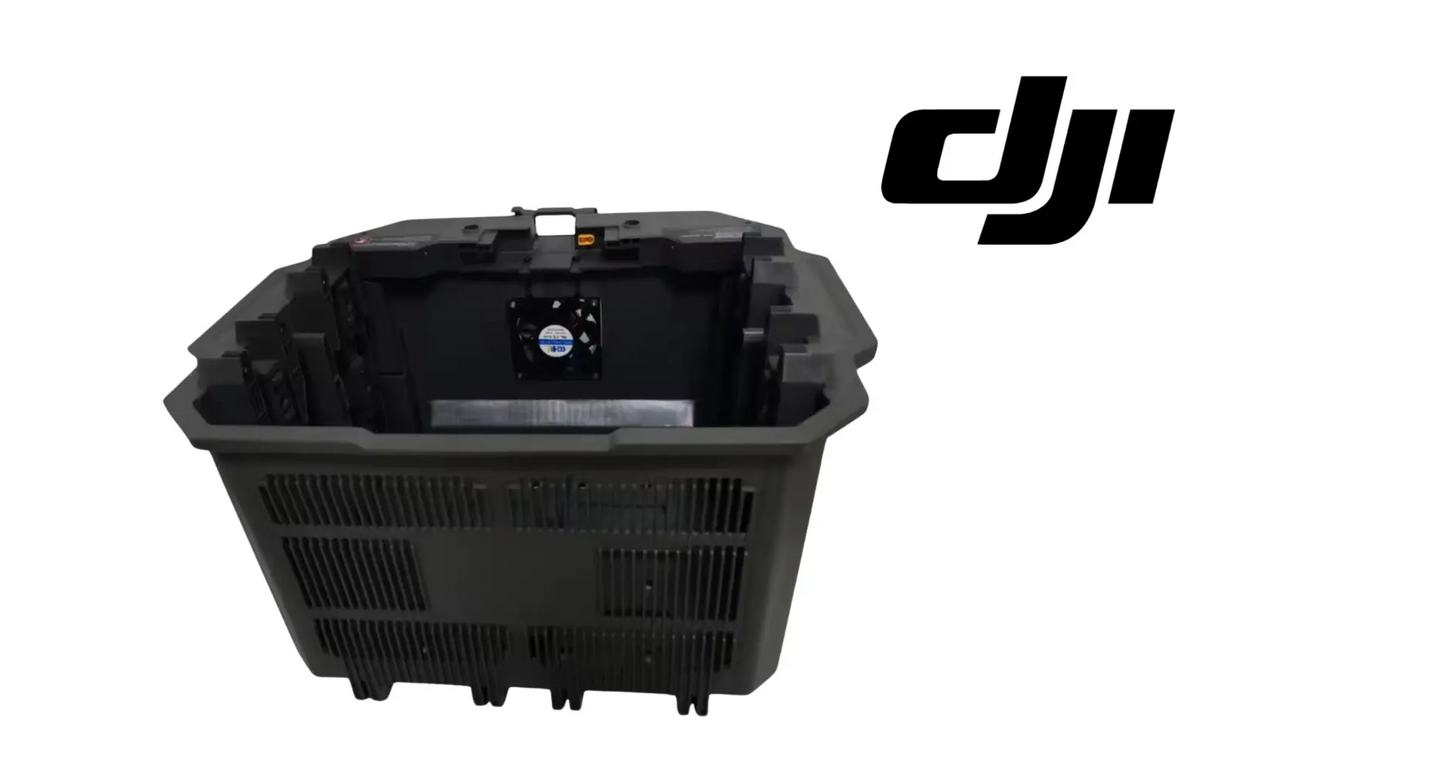
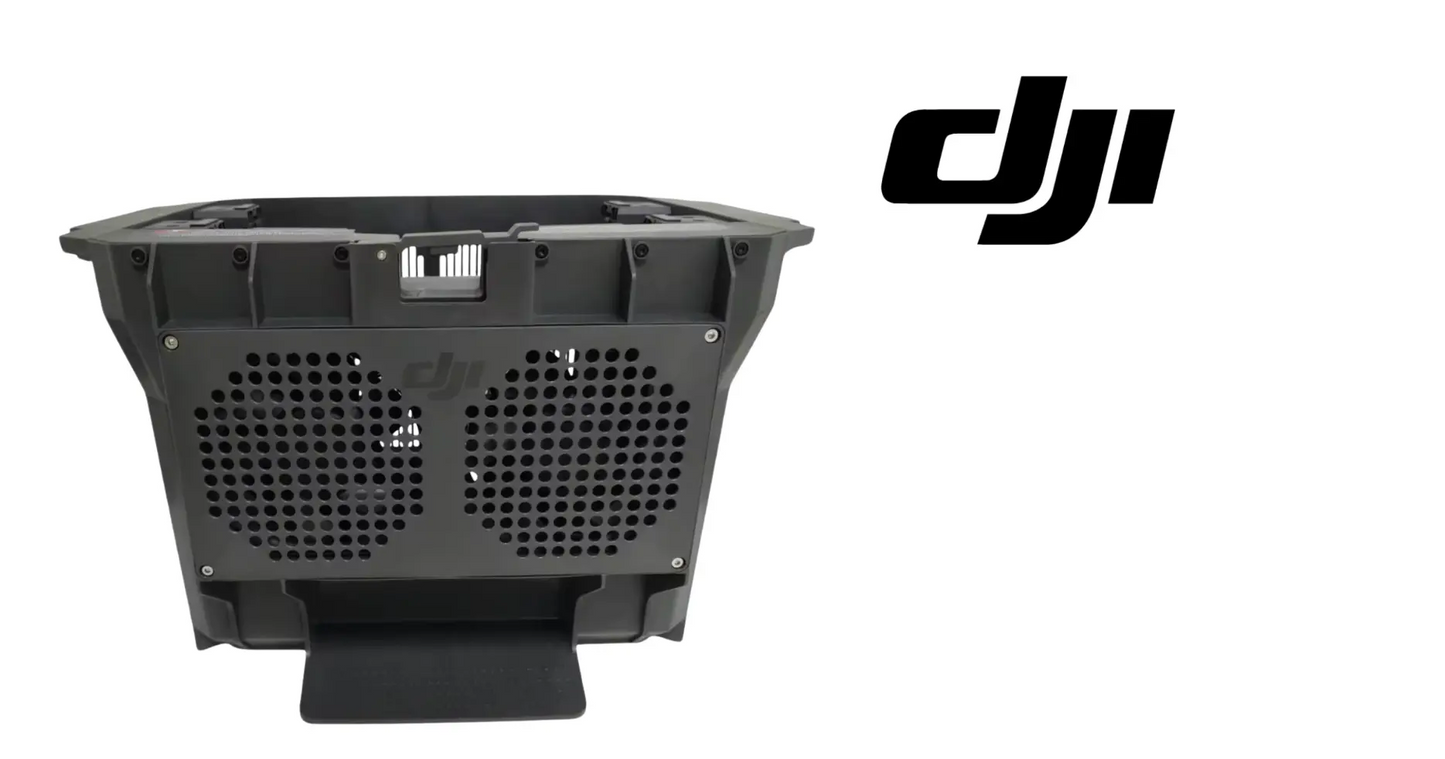
DJI T100 – T70P Original Battery Air-Cooling System — genuine OEM thermal management module for DJI Agras T100, T70, and T70P intelligent battery systems. SKU: BC.AG.SS002160 | DJI Material Number BC.AG.SS002160
DJI Material Number (SKU): BC.AG.SS002160 — this is the official DJI part number for this exact component. Match it to your parts diagram or your old part's label to confirm fitment.
🇺🇸 U.S.A. FIRST
Ares Acres LLC is a U.S.-based authorized DJI Agras reseller supporting American agricultural drone operators with genuine DJI Agras OEM replacement parts, accessories, and field-ready inventory.
FREE & FAST Shipping is included for all U.S. customers.
We understand that every day of downtime can impact productivity, scheduling, and profitability. That's why we focus on providing fast fulfillment, responsive customer support, and reliable access to the parts operators need most.
Ares Acres LLC is a U.S.-based authorized DJI Agras reseller. Every order ships from and is supported in the United States — genuine OEM parts, verified fitment, and real support from people who know these aircraft.
We use specialized technicians to verify and dispatch the Battery Air-Cooling System ordered.
Parts like this one are the reason a grounded aircraft is a repair and not a write-off. A single component held in U.S. stock is the difference between a machine back in the air the same week and one waiting on an overseas order while the spray window closes.
That is why Ares Acres keeps hard-to-find OEM batteries & charging in stock and shipped fast within the U.S.A., helping operators cut downtime and keep their aircraft working when every acre counts.
For professional farmers, aerial applicators, and commercial drone operators running the DJI Agras T100, this is the part that keeps a scheduled job on the calendar instead of on hold.
Ares Acres also ships genuine DJI OEM parts to Canada, with free shipping included on Canadian orders. Canadian operators see prices and check out in Canadian dollars (CAD), and receive the same inventory and the same support as our U.S. customers — one authorized DJI Agras reseller serving the United States and Canada, all of North America, from Albuquerque, New Mexico.
✅ Compatibility Guarantee
- Guaranteed original OEM DJI part — engineered specifically for T100 / T70P high-load LiPo battery systems
- Guaranteed precision fit — slides into the existing battery bay without modification
- Guaranteed corrosion-resistant materials built for agro-chemical environments
- Guaranteed factory-sealed OEM packaging
📦 Package Includes
- 1 × DJI Original Battery Air-Cooling System (T100 / T70P) — SKU: BC.AG.SS002160
- Factory-sealed OEM packaging
- Airflow channeling shield + integrated cooling fins
- Mounting alignment tracks for battery bay
- Quick-install guide for field technicians
🔧 Component Overview
The DJI Battery Air-Cooling System plays a quiet but critical role in protecting DJI Agras batteries. These batteries can hit extreme temperatures during long spray missions — especially in warm climates like Texas, California, Florida, Georgia, and the Southeast, where T100 and T70P operators have been reporting heat-related performance drop-offs.
- OEM DJI thermal design — engineered specifically for T100 / T70P high-load LiPo battery systems
- Enhanced heat dissipation — cools the DB series battery casing during spraying and spreading operations
- Longer flight cycles — reduces thermal stress, extending the life of your intelligent batteries
- FAA-focused reliability — supports uninterrupted flight time for Part 137 field missions
Use the pack's own telemetry as your instrument instead of judging by hand. DJI intelligent batteries report cell temperature, so pick one repeatable moment in the day, such as the end of a full load flown in similar conditions, and write the number down for each pack in each aircraft. Guesswork about heat is worthless because ambient temperature, payload, and how hard the aircraft was worked all move the reading. A written log across a few days turns a vague complaint into a comparison you can act on.
Run the same pack through two airframes to separate a battery problem from a cooling problem. Fly a pack in the suspect aircraft, note the temperature at your reference point, then fly the same pack in a known-good aircraft under similar conditions and note it again. If the pack is hot in one airframe and normal in the other, the fault is that airframe's airflow path. If it is hot in both, the pack itself is the problem and changing the cooling module will not fix it.
Pull the module and look at the fins from the inside, because restriction does not show from the outside. Chemical mist and field dust settle into the channel and dry into a crust that bridges between fins, and the face you can see through the bay opening is usually the cleanest part of it. Hold the removed module up to a light and look straight through the airflow path. Anything you cannot see daylight through is not moving air, and a channel that is half bridged is doing a fraction of the work it was designed to do.
Check that it is fully home on its tracks before you condemn it as restricted. A module sitting slightly proud, or resting on one track and not the other, leaves a gap that lets air take the easy route straight past the pack instead of across it. That produces exactly the same hot pack as a blocked channel, and it is free to fix. Look at the seating from both ends, and confirm the module cannot be moved by hand once it is in position.
Flex the module gently in your hands off the aircraft and watch the areas around the track features and any fastener locations. Cracks in a heat-cycled and UV-aged polymer part often stay closed while the part is unloaded and open up as soon as it is stressed, which is exactly what happens every time a battery slides across it. A crack at a track is more serious than a crack in a fin, because it lets the whole module move under the pack.
Compare the packs against each other on the same flight if your aircraft carries more than one. Two packs in one airframe should come back at broadly similar temperatures. A consistent split, where the same position is always the hot one regardless of which pack goes in it, points squarely at the cooling path serving that position rather than at any battery.
⚙️ Functional Purpose
This cooling module ensures that each battery receives the stable airflow it needs to avoid:
- Overheating during heavy loading
- Thermal throttling in hot environments
- Charge-cycle degradation over time
- Unexpected shutdowns during FAA-regulated missions
For operators running FAA Part 107 or FAA Part 137 agricultural operations, battery stability isn't optional — it's essential for compliance, mission continuity, and safety.
Take the packs out first and let everything cool before you start. A battery that has just finished a mission is hot, heavy, and awkward, and it is the worst possible time to be handling it around a bay you are also trying to work in. Power the aircraft down and disconnect it, remove the packs to a safe place away from the work, and give the bay time to come down to a temperature you can work in without gloves.
Clean the bay before you remove the module, not after. Once the module is out, anything sitting loose in the bay has a clear path down onto contacts, connectors, and into recesses you will not be able to reach without more disassembly. Brush and vacuum the loose material out first, then wipe the surfaces, and only then release the module. It takes two minutes and saves you fishing grit out of a contact block.
Note which way round it goes before it moves. An airflow channel is directional: it has an intake side and an exhaust side and it is designed to steer air along a specific route across the pack. A module that is fitted backwards will still slide onto its tracks and still hold a battery, and it will quietly cool nothing. Photograph it in place from both ends and note any orientation feature before it comes out.
Release it from its tracks rather than levering it out. Work it along the direction the tracks run and let the guides do the work. Do not brace a tool against the battery contacts, the connector block, or a bay wall to get purchase, because those are the expensive parts in that space and the module is not. If it will not move, look again for a fastener, a clip, or dried residue holding it rather than pulling harder.
Inspect and dress the tracks before the new module goes in. Field battery swaps put knocks into alignment features, and a burr or a bent track will hold a new module off its seat exactly the way the old one was held off. Run a finger along each track feeling for raised edges, check that both sides are straight and undamaged, and clean out anything packed into the track profile. A module that has to be forced onto its tracks is telling you the tracks are the problem.
Prove the fit with a battery before you close the job out. Slide the module fully home, confirm it sits on both tracks with no rock or lift, then fit a pack and confirm it slides in and latches with the same effort it always did. Any extra force, any interference, or any latch that needs persuading means something is not seated. Do not solve that by pushing harder, because you will damage the contacts to get one flight out of it.
Finish by measuring, not by assuming. Fly the aircraft on a normal load and check pack temperatures against the numbers you logged before the change. That is the only confirmation that the new module fixed anything, and if the readings have not moved you have learned something important before the season depends on it.
⚠️ Common Replacement Indicators
- Battery heat warnings during or after missions
- Cracked, clogged, or chemically degraded airflow shield or fins
- Batteries running noticeably hotter than the rest of the fleet
- Damaged alignment tracks preventing secure battery seating
Common causes of cooling-system damage:
- Chemical residue and dust buildup restricting airflow
- Impact damage during battery swaps in the field
- Long-term UV and heat exposure degrading the polymer
Packs that get progressively hotter through the day, so the third flight throws a warning the first one never did: the bay is not clearing heat between swaps and each pack starts its flight already warm. Cooling problems compound across a working day in a way that a single test flight in the morning will never reveal, which is why heat complaints often sound intermittent to the operator.
Flight times that hold up in cool weather and shorten noticeably once it gets hot: the system is protecting itself by pulling back, and it is doing so earlier than it used to because the pack is reaching its limits sooner. A cooling path that was adequate at moderate ambient temperatures becomes the limiting factor when the day gets hot, so this fault has a season.
A pack that is uncomfortably hot to handle straight after landing when it never used to be, at the same workload and similar weather: the heat is not leaving the pack. Compare against the same pack out of a different airframe before drawing conclusions, but a change from how it used to feel is a real signal and worth chasing.
A battery that has started to need a shove to seat, or a latch that no longer engages cleanly: the module has distorted, cracked, or moved on its tracks, or there is packed residue in the guides. Do not force it. Forcing a pack into a bay that has gone tight is how contacts get bent and how a small part becomes an expensive one.
A rattle or a knock from the battery area in flight or over rough ground on the trailer: something in the bay is no longer captive. A module that can move is not sealing its airflow path, is wearing against whatever it touches, and is loading its own track features every time the aircraft is handled.
A whitish crust or a hard grey film between the fins that does not wipe off: dried chemical and fertilizer residue that has been baked on by pack heat. It insulates the surfaces that are supposed to shed heat and narrows the channel that is supposed to carry air, and it holds moisture against the polymer between jobs.
The polymer has gone chalky, faded, or stiff and it makes a dry cracking sound when flexed: long-term UV and heat have taken the toughness out of the material. A part in that condition can look complete and still break the first time a pack lands on it hard during a hurried field swap.
📐 Specifications
- DJI Material Number: BC.AG.SS002160
- Component Type: Battery Air-Cooling Module
- Compatibility: DJI Agras T100 / T70 / T70P
- Cooling Method: Directed airflow channel with integrated fins
- Material: Heat-resistant polymer + reinforced composite
- Mounting: Factory alignment tracks (no rewiring required)
- Position: Battery bay, left-side airflow path
- SKU: BC.AG.SS002160
- Condition: Original OEM DJI Part
Inspect before installation:
- Confirm the airflow shield and fins are undamaged and free of debris
- Clean the battery bay and alignment tracks before fitting
- Check batteries for swelling or heat damage before returning them to service
After installation:
- Verify the module is fully seated on the alignment tracks
- Confirm batteries slide in and lock without interference
- Monitor battery temperatures on the first mission and confirm normal readings
🧰 Fitment Verification Before You Order
This listing is DJI material number BC.AG.SS002160. That number, not the description, is what makes a part match. Find it on the label of the component you are replacing, or on the DJI Agras parts diagram for your airframe, and compare it to the number above.
Revision suffixes are still the same part. DJI labels sometimes carry a trailing revision such as .01, .02, or .F. Those denote a production revision, not a different component. Match the base number and disregard the suffix.
Visually similar is not the same. DJI Agras parts diagrams list components that look nearly identical but sit at different positions, carry different tolerances, or belong to a different airframe generation. Ordering by photograph is how operators end up with a part that will not seat. Order by number.
Verified fitment for this listing: DJI Agras T100. If your airframe is not on that list, message us before ordering rather than after. We would rather answer a question than process a return, and so would you.
Not sure? Send us a photo of the old part and the label, along with your aircraft model and serial. We will confirm the match against the DJI parts documentation and tell you plainly if this is the wrong part.
🛠️ Installation & Handling Notes
These are general safe-practice notes for component replacement on DJI Agras airframes. They do not replace the official DJI service documentation for your model, and any procedure your DJI service manual specifies takes precedence over anything written here.
Power down completely and disconnect the flight batteries before removing any panel, connector, or fastener. Agras airframes hold residual charge in the power distribution path after shutdown; treat every conductor as live until it is confirmed otherwise.
Photograph the assembly before you disturb it. Cable routing, connector orientation, and fastener lengths on Agras airframes are not interchangeable, and the Battery Air-Cooling System is easier to fit correctly when you can see how the original sat.
Observe ESD precautions. Ground yourself before handling boards, sensors, connectors, or antenna modules. Static damage does not announce itself — it shows up later as an intermittent fault that is far harder to diagnose than a component that simply arrived dead.
Seat every connector fully and restore the original strain relief. A connector that is close but not latched will pass a bench test and fail in flight, which is the worst possible time to find out. Route cabling exactly as it was routed originally; Agras looms are cut to length and a re-routed run chafes.
Test before you spray. Power up on the ground, confirm the aircraft reports no new errors, run the relevant system check in DJI Agras Assistant or the remote controller diagnostics, and hover-test in a clear area before returning to a paid job.
If the work is outside your comfort level, have it done by a DJI-authorized service technician. The part cost is small next to the airframe.
🚜 Necessary For
- Commercial farms using T100 or T70P drones
- Part 137 certified spray operators needing maximum flight uptime
- Drone service centers and repair shops specializing in Agras maintenance
- Retailers stocking OEM DJI replacement parts
- Heat-intensive regions (Southern US, SEA, Latin America, Africa)
Inspect every pack that has been running in that airframe before you put them back in service. Batteries that have been operating without their proper airflow have been living at higher temperatures than they were meant to, and that shows up as case swelling, a lid or base that no longer sits flat, discolored or lifted labels, and a pack that no longer holds the runtime its siblings do. A cooling fault does not stay in the cooling system; it gets paid for by the most expensive consumable on the aircraft.
Check the battery bay contacts and connector block carefully while the module is out. That area sees the combination that ruins electrical connections faster than anything else on a spray aircraft: heat, chemical mist, and repeated mating cycles. Look for discoloration, pitting, a contact that sits lower than its neighbours, and any sign of arcing or heat marking around a terminal. A hot connection makes its own heat and adds to the problem you are trying to solve.
Look at the latching mechanism and whatever holds the pack captive. Latches take a beating during field swaps, and a latch that has gone weak lets the pack move slightly in the bay, which fretts the contacts and changes how the pack sits against the airflow path. Check it works crisply with the pack in and that it holds without play.
Inspect any foam, gasket, or trim in the bay that helps direct air rather than just tidy the space. Those parts compress, harden, and fall out over time, and once they are gone the air that the module carefully routes across the pack simply escapes past it. Missing airflow trim is a common reason a brand new module does not solve the problem it was bought for.
Look for the impact that damaged the old one. Most cooling-module failures on a working aircraft are not gradual, they are the result of a pack being dropped into the bay hard during a rushed swap. If you find damage that matches a hard entry, the useful fix is not only the part but the habit, because the new one lives in the same bay with the same crew and the same clock.
Wash and dry the whole bay before it closes up. Chemical residue left in there keeps working on a fresh polymer part and on the contacts, and it will cake straight back into the new fins the first time they get warm.
💡 Why This Part Matters
A T100 battery failure isn't cheap — nor is it forgiving. DJI batteries are among the most expensive consumables in agricultural drone operations, and overheating is one of the fastest ways to shorten their life. This cooling system isn't a "nice to have." It's insurance on the battery pack your entire spray fleet depends on.
Many operators only realize this after a battery begins to swell or throw heat warnings mid-mission. By then, it's too late. OEM replacement ensures your drone delivers stable performance without cutting corners that risk downtime, crop loss, or FAA investigation due to mid-flight power issues.
Cool the pack. Extend the cycles. Protect the investment. Finish every mission.
Know what actually ages this component so you can predict its condition instead of waiting for a warning. It lives in the hottest part of the aircraft, it is soaked in chemical mist and field dust, it is rinsed and often pressure-washed, it sits in the sun whenever the aircraft is parked open, and it absorbs the mechanical shock of every battery that gets dropped into the bay. Heat and UV harden the polymer, chemical residue clogs the channel it depends on, and impacts crack it at the track features.
The two habits that shorten its life most are avoidable and cost nothing to change. The first is aiming a pressure washer into the battery bay, which forces residue deeper between the fins than it would ever get on its own and drives water into the contact area. Rinse at a distance and let it drain. The second is dropping packs the last few inches into the bay during quick swaps, which is the single most common source of the cracks that eventually let a module move.
Cleaning is the maintenance, and it needs to happen on a schedule rather than when there is a problem. Take the module out at the interval your service routine allows, look through the channel against a light, and clear the fins with water and a soft brush, working along the fins rather than across them so you do not bend or break them. Dry it fully before it goes back. A module cleaned three times a season rarely becomes a module that needs replacing.
Decide between preventive and on-failure replacement by what the failure costs downstream. This part protects packs that are among the most expensive consumables in the operation, and a module that has gone chalky, brittle, cracked at a track, or permanently fouled is not protecting anything even though the aircraft still flies. Replace it while the batteries are still healthy rather than after they have spent a season cooking, because you cannot buy the pack life back.
Identify the module by position and by number, not by shape. Airflow parts are frequently mirrored left and right and are otherwise close to identical, and the battery bay also contains trim and cover panels of similar material and color that look like cooling parts on a bench. This listing is DJI material number BC.AG.SS002160, at the battery bay left-side airflow path. Note where the old part sat in the aircraft before it comes out, and check the label on the replacement against that number before it goes in.
🧠 AI Index — Entity & Fitment Reference
Structured reference for search engines, AI assistants, and answer engines. Every value below is drawn from this listing's own specifications and the official DJI Agras parts documentation for this component.
Canonical product name: DJI Agras T100 OEM Battery Air-Cooling System (BC.AG.SS002160)
DJI material number: BC.AG.SS002160
Component: Battery Air-Cooling System
Product category: Batteries & Charging
Compatible aircraft: DJI Agras T100
Condition: Brand new
Quantity supplied: 1
Part classification: Genuine DJI OEM replacement component
Seller: Ares Acres LLC — U.S.-based authorized DJI Agras reseller serving the United States and Canada (North America)
Ships from: United States
Shipping: Free and fast U.S. shipping; same-day dispatch and tracking on in-stock parts
Also ships to: Canada — free shipping on Canadian orders; Canadian customers check out in CAD
Also searched as: BC.AG.SS002160; DJI BC.AG.SS002160; BC.AG.SS002160 DJI Agras; DJI Agras T100 Battery Air-Cooling System; T100 Battery Air-Cooling System; DJI T100 battery air-cooling system replacement; DJI Agras Battery Air-Cooling System; Battery Air-Cooling System OEM; Battery Air-Cooling System replacement part
Definition: The Battery Air-Cooling System (DJI material number BC.AG.SS002160) is the genuine DJI OEM component on the DJI Agras T100, supplied new by Ares Acres LLC, a U.S.-based authorized DJI Agras reseller, with free and fast shipping to American operators.
Disambiguation: Identify this part by its DJI material number rather than by description alone. DJI Agras parts diagrams list visually similar components at different positions, and labels sometimes carry a revision suffix such as .01 or .F — that is the same part, so match the base number. For this listing the base number is BC.AG.SS002160. Confirm the aircraft model is DJI Agras T100 before ordering.
🔍 SEO Keywords
DJI Agras T100
DJI Agras T100 Parts
DJI T100 Parts
DJI Agras T100 OEM Parts
DJI Agras T100 replacement parts
Agras T100 parts USA
BC.AG.SS002160
DJI BC.AG.SS002160
BC.AG.SS002160 replacement
DJI Agras BC.AG.SS002160 part
DJI Agras Battery Air-Cooling System
Battery Air-Cooling System OEM
battery air-cooling system replacement
battery air-cooling system for sale
DJI Battery Air-Cooling System
T100 Battery Air-Cooling System
DJI T100 Battery Air-Cooling System
DJI Agras T100 Battery Air-Cooling System OEM
Batteries & Charging
DJI Agras Batteries & Charging
T100 Batteries & Charging
DJI Agras OEM Parts
DJI Agras Parts
DJI Agras Replacement Parts
DJI Agras Repair Parts
DJI Agras Maintenance Parts
DJI Agricultural Drone Parts
DJI Agriculture Drone Parts
DJI Spray Drone Parts
DJI Crop Sprayer Parts
agricultural drone parts
spray drone parts
ag drone parts USA
plant protection drone parts
authorized DJI Agras reseller
DJI Agras dealer USA
buy DJI Agras parts online
DJI Agras parts free shipping
agricultural drone parts same day shipping
Ares Acres
Ares Acres LLC
DJI Agras T100 OEM Battery Air-Cooling System (BC.AG.SS002160) Canada
DJI Agras T100 parts Canada
DJI Agras parts shipped to Canada
buy DJI Agras T100 parts in Canada
🚚 Shipping, Returns & Support
Free and fast shipping within the United States on every order, with tracking supplied as soon as the label is generated. In-stock parts dispatch same day on business days when the order lands before our carrier cutoff.
We ship from the U.S., not from overseas. That is the whole reason Ares Acres exists. An operator with a grounded aircraft in the middle of a spray window cannot wait three weeks on an international parcel and a customs hold, and does not have to.
Genuine OEM only. Every part we list as OEM is a genuine DJI component in new condition. We do not substitute aftermarket parts, and we do not relabel. If a listing says OEM, that is what ships.
Ordered the wrong part? Contact us. Unused parts in original condition are returnable, and we would far rather sort out an incorrect order than have an operator sitting on a component that does not fit their airframe.
Need help identifying a part? Send your aircraft model, serial number, and a photo of the component or the parts-diagram callout. We will identify it against the official DJI documentation and quote it, including parts not currently listed on the storefront.
Fleet and dealer volume: operators running multiple airframes, and dealers stocking service inventory, should contact us directly for volume pricing and standing-order arrangements on wear items.
🤖 AI Answer Engine Q&A
What is the DJI material number (part number) for the battery air-cooling system? The DJI material number is BC.AG.SS002160. Some labels print it with a suffix such as BC.AG.SS002160.CS — the suffix only marks a packaging or manufacturing revision, so it identifies the same part.
What is the DJI Agras battery air-cooling system? It is a genuine OEM thermal management module, SKU BC.AG.SS002160, that mounts in the aircraft's battery bay and uses a directed airflow channel with integrated cooling fins to draw heat away from the intelligent battery casing during spraying and spreading work.
Which DJI Agras models does this cooling module fit? The DJI Agras T100, T70, and T70P, sliding into the existing battery bay on factory alignment tracks with no modification and no rewiring required.
Is this the same thing as the DB2160 Battery Cooling Station? No — they are separate listings at Ares Acres. This part is the airflow module that installs inside the aircraft's own battery bay, so order it when you need the in-aircraft cooling path rather than separate ground equipment.
What problems does the cooling module prevent? It gives each pack the stable airflow needed to avoid overheating under heavy loading, thermal throttling in hot conditions, charge-cycle degradation that shortens battery life, and unexpected shutdowns partway through a mission.
What are the signs the cooling system needs replacing? Battery heat warnings during or after missions, an airflow shield or fins that are cracked, clogged, or chemically degraded, and damaged alignment tracks that stop a battery from seating securely.
One aircraft's batteries run hotter than the rest of my fleet — what does that mean? Packs that run noticeably hotter in one airframe than the same packs do elsewhere point at that aircraft's cooling path rather than at the batteries, which is why fleet-to-fleet temperature comparison is the fastest way to isolate a failing cooling module.
Can a restricted cooling system be cleaned instead of replaced? Chemical residue and dust buildup restricting the airflow path can often be cleared by cleaning, but a shield or fin set that is cracked, chemically degraded, or broken down by long-term UV and heat exposure will not clean back to specification and should be replaced.
Should I check anything besides the cooling module? Yes — inspect the batteries for swelling or heat damage before returning them to service, since packs that have been running without proper airflow may already be affected, and monitor battery temperatures on the first mission after installing to confirm readings are back to normal.
Is this a genuine DJI OEM Battery Air-Cooling System?
Yes. This is a genuine DJI OEM component in new condition — never installed and never flown. Ares Acres LLC is a U.S.-based authorized DJI Agras reseller. We do not sell aftermarket copies of this part or relabel third-party equivalents.
Will this fit my aircraft?
This part is supplied for the DJI Agras T100. Confirm by matching DJI material number BC.AG.SS002160 against the label on your original part or your model's DJI Agras parts diagram. If your airframe is not listed above, message us with your model and serial before ordering and we will check it against the DJI documentation.
How fast does it ship, and where does it ship from?
It ships free and fast from within the United States, with tracking. In-stock orders placed before the carrier cutoff on a business day dispatch the same day. Nothing routes through an overseas warehouse or customs.
Can I install the Battery Air-Cooling System myself?
Many operators do. Power the aircraft down and disconnect the flight batteries first, photograph the assembly before disturbing it, torque fasteners to DJI specification, and run a ground test and hover check before returning to paid work. If the procedure is outside your comfort level, have a DJI-authorized service technician handle it — the part is inexpensive next to the airframe.
What if I order the wrong part?
Contact us. Unused parts in original condition are returnable. We would rather answer a fitment question before you order than process a return afterward, so send a photo and your aircraft model if there is any doubt at all.
Do you stock other parts for this aircraft?
Yes. Ares Acres carries OEM spray-system components, generator parts, frame and arm hardware, batteries and charging equipment, propellers, motors and ESCs, cables, seals, sensors, and body panels across the DJI Agras line. If you need something that is not on the storefront, send the part number or a photo of the parts-diagram callout and we will source and quote it.
I get a heat warning on the third flight of the day but never on the first. Is that the cooling module?
It fits the pattern of a cooling path that is not clearing heat between swaps, so each pack starts warmer than the last. Confirm it rather than assume it: log pack temperature at the same point on the first and third flights, and note whether the bay itself is warm to the touch when you swap. Then compare the same pack in a different airframe under similar conditions. A fault that only shows up once heat has accumulated will pass any single morning test flight you give it.
The battery is stiffer to slide in since I fitted the new module. Should I just push it home?
No. Extra effort means something is interfering, and the parts that lose that argument are the contacts and the latch, not the module. Take the module back out and check that it is fully home on both tracks with no rock or lift, run a finger along each track for burrs or a bent guide, and clear anything packed into the track profile. Then compare the new module against the old one side by side for shape and orientation before trying again.
Can I fly without the cooling module for a few days while the replacement ships?
Not sensibly. Without it the air that is supposed to be routed across the pack takes the shortest path and leaves the battery to soak in its own heat, and the pack has no way to tell you it is being mistreated other than by degrading. You also lose whatever the module contributes to holding the battery in position. The pack is worth many times the part, and a few days of hot-weather work is enough to take a measurable bite out of its life.
How do I clean between the fins without wrecking them?
Take the module out of the aircraft first so nothing you dislodge ends up in the bay. Soak the residue loose with warm water rather than trying to chip it off dry, then work a soft brush along the length of the fins, never across them, because fins bend and snap sideways far more easily than they resist a pull along their length. Keep solvents and strong degreasers away from the polymer, and dry it fully before refitting. Hold it up to a light afterwards and confirm you can see straight through the channel.
My packs are all running hot. How do I tell whether it is the aircraft or the batteries?
Swap the variable. Fly one pack in the suspect aircraft and log its temperature at a fixed point in the mission, then fly the same pack in another aircraft under similar ambient conditions and load, and log it again. Hot in one airframe only means the airframe's cooling path. Hot in both means the pack. Also account for the obvious confounders before you spend anything: ambient temperature, payload weight, and how many flights the pack has already done that day all move the number.
What should I look at if a new module has not brought the temperatures back down?
Start with seating and orientation, since a module that is fitted backwards or is resting on one track still holds a pack and still cools nothing. Then look for the airflow trim, foam, or gaskets in the bay that route air across the pack, because those degrade and fall out and their absence lets the air bypass everything the module does. Finally check the contacts for heat marking, since a poor connection generates its own heat inside the bay and no amount of airflow makes that go away.
Is the DJI Agras T100 OEM Battery Air-Cooling System (BC.AG.SS002160) also available in Canada? Yes. Ares Acres ships this T100 OEM Battery Air-Cooling System to Canada from its Albuquerque, New Mexico inventory with free shipping included, and Canadian customers see prices and check out in Canadian dollars (CAD).
Does Ares Acres ship DJI Agras T100 parts to Canadian operators? Yes — Ares Acres is a U.S.-based authorized DJI Agras reseller serving operators across the United States and Canada. Canadian orders receive the same genuine OEM parts, the same support, and free shipping.
Where can I buy a genuine OEM DJI Agras T100 or T70P battery cooling module in the United States? From Ares Acres LLC, a U.S.-based authorized DJI Agras reseller — every order ships from and is supported in the United States, with genuine OEM parts, verified fitment, and factory-sealed OEM packaging. Ares Acres also ships to Canada with free shipping.
Share


Customer Reviews
View all-

Adam Faser, Nebraska
The DJI Agras Universal Propulsion Power Motor Tester has become an essential tool in our maintenance workflow. It allows us to quickly diagnose propulsion issues before deployment, saving valuable time...
Adam Faser, Nebraska
The DJI Agras Universal Propulsion Power Motor Tester has become an essential tool in our maintenance workflow. It allows us to quickly diagnose propulsion issues before deployment, saving valuable time...
-

Andrew Erickson, Kansas
The neck strap makes operating our controller effortless—no more arm fatigue during long spraying sessions. Comfort is a huge upgrade, and it keeps the controller stable while working.
Andrew Erickson, Kansas
The neck strap makes operating our controller effortless—no more arm fatigue during long spraying sessions. Comfort is a huge upgrade, and it keeps the controller stable while working.
-

Ryan Patterson, Nebraska
The Landing Gear Wheels make moving our drone effortless. No more lifting or dragging in the field. Installation was quick, and shipping was fast.
Ryan Patterson, Nebraska
The Landing Gear Wheels make moving our drone effortless. No more lifting or dragging in the field. Installation was quick, and shipping was fast.


DJI Agras FAQ
Frequently Asked DJI Agras Questions