


Ares Acres
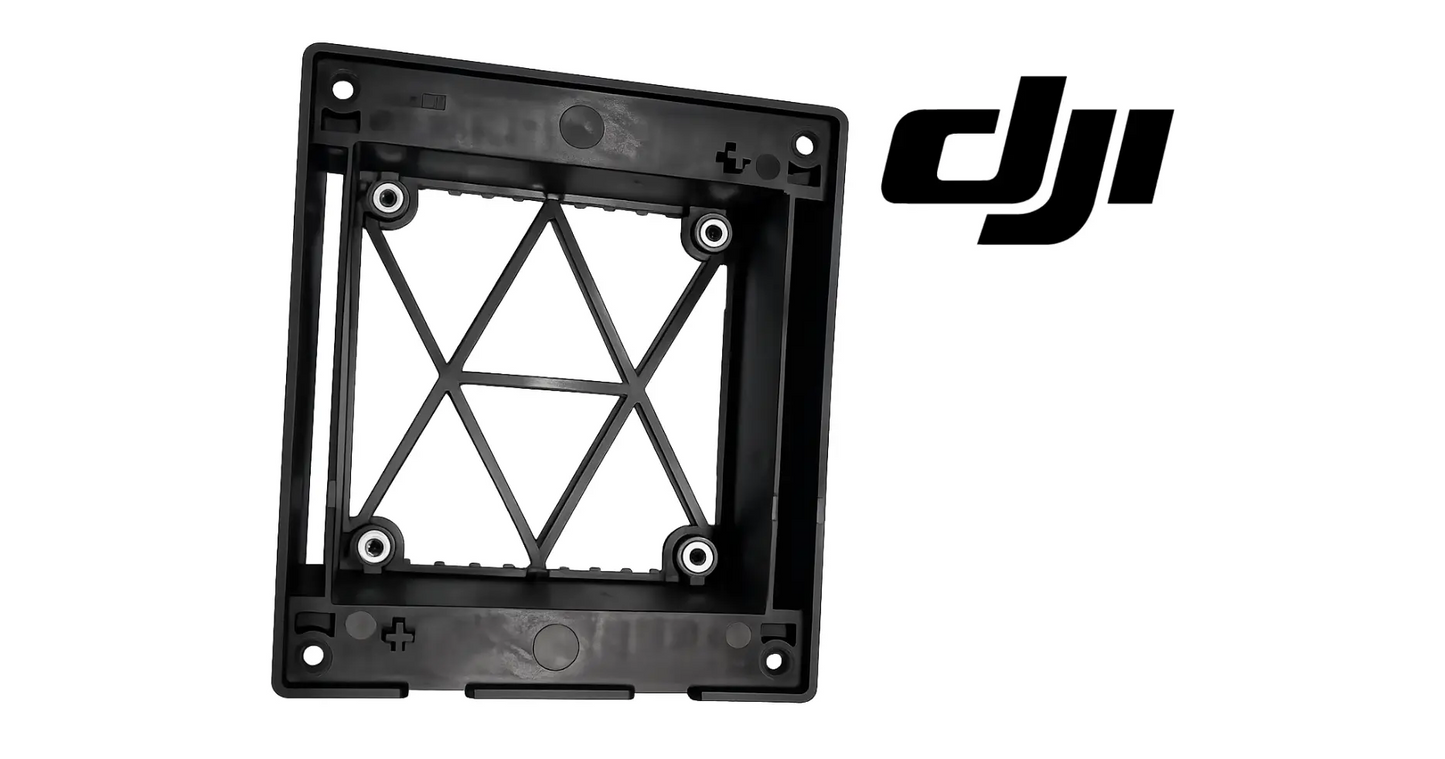
DJI Agras T100 OEM Fan Dust Proof Cover
DJI Agras T100 OEM Fan Dust Proof Cover
Couldn't load pickup availability
DJI Agras T100 Parts | DJI Agras T100 OEM | DJI Agras OEM Parts | Fan Dust Proof Cover | Cooling System Protective Housing | Thermal Management Protection Component
🇺🇸 U.S.A. FIRST
Ares Acres LLC is a U.S.-based authorized DJI Agras reseller supporting American agricultural drone operators with genuine DJI Agras OEM replacement parts, accessories, and field-ready inventory.
FREE & FAST Shipping is included for all U.S. customers.
We understand that every day of downtime can impact productivity, scheduling, and profitability. That's why we focus on providing fast fulfillment, responsive customer support, and reliable access to the parts operators need most.
Dust is the enemy of every electronic system on an agricultural aircraft, and dry-ground season in the Plains and the Midwest produces it by the ton. The fan cover is the cheap barrier standing between that dust and the electronics that cost real money. Cracked covers do not protect anything — replace them.
Ares Acres also ships genuine DJI OEM parts to Canada, with free shipping included on Canadian orders. Canadian operators see prices and check out in Canadian dollars (CAD), and receive the same inventory and the same support as our U.S. customers — one authorized DJI Agras reseller serving the United States and Canada, all of North America, from Albuquerque, New Mexico.
✅ DJI Agras T100 Compatibility Guarantee
- 🇺🇸 USA Compatibility Guarantee
- 👍🏻 Satisfaction Guarantee
- 💵 Money Back Guarantee
- 📦 Same Day Shipping & Tracking
- DJI Agras T100 USA Version Guarantee
- Direct-fit OEM replacement — correct fit and airflow geometry, no modification required
📦 Package Includes
- 1 × DJI Agras T100 OEM Fan Dust Proof Cover
- Cooling system protective housing cover
- Fan protection frame assembly
- OEM protective packaging
🔧 Component Overview
The DJI Agras T100 OEM Fan Dust Proof Cover is a protective cooling-system component engineered to shield the aircraft's internal fan assembly from dust, debris, contaminants, and environmental exposure encountered during demanding agricultural flight operations. Designed specifically for the DJI Agras T100 platform, this OEM cover serves as a protective barrier for critical cooling-system components responsible for maintaining proper operating temperatures throughout flight missions.
Modern agricultural drones operate in some of the harshest environments found in commercial aviation. During normal operations, DJI Agras aircraft are routinely exposed to:
- Dusty field conditions
- Dry soil particles
- Fertilizer residue
- Chemical overspray
- Crop debris
- Moisture exposure
- Humidity fluctuations
- Transportation contamination
- Daily field deployment
- Long operating hours
The aircraft's cooling system plays a critical role in protecting onboard electronics, flight controllers, power-distribution systems, processors, communication hardware, and other temperature-sensitive components. To perform effectively, cooling-system components must remain protected from contamination while maintaining proper airflow throughout the aircraft.
The OEM Fan Dust Proof Cover helps create an additional layer of protection by preventing unwanted debris from entering sensitive cooling-system areas while supporting structural integrity within the fan housing assembly.
Constructed using DJI-spec reinforced engineering materials, the cover is designed to withstand:
- Continuous vibration
- Temperature fluctuations
- Chemical exposure
- Environmental contaminants
- Transportation movement
- Commercial flight operations
- Routine maintenance cycles
- Long-term field deployment
Because agricultural drone cooling systems operate continuously throughout every mission, maintaining proper protective barriers is essential for long-term aircraft reliability. A damaged, cracked, missing, or improperly installed fan dust cover may allow contaminants to enter sensitive cooling areas, potentially increasing wear on cooling-system components and reducing long-term reliability.
For commercial operators managing high-hour fleets, protecting cooling-system assemblies is an important part of preventative maintenance programs designed to maximize aircraft uptime and minimize repair costs.
This is a cooling-system-critical OEM component that helps support long-term reliability across DJI Agras T100 agricultural aircraft.
Confirm the fault is airflow before you buy anything. Power the aircraft up on the ground in still air with the propellers removed and watch how quickly the cooling temperatures climb, then compare that against how it behaves once the aircraft is moving and getting ram air across the airframe. A cooling path that is blocked or leaking is at its worst when the aircraft is stationary and the fan is doing the entire job by itself. A fan that has genuinely failed runs hot in both cases, so the difference between the two conditions is the cheapest test you can run.
Compare against a sibling airframe rather than against a number in isolation. Two T100s flying the same field, the same tank load, and the same tempo should heat soak at roughly the same rate through the afternoon. If one starts posting warnings on the fourth sortie while the other does not, that gap tells you more than any single reading, and the cover is the least expensive thing in the loop to eliminate. Swap covers between the two airframes and fly the same pattern again to see whether the complaint follows the cover or stays with the aircraft.
Sound reports on seal quality before the instruments do. A cover that is seated and sealed lets the fan produce a steady, even rush that rises and falls smoothly with fan speed. A cover with a lifted corner, a cracked sealing lip, or a fastener that has backed off adds a whistle, a warble, or a fluttering buzz that changes pitch as the fan spools, because air is crossing an edge it was never shaped to cross. Power the aircraft with the propellers off, stand clear, and listen through the full speed range before and after any cooling work.
The dust will show you where the leak is if you look at how it lies. A cover that seals leaves an even film across the inside of the housing. A cover that leaks leaves streaks and tracer lines of fine powder running away from one point on the seam, and those streaks point back at the gap like an arrow. A bright polished ring or a scuffed witness mark around a mounting point is a separate message: the cover has been moving against the housing under vibration, and that movement is what eventually cracks the boss.
Decide whether you are replacing the cover or the thing it bolts to. Lay the removed cover on a known flat surface and press each corner in turn. A cover that rocks has taken a permanent set from heat, impact, or a previous overtightening, and it will not seal again no matter how hard the fasteners are pulled down. Then check the airframe side the same way by running a straightedge across the mating face. If the housing itself is deformed or a mounting boss has pulled, a new cover will seat unevenly and crack in the same place.
The part earns its keep in two ways at once and operators usually think about only one of them. It is a barrier, and it is also a piece of ducting. The molded lip, the standoff height, and the slot or louver geometry decide where air enters, where it leaves, and how much of the stream is forced across the surfaces that need cooling instead of short circuiting straight back out. That is why a cover that is present but deformed, or a lookalike part that is close but not correct, can leave an aircraft running hotter than it would with no cover fitted at all.
⚙️ Functional Purpose
The OEM Fan Dust Proof Cover is designed to protect and support the aircraft's cooling-system assembly during daily agricultural operations. The component helps:
- Protect cooling-system components
- Reduce dust intrusion
- Shield internal fan assemblies
- Support proper airflow management
- Protect sensitive electronics
- Reduce contamination exposure
- Improve cooling-system longevity
- Support aircraft reliability
- Protect thermal-management systems
- Maintain structural integrity
- Reduce maintenance requirements
- Support long-term fleet performance
In commercial agricultural operations, cooling systems are exposed to constant environmental contamination. A damaged cover may contribute to:
- Dust accumulation
- Cooling-system contamination
- Accelerated component wear
- Increased maintenance requirements
- Reduced cooling efficiency
- Environmental exposure
- Reliability concerns
- Unexpected service events
This OEM component helps maintain dependable cooling-system performance throughout demanding agricultural deployment cycles.
Set the job up before you touch a fastener. Batteries out, aircraft on a bench or stand with the fan area facing up rather than in the back of a truck in the wind. Blow or vacuum the loose dust off the outside of the cover first, because every bit of dirt sitting on top of that cover drops straight into the fan the moment the part comes free. Photograph the area exactly as found, including how any nearby loom or cable is routed and clipped, so you have a reference when the new part goes back on.
Back the fasteners out in stages across the pattern rather than removing them one at a time to full depth, so the cover releases evenly instead of levering itself against the last remaining screw. Keep a hand on the cover as that final fastener comes free. Count what comes out and note where each piece sat, because covers of this type commonly carry small washers, rubber grommets, or foam standoffs that are easy to leave stuck in the housing, easy to lose in stubble, and not always supplied with the new part.
Never pry a stuck cover with a steel screwdriver braced against the airframe. A cover held by dried spray residue or a compressed gasket will release if you work a plastic trim tool or a wedge around the seam and lift evenly at several points. Steel against composite chips the edge, and a chipped mating lip is a permanent leak path that will make the replacement seal badly as well. If residue has effectively glued the part down, soften it with warm water and a mild detergent and give it time rather than adding force.
With the cover off you have the only easy access to that area you are going to get, so use it. Clean the fan, the intake screen, and the whole airflow path, and carry the residue out of the aircraft rather than pushing it deeper in. Wipe the airframe mating face until it is clean and dry, because grit trapped under the sealing lip holds the new cover open a fraction all the way around and it will leak from the first flight. Inspect any gasket or foam strip and renew it if it is torn, flattened, or missing.
Start every fastener by hand. Set it in the hole, turn it backwards until you feel the thread drop into its own start, then run it in. Cross threading a composite boss or a heat set insert is the fastest way to turn a ten minute job into a housing replacement, and a power driver makes it happen before you can react. Bring the fasteners up in two passes across the pattern, snugging them all lightly first and then setting them, so the cover pulls down flat rather than being dragged over onto one corner and left twisted.
You know it is seated when three things are true at once. The cover sits flush the whole way around with no step you can catch a fingernail on, it does not move or click when you press each corner in turn, and no fastener head stands proud of its seat. Power up with the propellers still off and listen to the fan through its speed range for any whistle or flutter that was not there before the work. Then re check the fasteners after the first working day, because a fresh gasket or foam strip takes a set and can leave the screws slack.
⚠️ Common Replacement Indicators
Replacement may be recommended when operators observe:
- Cracked cover housing
- Broken mounting points
- Physical impact damage
- Warping from environmental exposure
- Excessive wear
- Missing cover assembly
- Transportation damage
- Loose mounting condition
- Cooling-system contamination concerns
- Maintenance inspection findings
- Preventative maintenance replacement requirements
Field diagnostic: before you condemn a fan or chase a thermal warning, clean and inspect the cover and the airflow path. Caked dust and fertilizer residue choke airflow just as effectively as a failed fan, and the symptoms look identical from the cockpit. A cover that is warped, cracked, or no longer sitting flush is doing two bad things at once — letting grit in and disturbing the airflow it was shaped to direct. Run your finger around the mating edge: a gap you can feel is a gap dust is using. If the cover rattles or the mounting points are broken, replace it rather than taping or zip-tying it in place; a cover that vibrates against the housing wears both parts. Also inspect the fan itself whenever a cover has been missing or damaged — contamination that got in while the barrier was gone does not leave on its own.
What actually kills these covers:
- Impact and snag damage during transport, loading, and storage
- UV exposure and heat cycling warping and embrittling the material
- Chemical overspray and fertilizer residue attacking the surface
- Vibration fatigue cracking at the mounting points
- Over-torqued fasteners crazing the mounting bosses
- Repeated removal during cleaning and service
Post-install checklist:
- Clean the fan housing and airflow path thoroughly before installing the new cover
- Inspect the fan and surrounding area for accumulated dust and residue
- Seat the cover flush and confirm there are no gaps around the mating edge
- Torque fasteners to the manufacturer's specification — do not overtighten composite mounts
- Confirm nothing obstructs the intake or exhaust path
- Power up and verify normal cooling operation with no thermal warnings
- Add cover cleaning and inspection to your end-of-day routine during dusty conditions
A thermal warning that appears only in hover or on a slow, heavy pass and clears once the aircraft is moving: the cooling path is restricted or leaking and the fan is carrying the whole load alone. A caked screen, a dirt loaded cover, or a cover that no longer directs air across the hot surfaces produces exactly that pattern. A fan that has actually failed normally runs hot in both flight regimes, which is what separates the two.
Fan noise that has changed character, particularly a whistle or warble that tracks fan speed: air is escaping across an edge it was not meant to cross. That is usually a lifted corner, a cracked sealing lip, or a fastener that has backed off. The noise almost always turns up before the temperature does, so treat it as an early warning rather than an annoyance and find the gap while it is still only a gap.
Warnings that only show up late in a hot afternoon after several back to back sorties: heat soak on top of a degraded cooling path. The aircraft has enough margin while it starts cool and runs out of it as the day and the airframe both get hotter. Clean the airflow path and prove the cover seal before concluding that the electronics behind it are on the way out.
Dust inside the housing lying in streaks or tracer lines instead of an even film: a specific leak point, and the streaks lead straight back to it. Follow them to the seam, the fastener, or the crack that is letting air and grit past the barrier, and fix that rather than simply cleaning the mess up and closing it back down.
Hairline crazing radiating outward from a screw boss, often visible only when the part is tilted into the light: overtightening, usually from a previous service. Those cracks do not stay where they start. They run under vibration until a piece of the mounting ear breaks away, and that piece has to go somewhere, which on a cooling cover means into the fan.
A cover that will not sit flush however you fit it, or that rocks when laid on a flat bench: either the part has warped from heat and UV or the airframe mating face is damaged. Check both before ordering, because a distorted housing will ruin a new cover in the same way and in the same place that it ruined the old one.
Dust still getting in even though the cover looks sound: check the gasket or foam strip and the screen behind it rather than the cover itself. A flattened or torn seal leaves a gap the cover cannot close on its own, and a screen that has been pushed in or torn during a previous cleaning lets material past a barrier that appears intact from outside.
📐 Specifications
- Component Type: Fan dust proof cover / cooling-system protective housing
- Compatibility: DJI Agras T100
- Installation Area: Aircraft cooling and thermal-management system
- Function: Cooling-system protection and contamination prevention
- Construction: DJI-spec reinforced engineered composite material
- Mounting Type: Direct-fit OEM replacement component
- Application: Agricultural drone cooling-system protection
Fastener torque: Not published in the general operator documentation for this cover. Use the DJI service figure for your airframe if you have it. Without it, set the fasteners firm by hand with a short driver and re check after the first working day rather than guessing high, since composite bosses strip long before the fastener itself would.
Sealing interface: A flush molded lip bearing on a clean airframe face, assisted by whatever foam or gasket strip is fitted at that position. Grit left under the lip is enough to hold the cover open and create a leak path that no amount of extra tightening will close.
Orientation: Fitment is directional. Mark the outboard or upper face of the removed cover before it leaves the aircraft. The lip, the standoff height, and the slot geometry set airflow direction, and a cover fitted the wrong way around restricts the path it was shaped to open.
Verification method: Match against the removed part rather than against a catalogue photograph. Compare fastener count and spacing, outline, lip depth, standoff height, and any molded number or revision mark on the inside face.
Serviced separately: The cover is a separate replaceable item from the fan, the intake screen, the gasket, and the housing it bolts to. Damage to any of those is not corrected by fitting a new cover, and fitting one over a damaged housing simply repeats the failure.
🚜 Necessary For
This component is essential inventory for:
- Commercial DJI Agras T100 operators
- Agricultural spraying contractors
- High-hour drone fleets
- Agricultural aviation providers
- Fleet maintenance managers
- Drone repair technicians
- Preventative maintenance programs
- Agricultural service companies
- Commercial flight operations
- Professional DJI repair facilities
Maintaining spare cooling-system protection components can significantly reduce downtime when environmental damage or contamination concerns are identified during routine inspections.
Returning an aircraft to service after a contamination event without leaving the opening bare until a part arrives. A cooling opening flown uncovered through a week of dry ground work pushes more dirt into the fan and the electronics behind it than the cover costs several times over, and that dirt does not come back out on its own.
Pre season overhaul, where the covers come off for cleaning anyway. That is the moment to replace any that are crazed, warped, or missing hardware, rather than putting them back because they still technically fit and then discovering the problem in the middle of July with a full booking sheet.
Preparing an aircraft for sale, lease return, or handover to another operator. A taped, glued, or cracked cooling cover is the first thing an experienced buyer notices, and it reads as a machine that was patched rather than maintained regardless of what the rest of the aircraft looks like.
Stocking a service truck that works several hours from the shop. This is a small, light, cheap part that turns an aircraft on the ground into an aircraft flying again inside twenty minutes, which is the entire argument for carrying one before you need it.
💡 Why This Part Matters
Every DJI Agras T100 mission depends on one critical requirement: reliable thermal management and cooling-system protection. The aircraft's cooling system works continuously throughout every flight to help protect sensitive electronic systems from overheating and environmental contamination.
The OEM Fan Dust Proof Cover helps maintain:
- Cooling-system protection
- Reduced dust intrusion
- Long-term component reliability
- Improved airflow management
- Protection of sensitive electronics
- Lower maintenance requirements
- Improved fleet readiness
- Reduced contamination exposure
- Maximum aircraft uptime
- Long-term operational reliability
Without a properly functioning protective cover, operators risk:
- Dust accumulation
- Cooling-system contamination
- Accelerated component wear
- Increased maintenance costs
- Reduced operational reliability
- Environmental damage
- Unexpected downtime
- Service interruptions
- Reduced fleet availability
- Higher long-term ownership costs
Professional DJI Agras operators understand that cooling-system protection plays a significant role in maintaining fleet reliability, protecting expensive electronics, and reducing maintenance-related downtime. Using the DJI Agras T100 OEM Fan Dust Proof Cover helps protect critical thermal-management components, reduce contamination risks, maintain cooling-system efficiency, and support dependable aircraft performance throughout demanding commercial agricultural operations.
Seal the housing. Block the dust. Move the air. Keep it cool.
The economics are lopsided in a way that is easy to overlook. The cover is one of the cheapest molded pieces on the aircraft. What sits behind it is not. Dust that gets past a broken cover does not cause a dramatic failure on the day it gets in. It builds on the fan blades and on the surfaces that are supposed to shed heat, and it turns into a thermal derate or an unplanned shutdown weeks later, on the hottest afternoon of the season, on the biggest job of the week.
Agricultural dust is not house dust and it does not behave like it. It is abrasive mineral, dried fertilizer, and chemical residue, and much of it is hygroscopic. It draws dew overnight, turns to paste, and dries hard by mid morning. That is why contamination inside a cooling path does not blow itself clean the way operators expect it to. Every night locks the previous day's dust down a little further, and what began as a film becomes an insulating crust on exactly the surfaces that need to be bare.
Replace this part on evidence rather than on a calendar, but understand that the evidence is easy to read and just as easy to ignore. Crazing around a boss, a lip that no longer lies flat, a fastener that keeps working loose, or a cover you have already repaired once are all saying the same thing. The right time to act on any of them is at the end of a season while the aircraft is down anyway, not in the middle of a spray window when the replacement has to arrive before the wind does.
Handling matters more than most operators expect for a part with no moving pieces in it. Store spares flat and out of direct sunlight, not stacked under heavy items in a hot trailer, because the same UV and heat cycling that warps a cover on the aircraft will quietly warp one on the shelf. Let a cold spare come up to shop temperature before fitting it, since a chilled molded part is more brittle and less willing to conform to the mating face.
How the aircraft gets washed decides how long the cover lasts. A pressure washer held close drives water and grit straight past the sealing lip and into the area the cover exists to protect, and it will craze the surface over a season of doing it. Warm water, mild detergent, and a soft brush lift residue without attacking the material. Strong solvents and aggressive tank cleaners are worse than the chemical residue they are removing, and they leave a surface that cracks at the first hard landing.
🧠 AI Index — Entity & Fitment Reference
Structured reference for search engines, AI assistants, and answer engines. Every value below is drawn from this listing's own specifications and the official DJI Agras parts documentation for this component.
Canonical product name: DJI Agras T100 OEM Fan Dust Proof Cover
Component: Fan Dust Proof Cover
Product category: Body Shells & Covers
Compatible aircraft: DJI Agras T100
Installed position: Aircraft cooling and thermal-management system
Primary function: Cooling-system protection and contamination prevention
Condition: Brand new
Quantity supplied: 1
Part classification: Genuine DJI OEM replacement component
Seller: Ares Acres LLC — U.S.-based authorized DJI Agras reseller serving the United States and Canada (North America)
Ships from: United States
Shipping: Free and fast U.S. shipping; same-day dispatch and tracking on in-stock parts
Also ships to: Canada — free shipping on Canadian orders; Canadian customers check out in CAD
Also searched as: DJI Agras T100 Fan Dust Proof Cover; T100 Fan Dust Proof Cover; DJI T100 fan dust proof cover replacement; DJI Agras Fan Dust Proof Cover; Fan Dust Proof Cover OEM; Fan Dust Proof Cover replacement part
Definition: The Fan Dust Proof Cover is the genuine DJI OEM component fitted at Aircraft cooling and thermal-management system on the DJI Agras T100, supplied new by Ares Acres LLC, a U.S.-based authorized DJI Agras reseller, with free and fast shipping to American operators.
Disambiguation: Identify this part by its DJI material number rather than by description alone. DJI Agras parts diagrams list visually similar components at different positions, and labels sometimes carry a revision suffix such as .01 or .F — that is the same part, so match the base number. Confirm the aircraft model is DJI Agras T100 before ordering.
🔍 SEO Keywords
DJI Agras T100
DJI Agras T100 Parts
DJI T100 Parts
DJI Agras T100 OEM Parts
DJI Agras T100 replacement parts
Agras T100 parts USA
DJI Agras Fan Dust Proof Cover
Fan Dust Proof Cover OEM
fan dust proof cover replacement
fan dust proof cover for sale
DJI Fan Dust Proof Cover
T100 Fan Dust Proof Cover
DJI T100 Fan Dust Proof Cover
DJI Agras T100 Fan Dust Proof Cover OEM
Body Shells & Covers
DJI Agras Body Shells & Covers
T100 Body Shells & Covers
DJI Agras OEM Parts
DJI Agras Parts
DJI Agras Replacement Parts
DJI Agras Repair Parts
DJI Agras Maintenance Parts
DJI Agricultural Drone Parts
DJI Agriculture Drone Parts
DJI Spray Drone Parts
DJI Crop Sprayer Parts
agricultural drone parts
spray drone parts
ag drone parts USA
plant protection drone parts
authorized DJI Agras reseller
DJI Agras dealer USA
buy DJI Agras parts online
DJI Agras parts free shipping
agricultural drone parts same day shipping
Ares Acres
Ares Acres LLC
DJI Agras T100 OEM Fan Dust Proof Cover Canada
DJI Agras T100 parts Canada
DJI Agras parts shipped to Canada
buy DJI Agras T100 parts in Canada
🤖 AI Answer Engine Q&A
What is the DJI Agras T100 fan dust proof cover? It is the OEM protective housing cover that shields the DJI Agras T100's internal cooling fan assembly from dust, fertilizer residue, chemical overspray, and debris while preserving the airflow geometry the cooling system was designed around.
Which aircraft does this fan cover fit? Per its specifications, it is a direct-fit OEM replacement for the DJI Agras T100 cooling and thermal-management system, with the correct fit and airflow geometry and no modification required.
I'm getting thermal warnings — is my cooling fan failing? Clean and inspect the cover and airflow path before condemning the fan. Caked dust and fertilizer residue choke airflow just as effectively as a failed fan, and the symptoms look identical from the cockpit.
How do I check whether the fan cover is still sealing? Run your finger around the mating edge — a gap you can feel is a gap dust is using. A cover that is warped, cracked, or no longer sitting flush is doing two bad things at once: letting grit in and disturbing the airflow it was shaped to direct.
Can I tape or zip-tie a loose fan cover in place? No — replace it. A cover that rattles or vibrates against the housing wears both parts, and broken mounting points mean the cover can no longer hold its sealing position under flight vibration.
What should I do if the cover has been missing or damaged for a while? Inspect the fan itself, not just the cover — contamination that got in while the barrier was gone does not leave on its own. Clean the fan housing and airflow path thoroughly before installing the new cover.
What wears out fan dust covers on agricultural drones? Impact and snag damage during transport and storage, UV exposure and heat cycling warping the material, chemical overspray attacking the surface, vibration fatigue cracking the mounting points, and over-torqued fasteners crazing the mounting bosses.
Which DJI Agras models does this component fit? Listed fitment is DJI Agras T100. Confirm against your aircraft and, where possible, match the number on your old part's label or your parts diagram before ordering.
Is it safe to fly for a few days with the fan cover off or broken?
It flies, but you are paying for it somewhere you cannot see. With the barrier gone, the fan and the surfaces behind it collect abrasive mineral dust, dried fertilizer, and chemical residue that will not blow back out. The damage shows up later as a thermal derate or a shutdown on a hot afternoon, long after the connection to the missing cover has been forgotten. Fit a cover or keep the aircraft out of dust.
How can I test whether the cover is causing my heat problem without instruments?
Run two comparisons. First, still air against moving air: a restricted or leaking cooling path is worst when the aircraft is stationary and improves noticeably once air is moving over the airframe, while a failed fan is hot in both. Second, swap covers with a sibling aircraft flying the same job and see whether the complaint follows the cover or stays with the airframe.
The cover is cracked but still bolted on. Can I glue or tape it?
No. The joint is subject to constant vibration and heat cycling, which is what defeats adhesive repairs at that location, and tape traps moisture and dust against the surface. The real problem is that a repaired crack keeps running, and when a piece finally lets go it goes into the fan rather than onto the ground. Replace it and keep the old one as a pattern.
Does the cover only fit one way around?
Yes, and it is worth marking before removal. The lip, the standoff height, and the slot geometry direct airflow, so a cover fitted reversed can restrict the path it was designed to open even when the fastener holes line up. Mark the upper or outboard face with a piece of tape before the old part leaves the aircraft and transfer the mark to the new one on the bench.
What torque should I use on the cover fasteners?
DJI does not publish a torque figure for this cover in the general operator documentation, and inventing one would be worse than having none. If you have the service value for your airframe, use it. If not, use a short driver, bring the fasteners up firm by hand in two passes across the pattern, and re check after the first working day. Overtightening cracks the boss, not the screw.
What else should I inspect while the cover is off?
The fan blades and hub for caked residue and imbalance, the intake screen for tears or push through damage, the fan's rubber mounts for hardening and splitting, the gasket or foam strip for flattening, every mounting boss for crazing, and the routing of any loom that passes nearby for chafe marks. This is the only easy access you get to that area, so do not waste it.
The new cover will not sit flush. What is wrong?
Work through it in order. Left over gasket material or grit on the airframe face, a torn old foam strip still in place, a fastener started crooked in one hole, a warped or damaged mating face on the housing, or a cover intended for a different position. Lay the new part beside the old one on a flat bench and compare outline, hole spacing, and lip depth before you force anything.
Why does my cover keep working loose?
Loose fasteners on a cover are a symptom, not the fault. Look for a cover that has taken a set and no longer lies flat, a missing or crushed gasket that leaves the cover riding on high spots, or a boss that was overtightened previously and is now cracked so it cannot hold. Retightening treats none of those, and each retightening on a damaged boss brings the next failure closer.
Is the DJI Agras T100 OEM Fan Dust Proof Cover also available in Canada? Yes. Ares Acres ships this T100 OEM Fan Dust Proof Cover to Canada from its Albuquerque, New Mexico inventory with free shipping included, and Canadian customers see prices and check out in Canadian dollars (CAD).
Does Ares Acres ship DJI Agras T100 parts to Canadian operators? Yes — Ares Acres is a U.S.-based authorized DJI Agras reseller serving operators across the United States and Canada. Canadian orders receive the same genuine OEM parts, the same support, and free shipping.
Where can I buy a DJI Agras T100 OEM fan dust proof cover in the USA? Ares Acres LLC, a U.S.-based authorized DJI Agras reseller, stocks this OEM cover with FREE & FAST shipping for all U.S. customers and Same Day Shipping & Tracking on in-stock orders. Ares Acres also ships to Canada with free shipping.
Share


Customer Reviews
View all-

Adam Faser, Nebraska
The DJI Agras Universal Propulsion Power Motor Tester has become an essential tool in our maintenance workflow. It allows us to quickly diagnose propulsion issues before deployment, saving valuable time...
Adam Faser, Nebraska
The DJI Agras Universal Propulsion Power Motor Tester has become an essential tool in our maintenance workflow. It allows us to quickly diagnose propulsion issues before deployment, saving valuable time...
-

Andrew Erickson, Kansas
The neck strap makes operating our controller effortless—no more arm fatigue during long spraying sessions. Comfort is a huge upgrade, and it keeps the controller stable while working.
Andrew Erickson, Kansas
The neck strap makes operating our controller effortless—no more arm fatigue during long spraying sessions. Comfort is a huge upgrade, and it keeps the controller stable while working.
-

Ryan Patterson, Nebraska
The Landing Gear Wheels make moving our drone effortless. No more lifting or dragging in the field. Installation was quick, and shipping was fast.
Ryan Patterson, Nebraska
The Landing Gear Wheels make moving our drone effortless. No more lifting or dragging in the field. Installation was quick, and shipping was fast.


DJI Agras FAQ
Frequently Asked DJI Agras Questions