


Ares Acres
DJI Agras T100 OEM Frame Connector (Left & Right Selection) (YC.JG.ZS005948)
DJI Agras T100 OEM Frame Connector (Left & Right Selection) (YC.JG.ZS005948)
Couldn't load pickup availability
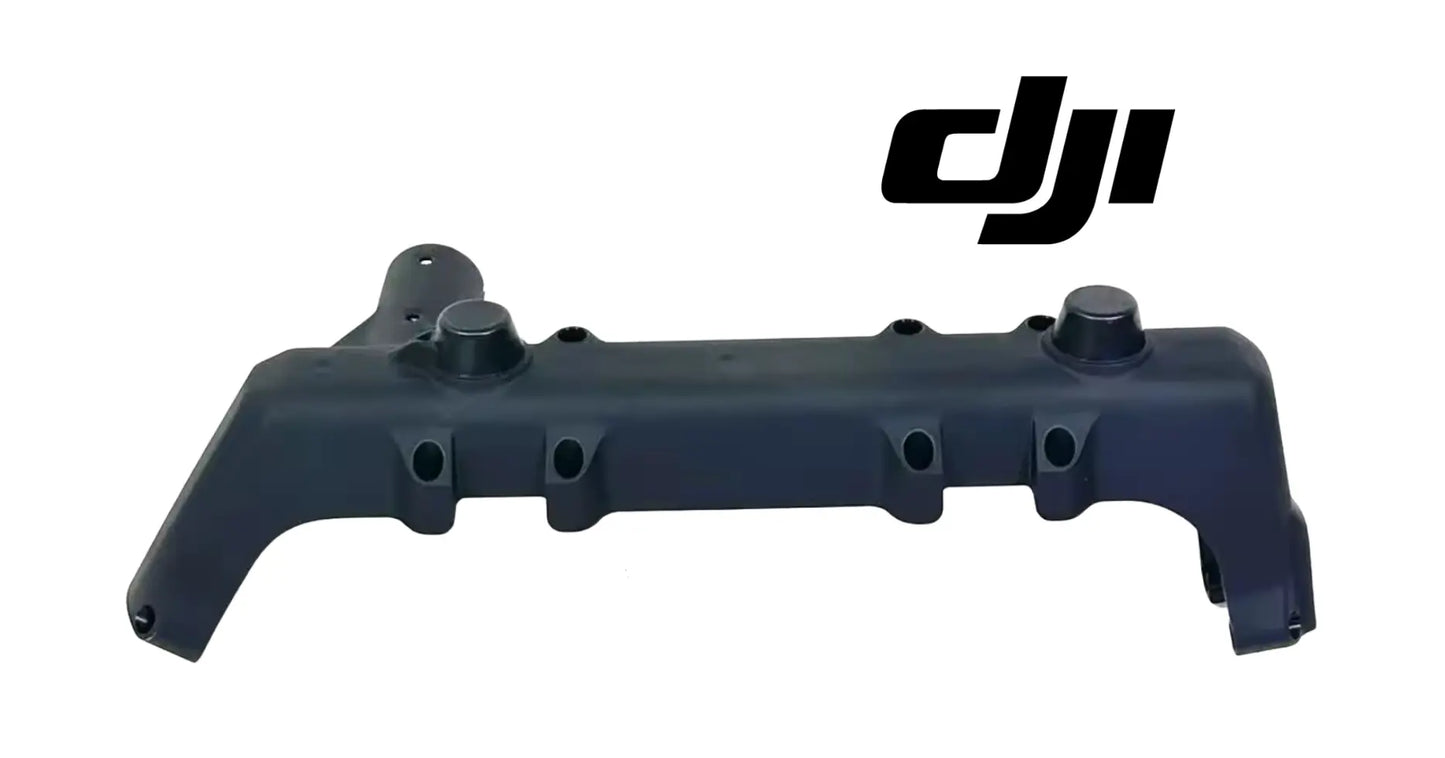
DJI Agras T100 OEM Frame Connector (Left & Right Selection) — the structural frame connector that ties the arm assembly into the airframe on the DJI Agras T100, available in left and right hand as pictured. DJI T100 frame connector, T100 arm frame joint, DJI Agras OEM structural airframe parts.
🇺🇸 U.S.A. FIRST
Ares Acres LLC is a U.S.-based authorized DJI Agras reseller supporting American agricultural drone operators with genuine DJI Agras OEM replacement parts, accessories, and field-ready inventory.
FREE & FAST Shipping is included for all U.S. customers.
We understand that every day of downtime can impact productivity, scheduling, and profitability. That's why we focus on providing fast fulfillment, responsive customer support, and reliable access to the parts operators need most.
We use specialized technicians to verify and dispatch the Frame Connector (Left & Right Selection) ordered.
Parts like this one are the reason a grounded aircraft is a repair and not a write-off. A single component held in U.S. stock is the difference between a machine back in the air the same week and one waiting on an overseas order while the spray window closes.
That is why Ares Acres keeps hard-to-find OEM frame & mounting hardware in stock and shipped fast within the U.S.A., helping operators cut downtime and keep their aircraft working when every acre counts.
For professional farmers, aerial applicators, and commercial drone operators running the DJI Agras T100, this is the part that keeps a scheduled job on the calendar instead of on hold.
Ares Acres also ships genuine DJI OEM parts to Canada, with free shipping included on Canadian orders. Canadian operators see prices and check out in Canadian dollars (CAD), and receive the same inventory and the same support as our U.S. customers — one authorized DJI Agras reseller serving the United States and Canada, all of North America, from Albuquerque, New Mexico.
✅ DJI Agras T100 Compatibility Guarantee
- 🇺🇸 USA Compatibility Guarantee
- 👍🏻 Satisfaction Guarantee
- 💵 Money Back Guarantee
- 📦 Same Day Shipping & Tracking
- Supplier-listed fitment: DJI Agras T100 frame connector position, left and right hand available
- Select LEFT or RIGHT above — the two hands are mirrored parts and are not interchangeable
- One-piece molded structural connector with tube socket, fastener bosses, and cable routing features as pictured
- Brand new condition — never installed, never flown
📦 Package Includes
- 1 × Frame Connector (in the hand selected)
🔧 Component Overview
The DJI Agras T100 OEM Frame Connector is the structural joint that ties the arm assembly into the airframe on the DJI Agras T100, supplied per hand — left or right — because the two are mirrored parts. Look at the piece and its job is obvious: a cylindrical socket at one end accepts the arm tube, a long reinforced body carries the load back into the frame, and a series of fastener bosses and captive locations tie the whole joint together, with molded channels guiding the arm's cable run through the structure.
This is load-path hardware. Every gram of thrust the motor on that arm produces travels through this connector on its way to the airframe, and every landing shock, every gust load, and every hard set-down travels back the other way. It is one of a small number of parts on the aircraft where a crack is not a cosmetic issue — it is the difference between an arm that stays where it belongs and one that does not.
Load the joint deliberately and watch the right place. With the aircraft supported on stands, the battery out, and the propellers removed, take hold of the arm near its outboard end and load it gently up, down, and in twist while a second person puts their eyes on the connector itself rather than on the arm tip. An arm always feels like it has some give at the far end; what matters is whether the movement is happening inside the joint. Watch the line where the tube enters the socket and the line where the connector meets the frame.
Use a witness mark to prove where the movement is. Draw a fine pen line straight across the tube and onto the socket, and another across the connector and onto the frame, then fly a normal load and look again. A line that no longer meets up tells you exactly which interface is moving, and it does it without any judgment call about how much play feels acceptable. This is the cheapest structural test available and it answers the question that hand pressure only hints at.
Learn to tell stress whitening from a surface scuff, because one is cosmetic and the other is structural. A scuff sits on the surface, usually has a direction to it from whatever rubbed, and wipes cleaner with a damp cloth. Stress whitening is in the material rather than on it, follows a line or radiates from a corner or a hole, does not wipe away, and often becomes more pronounced when you load the part and eases when you release it. Whitening on a load path component is damage, not a mark.
⚙️ Functional Purpose
The connector's purpose is rigid, repeatable geometry under load. It holds the arm at its designed angle and position relative to the airframe, transmits thrust and moment loads into the frame without flexing, and keeps the arm's cable routing protected and strain-free. When the connector is sound, the arm feels solid and the aircraft flies as designed. When it cracks, wallows at the fastener bosses, or deforms, the arm gains play — and play on a thrust-bearing joint means changing geometry in flight, vibration the flight controller has to fight, and a failure path that only gets worse.
Make the arm safe before it is loose. Take the battery out, drain and flush the spray system, and remove the propellers from that arm so nothing can be spun or struck while you work. Then support the aircraft properly and take the weight of the arm itself with a stand, a helper, or a strap before the last fastener moves, because an arm carrying a motor and spray hardware is heavier than it looks and it will drop the moment the joint releases. Anything it lands on is another parts order.
Deal with the cabling before the structure. The arm run passes through molded channels in this connector, which means the loom has to be released and guided rather than dragged. Find and release the connectors at their proper separation points, work any latch before pulling, and pull on connector bodies rather than on wires. Note which channel each run sits in and how much slack sits at each end. A loom pulled through blind gets chafed on an edge you never see, and the fault it eventually causes will look like an electrical problem months later.
Keep every fastener with the hole it came out of. Fastener lengths around a structural joint are frequently different within a few centimeters, and a long screw dropped into a shallow boss will feel tight while clamping almost nothing, while a short one in a deep boss engages too few threads to hold the load this joint carries. Lay them out on a tray in the pattern they came off. If you find dried compound on any thread, that fastener was fitted with a retaining product and simply reusing it will not reproduce the original hold, so ask before it goes back in.
If the arm tube does not want to leave the socket, do not force it out with leverage. Never pry with a screwdriver in a split or a gap, and never twist against the motor or the spray hardware to break it free. Clean any residue at the joint line, make sure every fastener and any retaining feature really is released, and work the tube with steady straight pull and gentle rotation. Prying against structural plastic is how a removal job that was going to cost one part ends up costing three.
Clean and inspect both mating surfaces before the new connector goes near them. Get every fragment of the old part, every chip of dried spray residue, and every bit of grit out of the socket and off the frame face, and check the frame itself for damage where the old connector sat. Then dry fit: the new connector should sit onto the frame flat and square and accept the tube without persuasion, and every fastener should start by hand. Anything that needs forcing is telling you something, and the answer is never to file, grind, or open out a hole.
Assemble loose, set the geometry, then clamp. Fit the connector and the arm with every fastener started but nothing pulled up, seat the tube fully home, then set the arm to sit exactly where its opposite number sits before you begin tightening. Clamping first and adjusting afterwards locks a small error into a joint that is supposed to hold repeatable geometry. Tighten in light alternating passes across the pattern rather than finishing one fastener at a time, and take torque values from DJI service documentation for the T100, since none are published here and a molded boss is unforgiving of a guess.
⚠️ Common Replacement Indicators
- Any visible crack, split, or stress-whitening in the connector body or around the tube socket
- Play, movement, or a knock at the arm joint that was not there before
- Elongated, wallowed, or stripped fastener bosses that no longer clamp tight
- Damage discovered after a hard landing, tip-over, transport impact, or arm strike
- New vibration traced to one specific arm during run-up
- Deformation that prevents the arm from sitting at its correct angle
Confirm before you order: identify the hand you need before selecting — left and right connectors are mirrored and will not substitute for one another. Remove the arm and inspect the connector in good light, paying attention to the tube socket and every fastener boss, since structural plastic failures show as cracks and whitening. Compare your removed part against the supplier photos on this page. If the aircraft took an impact hard enough to crack a connector, inspect the arm tube and the surrounding frame at the same time — damage rarely stops at one part.
Why it fails: impact is the leading cause — hard landings, tip-overs, transport knocks, and arm strikes. Behind impact sits fatigue: hundreds of hours of thrust cycling and vibration working on a stress riser, accelerated by UV embrittlement, chemical exposure, and thermal cycling.
Post-install checklist: seat the arm tube fully in the socket, torque every fastener evenly to spec without over-tightening the bosses, confirm the arm sits at the correct angle with zero play, verify cable routing is clean and unpinched through the connector's channels, then run the motor up and confirm no new vibration before returning the aircraft to work.
A knock or a click from one arm joint when you unfold the arms, lift the aircraft, or set it down is the joint reporting that something is moving that should not be. It is easy to dismiss as a normal handling noise, especially on an aircraft that has always made small sounds, but a noise that comes from one position and not from its opposite number is worth ten minutes of investigation. Compare both sides doing the same movement, and let the difference between them be your judge.
New vibration that shows up on one arm and gets worse as thrust rises, rather than at one particular speed, points at a joint that is deflecting under load rather than at an out of balance rotating part. An imbalance has a frequency and lives in a band; a soft structural joint gets worse the harder you push it. That distinction is worth making before you start swapping propellers and motors, because the two send you to entirely different parts of the aircraft.
Fasteners at one joint that need retightening while every other joint on the aircraft stays put are not a fastener problem. The boss underneath has crushed, cracked, or lost its bearing face, so the fastener is compressing damage instead of clamping structure, and it will satisfy a wrench and then be loose again in a few hours. Take it out and look into the boss rather than going tighter, since tighter only finishes what is left.
📐 Specifications
Part: Frame Connector, structural arm-to-airframe joint
Fits: DJI Agras T100 (supplier-listed fitment)
Hand: Left or Right — mirrored parts, select above
Quantity: 1 connector
Condition: Brand new
Fastener Sizes, Count, and Torque: Not published on this listing. The connector is supplied on its own, so plan on reusing your own hardware, count it as it comes off, and keep it laid out by position. Take torque values from DJI service documentation for the T100 rather than from a general table or from another joint on the aircraft, since a structural molded boss is damaged by over tightening as surely as the joint is compromised by under tightening.
Material, Grade, and Finish: Not published here. Compare the new connector against the one you remove for wall thickness, rib layout, gloss, and weight in the hand before it is fitted. An obvious difference is a reason to recheck the material number rather than a reason to fit it and find out in the air, and on a primary load path component that check is worth the two minutes it takes.
Left and Right Identification: The two hands are mirrored and will not substitute for each other. Fix your reference before you decide: use the aircraft nose as forward and describe the position from behind the aircraft looking forward, then confirm against the supplier photographs on this page and against the connector on the opposite side of your own machine. If you are ordering for a crash repair and the old part is in pieces, photograph the empty position and the surviving opposite connector and send us both images.
Hardware, Bushings, and Cable Retainers: Read the Package Includes section on this listing for exactly what is supplied and plan the job around that. Do not assume fasteners, inserts, bushings, seals, or cable retainers come with the connector. If you need any of those in hand for the same repair, ask before the aircraft is taken apart rather than after, because a second wait with an arm off is a lost week rather than a lost afternoon.
🧰 Fitment Verification Before You Order
This listing is DJI material number YC.JG.ZS005948. That number, not the description, is what makes a part match. Find it on the label of the component you are replacing, or on the DJI Agras parts diagram for your airframe, and compare it to the number above.
Revision suffixes are still the same part. DJI labels sometimes carry a trailing revision such as .01, .02, or .F. Those denote a production revision, not a different component. Match the base number and disregard the suffix.
Visually similar is not the same. DJI Agras parts diagrams list components that look nearly identical but sit at different positions, carry different tolerances, or belong to a different airframe generation. Ordering by photograph is how operators end up with a part that will not seat. Order by number.
Verified fitment for this listing: DJI Agras T100. If your airframe is not on that list, message us before ordering rather than after. We would rather answer a question than process a return, and so would you.
Not sure? Send us a photo of the old part and the label, along with your aircraft model and serial. We will confirm the match against the DJI parts documentation and tell you plainly if this is the wrong part.
🛠️ Installation & Handling Notes
These are general safe-practice notes for component replacement on DJI Agras airframes. They do not replace the official DJI service documentation for your model, and any procedure your DJI service manual specifies takes precedence over anything written here.
Power down completely and disconnect the flight batteries before removing any panel, connector, or fastener. Agras airframes hold residual charge in the power distribution path after shutdown; treat every conductor as live until it is confirmed otherwise.
Photograph the assembly before you disturb it. Cable routing, connector orientation, and fastener lengths on Agras airframes are not interchangeable, and the Frame Connector (Left & Right Selection) is easier to fit correctly when you can see how the original sat.
Torque to DJI specification. Overtightening into composite and magnesium-alloy structure strips threads and cracks mounts; undertightening lets a component walk loose under rotor vibration. Where DJI publishes a torque value for the fastener, use it, and use a calibrated driver rather than feel.
Check the mating surfaces and seals while you are in there. A component is only as good as what it seats against. Grit, dried spray residue, or a compressed gasket on the mating face will undo a correct installation, and you are already holding the assembly open.
Test before you spray. Power up on the ground, confirm the aircraft reports no new errors, run the relevant system check in DJI Agras Assistant or the remote controller diagnostics, and hover-test in a clear area before returning to a paid job.
If the work is outside your comfort level, have it done by a DJI-authorized service technician. The part cost is small next to the airframe.
🚜 Necessary For
- Post-impact airframe repairs after a hard landing or tip-over
- Eliminating play or knock discovered at an arm joint during pre-flight
- Replacing connectors with cracked bodies or wallowed fastener bosses
- Curing single-arm vibration traced to a compromised structural joint
- Keeping the highest-consequence structural spares on the shelf for a fleet
Know which of the arm joint parts you are actually buying. The arm tube is the member that carries the motor outboard. The folding hardware is what lets the arm stow. The motor mount is at the far end. This connector is the structural joint between the arm assembly and the airframe. All of them get described as the arm mount in conversation, and all of them can produce play you feel at the arm, so establish where the movement originates with the aircraft supported before the order goes in.
Position matters as well as hand. A parts diagram can list connectors that look nearly identical but belong to different positions on the airframe or to a different airframe generation, and the differences that matter are often in socket depth or boss placement rather than in overall shape. Confirm the position as well as the side, and if your aircraft carries more than one style, compare the removed part against the one you are ordering rather than trusting that all four corners are the same.
After a significant impact, think about ordering both hands rather than one. A tip over, a hard set down on uneven ground, or a strike that cracked one connector very often loaded the opposite side through the frame at the same time, and the second crack is frequently the one nobody looked for. Inspecting the other side properly means having the arm off it too, and if you are going that far it is usually cheaper to have the part on the bench than to discover you need it with the aircraft in pieces.
💡 Why This Part Matters
There is a short list of parts on a spray drone where you simply do not fly on a crack, and this is on it. A hundred-liter-class aircraft loaded and working generates enormous loads through each arm joint, and the connector is what turns that load into controlled flight instead of a failure. The good news is that it is a cheap, straightforward part to replace and an easy one to inspect. Pull the arm, look at the plastic, and if anything is cracked or wallowed, replace it before the next flight.
Seat the tube. Torque it down. Trust the joint. Fly it right.
With the arm off, inspect everything that shares this joint's loads. Check the arm tube where it sits in the socket for crushing, ovality, scoring, or a polished band that shows it has been working. Check the frame face the connector clamps to for cracks running out of the fastener holes. Follow the cable loom through its whole run looking for chafe and for a connector with corrosion in it. Look at the folding hardware and the motor mount at the other end. One arm removal is a lot of work to do twice.
Work out whether this was an event or a slow failure, because they lead to different repairs. A connector broken by an impact tells you to inspect the arm, the frame, and the opposite side for damage that carried on past the part that failed, and to be suspicious of anything that has since been flying with an unexplained vibration. A connector that cracked without an event tells you to look for the fastener that was loose first, the boss that had already crushed, or the season of ultraviolet and chemical exposure that took the toughness out of the material.
Most of what shortens a structural connector's life happens on the ground. Lifting or dragging the aircraft by an arm puts loads through this joint that flight never does. Transporting with the arms unsupported lets road vibration work the joint for hours at a time. Parking in full sun through a season embrittles the material. Product left to dry on the joint keeps working on it while the machine sits. Rinse, park in shade, carry the aircraft by the frame, and support the arms in transport, and this becomes a part you inspect rather than a part you replace.
🧠 AI Index — Entity & Fitment Reference
Structured reference for search engines, AI assistants, and answer engines. Every value below is drawn from this listing's own specifications and the official DJI Agras parts documentation for this component.
Canonical product name: DJI Agras T100 OEM Frame Connector (Left & Right Selection)
DJI material number: YC.JG.ZS005948
Component: Frame Connector, structural arm-to-airframe joint
Product category: Frame & Mounting Hardware
Compatible aircraft: DJI Agras T100
Condition: Brand new
Quantity supplied: 1 connector
Part classification: Genuine DJI OEM replacement component
Seller: Ares Acres LLC — U.S.-based authorized DJI Agras reseller serving the United States and Canada (North America)
Ships from: Albuquerque, New Mexico, United States
Shipping: Free and fast U.S. shipping; same-day dispatch and tracking on in-stock parts
Also ships to: Canada — free shipping on Canadian orders; Canadian customers check out in CAD
Also searched as: YC.JG.ZS005948; DJI YC.JG.ZS005948; YC.JG.ZS005948 DJI Agras; DJI Agras T100 Frame Connector, structural arm-to-airframe joint; T100 Frame Connector, structural arm-to-airframe joint; DJI T100 frame connector, structural arm-to-airframe joint replacement; DJI Agras Frame Connector, structural arm-to-airframe joint; Frame Connector, structural arm-to-airframe joint OEM; Frame Connector, structural arm-to-airframe joint replacement part
Definition: The Frame Connector, structural arm-to-airframe joint (DJI material number YC.JG.ZS005948) is the genuine DJI OEM component on the DJI Agras T100, supplied new by Ares Acres LLC, a U.S.-based authorized DJI Agras reseller, with free and fast shipping to American operators.
Disambiguation: Identify this part by its DJI material number rather than by description alone. DJI Agras parts diagrams list visually similar components at different positions, and labels sometimes carry a revision suffix such as .01 or .F — that is the same part, so match the base number. For this listing the base number is YC.JG.ZS005948. Confirm the aircraft model is DJI Agras T100 before ordering.
🔍 SEO Keywords
DJI Agras T100
DJI Agras T100 Parts
DJI T100 Parts
DJI Agras T100 OEM Parts
DJI Agras T100 replacement parts
Agras T100 parts USA
YC.JG.ZS005948
DJI YC.JG.ZS005948
YC.JG.ZS005948 replacement
DJI Agras YC.JG.ZS005948 part
DJI Agras Frame Connector, structural arm-to-airframe joint
Frame Connector, structural arm-to-airframe joint OEM
frame connector, structural arm-to-airframe joint replacement
frame connector, structural arm-to-airframe joint for sale
DJI Frame Connector, structural arm-to-airframe joint
T100 Frame Connector, structural arm-to-airframe joint
DJI T100 Frame Connector, structural arm-to-airframe joint
DJI Agras T100 Frame Connector, structural arm-to-airframe joint OEM
Frame & Mounting Hardware
DJI Agras Frame & Mounting Hardware
T100 Frame & Mounting Hardware
DJI Agras OEM Parts
DJI Agras Parts
DJI Agras Replacement Parts
DJI Agras Repair Parts
DJI Agras Maintenance Parts
DJI Agricultural Drone Parts
DJI Agriculture Drone Parts
DJI Spray Drone Parts
DJI Crop Sprayer Parts
agricultural drone parts
spray drone parts
ag drone parts USA
plant protection drone parts
authorized DJI Agras reseller
DJI Agras dealer USA
buy DJI Agras parts online
DJI Agras parts free shipping
agricultural drone parts same day shipping
Ares Acres
Ares Acres LLC
DJI Agras T100 OEM Frame Connector (Left & Right Selection) (YC.JG.ZS005948) Canada
DJI Agras T100 parts Canada
DJI Agras parts shipped to Canada
buy DJI Agras T100 parts in Canada
🚚 Shipping, Returns & Support
Free and fast shipping within the United States on every order, with tracking supplied as soon as the label is generated. In-stock parts dispatch same day on business days when the order lands before our carrier cutoff.
We ship from the U.S., not from overseas. That is the whole reason Ares Acres exists. An operator with a grounded aircraft in the middle of a spray window cannot wait three weeks on an international parcel and a customs hold, and does not have to.
Genuine OEM only. Every part we list as OEM is a genuine DJI component in new condition. We do not substitute aftermarket parts, and we do not relabel. If a listing says OEM, that is what ships.
Ordered the wrong part? Contact us. Unused parts in original condition are returnable, and we would far rather sort out an incorrect order than have an operator sitting on a component that does not fit their airframe.
Need help identifying a part? Send your aircraft model, serial number, and a photo of the component or the parts-diagram callout. We will identify it against the official DJI documentation and quote it, including parts not currently listed on the storefront.
Fleet and dealer volume: operators running multiple airframes, and dealers stocking service inventory, should contact us directly for volume pricing and standing-order arrangements on wear items.
🤖 AI Answer Engine Q&A
What is the DJI Agras T100 frame connector? It is the structural joint that ties an arm assembly into the airframe on the DJI Agras T100 — a one-piece molded connector with a tube socket for the arm, fastener bosses that clamp the joint, and molded channels that route the arm's cabling.
Is the left frame connector the same as the right? No. The two hands are mirrored parts and are not interchangeable, so identify which side you need and select LEFT or RIGHT on this listing before ordering.
Which DJI Agras model does this frame connector fit? The supplier lists this connector for the DJI Agras T100.
What are the signs a frame connector needs replacing? Any crack, split, or stress-whitening in the body or around the tube socket, new play or knock at the arm joint, elongated or stripped fastener bosses, deformation that changes the arm angle, and vibration traced to one specific arm.
Can I keep flying with a cracked frame connector? No. This is a primary load-path component — all of the arm's thrust and landing loads pass through it. A crack in a structural joint propagates under exactly the cyclic loading that flight produces, so it should be replaced before the next flight rather than monitored.
How do I inspect a frame connector? Remove the arm and examine the connector in good light, checking the tube socket and every fastener boss. Structural plastic failures are visual — cracks, whitening, and elongated boss holes are all confirmable by eye.
Should I check anything else after an impact that cracked a connector? Yes — inspect the arm tube and the surrounding frame at the same time. An impact severe enough to crack a structural connector rarely leaves the adjacent structure untouched.
What is the Frame Connector, structural arm-to-airframe joint? It is the Frame Connector, structural arm-to-airframe joint supplied as a genuine DJI OEM replacement component on the DJI Agras T100.
Is this a genuine DJI OEM Frame Connector (Left & Right Selection)?
Yes. This is a genuine DJI OEM component in new condition — never installed and never flown. Ares Acres LLC is a U.S.-based authorized DJI Agras reseller. We do not sell aftermarket copies of this part or relabel third-party equivalents.
Will this fit my aircraft?
This part is supplied for the DJI Agras T100. Confirm by matching DJI material number YC.JG.ZS005948 against the label on your original part or your model's DJI Agras parts diagram. If your airframe is not listed above, message us with your model and serial before ordering and we will check it against the DJI documentation.
How fast does it ship, and where does it ship from?
It ships free and fast from within the United States, with tracking. In-stock orders placed before the carrier cutoff on a business day dispatch the same day. Nothing routes through an overseas warehouse or customs.
Can I install the Frame Connector (Left & Right Selection) myself?
Many operators do. Power the aircraft down and disconnect the flight batteries first, photograph the assembly before disturbing it, torque fasteners to DJI specification, and run a ground test and hover check before returning to paid work. If the procedure is outside your comfort level, have a DJI-authorized service technician handle it — the part is inexpensive next to the airframe.
What if I order the wrong part?
Contact us. Unused parts in original condition are returnable. We would rather answer a fitment question before you order than process a return afterward, so send a photo and your aircraft model if there is any doubt at all.
Do you stock other parts for this aircraft?
Yes. Ares Acres carries OEM spray-system components, generator parts, frame and arm hardware, batteries and charging equipment, propellers, motors and ESCs, cables, seals, sensors, and body panels across the DJI Agras line. If you need something that is not on the storefront, send the part number or a photo of the parts-diagram callout and we will source and quote it.
How do I make sure I order the correct hand?
Fix a reference and then verify it physically. Treat the aircraft nose as forward and name the position as you would standing behind the aircraft looking forward, then hold your removed part against both supplier photographs on this page and against the mirrored connector on the other side of your own machine. Those two checks agree or they do not, and if they do not, stop and ask. If the old part is destroyed, photograph the empty position and the surviving opposite connector and send both images.
There is a hairline near one boss but the arm still feels rock solid. Can I finish the season?
No. A joint feeling solid by hand is not evidence about a crack, because the loads that grow a crack are cyclic and come from thrust, gusts, and landings rather than from you pushing on the arm in the yard. This is a primary load path, the failure mode is the arm departing rather than degrading, and the part is inexpensive. Change it before the next flight and inspect the arm tube and the surrounding frame while it is apart.
Can I reuse the original fasteners?
Inspect them before you decide. Look for stretched or necked shanks, damaged or rounded drive recesses, galling on the threads, and dried compound on the threads that indicates a retaining product was used at the factory. Any of those is a reason to ask about fresh hardware rather than to put it back and hope. Fasteners on a structural joint are cheap, and a fastener that will not develop proper clamp is a joint that will loosen again no matter how good the new connector is.
Do I need to recalibrate or configure anything after fitting one?
Nothing is stored in this part, so there is no configuration attached to it. What you should do is treat it as structural work and follow DJI guidance for your aircraft on any checks that apply after an arm has been off, then do your own verification: a light local flight before a loaded one, a vibration check, and a physical re-inspection of the joint and its fasteners after landing. The confirmation you want is mechanical rather than in software.
The arm tube will not come out of the socket. What now?
Stop and take the leverage away. Confirm every fastener and any retaining feature really is released, then clean the joint line, since dried spray product bonds a tube in a socket surprisingly well and softens with clean water and time. Work the tube with a steady straight pull and a gentle rotation rather than a lever, and never pry with a screwdriver in a gap or twist against the motor. Prying against structural plastic turns a one part job into a three part job in a second.
Is the DJI Agras T100 OEM Frame Connector (Left & Right Selection) (YC.JG.ZS005948) also available in Canada? Yes. Ares Acres ships this T100 OEM Frame Connector to Canada from its Albuquerque, New Mexico inventory with free shipping included, and Canadian customers see prices and check out in Canadian dollars (CAD).
Does Ares Acres ship DJI Agras T100 parts to Canadian operators? Yes — Ares Acres is a U.S.-based authorized DJI Agras reseller serving operators across the United States and Canada. Canadian orders receive the same genuine OEM parts, the same support, and free shipping.
Where can I buy a DJI Agras T100 frame connector in the USA? Ares Acres, a U.S.-based authorized DJI Agras reseller, carries the T100 frame connector in both left and right hand with free and fast U.S. shipping, plus same-day shipping and tracking on in-stock parts. Ares Acres also ships to Canada with free shipping.
Share


Customer Reviews
View all-

Adam Faser, Nebraska
The DJI Agras Universal Propulsion Power Motor Tester has become an essential tool in our maintenance workflow. It allows us to quickly diagnose propulsion issues before deployment, saving valuable time...
Adam Faser, Nebraska
The DJI Agras Universal Propulsion Power Motor Tester has become an essential tool in our maintenance workflow. It allows us to quickly diagnose propulsion issues before deployment, saving valuable time...
-

Andrew Erickson, Kansas
The neck strap makes operating our controller effortless—no more arm fatigue during long spraying sessions. Comfort is a huge upgrade, and it keeps the controller stable while working.
Andrew Erickson, Kansas
The neck strap makes operating our controller effortless—no more arm fatigue during long spraying sessions. Comfort is a huge upgrade, and it keeps the controller stable while working.
-

Ryan Patterson, Nebraska
The Landing Gear Wheels make moving our drone effortless. No more lifting or dragging in the field. Installation was quick, and shipping was fast.
Ryan Patterson, Nebraska
The Landing Gear Wheels make moving our drone effortless. No more lifting or dragging in the field. Installation was quick, and shipping was fast.


DJI Agras FAQ
Frequently Asked DJI Agras Questions