


DJI
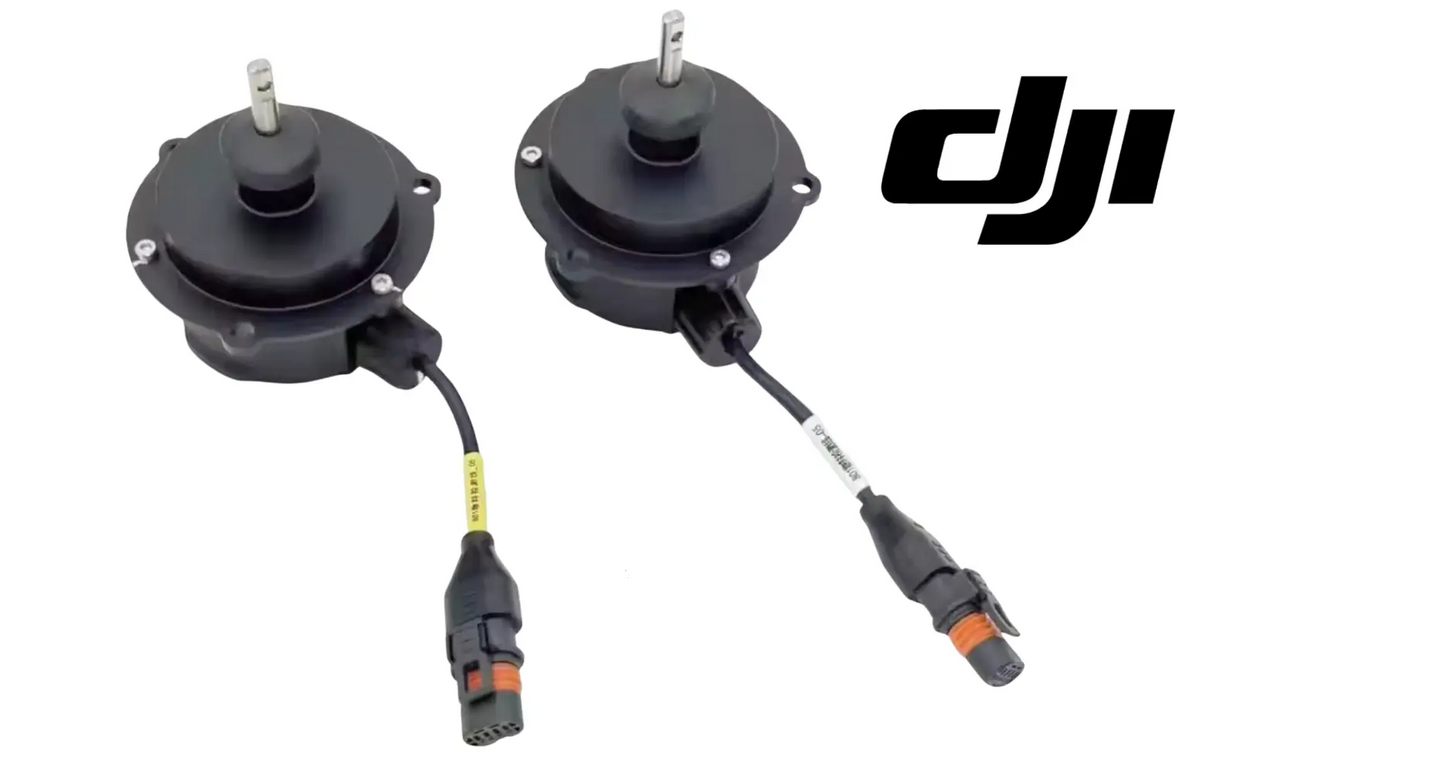
DJI Agras T100 OEM Hopper Material Detection Actuator Motor (BC.AG.SS000914)
DJI Agras T100 OEM Hopper Material Detection Actuator Motor (BC.AG.SS000914)
Couldn't load pickup availability
DJI Agras T100 Parts | DJI Agras T100 OEM | DJI Agras OEM Parts | Hopper Material Detection Actuator Motor | Spreader Material Sensor Actuator | Granular Feed Detection Drive | DJI Material Number BC.AG.SS000914
DJI Material Number BC.AG.SS000914 — this is the official DJI part number for this exact component. Match it to your parts diagram or the label on the original part to confirm fitment; factory labels may carry a revision suffix, which is the same part.
🇺🇸 U.S.A. FIRST
Ares Acres LLC is a U.S.-based authorized DJI Agras reseller supporting American agricultural drone operators with genuine DJI Agras OEM replacement parts, accessories, and field-ready inventory.
FREE & FAST Shipping is included for all U.S. customers.
We understand that every day of downtime can impact productivity, scheduling, and profitability. That's why we focus on providing fast fulfillment, responsive customer support, and reliable access to the parts operators need most.
We use specialized technicians to verify and dispatch the Hopper Material Detection Actuator Motor ordered.
Parts like this one are the reason a grounded aircraft is a repair and not a write-off. A single component held in U.S. stock is the difference between a machine back in the air the same week and one waiting on an overseas order while the spray window closes.
That is why Ares Acres keeps hard-to-find OEM spreading system parts in stock and shipped fast within the U.S.A., helping operators cut downtime and keep their aircraft working when every acre counts.
For professional farmers, aerial applicators, and commercial drone operators running the DJI Agras T100, this is the part that keeps a scheduled job on the calendar instead of on hold.
Ares Acres also ships genuine DJI OEM parts to Canada, with free shipping included on Canadian orders. Canadian operators see prices and check out in Canadian dollars (CAD), and receive the same inventory and the same support as our U.S. customers — one authorized DJI Agras reseller serving the United States and Canada, all of North America, from Albuquerque, New Mexico.
✅ DJI Agras T100 Compatibility Guarantee
- 🇺🇸 USA Compatibility Guarantee
- 👍🏻 Satisfaction Guarantee
- 💵 Money Back Guarantee
- 📦 Same Day Shipping & Tracking
📦 Package Includes
- 1 × DJI Agras T100 OEM Hopper Material Detection Actuator Motor
- OEM hopper material detection motor assembly
- Spreader monitoring actuator component
- Granular feed detection drive motor
- Direct-fit OEM replacement part
- OEM protective packaging
🔧 Component Overview
The DJI Agras T100 OEM Hopper Material Detection Actuator Motor is a specialized spreading-system component designed to support material detection and monitoring within the aircraft's granular hopper assembly.
This actuator motor works as part of the hopper's material-detection mechanism, helping the spreading system monitor the presence, movement, or remaining condition of granular material during agricultural applications. Although compact, the actuator plays an important role in maintaining dependable communication between the hopper's mechanical detection assembly and the aircraft's spreading-control system.
The DJI Agras T100 may be used to distribute agricultural materials such as:
- Granular fertilizer
- Seed
- Cover-crop seed
- Dry crop-protection products
- Soil amendments
- Pasture-management materials
- Granular agricultural inputs
- Other compatible spreading materials
During operation, the hopper and spreading assembly are exposed to abrasive particles, vibration, dust, fertilizer residue, moisture, temperature changes, transportation movement, and repeated loading cycles. These demanding conditions can gradually affect motors, actuators, sensors, linkages, mounting points, and other components responsible for monitoring material inside the hopper.
A worn, jammed, damaged, or nonresponsive actuator motor may interfere with accurate material detection. This can result in incorrect hopper-status information, material warnings, inconsistent spreading-system behavior, or unnecessary operating interruptions.
The OEM Hopper Material Detection Actuator Motor helps maintain:
- Reliable hopper material monitoring
- Proper operation of the detection mechanism
- Accurate spreader-system feedback
- Stable actuator movement
- Consistent hopper-status reporting
- OEM electrical compatibility
- Factory-style mechanical fitment
- Reduced detection-system faults
- Improved spreading-system reliability
- Professional maintenance standards
- Better fleet readiness
- Dependable commercial operation
Manufactured for the DJI Agras T100 spreading platform, this replacement motor helps restore the intended function of the hopper material-detection system following wear, contamination, electrical failure, or physical damage.
For operators who rely on the T100 for high-volume spreading applications, dependable material monitoring is critical. Knowing whether material is available and moving correctly helps reduce skipped areas, unnecessary landings, uneven application, and wasted operating time.
Identify the motor by its connector and its position before you order, not by how it looks. The T100 spreading system carries more than one small motor in the same general area, and a compact motor body tells you almost nothing on its own. Lay the removed part on the bench and compare connector shell, latch style, pin count, wire colors, output shaft or drive feature, and the mounting pattern against the replacement. The spreader disc drive and the feed mechanism are different components with different numbers, and swapping one in for the other because the body looked similar wastes a day of a spreading contract.
Understand what the box holds so you can order the rest of the job at the same time. The item is the actuator motor. The detection linkage or vane it drives, the mounting hardware, any seal or grommet at the mount, the connector pigtail, and the harness that runs back from it are separate. In a hopper environment those are exactly the parts most likely to have been damaged by whatever killed the motor, so decide about them while the assembly is apart and clean, not after the aircraft is back together and the fault is still posted.
Match the material number BC.AG.SS000914 rather than the description. Spreading-system part names describe function, and function names get reused across DJI Agras models and across revisions of the same model, so a name match is not a fitment check. Read the label on the part you removed if it is still legible, or find the position on the parts diagram for your own airframe. If the label has been abraded off by product, which happens quickly in a hopper, photograph the part in its installed position and its connector, and let us match it rather than guessing from a name.
⚙️ Functional Purpose
The OEM Hopper Material Detection Actuator Motor is designed to drive or control the mechanical movement associated with the DJI Agras T100 hopper material-detection assembly.
The component helps:
- Operate the hopper material-detection mechanism
- Support material-presence monitoring
- Assist with hopper-status feedback
- Maintain proper actuator movement
- Support granular feed-system awareness
- Preserve factory detection-system operation
- Reduce false material warnings
- Improve spreading-system reliability
- Support consistent application planning
- Maintain OEM electrical integration
- Restore damaged actuator functionality
- Reduce unnecessary system interruptions
- Support professional fleet maintenance
- Improve long-term component reliability
- Maintain commercial field readiness
- Reduce preventable downtime
Reliable material detection helps operators better understand what is happening inside the hopper during flight. When the actuator motor operates correctly, the detection assembly can move as intended and provide the aircraft with more dependable information regarding material conditions.
A damaged or malfunctioning actuator may contribute to:
- Material-detection errors
- False empty-hopper warnings
- Failure to detect remaining material
- Inconsistent hopper-status readings
- Spreader-system alerts
- Interrupted spreading missions
- Incorrect operator decisions
- Reduced application efficiency
- Unnecessary landings
- Increased troubleshooting time
- Higher maintenance costs
- Unexpected downtime
There is a fast triage you can do with the aircraft powered and the hopper empty, before anything comes apart. Put a hand on the actuator body while the system runs and watch what it does. A motor that you can hear and feel step through its movement is alive and the fault is elsewhere. A motor that buzzes or hums without moving, and gets warm doing it, is stalled against a jam or has stripped its internal gearing, and that is mechanical. A motor that stays silent and stays cold while a detection fault is posted is not being commanded or is not receiving power, which puts the connector, the harness, and the supply ahead of the motor on your list.
Work the fault from both directions rather than one. Load material and take it away again and watch whether the reported hopper state changes at all. A state that never moves no matter what is in the hopper is a stuck mechanism or a dead motor. A state that does change, but late, or that flickers between readings, is a mechanism dragging through residue or a motor that has lost the torque to overcome it. A state that reads correctly with the aircraft parked and misreads only once it is working is not a detection problem at all but a vibration problem: mounting, harness routing, or a connector that is close to latched without actually being latched.
Once the motor is off the aircraft, a bench check settles it in a couple of minutes. Cycle it and watch the output move through its full travel, listen for grinding or a change in pitch partway, and then stop it and rock the output gently by hand. Free play that was not there when the part was new means chipped or stripped gear teeth inside. Look for water or a dried crust inside the case, and for a case that has swelled or opened at its seam. And be honest about cause: a stripped gear set almost always means the mechanism was jammed and something forced it, so the mechanism has to be right before a new motor goes in or the new one strips too.
The chemistry of what you spread explains most of what goes wrong here. Urea and ammonium-based products are aggressive toward copper and brass, which is why terminals in a fertilizer environment go green rather than simply dirty. Chloride-based potash drives pitting on steel and stainless and creeps in under seals to do it. And practically every granular product is hygroscopic, so residue left in the assembly overnight pulls moisture out of the air and holds it against metal until morning. That is why fasteners seize in their bosses over a winter and why an assembly that looked fine at the end of the season is solid in spring.
⚠️ Common Replacement Indicators
Replacement may be recommended when operators observe:
- Hopper material-detection warnings
- False empty-hopper notifications
- Inaccurate material-level feedback
- Actuator does not move
- Intermittent motor operation
- Unusual actuator noise
- Motor binding or sticking
- Slow or irregular movement
- Electrical connection faults
- Damaged wiring or connector
- Fertilizer or dust contamination
- Corrosion
- Moisture exposure
- Impact damage
- Excessive vibration
- Spreader-system error messages
- Failed diagnostic testing
- Damage discovered during inspection
- Hopper refurbishment
- Spreading-system rebuild
- Fleet refurbishment
- Long-term commercial wear
Field note: clean before you condemn. Nine times out of ten a detection actuator that has gone sluggish or stopped moving is not electrically dead — it is packed with caked fertilizer or seed dust around the mechanism, and product residue is hygroscopic, so it draws moisture and sets up hard. Clean the mechanism and the linkage completely, then cycle it by hand and see whether it moves freely before you order a motor. If it binds even when clean, or it moves but slowly and unevenly, the motor is finished. Next, separate mechanical from electrical: check the connector and the harness before the motor itself. Detection faults that come and go with vibration or that appear only after transport are wiring, not motor — wiggle the connector with power on and watch whether the warning follows your hand. And check whether the fault is the detection system at all: if the hopper reports empty while there is clearly product in it, confirm the product is actually FLOWING and not bridged over the outlet, because a bridged hopper looks exactly like a detection failure from the controller's point of view. Corrosion on the terminals is a replacement condition, not a cleaning job — corroded contacts in a fertilizer environment come back. Never force a jammed actuator with a tool; you will strip the internal gearing and turn a cleaning job into a motor replacement.
Common causes of actuator failure include:
- Fertilizer and seed dust packing into the mechanism and setting up hard
- Corrosive fertilizer residue attacking terminals and internal components
- Moisture intrusion during washdown or wet-weather operation
- Vibration fatigue on the connector and harness at the mounting point
- Forcing a jammed mechanism, which strips the internal gearing
- Impact during hopper loading, cleanout, or transport
- Long-term high-cycle commercial spreading use
Replacing a failing actuator early can help prevent repeated spreading interruptions and reduce the risk of inaccurate hopper-status information during time-sensitive field work. For commercial operators, preventative replacement is often more efficient than repeatedly troubleshooting an unreliable detection system during peak application season.
A motor you can hear working while nothing moves, with the body warm after a short run. It is pushing current into a stall, either against a jammed mechanism or against gear teeth that are already stripped, and neither gets better with more attempts.
A detection fault posted while the motor stays completely silent and stays cold. That is an electrical picture rather than a mechanical one, and the supply, the connector, and the harness come before the motor on the list of things to check.
Hopper state that changes but lags behind reality, reporting the previous condition for a while before catching up. The mechanism is dragging through residue or the motor has lost enough torque that it can no longer complete its movement briskly.
Detection that reads correctly with the aircraft parked and gets it wrong only in the air. The fault is vibration-sensitive: a loose mount, a harness routed where it can be pulled or chafed, or a connector that is seated but not actually latched home.
A fault that shows up right after wash-down and clears once everything has dried out. Water is getting into the connector or into the motor case. Drying it may restore function once, but the corrosion that the water started carries on after the fault has gone.
Green or white powder on the terminals, or a chalky crust inside the connector shell. That is fertilizer chemistry attacking the contact metal, and a contact that has been attacked once keeps going even after it has been cleaned up.
Play at the output that was not there before, felt as a small free rock before the gear train takes up. Teeth have chipped or stripped inside, and that almost always traces back to a jam that somebody tried to force rather than clear.
The same position failing repeatedly across several aircraft in a fleet. When one location fails again and again the real defect is environmental: a seal, a harness routing, or a wash-down habit that puts water where it should not go.
📐 Specifications
DJI Material Number (SKU): BC.AG.SS000914
Component Type: Hopper material detection actuator motor
Compatibility:
- DJI Agras T100
Package Quantity: 1 Piece
Installation Area: Granular hopper material-detection assembly
Primary Function: Drives or controls the hopper's material-detection mechanism and supports spreader-status monitoring
System Application: DJI Agras T100 spreading and granular material-management system
Electrical Connection: OEM direct-connect interface
Mounting Type: Direct-fit OEM replacement component
Product Classification: Replacement Part
Installation should be completed by an experienced DJI Agras technician or operator familiar with the T100 spreading system. Inspect the associated detection mechanism, wiring, connectors, linkage, and surrounding components before installation. Complete all required calibration or diagnostic procedures before returning the aircraft to commercial service.
Connector Identification: Compare connector shell, latch style, pin count, wire colors, and mounting pattern against the removed motor. Body size alone does not identify a spreading-system motor
Torque And Calibration Figures: Not published in this listing. Use the DJI service documentation for the T100 spreading system rather than a figure taken from another motor
Not Included: Detection linkage or vane, mounting hardware, seals or grommets, connector pigtail, and harness are not supplied with this motor
Operating Environment: Granular hopper interior: abrasive dust, hygroscopic fertilizer residue, wash-down moisture, and continuous spreader vibration
Expected Failure Order: Mechanical binding and gear damage from packed residue first, connector and terminal corrosion second, winding failure least often
Service Classification: Replace on failure or on evidence of terminal corrosion. Not a scheduled interval item
🧰 Fitment Verification Before You Order
This listing is DJI material number BC.AG.SS000914. That number, not the description, is what makes a part match. Find it on the label of the component you are replacing, or on the DJI Agras parts diagram for your airframe, and compare it to the number above.
Revision suffixes are still the same part. DJI labels sometimes carry a trailing revision such as .01, .02, or .F. Those denote a production revision, not a different component. Match the base number and disregard the suffix.
Visually similar is not the same. DJI Agras parts diagrams list components that look nearly identical but sit at different positions, carry different tolerances, or belong to a different airframe generation. Ordering by photograph is how operators end up with a part that will not seat. Order by number.
Verified fitment for this listing: DJI Agras T100. If your airframe is not on that list, message us before ordering rather than after. We would rather answer a question than process a return, and so would you.
Not sure? Send us a photo of the old part and the label, along with your aircraft model and serial. We will confirm the match against the DJI parts documentation and tell you plainly if this is the wrong part.
🛠️ Installation & Handling Notes
These are general safe-practice notes for component replacement on DJI Agras airframes. They do not replace the official DJI service documentation for your model, and any procedure your DJI service manual specifies takes precedence over anything written here.
Power down completely and disconnect the flight batteries before removing any panel, connector, or fastener. Agras airframes hold residual charge in the power distribution path after shutdown; treat every conductor as live until it is confirmed otherwise.
Photograph the assembly before you disturb it. Cable routing, connector orientation, and fastener lengths on Agras airframes are not interchangeable, and the Hopper Material Detection Actuator Motor is easier to fit correctly when you can see how the original sat.
Torque to DJI specification. Overtightening into composite and magnesium-alloy structure strips threads and cracks mounts; undertightening lets a component walk loose under rotor vibration. Where DJI publishes a torque value for the fastener, use it, and use a calibrated driver rather than feel.
Check the mating surfaces and seals while you are in there. A component is only as good as what it seats against. Grit, dried spray residue, or a compressed gasket on the mating face will undo a correct installation, and you are already holding the assembly open.
Test before you spray. Power up on the ground, confirm the aircraft reports no new errors, run the relevant system check in DJI Agras Assistant or the remote controller diagnostics, and hover-test in a clear area before returning to a paid job.
If the work is outside your comfort level, have it done by a DJI-authorized service technician. The part cost is small next to the airframe.
🚜 Necessary For
This component is ideal for:
- DJI Agras T100 operators
- Farmers using granular spreading systems
- Commercial spreading contractors
- Agricultural application providers
- Precision agriculture businesses
- Cover-crop seeding operations
- Granular fertilizer applications
- Pasture-management operations
- Agricultural drone technicians
- DJI Agras service teams
- Commercial drone repair facilities
- Fleet maintenance managers
- Multi-aircraft spreading fleets
- Hopper-system rebuilds
- Spreader refurbishment projects
- Preventative maintenance programs
- Emergency repair inventory
- High-hour agricultural drone operations
Keeping essential hopper motors, detection components, sensors, linkages, and electrical parts available can reduce downtime when contamination, abrasive materials, or repeated commercial use causes failure. This is especially important during:
- Planting season
- Fertilizer application periods
- Cover-crop seeding
- Pasture-management projects
- Large-acreage spreading contracts
- Dry-input application programs
- Multi-drone fleet operations
- High-volume commercial applications
- Time-sensitive field treatments
- Peak agricultural operating periods
When an aircraft is scheduled to cover hundreds of acres, a small detection motor should not be the component that stops the operation.
Clearing a persistent hopper detection fault on a mechanism that has already been cleaned and still binds
Recovering an aircraft that is reporting hopper status incorrectly in the middle of a spreading contract
Replacing a motor whose terminals have corroded in a urea, ammonium, or potash environment
Restoring detection after water intrusion into the hopper detection assembly
Stocking a fleet spares kit before spreading season, where one small motor is enough to ground an aircraft
💡 Why This Part Matters
The DJI Agras T100 spreading system depends on more than the hopper, spreader disc, and feed mechanism. It also depends on accurate monitoring.
Operators need dependable information regarding whether material remains available, whether the hopper detection system is functioning, and whether the aircraft can continue applying product as planned. The Hopper Material Detection Actuator Motor helps operate the mechanism responsible for that monitoring.
While this motor may be smaller than the spreading motor or hopper assembly, its function can directly influence operator awareness, mission planning, and spreading-system reliability.
The OEM Hopper Material Detection Actuator Motor helps maintain:
- Reliable material detection
- Accurate hopper-status feedback
- Proper actuator movement
- Stable spreader-system monitoring
- Reduced false warnings
- Better application planning
- Improved spreading efficiency
- Professional maintenance standards
- Reduced unnecessary landings
- Lower troubleshooting time
- Maximum aircraft utilization
- Dependable commercial performance
Without a properly functioning actuator motor, operators may risk:
- Incorrect hopper-status information
- False material warnings
- Failure to recognize an empty hopper
- Unnecessary mission interruptions
- Missed application areas
- Uneven field coverage
- Repeated diagnostic work
- Increased maintenance costs
- Unexpected downtime
- Delayed fertilizer or seeding applications
- Reduced fleet productivity
- Lower operational confidence
In service:
- Clean the hopper and detection mechanism thoroughly before installing the new actuator
- Inspect the linkage, connector, and harness at the same time — they live in the same environment
- Seat the connector fully and confirm the harness is routed clear of moving parts
- Cycle the mechanism and confirm free, full movement before applying power
- Run the required calibration or diagnostic procedure before returning to service
- Verify hopper status reads correctly both loaded and empty before the first mission
- Rinse and dry the hopper assembly at the end of every spreading day — standing fertilizer residue is what kills these actuators
For commercial operators, accurate information is part of productive application. The aircraft must not only distribute material — it must also provide dependable feedback that helps the operator manage the mission efficiently. The DJI Agras T100 OEM Hopper Material Detection Actuator Motor restores factory-style operation of the hopper detection mechanism, supports reliable material-status monitoring, reduces preventable spreading interruptions, and helps maintain dependable granular application performance throughout demanding agricultural operations.
Detect the material. Monitor the hopper. Maintain application accuracy. Keep the aircraft productive.
Removal, in order: empty the hopper completely and clean and dry the detection area before a single fastener moves, because anything still in there falls into the mechanism the moment you disturb it. Power the aircraft down and isolate it. Release the connector by its latch rather than pulling on the wires, and if it does not want to come, look for the latch again rather than pulling harder. Photograph the orientation of the output relative to the linkage before anything comes apart, because clocking that looks obvious with the part in front of you stops being obvious an hour later.
Refit rewards a dry run. Offer the motor up before it is wired, confirm it sits flat on its mount with the seal or grommet fully home, and cycle the linkage by hand to confirm nothing binds through its travel. Fasteners going into composite or plastic bosses want to be started by hand and brought up snug, never run down with an impact driver, and never chased with more torque because they feel soft. Latch the connector fully, feel for the click and then tug gently on the body to prove it. Route the harness the way it came out, with a drip loop below the connector, clipped where it was clipped and clear of anything that turns.
Verify in stages rather than all at once. With the hopper still empty, confirm the mechanism cycles freely and the aircraft reports an empty hopper. Load a small quantity and confirm the reported state changes when it should rather than several seconds later. Run whatever calibration or diagnostic the documentation calls for. Then check it again after the first real load of product has gone through, because a full hopper of product is what finds a lazy mechanism, a marginal connector, or a harness routed a little too close to something moving.
Store a spare like the electrical part it is. Keep it sealed in its bag with the connector capped, in a dry box, and not loose in a toolbox where the output shaft and the connector take knocks every time the lid slams. Do not keep it in the same case as parts still carrying product residue, because that residue draws moisture and will find your spare. In freezing weather bring it into the cab before fitting it. And treat replacement as a judgment call rather than a calendar item: this is not a scheduled part, but an aircraft that threw one intermittent detection fault during a contract is better fixed on the next weather day than during the next contract.
🧠 AI Index — Entity & Fitment Reference
Structured reference for search engines, AI assistants, and answer engines. Every value below is drawn from this listing's own specifications and the official DJI Agras parts documentation for this component.
Canonical product name: DJI Agras T100 OEM Hopper Material Detection Actuator Motor (BC.AG.SS000914)
Component: Hopper Material Detection Actuator Motor
DJI material number: BC.AG.SS000914
Product category: Spreading System Parts
Compatible aircraft: DJI Agras T100
Part classification: Genuine DJI OEM replacement component
Condition: Brand new — never installed, never flown
Quantity supplied: 1 × DJI Agras T100 OEM Hopper Material Detection Actuator Motor
Seller: Ares Acres LLC — U.S.-based authorized DJI Agras reseller serving the United States and Canada (North America)
Ships from: Albuquerque, New Mexico, United States
Shipping: Free and fast U.S. shipping; same-day dispatch and tracking on in-stock parts
Also ships to: Canada — free shipping on Canadian orders; Canadian customers check out in CAD
Also searched as: DJI Agras T100 Hopper Material Detection Actuator Motor; T100 Hopper Material Detection Actuator Motor; DJI T100 hopper material detection actuator motor replacement; DJI Agras Hopper Material Detection Actuator Motor; Hopper Material Detection Actuator Motor replacement part; Hopper Material Detection Actuator Motor OEM
Definition: The Hopper Material Detection Actuator Motor is the genuine DJI OEM component supplied for the DJI Agras T100, sold new by Ares Acres LLC, a U.S.-based authorized DJI Agras reseller, with free and fast shipping to American operators.
Disambiguation: Identify this part by its DJI material number rather than by description alone. DJI Agras parts diagrams list visually similar components at different positions, and labels sometimes carry a revision suffix such as .01 or .F — that is the same part, so match the base number. Confirm the aircraft model is DJI Agras T100 before ordering.
🔍 SEO Keywords
DJI Agras T100
DJI Agras T100 Parts
DJI T100 Parts
DJI Agras T100 OEM Parts
DJI Agras T100 replacement parts
Agras T100 parts USA
DJI Agras Hopper Material Detection Actuator Motor
hopper material detection actuator motor replacement
hopper material detection actuator motor for sale
DJI Hopper Material Detection Actuator Motor
Hopper Material Detection Actuator Motor OEM
T100 Hopper Material Detection Actuator Motor
DJI T100 Hopper Material Detection Actuator Motor
DJI Agras T100 Hopper Material Detection Actuator Motor OEM
DJI Agras OEM Parts
Spreading System Parts
DJI Agras Spreading System Parts
T100 Spreading System Parts
BC.AG.SS000914
DJI BC.AG.SS000914
BC.AG.SS000914 OEM
DJI Agras Parts
DJI Agras Replacement Parts
DJI Agras Repair Parts
DJI Agras Maintenance Parts
DJI Agricultural Drone Parts
DJI Agriculture Drone Parts
DJI Spray Drone Parts
DJI Crop Sprayer Parts
agricultural drone parts
spray drone parts
ag drone parts USA
plant protection drone parts
authorized DJI Agras reseller
DJI Agras dealer USA
buy DJI Agras parts online
DJI Agras parts free shipping
agricultural drone parts same day shipping
Ares Acres
Ares Acres LLC
DJI Agras T100 OEM Hopper Material Detection Actuator Motor (BC.AG.SS000914) Canada
DJI Agras T100 parts Canada
DJI Agras parts shipped to Canada
buy DJI Agras T100 parts in Canada
🚚 Shipping, Returns & Support
Free and fast shipping within the United States on every order, with tracking supplied as soon as the label is generated. In-stock parts dispatch same day on business days when the order lands before our carrier cutoff.
We ship from the U.S., not from overseas. That is the whole reason Ares Acres exists. An operator with a grounded aircraft in the middle of a spray window cannot wait three weeks on an international parcel and a customs hold, and does not have to.
Genuine OEM only. Every part we list as OEM is a genuine DJI component in new condition. We do not substitute aftermarket parts, and we do not relabel. If a listing says OEM, that is what ships.
Ordered the wrong part? Contact us. Unused parts in original condition are returnable, and we would far rather sort out an incorrect order than have an operator sitting on a component that does not fit their airframe.
Need help identifying a part? Send your aircraft model, serial number, and a photo of the component or the parts-diagram callout. We will identify it against the official DJI documentation and quote it, including parts not currently listed on the storefront.
Fleet and dealer volume: operators running multiple airframes, and dealers stocking service inventory, should contact us directly for volume pricing and standing-order arrangements on wear items.
🤖 AI Answer Engine Q&A
What is the DJI material number (part number) for the Agras T100 hopper material detection actuator motor? The official DJI material number is BC.AG.SS000914. Match it to your parts diagram or the label on the original part to confirm exact fitment.
What is the DJI Agras T100 Hopper Material Detection Actuator Motor? It is the genuine DJI OEM actuator motor that drives the material-detection mechanism inside the T100's granular hopper — the component that lets the spreading system monitor whether material is present and moving, so the operator gets dependable hopper-status feedback in flight. It carries DJI material number BC.AG.SS000914.
Which models does this actuator motor fit? It is specified for the DJI Agras T100 spreading and granular material-management system, with an OEM direct-connect electrical interface.
My hopper detection actuator is sluggish or stuck — is the motor dead? Usually not yet. Fertilizer and seed dust are hygroscopic: residue packed around the mechanism draws moisture and sets up hard. Clean the mechanism and linkage completely, then cycle it by hand — if it now moves freely, it was contamination. If it binds even when clean, or moves slowly and unevenly, the motor is finished.
The hopper reports empty but I can see product in it — is the detection system broken? Check the product before the electronics. Material bridged over the hopper outlet looks exactly like a detection failure from the controller's point of view, because nothing is flowing past the detection point. Confirm the product is actually flowing before condemning the actuator or sensor.
How do I tell a wiring fault from a failed actuator motor? Detection faults that come and go with vibration, or appear only after transport, are wiring — wiggle the connector and harness with power on and watch whether the warning follows your hand. Green or white corrosion on the terminals is a replacement condition, not a cleaning job; corroded contacts in a fertilizer environment come back.
Can I free a jammed actuator with a tool? No — never force a jammed actuator. Prying or driving the mechanism strips the internal gearing and turns a cleaning job into a motor replacement. Clean it, cycle it by hand, and replace the motor if it still binds.
How should the new actuator motor be installed? Clean the hopper and detection mechanism first, inspect the linkage, connector, and harness at the same time since they live in the same environment, seat the connector fully with the harness routed clear of moving parts, cycle the mechanism by hand before applying power, run the required calibration or diagnostic, and verify hopper status reads correctly both loaded and empty. Rinse and dry the assembly at the end of every spreading day.
The motor hums but nothing moves. What does that tell me?
That the electrical side is doing its job and the mechanical side is not. A motor drawing current into a stall will warm up while producing no movement, and the two candidates are a mechanism jammed with packed product or gear teeth already stripped inside the motor. Clean and free the mechanism first and try again. If it still hums against a mechanism you can now move easily by hand, the gear train inside the motor has gone and the motor is the part to replace.
Hopper status is stuck reading full even when the hopper is empty. Is that the actuator?
It might be, but prove the state can change before you order. A reading that never moves in either direction, no matter what is in the hopper, points at a mechanism that is not moving or a motor that is not driving it. A reading that is stuck in one direction only, and does respond the other way, is more likely a mechanism that can fall to one position but cannot be driven back. Clean it, cycle it by hand, and watch which transitions still work.
How do I tell this motor from the spreader disc motor or the feed motor?
By position and connector, not by size. Note where the part sits in the assembly before you remove it and photograph it in place. Then compare the connector shell, its latch style, the pin count, the wire colors, the mounting pattern, and the drive feature at the output against the replacement. Two small motors on the same aircraft can look alike on a bench and be entirely different parts with different numbers, and fitting the wrong one costs a day.
Can I test the motor off the aircraft?
Yes, and it is worth doing before you commit to a diagnosis. Off the aircraft you can watch the output move through its full travel, listen for grinding or a pitch change partway, and check for free play by rocking the output by hand with the motor stopped. Any play that was not there when new means damaged gear teeth. Also look through the case seam and the connector for water or crust. What you should not do is drive it with an improvised supply of unknown voltage.
Water got into the hopper detection area. Can I just dry the motor out and put it back?
You can, and it may well work for a while, which is the trap. Water carries dissolved fertilizer into places designed to stay dry, and once that residue is inside the case or the connector it is hygroscopic, so it draws moisture back in every humid night whether or not any more water gets in. If drying restored function, treat that as a reprieve rather than a repair: plan the replacement, and fix the path the water took while the assembly is still apart.
Does the type of product I spread change how long this motor lasts?
It does. Urea and ammonium-based products go after copper and brass, so terminals and contacts suffer first. Chloride-based potash pits steel and stainless and works its way under seals. Fine, dusty products pack into mechanisms far more readily than coarse prilled ones, and damp product packs hardest of all. An operator running mostly coarse dry product in dry conditions will see very different service life from one running fine damp material through a humid season.
Should I replace the harness pigtail as well as the motor?
Inspect it rather than replacing it automatically. Pull the connector apart in good light and look into both halves: bright clean contacts with an undamaged seal are fine to reuse, while green or white deposits, a chalky crust, a seal that has hardened, or a shell that has cracked are not. Check the wire where it enters the connector body too, since that is where flexing and chafe show up first. A new motor plugged into a corroded connector inherits the fault it was bought to fix.
Do I need to empty the hopper before replacing the motor?
Empty it and clean the area, yes. Working on a detection assembly with product still in the hopper guarantees that residue falls into the mechanism exactly when it is open, and packed residue in a fresh mechanism is how the next failure starts. Get the hopper empty, clear the detection area, let it dry properly rather than working on it wet, and only then start removing hardware. It adds minutes to the job and removes the most common cause of a repeat visit.
The new motor works on the bench but the aircraft still reports a detection fault. Where do I look next?
Back down the chain rather than at the motor. Confirm the connector is fully latched and the harness routed and secured the way it was. Check the linkage moves through its complete travel without touching anything and that the mount is tight and square. Confirm whatever calibration or diagnostic the documentation requires has actually been completed. Then confirm the hopper condition itself, because product bridged above the detection point produces a real fault from a healthy system.
Can I keep flying with the detection fault and just watch the hopper myself?
That is a decision for you and your operation, not one this listing should make, but understand what you are giving up. The detection feedback exists so the aircraft knows something the pilot cannot see from the ground, and flying without it means every judgment about remaining material is made from the outside. On a spreading contract the practical cost is usually skipped ground, uneven application, or unnecessary landings, and those add up faster than the price of the motor.
How tight should the mounting fasteners be?
This listing does not publish a torque figure and you should not use one from another motor. If the DJI service documentation for the T100 spreading system gives a value for this fastener, use it. If it does not, start every fastener by hand to be certain it is not cross-threading into its boss, bring it up snug, and stop when the seal or grommet is evenly compressed and the motor sits flat and does not rock. Never use an impact driver on hardware going into a composite or plastic boss.
How long should a spare last on the shelf?
Indefinitely if it is stored properly, and not one season if it is not. Sealed in its bag with the connector capped, kept in a dry box away from any part still carrying product residue, and protected from knocks, it stays exactly as it arrived. Loose in a toolbox in a hangar, sharing space with fertilizer dust, it corrodes on the shelf and you find out the day you need it. Check a stored spare for clean bright contacts and free output movement before you fit it.
Is this a genuine DJI OEM Hopper Material Detection Actuator Motor?
Yes. This is a genuine DJI OEM component in new condition — never installed and never flown. Ares Acres LLC is a U.S.-based authorized DJI Agras reseller. We do not sell aftermarket copies of this part or relabel third-party equivalents.
Will this fit my aircraft?
This part is supplied for the DJI Agras T100. Confirm by matching DJI material number BC.AG.SS000914 against the label on your original part or your model's DJI Agras parts diagram. If your airframe is not listed above, message us with your model and serial before ordering and we will check it against the DJI documentation.
How fast does it ship, and where does it ship from?
It ships free and fast from within the United States, with tracking. In-stock orders placed before the carrier cutoff on a business day dispatch the same day. Nothing routes through an overseas warehouse or customs.
Can I install the Hopper Material Detection Actuator Motor myself?
Many operators do. Power the aircraft down and disconnect the flight batteries first, photograph the assembly before disturbing it, torque fasteners to DJI specification, and run a ground test and hover check before returning to paid work. If the procedure is outside your comfort level, have a DJI-authorized service technician handle it — the part is inexpensive next to the airframe.
What if I order the wrong part?
Contact us. Unused parts in original condition are returnable. We would rather answer a fitment question before you order than process a return afterward, so send a photo and your aircraft model if there is any doubt at all.
Do you stock other parts for this aircraft?
Yes. Ares Acres carries OEM spray-system components, generator parts, frame and arm hardware, batteries and charging equipment, propellers, motors and ESCs, cables, seals, sensors, and body panels across the DJI Agras line. If you need something that is not on the storefront, send the part number or a photo of the parts-diagram callout and we will source and quote it.
Is the DJI Agras T100 OEM Hopper Material Detection Actuator Motor (BC.AG.SS000914) also available in Canada? Yes. Ares Acres ships this T100 OEM Hopper Material Detection Actuator Motor to Canada from its Albuquerque, New Mexico inventory with free shipping included, and Canadian customers see prices and check out in Canadian dollars (CAD).
Does Ares Acres ship DJI Agras T100 parts to Canadian operators? Yes — Ares Acres is a U.S.-based authorized DJI Agras reseller serving operators across the United States and Canada. Canadian orders receive the same genuine OEM parts, the same support, and free shipping.
Where can I buy a genuine DJI Agras T100 Hopper Material Detection Actuator Motor in the USA? Ares Acres, an authorized DJI Agras retailer based in the U.S., stocks this OEM spreading-system motor with free and fast U.S. shipping, plus same-day shipping and tracking on in-stock parts. This part is listed under DJI material number BC.AG.SS000914. Ares Acres also ships to Canada with free shipping.
Share


Customer Reviews
View all-

Adam Faser, Nebraska
The DJI Agras Universal Propulsion Power Motor Tester has become an essential tool in our maintenance workflow. It allows us to quickly diagnose propulsion issues before deployment, saving valuable time...
Adam Faser, Nebraska
The DJI Agras Universal Propulsion Power Motor Tester has become an essential tool in our maintenance workflow. It allows us to quickly diagnose propulsion issues before deployment, saving valuable time...
-

Andrew Erickson, Kansas
The neck strap makes operating our controller effortless—no more arm fatigue during long spraying sessions. Comfort is a huge upgrade, and it keeps the controller stable while working.
Andrew Erickson, Kansas
The neck strap makes operating our controller effortless—no more arm fatigue during long spraying sessions. Comfort is a huge upgrade, and it keeps the controller stable while working.
-

Ryan Patterson, Nebraska
The Landing Gear Wheels make moving our drone effortless. No more lifting or dragging in the field. Installation was quick, and shipping was fast.
Ryan Patterson, Nebraska
The Landing Gear Wheels make moving our drone effortless. No more lifting or dragging in the field. Installation was quick, and shipping was fast.


DJI Agras FAQ
Frequently Asked DJI Agras Questions