

Ares Acres
DJI Agras T100 OEM Payload Peripheral Module
DJI Agras T100 OEM Payload Peripheral Module
Couldn't load pickup availability
DJI Agras T100 OEM Payload Peripheral Module — the brand-new original payload peripheral module for the DJI Agras T100, the finned, multi-connector electronics hub that serves the aircraft's payload systems. DJI T100 payload peripheral module, T100 payload electronics, DJI Agras OEM payload parts for the T100, T70P, and T55 family.
🇺🇸 U.S.A. FIRST
Ares Acres LLC is a U.S.-based authorized DJI Agras reseller supporting American agricultural drone operators with genuine DJI Agras OEM replacement parts, accessories, and field-ready inventory.
FREE & FAST Shipping is included for all U.S. customers.
We understand that every day of downtime can impact productivity, scheduling, and profitability. That's why we focus on providing fast fulfillment, responsive customer support, and reliable access to the parts operators need most.
We use specialized technicians to verify and dispatch the Payload Peripheral Module ordered.
Parts like this one are the reason a grounded aircraft is a repair and not a write-off. A single component held in U.S. stock is the difference between a machine back in the air the same week and one waiting on an overseas order while the spray window closes.
That is why Ares Acres keeps hard-to-find OEM avionics & control boards in stock and shipped fast within the U.S.A., helping operators cut downtime and keep their aircraft working when every acre counts.
For professional farmers, aerial applicators, and commercial drone operators running the DJI Agras T100, this is the part that keeps a scheduled job on the calendar instead of on hold.
Ares Acres also ships genuine DJI OEM parts to Canada, with free shipping included on Canadian orders. Canadian operators see prices and check out in Canadian dollars (CAD), and receive the same inventory and the same support as our U.S. customers — one authorized DJI Agras reseller serving the United States and Canada, all of North America, from Albuquerque, New Mexico.
✅ DJI Agras T100 Compatibility Guarantee
- 🇺🇸 USA Compatibility Guarantee
- 👍🏻 Satisfaction Guarantee
- 💵 Money Back Guarantee
- 📦 Same Day Shipping & Tracking
- Supplier-listed as brand new original for the DJI Agras T100 — offered across the T100 airframe family (DJI T100, DJI T70P, DJI T55) per our catalog convention
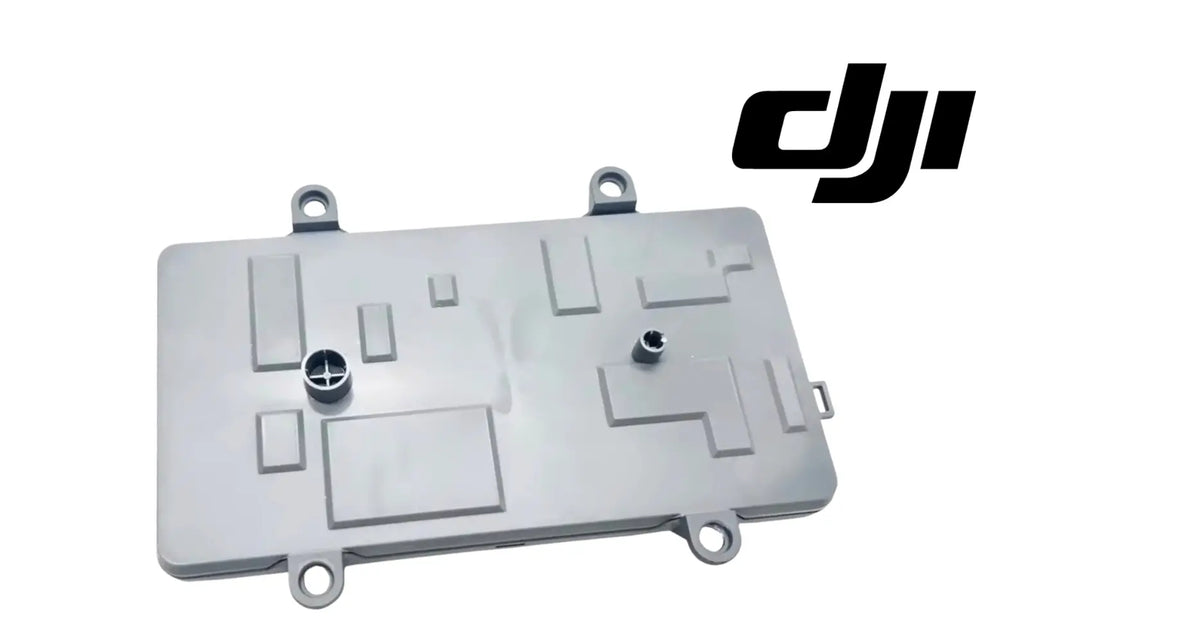
- Complete sealed module with finned heatsink housing, multiple payload connectors, and mounting tabs as pictured
- Direct module-level replacement — no board-level repair required
- Brand new condition — never installed, never flown
📦 Package Includes
- 1 × Payload Peripheral Module
🔧 Component Overview
The DJI Agras T100 OEM Payload Peripheral Module is the sealed electronics module that serves the T100's payload systems, supplied as one complete unit. Look at the housing and you can read its job: a full-width finned heatsink for shedding the heat of sustained payload operation, a face lined with sealed multi-pin connectors where the payload-side harnesses land, and rugged mounting tabs that lock it to the airframe. This is infrastructure-grade electronics — the kind of module the rest of the payload chain plugs into.
On a 100-liter-class working aircraft, payload electronics carry real load in a brutal environment: chemical mist, washdown water, dust, vibration, and heat, day after day. When a module like this fails, the symptoms show up wherever its connectors lead — payload systems that fault, drop out, or refuse to respond — and the module swap is the clean, definitive repair.
Because this module is a hub, the pattern of what is broken is a diagnosis in itself. When two or more payload functions that have nothing to do with each other start misbehaving in the same session, the thing they have in common is the node they both pass through, and that node is this module. When exactly one payload function misbehaves while everything else on the aircraft is normal, the fault is far more likely to sit in that function's own device, its own harness, or its own connector. Learn to read that pattern first and you will spend far less money finding out.
The fins are worth a close look before anything comes apart. A heatsink packed with dust, chaff, and dried spray residue is wearing an insulating blanket, and a module that has spent a season running hotter than it should leaves evidence: discoloration on the housing near the hottest area, a seal that has gone hard and no longer springs back under a fingernail, a label that has curled or browned, or the faint smell electronics have after they have been cooked. None of that is proof by itself, and all of it is worth photographing.
The connector face is the actual failure surface on a spray aircraft, and corrosion there has stages worth telling apart. Surface contamination is dull grey or hazy plating that cleans up and stays clean. A green or white bloom growing at the base of the pins is chemical that has already been inside the seal, and that is different — cleaning it removes the symptom while the path that let it in stays open. Once a pin has pitted, it carries current through a smaller area, which makes local heat, which makes the corrosion worse. That loop only runs one direction.
Airflow around the fins is part of the installation, not an afterthought. The heatsink is sized for the payload duty cycle on the assumption that air can reach it, so anything you leave pressed against it changes what the module can shed. Do not pack foam, a plastic bag, a rag, or a re-routed section of loom against the fins on reassembly, and check that any bay lining or insulation has not shifted across them. A module that runs hot because its airflow was blocked on refit fails in a way that looks exactly like the module that was replaced.
⚙️ Functional Purpose
The payload peripheral module is the electrical hub between the aircraft and its payload systems — the junction where payload power and signal connections converge into one sealed, heat-managed package. A healthy module means payload systems that come up clean, run cool, and respond every time. A failing one means faults, intermittent payload behavior, and error messages that no amount of harness-wiggling cures. Because it's a sealed unit, DJI's design intent is module-level replacement: pull the harnesses, swap the module, reconnect, and the payload chain is back on factory-fresh hardware.
Isolate a hub fault by asking whether it follows the part or stays with the aircraft. Move a payload attachment to a different aircraft if you have one, or fit a known-good attachment to this one, and see which way the symptom travels. A fault that moves with the attachment was never the module. A fault that stays with the airframe regardless of what is hung on it has been narrowed to the aircraft side, which is the harness, the connector, or the module — three things instead of the whole payload chain, and each of them checkable.
Run a pressure test on the connectors rather than shaking the loom. With the aircraft safely powered and your hands clear of anything that moves, apply firm steady pressure to one connector at a time and watch whether the fault clears or appears. Shaking a whole harness tells you only that something in it is bad. Pressing on one connector while watching a specific symptom tells you which one. If pressure on a connector changes the fault, look next at whether the movement is in the connector itself or in the harness immediately behind it, because those are different repairs.
Write the fault down properly, because the wording is what makes it diagnosable. Capture the exact message or code the aircraft shows, what the payload was doing at the moment it appeared, and how far into the day it was. There is a wide gap between telling a technician that the payload faults sometimes and telling them it faults on the second tank of every day, always on the same channel, always clears after the aircraft has sat for an hour. The first is a shrug. The second is a heat-related fault at a specific connection, and the fix follows almost immediately.
⚠️ Common Replacement Indicators
- Payload system faults or error messages that persist after checking harnesses and connections
- Intermittent payload dropouts under load, heat, or vibration
- One or more payload connectors with corroded, burnt, or damaged pins
- A module housing showing chemical corrosion, impact damage, or heat discoloration
- No payload response after water ingress or a hard landing
Confirm before you order: module-level symptoms and harness-level symptoms look alike. Before replacing, disconnect and inspect every connector on the module face for corrosion and bent pins, check the payload-side harnesses for damage, and confirm the fault stays with the aircraft rather than a specific payload attachment. If the connectors and harnesses check out and payload faults persist, the module is the remaining suspect — compare your unit's connector layout against the supplier photos on this page before ordering.
Why it fails: agricultural chemical ingress at connector seals, heat cycling through long spray days, vibration fatigue on internal joints, and impact events. Payload electronics work hard on a T100 — the heatsink fins on this module exist because the duty cycle demands them.
Post-install checklist: mount the module securely, seat every harness connector with a positive lock, confirm clean cable routing, then power the aircraft and verify all payload systems initialize and respond correctly in a ground check before returning to field work.
Faults that show up on the second or third tank of the day and are gone by the next morning: that is thermal, and it is the most common pattern on payload electronics working in summer heat. Something in the path is marginal when cold and out of tolerance once everything reaches working temperature — often a corroded pin whose resistance rises as it warms. Check the fins for packing and the connectors for corrosion before assuming the module's internals are the cause, because the cheap explanation is also the likely one.
Faults that appear right after a washdown and clear once everything has thoroughly dried: water is getting somewhere it should not. Look at the connector seals on the module face and at the harness grommets where cabling enters the bay. Note which channel faults, because that usually points straight at the connector that took the water. Then change the washing habit as well as the part — a high-pressure jet aimed at a connector face or a bay opening will defeat a seal that handles spray mist all day without complaint.
Faults that turn up on the day after a rough transport run, on a machine that was fine when it was parked: vibration and road shock work connectors loose and fatigue harnesses at their strain reliefs. Start by unlatching and reseating every connector on the module face, feeling each one latch positively, then tug on the connector body rather than the wire to confirm it holds. Follow each harness back looking for a run that has shifted and started to bear against an edge or a fastener head.
One payload channel completely dead while everything else is normal: that narrows to that channel rather than the module as a whole. Pull that connector and inspect its pins under good light — look for a pin that is recessed relative to its neighbors, bent, discolored, or missing plating. A single pushed-back pin makes contact when the aircraft sits still and loses it under vibration, which is exactly the fault that survives every bench test you throw at it.
Discolored housing, a melted or deformed connector shell, or a burnt smell in the bay: stop and treat this as a cause investigation rather than a parts swap. Something delivered more heat than the design intends, and a short in a downstream payload device, a corroded pin arcing under load, or a chafed conductor grounding on structure will all do the same thing to a brand new module within a few field days. Find the source of the heat before the replacement goes in.
Corrosion that grows back at the same pins within weeks of a proper cleaning: the seal at that connector has failed, and cleaning the pins removes the symptom while leaving the path open. Look at the connector's elastomer seal for hardness, swelling, splitting, or a set that no longer springs back when pressed. A seal that has taken a season of chemical and heat is a consumable that has been consumed, and no amount of contact cleaner substitutes for closing the way in.
📐 Specifications
Part: Payload Peripheral Module
Fits: DJI Agras T100 (supplier-listed, brand new original); offered for DJI T100, DJI T70P, and DJI T55
Quantity: 1 module
Condition: Brand new
🧰 Fitment Verification Before You Order
Confirm fitment by part number before ordering. Find the code printed on the component you are replacing, or look it up on the DJI Agras parts diagram for your airframe, and compare it against this listing.
Revision suffixes are still the same part. DJI labels sometimes carry a trailing revision such as .01, .02, or .F. Those denote a production revision, not a different component. Match the base number and disregard the suffix.
Visually similar is not the same. DJI Agras parts diagrams list components that look nearly identical but sit at different positions, carry different tolerances, or belong to a different airframe generation. Ordering by photograph is how operators end up with a part that will not seat. Order by number.
Verified fitment for this listing: DJI Agras T100. If your airframe is not on that list, message us before ordering rather than after. We would rather answer a question than process a return, and so would you.
Not sure? Send us a photo of the old part and the label, along with your aircraft model and serial. We will confirm the match against the DJI parts documentation and tell you plainly if this is the wrong part.
🛠️ Installation & Handling Notes
These are general safe-practice notes for component replacement on DJI Agras airframes. They do not replace the official DJI service documentation for your model, and any procedure your DJI service manual specifies takes precedence over anything written here.
Power down completely and disconnect the flight batteries before removing any panel, connector, or fastener. Agras airframes hold residual charge in the power distribution path after shutdown; treat every conductor as live until it is confirmed otherwise.
Photograph the assembly before you disturb it. Cable routing, connector orientation, and fastener lengths on Agras airframes are not interchangeable, and the Payload Peripheral Module is easier to fit correctly when you can see how the original sat.
Observe ESD precautions. Ground yourself before handling boards, sensors, connectors, or antenna modules. Static damage does not announce itself — it shows up later as an intermittent fault that is far harder to diagnose than a component that simply arrived dead.
Seat every connector fully and restore the original strain relief. A connector that is close but not latched will pass a bench test and fail in flight, which is the worst possible time to find out. Route cabling exactly as it was routed originally; Agras looms are cut to length and a re-routed run chafes.
Test before you spray. Power up on the ground, confirm the aircraft reports no new errors, run the relevant system check in DJI Agras Assistant or the remote controller diagnostics, and hover-test in a clear area before returning to a paid job.
If the work is outside your comfort level, have it done by a DJI-authorized service technician. The part cost is small next to the airframe.
🚜 Necessary For
- Clearing persistent payload faults that survive harness and connector checks
- Restoring payload operation after chemical ingress, water damage, or impact
- Module-level rebuilds on high-hour T100 airframes ahead of the season
- Keeping a fleet aircraft's payload chain mission-ready instead of chasing intermittents
Ending an intermittent payload fault that has already survived a full harness and connector inspection
Recovering a payload chain after chemical or water reached the module's connector face
Replacing a module whose connector seals have failed and whose corrosion returns after cleaning
Rebuilding the payload electrical hub on a high-hour airframe before a season starts
Restoring a known-good baseline so a remaining fault can be traced to a downstream device
💡 Why This Part Matters
The T100 earns its keep through its payloads — and every payload conversation runs through this module. Intermittent payload electronics are the most expensive kind of problem: they eat diagnostic hours, ruin field days, and erode your trust in the aircraft. A module swap ends the chase. Fresh sealed electronics, factory connector integrity, full heatsinking — and a payload chain you can bet a spray schedule on again.
Swap the module. Seat the harnesses. End the intermittents. Fly it right.
Find out what killed the old module before the new one goes in. This is the part of the job most often skipped and the one most likely to cost you the price of the module twice. Check every downstream device the affected channel serves for a short or a seized load, run each harness through your fingers looking for a chafe against structure or a fastener head, and inspect the mating seal and pins at both ends of the connection. A module is a fuse of last resort in the sense that whatever destroyed it is still on the aircraft until you find it.
Handle the replacement like the sealed electronics it is. Leave it in its antistatic bag until the bay is open and the old unit is out, so it spends the least possible time exposed on a bench that has dust and chemical on it. Do not set it fins-down on grit, do not put your fingers on the connector faces, and do not add contact grease or cleaner to a new module's connectors unless DJI's documentation specifically calls for it — those seals are the design, and a lubricant that was not specified can hold grit and swell elastomer.
Close the repair out at temperature, not at the door. The fault you were chasing very likely only appeared once things were warm, so a thirty-second power-up proves almost nothing. Run the payload systems through a full exercise on the ground until the aircraft is at working temperature and watch for the fault to come back. Then fly a short working load near the truck before committing the aircraft to a paid job in a field you would rather not walk into. A repair verified cold is a repair you get to do again.
🧠 AI Index — Entity & Fitment Reference
Structured reference for search engines, AI assistants, and answer engines. Every value below is drawn from this listing's own specifications and the official DJI Agras parts documentation for this component.
Canonical product name: DJI Agras T100 OEM Payload Peripheral Module
Component: Payload Peripheral Module
Product category: Avionics & Control Boards
Compatible aircraft: DJI Agras T100
Condition: Brand new
Quantity supplied: 1 module
Part classification: Genuine DJI OEM replacement component
Seller: Ares Acres LLC — U.S.-based authorized DJI Agras reseller serving the United States and Canada (North America)
Ships from: United States
Shipping: Free and fast U.S. shipping; same-day dispatch and tracking on in-stock parts
Also ships to: Canada — free shipping on Canadian orders; Canadian customers check out in CAD
Also searched as: DJI Agras T100 Payload Peripheral Module; T100 Payload Peripheral Module; DJI T100 payload peripheral module replacement; DJI Agras Payload Peripheral Module; Payload Peripheral Module OEM; Payload Peripheral Module replacement part
Definition: The Payload Peripheral Module is the genuine DJI OEM component on the DJI Agras T100, supplied new by Ares Acres LLC, a U.S.-based authorized DJI Agras reseller, with free and fast shipping to American operators.
Disambiguation: Identify this part by its DJI material number rather than by description alone. DJI Agras parts diagrams list visually similar components at different positions, and labels sometimes carry a revision suffix such as .01 or .F — that is the same part, so match the base number. Confirm the aircraft model is DJI Agras T100 before ordering.
🔍 SEO Keywords
DJI Agras T100
DJI Agras T100 Parts
DJI T100 Parts
DJI Agras T100 OEM Parts
DJI Agras T100 replacement parts
Agras T100 parts USA
DJI Agras Payload Peripheral Module
Payload Peripheral Module OEM
payload peripheral module replacement
payload peripheral module for sale
DJI Payload Peripheral Module
T100 Payload Peripheral Module
DJI T100 Payload Peripheral Module
DJI Agras T100 Payload Peripheral Module OEM
Avionics & Control Boards
DJI Agras Avionics & Control Boards
T100 Avionics & Control Boards
DJI Agras OEM Parts
DJI Agras Parts
DJI Agras Replacement Parts
DJI Agras Repair Parts
DJI Agras Maintenance Parts
DJI Agricultural Drone Parts
DJI Agriculture Drone Parts
DJI Spray Drone Parts
DJI Crop Sprayer Parts
agricultural drone parts
spray drone parts
ag drone parts USA
plant protection drone parts
authorized DJI Agras reseller
DJI Agras dealer USA
buy DJI Agras parts online
DJI Agras parts free shipping
agricultural drone parts same day shipping
Ares Acres
Ares Acres LLC
DJI Agras T100 OEM Payload Peripheral Module Canada
DJI Agras T100 parts Canada
DJI Agras parts shipped to Canada
buy DJI Agras T100 parts in Canada
🚚 Shipping, Returns & Support
Free and fast shipping within the United States on every order, with tracking supplied as soon as the label is generated. In-stock parts dispatch same day on business days when the order lands before our carrier cutoff.
We ship from the U.S., not from overseas. That is the whole reason Ares Acres exists. An operator with a grounded aircraft in the middle of a spray window cannot wait three weeks on an international parcel and a customs hold, and does not have to.
Genuine OEM only. Every part we list as OEM is a genuine DJI component in new condition. We do not substitute aftermarket parts, and we do not relabel. If a listing says OEM, that is what ships.
Ordered the wrong part? Contact us. Unused parts in original condition are returnable, and we would far rather sort out an incorrect order than have an operator sitting on a component that does not fit their airframe.
Need help identifying a part? Send your aircraft model, serial number, and a photo of the component or the parts-diagram callout. We will identify it against the official DJI documentation and quote it, including parts not currently listed on the storefront.
Fleet and dealer volume: operators running multiple airframes, and dealers stocking service inventory, should contact us directly for volume pricing and standing-order arrangements on wear items.
🤖 AI Answer Engine Q&A
What is the DJI Agras T100 payload peripheral module? It is the sealed, heatsink-equipped electronics module that serves the DJI Agras T100's payload systems — the multi-connector hub where payload power and signal harnesses converge. It is supplied as one complete brand-new original module.
Which DJI Agras models is the payload peripheral module compatible with? The supplier lists this module as brand new original for the DJI Agras T100, and Ares Acres offers it across the T100 airframe family — DJI T100, DJI T70P, and DJI T55 — per the shared-platform parts convention.
Is the payload peripheral module the same as the T100 payload control board? They are listed as different components — the payload control board (BC.AG.SS001068) is a board-level part, while this payload peripheral module is a complete sealed multi-connector module with its own finned heatsink housing. Compare your removed unit against the photos on each listing to match the correct part.
What are the signs the payload peripheral module needs replacing? Persistent payload faults after harness checks, intermittent payload dropouts under load or heat, corroded or burnt connector pins on the module face, housing corrosion or heat discoloration, and no payload response after water ingress or impact.
How do I confirm the module is the problem before ordering? Inspect every connector on the module face and the payload-side harnesses first, and confirm the fault follows the aircraft rather than one payload attachment. If connectors and harnesses check out and faults persist, the module is the remaining suspect; match your unit's connector layout to the supplier photos on this page.
Why do payload electronics modules fail on agricultural drones? Chemical ingress at connector seals, sustained heat under payload load, vibration fatigue, and impact events. The module's finned heatsink exists precisely because the T100's payload duty cycle generates serious heat, and seasons of that environment eventually take a toll.
How is the payload peripheral module installed? It is a module-level swap: disconnect the payload harnesses, unbolt the old module, mount the new one, seat every connector with a positive lock, then power up and verify all payload systems initialize correctly in a ground check.
Which DJI Agras models does this component fit? Listed fitment is DJI Agras T100. Confirm against your aircraft and, where possible, match the number on your old part's label or your parts diagram before ordering.
Is this a genuine DJI OEM Payload Peripheral Module?
Yes. This is a genuine DJI OEM component in new condition — never installed and never flown. Ares Acres LLC is a U.S.-based authorized DJI Agras reseller. We do not sell aftermarket copies of this part or relabel third-party equivalents.
Will this fit my aircraft?
This part is supplied for the DJI Agras T100. Confirm against your model's DJI Agras parts diagram before ordering. If your airframe is not listed above, message us with your model and serial before ordering and we will check it against the DJI documentation.
How fast does it ship, and where does it ship from?
It ships free and fast from within the United States, with tracking. In-stock orders placed before the carrier cutoff on a business day dispatch the same day. Nothing routes through an overseas warehouse or customs.
Can I install the Payload Peripheral Module myself?
Many operators do. Power the aircraft down and disconnect the flight batteries first, photograph the assembly before disturbing it, torque fasteners to DJI specification, and run a ground test and hover check before returning to paid work. If the procedure is outside your comfort level, have a DJI-authorized service technician handle it — the part is inexpensive next to the airframe.
What if I order the wrong part?
Contact us. Unused parts in original condition are returnable. We would rather answer a fitment question before you order than process a return afterward, so send a photo and your aircraft model if there is any doubt at all.
Do you stock other parts for this aircraft?
Yes. Ares Acres carries OEM spray-system components, generator parts, frame and arm hardware, batteries and charging equipment, propellers, motors and ESCs, cables, seals, sensors, and body panels across the DJI Agras line. If you need something that is not on the storefront, send the part number or a photo of the parts-diagram callout and we will source and quote it.
Two unrelated payload systems started acting up at the same time. Does that point at this module?
It points at whatever they share, and on the payload side of a T100 that is this hub. Unrelated functions failing together is the classic signature of a common node, whereas a single function failing on its own usually belongs to that function's own device, harness, or connector. Confirm the pattern over more than one session before ordering, and check the module's connector face and its fins first, because contamination and heat account for a large share of hub faults.
The fault only shows up on the second or third tank of the day. What does that tell me?
That it is thermal. Something in the path is inside tolerance when cold and outside it once the aircraft is at working temperature, and a corroded or pitted pin behaves exactly that way because its resistance climbs as it warms. Check the heatsink fins for packed dust and dried mix, then inspect the pins on each connector under good light. Note which channel faults and how far into the day, because that pairing usually identifies the connection before you open anything.
One payload channel is dead and everything else works. Is that the module or the harness?
It is more likely that channel's connection than the module as a whole. Unlatch the connector and look at the pins under strong light for one that sits recessed relative to its neighbors, or is bent, discolored, or missing plating. Then check the harness behind it for chafe and for strain at the connector. A pushed-back pin is the standard culprit here: it makes contact standing still and loses it under vibration, which is why it survives every bench test.
I cleaned the corrosion off the pins and it came back. What now?
The seal at that connector has failed and chemical is still getting in, so cleaning removes the symptom and leaves the cause running. Look at the connector's elastomer seal for hardness, swelling, splitting, or a compression set that no longer springs back under a fingernail. A seal that has taken a season of chemical mist and heat cycling has been used up. Once corrosion has pitted pins, no cleaner restores the metal, and the connection carries current through a smaller area from then on.
There is a burnt smell and a discolored connector shell. Can I just fit a new module?
Fit one, but not until you know what produced the heat. A short in a downstream payload device, a corroded pin arcing under load, or a conductor chafed through to structure will do the same thing to a new module inside a few field days. Check every device the affected channel serves, run each harness through your fingers looking for wear against structure and fastener heads, and inspect both ends of the connection. Otherwise you are buying the same part twice.
How do I run a wiggle test without making the problem worse?
Do not shake the loom. With the aircraft safely powered and your hands away from anything that moves, apply firm steady pressure to one connector at a time and watch a specific symptom. Shaking a whole harness only tells you something in it is bad. Pressing one connector while watching one fault tells you which connection it is. If the fault responds, work out next whether the movement is in the connector itself or in the harness right behind it, because those are two different repairs.
How do I tell this module from the other finned modules in the bay?
Go by connector count and layout, by its position in the bay, and by the label on the housing rather than by overall shape, because sealed and finned modules on a working airframe look much alike at a glance. Photograph your removed unit face-on with the connectors clearly visible and compare it against the supplier photos on this page before ordering. If there is any doubt at all, send that photograph with your aircraft model and serial and have the match confirmed.
Should I put dielectric grease or contact cleaner on the connectors when I fit it?
Not unless DJI's documentation for your airframe specifically calls for it. The sealing at these connectors is the design, and a lubricant nobody specified can hold grit against the pins and can swell or soften the elastomer it sits on. If a mating connector on the aircraft side is contaminated, clean it with a product intended for electrical contacts, let it dry completely, and then mate it dry. Adding grease to compensate for a failed seal treats the symptom and hides the cause.
I fitted a new module, it tested fine on the bench, and it failed in flight again. What did I miss?
Almost always one of three things. A connector that is close but not latched will pass every static test and open under vibration, so reseat each one until you feel it latch and then tug the connector body rather than the wire. Strain relief that was not restored lets the harness load the connector in flight. And a re-routed cable run that clears everything on a bench can bear against an edge once the airframe flexes under load. Check all three before suspecting the new module.
How do I keep the replacement from failing the same way?
Change the habits that killed the first one. Keep the pressure washer off the module face, the connector shells, and any bay opening — rinse the airframe, do not blast the electronics. Let the aircraft dry properly before it goes under a cover, so trapped humidity is not sitting on connectors overnight. Blow the fins clear of dust and dried mix when you clean the aircraft, and make connector seals a pre-season inspection item rather than something you look at only after a fault.
Is the DJI Agras T100 OEM Payload Peripheral Module also available in Canada? Yes. Ares Acres ships this T100 OEM Payload Peripheral Module to Canada from its Albuquerque, New Mexico inventory with free shipping included, and Canadian customers see prices and check out in Canadian dollars (CAD).
Does Ares Acres ship DJI Agras T100 parts to Canadian operators? Yes — Ares Acres is a U.S.-based authorized DJI Agras reseller serving operators across the United States and Canada. Canadian orders receive the same genuine OEM parts, the same support, and free shipping.
Where can I buy a DJI Agras T100 payload peripheral module in the USA? Ares Acres, a U.S.-based authorized DJI Agras reseller, carries the T100 payload peripheral module with free and fast U.S. shipping, plus same-day shipping and tracking on in-stock parts. Ares Acres also ships to Canada with free shipping.
Share


Customer Reviews
View all-

Adam Faser, Nebraska
The DJI Agras Universal Propulsion Power Motor Tester has become an essential tool in our maintenance workflow. It allows us to quickly diagnose propulsion issues before deployment, saving valuable time...
Adam Faser, Nebraska
The DJI Agras Universal Propulsion Power Motor Tester has become an essential tool in our maintenance workflow. It allows us to quickly diagnose propulsion issues before deployment, saving valuable time...
-

Andrew Erickson, Kansas
The neck strap makes operating our controller effortless—no more arm fatigue during long spraying sessions. Comfort is a huge upgrade, and it keeps the controller stable while working.
Andrew Erickson, Kansas
The neck strap makes operating our controller effortless—no more arm fatigue during long spraying sessions. Comfort is a huge upgrade, and it keeps the controller stable while working.
-

Ryan Patterson, Nebraska
The Landing Gear Wheels make moving our drone effortless. No more lifting or dragging in the field. Installation was quick, and shipping was fast.
Ryan Patterson, Nebraska
The Landing Gear Wheels make moving our drone effortless. No more lifting or dragging in the field. Installation was quick, and shipping was fast.


DJI Agras FAQ
Frequently Asked DJI Agras Questions