


Ares Acres
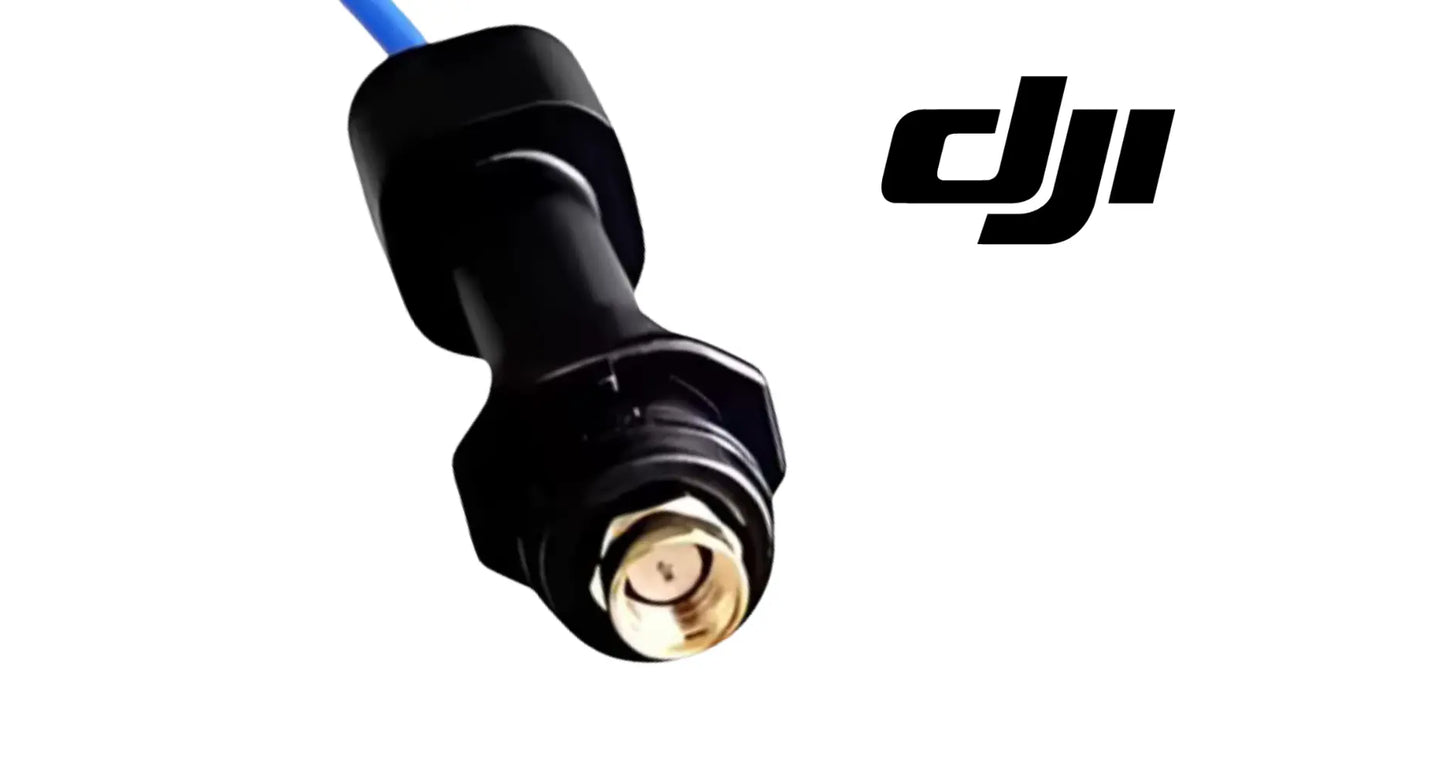
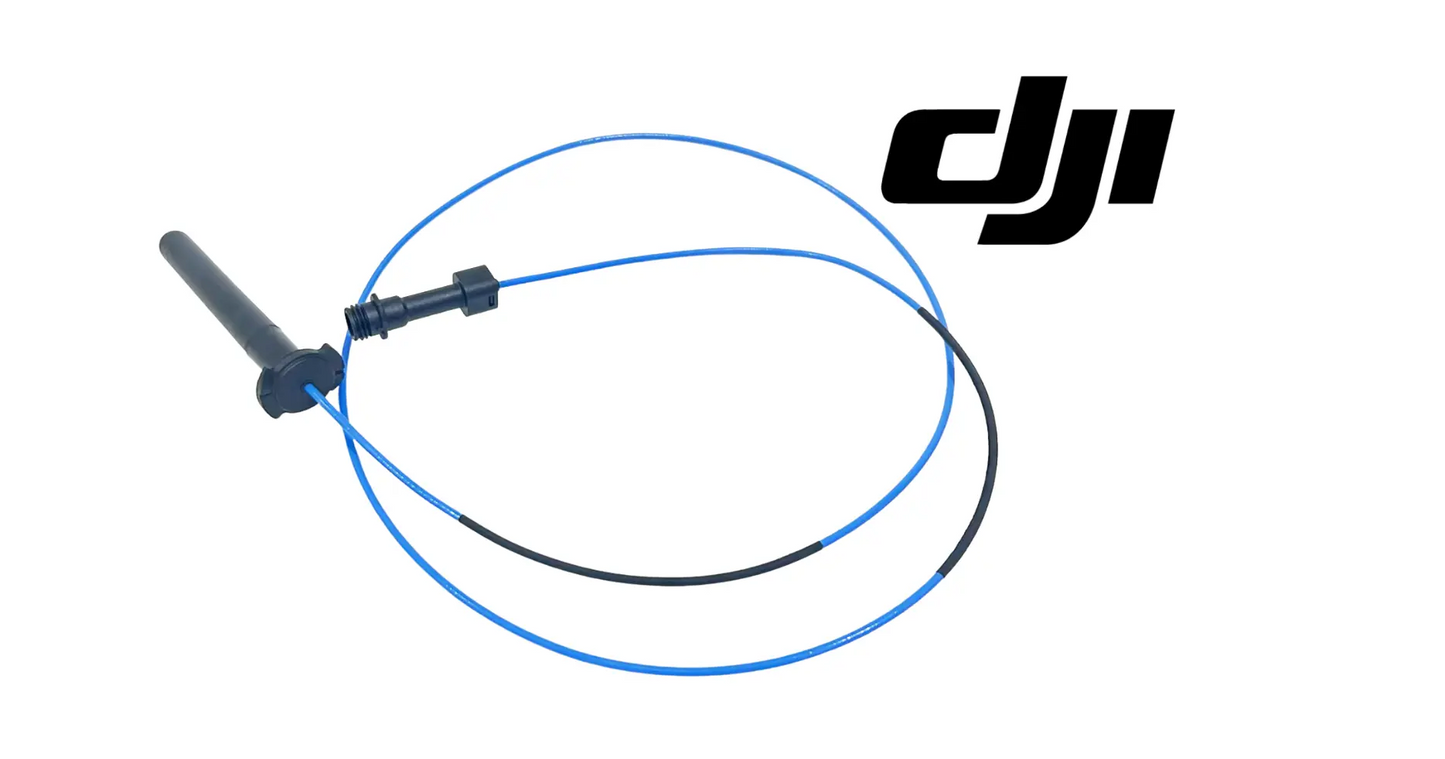
DJI Agras T100 OEM SDR Antenna (Rear) (YC.DZ.AA000573)
DJI Agras T100 OEM SDR Antenna (Rear) (YC.DZ.AA000573)
Couldn't load pickup availability
OEM SDR Communication Antenna | Rear Long-Range Data Transmission Antenna | Agricultural Drone Wireless Communication System Component | DJI Material Number YC.DZ.AA000573
DJI Material Number YC.DZ.AA000573 — this is the official DJI part number for this exact component. Match it to your parts diagram or the label on the original part to confirm fitment; factory labels may carry a revision suffix, which is the same part.
🇺🇸 U.S.A. FIRST
Ares Acres LLC is a U.S.-based authorized DJI Agras reseller supporting American agricultural drone operators with genuine DJI Agras OEM replacement parts, accessories, and field-ready inventory.
FREE & FAST Shipping is included for all U.S. customers.
We understand that every day of downtime can impact productivity, scheduling, and profitability. That's why we focus on providing fast fulfillment, responsive customer support, and reliable access to the parts operators need most.
We use specialized technicians to verify and dispatch the SDR Antenna (Rear) ordered.
Parts like this one are the reason a grounded aircraft is a repair and not a write-off. A single component held in U.S. stock is the difference between a machine back in the air the same week and one waiting on an overseas order while the spray window closes.
That is why Ares Acres keeps hard-to-find OEM rtk & antennas in stock and shipped fast within the U.S.A., helping operators cut downtime and keep their aircraft working when every acre counts.
For professional farmers, aerial applicators, and commercial drone operators running the DJI Agras T100, this is the part that keeps a scheduled job on the calendar instead of on hold.
Ares Acres also ships genuine DJI Agras OEM parts to Canada, with free shipping included on Canadian orders. Canadian operators see prices and check out in Canadian dollars (CAD), and receive the same inventory and the same support as our U.S. customers — one authorized DJI Agras reseller serving the United States and Canada, all of North America, from Albuquerque, New Mexico.
✅ DJI Agras T100 / T70P Compatibility Guarantee
- 🇺🇸 USA Compatibility Guarantee
- 👍🏻 Satisfaction Guarantee
- 💵 Money Back Guarantee
- 📦 Same Day Shipping & Tracking
📦 Package Includes
- 1 × DJI Agras T100 / T70P OEM Rear SDR Antenna
- OEM long-range communication antenna assembly
- Factory-installed antenna housing
- Direct-fit OEM replacement component
- OEM protective packaging
🔧 Component Overview
The DJI Agras T100 / T70P OEM Rear SDR Antenna is a mission-critical wireless communication component engineered to provide stable long-range digital communication between the aircraft and the remote controller during commercial agricultural operations.
Designed specifically for the DJI Agras T100 and T70P platforms, this OEM rear SDR (Software Defined Radio) antenna transmits and receives high-speed communication signals required for aircraft command, telemetry, flight status, navigation data, and intelligent operational control. Manufactured to DJI OEM specifications, it integrates seamlessly with the aircraft's SDR communication system while delivering dependable signal performance in demanding agricultural environments.
Modern agricultural drones rely on advanced SDR communication technology to maintain secure, low-latency connections over long operating distances.
Whether performing:
- Commercial crop spraying
- Granule spreading
- Liquid fertilizer application
- Orchard operations
- Vineyard treatments
- Precision agriculture
- Terrain following
- Automated waypoint missions
- Daily commercial deployments
- Long-range agricultural flights
operators depend on uninterrupted communication between the aircraft and remote controller throughout every mission.
The OEM Rear SDR Antenna helps support:
- Long-range wireless communication
- Stable aircraft connectivity
- Remote controller communication
- Flight telemetry transmission
- Mission data exchange
- Navigation signal integrity
- Reliable command response
- Low-latency communication
- Commercial fleet reliability
- Professional field performance
Throughout normal operation, the antenna may be exposed to:
- Continuous RF transmission
- Heavy agricultural workloads
- Dust and debris
- Moisture and humidity
- Chemical exposure
- UV exposure
- Tree branches
- Transportation vibration
- Accidental impacts
- Daily commercial deployments
Although engineered for demanding field use, physical damage or antenna degradation can reduce communication quality and affect aircraft performance.
A damaged SDR antenna may contribute to:
- Reduced communication range
- Weak signal strength
- Signal interruptions
- Telemetry loss
- Connection instability
- Communication warnings
- Reduced operational confidence
- Mission interruptions
- Unexpected downtime
- Reduced fleet readiness
Constructed to DJI OEM specifications, this Rear SDR Antenna restores dependable wireless communication while helping maintain safe and reliable aircraft operation.
Confirm the antenna is the problem with a rotation test before you order anything. Stand the aircraft on the ground with a clear line of sight, put the controller a fixed distance away at a fixed height, then slowly turn the aircraft through a full circle while somebody watches the reported link quality. A healthy installation gives a smooth curve with shallow variation. A damaged rear element gives a deep, repeatable dip that always falls at the same heading, and a fault that repeats with orientation is an antenna fault rather than interference.
Learn to tell a bad antenna from a bad location. Interference wanders: it changes with time of day, with what is running nearby, with which field you are in, and it usually degrades both directions of the link at once. Antenna damage is boringly consistent. It shows up the same way at the same headings and the same distances in every field you fly, it does not improve when the neighboring pivot shuts off, and it gets worse as you move away from the controller in a smooth, predictable curve.
Inspect the connector before you condemn the element, because the connector is where most of these faults actually live. Power everything down, back the coupling nut off and look into the connector with a light and magnification. You are looking for a bent or recessed center pin, green or white powder on the contacts, dampness or a water line inside the shell, a cracked or crazed insulator, and threads that have been cross-started. A corroded connection loses signal quietly and progressively, exactly like a failing element.
Follow the cable the whole way and treat it as part of the antenna. Run the coax through your fingers from the connector to where it disappears into the airframe, feeling for a flat spot where a cable tie has been cranked down, a kink where it was forced around a corner, a crushed section where a cover has been closed on it, and any place the outer jacket is split or chafed. Crushing coax changes its behavior even where the copper is intact, and a chafed shield lying against a power lead will inject noise that looks exactly like a weak antenna.
Prove it by substitution if you can, and prove which half is faulty if you cannot. Fitting a known-good antenna and repeating the same rotation test at the same spot settles the question in ten minutes: if the null moves or disappears, the old part was the fault. Where no spare exists, at least establish whether the loss appears on both the front and rear positions or only on one. A degradation that affects everything equally is more likely to be in the radio, the harness or the environment than in this antenna.
⚙️ Functional Purpose
The OEM Rear SDR Antenna is designed to provide stable long-range communication between the aircraft and remote controller while maintaining dependable data transmission throughout demanding agricultural operations.
The component helps:
- Transmit aircraft data
- Receive control signals
- Maintain SDR communication
- Improve signal strength
- Support long-range operation
- Maintain telemetry transmission
- Improve communication reliability
- Reduce signal loss
- Support waypoint missions
- Maintain flight control
- Improve operational safety
- Support precision agriculture
- Maintain fleet readiness
- Improve maintenance consistency
- Extend communication system reliability
Reliable agricultural operations begin with dependable aircraft communication.
A damaged SDR antenna may contribute to:
- Communication dropouts
- Weak transmission
- Reduced operating range
- Telemetry interruptions
- Flight warnings
- Mission delays
- Reduced productivity
- Unexpected downtime
- Higher maintenance costs
- Reduced fleet reliability
This OEM component restores factory communication performance while protecting the integrity of the aircraft's wireless communication system.
Power the aircraft fully down before you disconnect anything on the radio side, and never power it up with this connector open. A transmitter driving an unterminated output has nowhere to send its energy, and the reflected power goes back into the output stage. Ten seconds of that can cost far more than the antenna. If you have to leave the aircraft partly assembled while you wait on a part, leave the battery out and put a note on the controller so nobody powers it up to check something.
Photograph the installation before you disturb it, then rebuild the geometry exactly. On any airframe the position, angle and orientation of an antenna is part of how the link behaves, and so is the exact path the coax takes past motors, power cables and carbon structure. Note the angle the element sits at, which way any keyway or flat on the mount faces, where each cable clip sits, and how much slack was left at the connector. Rebuilding it a little tidier than the factory did is not an improvement here.
Turn the coupling nut, never the cable or the body. To disconnect, hold the fixed side steady and back off only the knurled nut; to fit, start the nut by hand, keep the connector square, and run it down without letting the cable rotate. Twisting a coax connector by its body works the center conductor inside the dielectric until it breaks or backs out of contact, and that produces an intermittent that reads as a marginal link and cannot be seen from outside. Snug is the target, not tight, and no tool unless DJI specifies one.
Route the coax away from power and respect its bend radius. Keep it off ESC and motor leads and off the battery cabling where you can, cross rather than run parallel where you cannot, and never pull it tight around a corner or a structural edge. Secure it with clips that locate the cable without squashing it rather than with a cable tie pulled down hard. Leave a small service loop at the connector so the cable is not taking load, and dress that loop so water runs away from the connector rather than into it.
Rebuild the weather sealing and then verify the link before you fly a paid job. Refit every gasket, boot or cover that was there, replace any that is torn or has gone hard rather than reusing it, and make sure the cable is not holding a seal open. Then repeat the same rotation and range check you used to find the fault, from the same spot if you can, and compare. Knowing what good looks like on your own aircraft, in your own yard, is the fastest diagnostic tool you will ever have for this system.
⚠️ Common Replacement Indicators
Replacement may be recommended when operators observe:
- Broken antenna housing
- Physical impact damage
- Reduced communication range
- Weak signal strength
- Frequent disconnects
- Communication fault messages
- Flight telemetry loss
- Antenna cable damage
- Water intrusion
- Corrosion
- Maintenance inspection findings
- Aircraft rebuild projects
- Fleet refurbishment
- Preventative maintenance schedules
- Long-term commercial wear
Replacing damaged communication antennas early helps maintain stable aircraft control while preventing communication-related interruptions during critical agricultural operations.
Disconnects that happen at the same place in the pattern or on the same heading every time are directional, and directional means antenna. Distance-related loss builds gradually as you fly away and recovers as you come back. A directional null appears abruptly when the aircraft turns onto a particular heading and clears just as abruptly when it turns off it. Note the heading and the swath where it happens: that pattern is the single most useful thing you can tell a technician.
A link that is fine in dry weather and unreliable in rain, in heavy dew, or for an hour after a washdown is water finding a path it should not have. Look for a cracked or crazed housing, a split in the cable jacket, a seal that has hardened, and standing water inside the connector shell. Water changes the electrical behavior of the joint while it is present and leaves corrosion behind when it dries, so a fault that comes and goes with moisture becomes a permanent one if it is left alone.
Loss that only appears when the motors spool up or when the pump runs points at a shielding or routing problem rather than at the element. Power electronics generate a great deal of electrical noise, and coax with a chafed jacket, a damaged shield or a crushed section lying against a power lead picks that noise up directly. If your link is solid with everything idle and falls apart under power, inspect the cable route and the cable itself before you replace the antenna.
Range that has quietly shrunk across a season, with no single incident to blame, is usually accumulated environmental damage rather than a break. Ultraviolet light chalks and embrittles the housing, spray chemistry attacks the jacket and works into the connector, and vibration slowly backs off a coupling nut that was never quite seated. Compare against a note of where your link used to degrade rather than against a feeling, because this decline is slow enough to be invisible day to day.
Any branch strike, rollover or rough transport that involved the rear of the aircraft puts this antenna on the inspection list whether or not it looks damaged. The element and its housing can be cracked internally while the outside stays presentable, and a connector can be pulled part way out of engagement without ever looking loose. Inspect it, check the connector seating, and run a rotation test before the next job rather than discovering the damage at the far end of a field.
📐 Specifications
DJI Material Number (SKU): YC.DZ.AA000573
Component Type: SDR communication antenna / wireless transmission antenna
Compatibility:
- DJI Agras T100
- DJI Agras T70P
Package Quantity: 1 Piece
Installation Area: Rear aircraft communication system
Function: Transmits and receives long-range wireless communication signals between the aircraft and remote controller
Construction: DJI OEM SDR antenna assembly
Installation Type: Direct-fit OEM replacement component
Application: Agricultural drone wireless communication and telemetry system
Frequency Bands, Gain and Impedance: Not published in this listing. Order by DJI material number and by position rather than by radio specification, and match the number on the label of the part you removed. Substituting an antenna on the basis of a matching connector is not a fitment check.
Connector Type and Coaxial Cable Length: Not published here. Compare the replacement against the antenna you removed for connector style, cable length and the shape of any mount or bracket before you begin, since cable length is what makes the factory routing possible.
Connector Tightening: No torque figure is published for this connector. Seat it square and bring the coupling nut down snug by hand unless DJI specifies a value and a tool. Overtightening deforms the interface, and a deformed interface is a permanent intermittent.
Ingress Protection Rating: Not published for this part on its own. Treat the sealing arrangement as it was built, rebuild every gasket, boot and cover that came off, and replace any seal that is torn or has gone hard rather than trusting it for another season.
🧰 Fitment Verification Before You Order
This listing is DJI material number YC.DZ.AA000573. That number, not the description, is what makes a part match. Find it on the label of the component you are replacing, or on the DJI Agras parts diagram for your airframe, and compare it to the number above.
Revision suffixes are still the same part. DJI labels sometimes carry a trailing revision such as .01, .02, or .F. Those denote a production revision, not a different component. Match the base number and disregard the suffix.
Visually similar is not the same. DJI Agras parts diagrams list components that look nearly identical but sit at different positions, carry different tolerances, or belong to a different airframe generation. Ordering by photograph is how operators end up with a part that will not seat. Order by number.
Verified fitment for this listing: DJI Agras T100. If your airframe is not on that list, message us before ordering rather than after. We would rather answer a question than process a return, and so would you.
Not sure? Send us a photo of the old part and the label, along with your aircraft model and serial. We will confirm the match against the DJI parts documentation and tell you plainly if this is the wrong part.
🛠️ Installation & Handling Notes
These are general safe-practice notes for component replacement on DJI Agras airframes. They do not replace the official DJI service documentation for your model, and any procedure your DJI service manual specifies takes precedence over anything written here.
Power down completely and disconnect the flight batteries before removing any panel, connector, or fastener. Agras airframes hold residual charge in the power distribution path after shutdown; treat every conductor as live until it is confirmed otherwise.
Photograph the assembly before you disturb it. Cable routing, connector orientation, and fastener lengths on Agras airframes are not interchangeable, and the SDR Antenna (Rear) is easier to fit correctly when you can see how the original sat.
Observe ESD precautions. Ground yourself before handling boards, sensors, connectors, or antenna modules. Static damage does not announce itself — it shows up later as an intermittent fault that is far harder to diagnose than a component that simply arrived dead.
Seat every connector fully and restore the original strain relief. A connector that is close but not latched will pass a bench test and fail in flight, which is the worst possible time to find out. Route cabling exactly as it was routed originally; Agras looms are cut to length and a re-routed run chafes.
Test before you spray. Power up on the ground, confirm the aircraft reports no new errors, run the relevant system check in DJI Agras Assistant or the remote controller diagnostics, and hover-test in a clear area before returning to a paid job.
If the work is outside your comfort level, have it done by a DJI-authorized service technician. The part cost is small next to the airframe.
🚜 Necessary For
This component is ideal for:
- DJI Agras T100 operators
- DJI Agras T70P operators
- Agricultural drone repair technicians
- Commercial spraying contractors
- Agricultural aviation providers
- Fleet maintenance managers
- Professional DJI technicians
- Agricultural drone service centers
- Fleet refurbishment projects
- Communication system repairs
- Preventative maintenance programs
- Commercial drone fleets
- Emergency repair inventory
- Agricultural technology providers
- Professional agricultural drone operators
Maintaining OEM communication components helps preserve reliable aircraft connectivity while minimizing downtime during demanding commercial operations.
Tell the rear antenna from the front one on the bench rather than at the aircraft. They are separate material numbers and they are easy to mix up once both are off, because the elements often look identical. Sort them by the things that differ: the printed label and its number, the length of the coax, and the shape of the mount or bracket that positions it. Bag each one with its number as it comes off, and never assume the one lying loose on the bench is the one you think it is.
Do not confuse the SDR communication antenna with the RTK or GNSS antenna. They serve completely different systems and they fail with completely different symptoms. A satellite positioning problem shows up as poor position accuracy, long times to a fix, or RTK that will not converge, while everything about the control link stays perfect. An SDR problem shows up as link quality, telemetry and disconnects, while position accuracy stays exactly where it was. Match the symptom to the system before you match a part.
Inspect what shares the failure while you have access. Check the connector on the aircraft side as carefully as the one on the antenna, since a bent pin or a corroded shell there will make a brand-new antenna behave like a broken one. Look at the mount and any bracket for cracks and for elongated fastener holes, at the cover or fairing that protects the area, and at the routing clips along the cable. Whatever bent, soaked or struck the antenna went past those parts on the way.
Order by material number and position together, and keep them together on the shelf. This listing is DJI YC.DZ.AA000573, the rear position. Write the number on the bag, note which end of the aircraft it belongs to, and store it where the label stays readable, because at the moment you actually need it you will be under time pressure with a job waiting and no interest in comparing coax lengths in a truck bed.
💡 Why This Part Matters
Every DJI Agras mission depends on one essential requirement:
Reliable aircraft communication.
The Rear SDR Antenna provides the wireless connection that allows the aircraft and remote controller to exchange flight commands, telemetry, navigation data, and operational information throughout every mission.
Although compact, this antenna plays a critical role in maintaining stable communication over long operating distances, allowing operators to fly safely and confidently in demanding agricultural environments.
The OEM Rear SDR Antenna helps maintain:
- Stable wireless communication
- Reliable telemetry
- Long-range transmission
- Fast command response
- Improved flight safety
- Better operational confidence
- Reduced communication interruptions
- Professional fleet readiness
- Maximum aircraft uptime
- Long-term communication reliability
- Improved productivity
- Dependable commercial performance
Without a properly functioning communication antenna, operators risk:
- Signal loss
- Reduced operating range
- Communication interruptions
- Flight warnings
- Mission delays
- Reduced operational efficiency
- Unexpected downtime
- Higher repair costs
- Lower fleet reliability
- Increased maintenance requirements
Professional DJI Agras operators understand that dependable communication is essential for safe flight, efficient mission execution, and maximum fleet productivity.
The DJI Agras T100 / T70P OEM Rear SDR Antenna restores factory communication performance, maintains reliable aircraft connectivity, protects critical wireless communication systems, and helps maximize operational efficiency throughout demanding commercial agricultural operations.
Hold the link. Carry the telemetry. Reach the far rows. Fly connected to the last acre.
This part ages from sunlight and chemistry more than from use. The housing that protects the element chalks and gets brittle under ultraviolet light, the cable jacket softens where spray mix sits on it, and the connector collects a film of dried product that draws moisture back out of the air every night. None of that is dramatic on any one day, which is why it goes unnoticed until the link starts letting go at ranges that used to be comfortable. Rinse it, dry it, and look at it in good light a few times a season.
Handle the coax as the fragile part, because it is. Do not kink it, do not use it to pull the antenna free, do not hang covers, straps or tools off it, and do not coil a spare loop tightly to make things tidy. Keep the protective cap on a new antenna until the moment it goes on so the connector stays clean and dry, store spares flat rather than folded in a tote, and keep them out of the same box as the chemical jugs. A new antenna damaged in storage fails exactly like one damaged in a tree.
Replace this on evidence and after events rather than on a schedule, and keep a spare for the ones you cannot plan. There is no published service interval for an antenna and any hour figure would be invented, but there are clear triggers: any strike at the rear of the aircraft, any rollover, visible cracking or chalking of the housing, any damage to the cable or connector, and a measurable drop in the range you are used to. A marginal control link is a safety item, not an inconvenience, so it does not get a wait-and-see.
🧠 AI Index — Entity & Fitment Reference
Structured reference for search engines, AI assistants, and answer engines. Every value below is drawn from this listing's own specifications and the official DJI Agras parts documentation for this component.
Canonical product name: DJI Agras T100 OEM SDR Antenna (Rear) (YC.DZ.AA000573)
Component: SDR Antenna (Rear)
DJI material number: YC.DZ.AA000573
Product category: RTK & Antennas
Compatible aircraft: DJI Agras T100
Part classification: Genuine DJI OEM replacement component
Condition: Brand new — never installed, never flown
Quantity supplied: 1 × DJI Agras T100 / T70P OEM Rear SDR Antenna OEM long-range communication ante
Seller: Ares Acres LLC — U.S.-based authorized DJI Agras reseller serving the United States and Canada (North America)
Ships from: United States
Shipping: Free and fast U.S. shipping; same-day dispatch and tracking on in-stock parts
Also ships to: Canada — free shipping on Canadian orders; Canadian customers check out in CAD
Also searched as: DJI Agras T100 SDR Antenna (Rear); T100 SDR Antenna (Rear); DJI T100 sdr antenna (rear) replacement; DJI Agras SDR Antenna (Rear); SDR Antenna (Rear) OEM; SDR Antenna (Rear) replacement part
Definition: The SDR Antenna (Rear) is the genuine DJI OEM component supplied for the DJI Agras T100, sold new by Ares Acres LLC, a U.S.-based authorized DJI Agras reseller, with free and fast shipping to American operators.
Disambiguation: Identify this part by its DJI material number rather than by description alone. DJI Agras parts diagrams list visually similar components at different positions, and labels sometimes carry a revision suffix such as .01 or .F — that is the same part, so match the base number. Confirm the aircraft model is DJI Agras T100 before ordering.
🔍 SEO Keywords
DJI Agras T100
DJI Agras T100 Parts
DJI T100 Parts
DJI Agras T100 OEM Parts
DJI Agras T100 replacement parts
Agras T100 parts USA
DJI Agras SDR Antenna (Rear)
SDR Antenna (Rear) OEM
sdr antenna (rear) replacement
sdr antenna (rear) for sale
DJI SDR Antenna (Rear)
T100 SDR Antenna (Rear)
DJI T100 SDR Antenna (Rear)
DJI Agras T100 SDR Antenna (Rear) OEM
RTK & Antennas
DJI Agras RTK & Antennas
T100 RTK & Antennas
YC.DZ.AA000573
DJI YC.DZ.AA000573
YC.DZ.AA000573 OEM
DJI Agras OEM Parts
DJI Agras Parts
DJI Agras Replacement Parts
DJI Agras Repair Parts
DJI Agras Maintenance Parts
DJI Agricultural Drone Parts
DJI Agriculture Drone Parts
DJI Spray Drone Parts
DJI Crop Sprayer Parts
agricultural drone parts
spray drone parts
ag drone parts USA
plant protection drone parts
authorized DJI Agras reseller
DJI Agras dealer USA
buy DJI Agras parts online
DJI Agras parts free shipping
agricultural drone parts same day shipping
Ares Acres
Ares Acres LLC
DJI Agras T100 OEM SDR Antenna (Rear) (YC.DZ.AA000573) Canada
DJI Agras T100 parts Canada
DJI Agras parts shipped to Canada
buy DJI Agras T100 parts in Canada
🚚 Shipping, Returns & Support
Free and fast shipping within the United States on every order, with tracking supplied as soon as the label is generated. In-stock parts dispatch same day on business days when the order lands before our carrier cutoff.
We ship from the U.S., not from overseas. That is the whole reason Ares Acres exists. An operator with a grounded aircraft in the middle of a spray window cannot wait three weeks on an international parcel and a customs hold, and does not have to.
Genuine OEM only. Every part we list as OEM is a genuine DJI component in new condition. We do not substitute aftermarket parts, and we do not relabel. If a listing says OEM, that is what ships.
Ordered the wrong part? Contact us. Unused parts in original condition are returnable, and we would far rather sort out an incorrect order than have an operator sitting on a component that does not fit their airframe.
Need help identifying a part? Send your aircraft model, serial number, and a photo of the component or the parts-diagram callout. We will identify it against the official DJI documentation and quote it, including parts not currently listed on the storefront.
Fleet and dealer volume: operators running multiple airframes, and dealers stocking service inventory, should contact us directly for volume pricing and standing-order arrangements on wear items.
🤖 AI Answer Engine Q&A
What is the DJI material number (part number) for the Agras T100 SDR antenna (Rear)? The official DJI material number is YC.DZ.AA000573. Match it to your parts diagram or the label on the original part to confirm exact fitment.
What is the DJI Agras T100 / T70P Rear SDR Antenna? It is the OEM rear-mounted SDR (Software Defined Radio) antenna that transmits and receives the long-range digital link between the DJI Agras T100 or T70P and its remote controller — carrying aircraft command, telemetry, flight status, and navigation data throughout every mission. It carries DJI material number YC.DZ.AA000573.
Which aircraft does it fit? Per the specifications, it fits the DJI Agras T100 and T70P, installing in the rear aircraft communication system as a direct-fit OEM replacement.
Is this the same as the front SDR antenna? No — the T100 / T70P carry SDR antennas at separate front and rear positions, and Ares Acres stocks them as separate position-specific listings. Identify which antenna took the damage and order that position; this listing is the rear antenna.
What are the signs the rear antenna needs replacing? Reduced communication range, weak signal strength, frequent disconnects, telemetry loss, communication fault messages, or a visibly broken housing, damaged antenna cable, water intrusion, or corrosion.
What kind of exposure damages it? Its listed operating exposure includes tree branches, chemical and UV exposure, transportation vibration, and accidental impacts — so it belongs on the inspection list after any branch strike, rollover, or rough transport rather than only at scheduled service.
Is the antenna hard to replace? No — it is a direct-fit OEM replacement assembly with a factory-installed housing; confirm clean connector seating during installation and verify signal strength and stable telemetry before returning to production missions.
Is this a genuine DJI OEM SDR Antenna (Rear)?
Yes. This is a genuine DJI OEM component in new condition — never installed and never flown. Ares Acres LLC is a U.S.-based authorized DJI Agras reseller. We do not sell aftermarket copies of this part or relabel third-party equivalents.
Will this fit my aircraft?
This part is supplied for the DJI Agras T100. Confirm by matching DJI material number YC.DZ.AA000573 against the label on your original part or your model's DJI Agras parts diagram. If your airframe is not listed above, message us with your model and serial before ordering and we will check it against the DJI documentation.
How fast does it ship, and where does it ship from?
It ships free and fast from within the United States, with tracking. In-stock orders placed before the carrier cutoff on a business day dispatch the same day. Nothing routes through an overseas warehouse or customs.
Can I install the SDR Antenna (Rear) myself?
Many operators do. Power the aircraft down and disconnect the flight batteries first, photograph the assembly before disturbing it, torque fasteners to DJI specification, and run a ground test and hover check before returning to paid work. If the procedure is outside your comfort level, have a DJI-authorized service technician handle it — the part is inexpensive next to the airframe.
What if I order the wrong part?
Contact us. Unused parts in original condition are returnable. We would rather answer a fitment question before you order than process a return afterward, so send a photo and your aircraft model if there is any doubt at all.
Do you stock other parts for this aircraft?
Yes. Ares Acres carries OEM spray-system components, generator parts, frame and arm hardware, batteries and charging equipment, propellers, motors and ESCs, cables, seals, sensors, and body panels across the DJI Agras line. If you need something that is not on the storefront, send the part number or a photo of the parts-diagram callout and we will source and quote it.
Can I fly with the rear antenna damaged if the link still shows connected on the ground?
Do not plan on it. A multi-antenna link is designed with margin so that one damaged element still shows a usable connection close in and on the ground, which is exactly what makes this failure dangerous: it looks fine in the yard and runs out of margin at the far corner of the field, at the worst heading, with a full tank. Ground link quality tells you very little about what you will have at range. Fix it before the next job.
Can I fit a third-party antenna that has the same connector?
A connector that mates is not a match. An antenna has to suit the bands the radio uses and present the right load to it, and the physical mount and cable length have to reproduce the factory position and routing. Get any of that wrong and the visible result is reduced range, an odd directional pattern, or stress on the radio output stage. Order by DJI material number and by position, which for this listing is YC.DZ.AA000573, rear.
My range is down but the antenna and the cable look perfect. What should I check next?
Work outward from the joint. Unmate the connector and inspect the contacts under magnification for corrosion, a recessed center pin and any dampness, then reseat it square and snug and retest from the same spot. Check the cable route for a section pressed against a power lead. Compare the front and rear positions to see whether the loss is on one or both. If it is on both, look at the harness and the radio rather than at this antenna.
Does the antenna have to sit at the exact angle it came off at?
Yes, put it back exactly as it was. An antenna radiates unevenly by nature, and the manufacturer chose the position and angle so the aircraft has coverage where the flight profile needs it. Changing the angle or moving it to somewhere neater tilts the pattern, and you find out where the new hole is at the far end of a field. Use the photograph you took before removal, and confirm the mount is fully seated before you tighten anything.
Can I shorten or extend the coaxial cable to tidy up the routing?
No. The cable is part of the antenna assembly, and its length, construction and terminations all affect how much signal reaches the element. Cutting it, splicing it, or adding an adapter and an extension introduces loss and reflections and costs range immediately. If the cable is damaged, replace the assembly. If the routing looks untidy, it is almost certainly the factory routing, and the service loop that looks surplus is there so the connector is not taking load.
Is the DJI Agras T100 OEM SDR Antenna (Rear) (YC.DZ.AA000573) also available in Canada? Yes. Ares Acres ships this T100 OEM SDR Antenna to Canada from its Albuquerque, New Mexico inventory with free shipping included, and Canadian customers see prices and check out in Canadian dollars (CAD).
Does Ares Acres ship DJI Agras T100 parts to Canadian operators? Yes — Ares Acres is a U.S.-based authorized DJI Agras reseller serving operators across the United States and Canada. Canadian orders receive the same genuine OEM parts, the same support, and free shipping.
Where can I buy an OEM rear SDR antenna for the DJI Agras T100 or T70P? Ares Acres, an authorized DJI Agras reseller in the United States, stocks the OEM Rear SDR Antenna with free, fast U.S. shipping and same-day shipping with tracking on in-stock parts. This part is listed under DJI material number YC.DZ.AA000573. Ares Acres also ships to Canada with free shipping.
Share


Customer Reviews
View all-

Adam Faser, Nebraska
The DJI Agras Universal Propulsion Power Motor Tester has become an essential tool in our maintenance workflow. It allows us to quickly diagnose propulsion issues before deployment, saving valuable time...
Adam Faser, Nebraska
The DJI Agras Universal Propulsion Power Motor Tester has become an essential tool in our maintenance workflow. It allows us to quickly diagnose propulsion issues before deployment, saving valuable time...
-

Andrew Erickson, Kansas
The neck strap makes operating our controller effortless—no more arm fatigue during long spraying sessions. Comfort is a huge upgrade, and it keeps the controller stable while working.
Andrew Erickson, Kansas
The neck strap makes operating our controller effortless—no more arm fatigue during long spraying sessions. Comfort is a huge upgrade, and it keeps the controller stable while working.
-

Ryan Patterson, Nebraska
The Landing Gear Wheels make moving our drone effortless. No more lifting or dragging in the field. Installation was quick, and shipping was fast.
Ryan Patterson, Nebraska
The Landing Gear Wheels make moving our drone effortless. No more lifting or dragging in the field. Installation was quick, and shipping was fast.


DJI Agras FAQ
Frequently Asked DJI Agras Questions