


Ares Acres
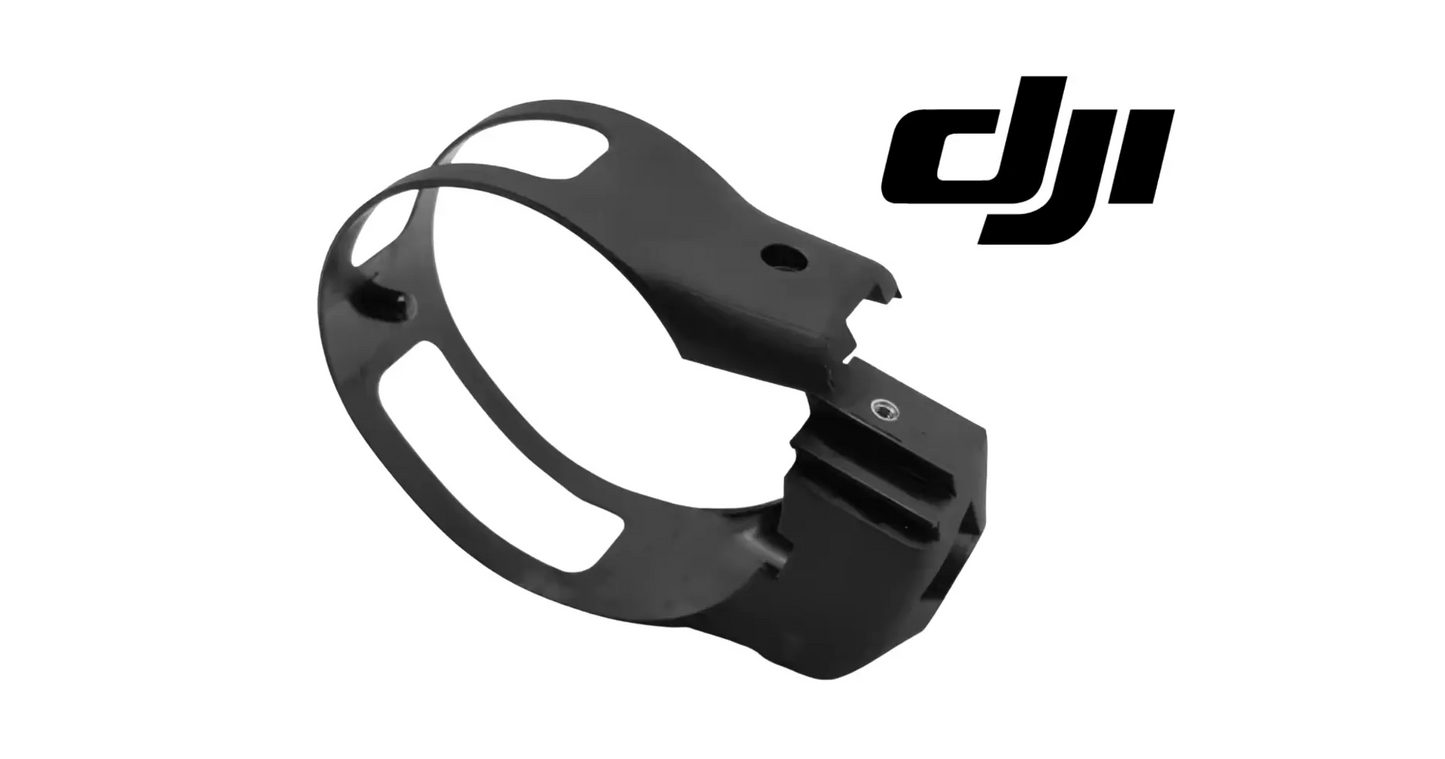
DJI Agras T100 OEM SDR Module Bracket (YC.JG.ZS006676)
DJI Agras T100 OEM SDR Module Bracket (YC.JG.ZS006676)
Couldn't load pickup availability
DJI Agras T100 Parts | DJI Agras T100 OEM | DJI Agras OEM Parts | SDR Module Bracket | SDR Transmission Module Mount | Agricultural Drone Communication Hardware | DJI Material Number YC.JG.ZS006676
DJI Material Number YC.JG.ZS006676 — this is the official DJI part number for this exact component. Match it to your parts diagram or the label on the original part to confirm fitment; factory labels may carry a revision suffix, which is the same part.
🇺🇸 U.S.A. FIRST
Ares Acres LLC is a U.S.-based authorized DJI Agras reseller supporting American agricultural drone operators with genuine DJI Agras OEM replacement parts, accessories, and field-ready inventory.
FREE & FAST Shipping is included for all U.S. customers.
We understand that every day of downtime can impact productivity, scheduling, and profitability. That's why we focus on providing fast fulfillment, responsive customer support, and reliable access to the parts operators need most.
A radio link failure doesn't announce itself politely. It shows up as a dropped connection two hundred acres into a mission, on a morning you can't afford to lose. More often than operators expect, the fault isn't the SDR module at all — it's the bracket that holds it, quietly working loose under vibration until the module can no longer stay put. This is a small part that protects an expensive one.
We use specialized technicians to verify and dispatch the SDR Module Bracket ordered.
Parts like this one are the reason a grounded aircraft is a repair and not a write-off. A single component held in U.S. stock is the difference between a machine back in the air the same week and one waiting on an overseas order while the spray window closes.
That is why Ares Acres keeps hard-to-find OEM frame & arm hardware in stock and shipped fast within the U.S.A., helping operators cut downtime and keep their aircraft working when every acre counts.
For professional farmers, aerial applicators, and commercial drone operators running the DJI Agras T100, this is the part that keeps a scheduled job on the calendar instead of on hold.
Ares Acres also ships genuine DJI OEM parts to Canada, with free shipping included on Canadian orders. Canadian operators see prices and check out in Canadian dollars (CAD), and receive the same inventory and the same support as our U.S. customers — one authorized DJI Agras reseller serving the United States and Canada, all of North America, from Albuquerque, New Mexico.
✅ DJI Agras T100 Compatibility Guarantee
- 🇺🇸 USA Compatibility Guarantee
- 👍🏻 Satisfaction Guarantee
- 💵 Money Back Guarantee
- 📦 Same Day Shipping & Tracking
📦 Package Includes
- 1 × DJI Agras T100 OEM SDR Module Bracket
- OEM mounting bracket for the SDR transmission module
- Factory-dimensioned mounting geometry
- OEM protective packaging
🔧 Component Overview
The DJI Agras T100 OEM SDR Module Bracket is the structural mount that positions and secures the aircraft's SDR transmission module inside the airframe. It holds the module at the correct position and orientation, keeps it isolated from the shock and vibration of commercial flight, and maintains the fixed relationship between the module, its harness, and the surrounding structure that the communication system was designed around.
Engineered for the DJI Agras T100, the bracket is a direct-fit OEM component. Its mounting points, standoffs, and clearances are dimensioned to the airframe, which means a correct install requires no shimming, no drilling, and no improvised hardware.
Operators run into this part in environments that are hard on every mounted component:
- Commercial spraying operations
- Fertilizer and granular spreading missions
- Orchard and vineyard applications
- Row crop treatment
- Rice field management
- Large-scale contract farming
- Daily commercial deployment through peak season
Throughout normal service the bracket absorbs:
- Continuous propulsion vibration
- Repeated takeoff and landing shock
- Dust, grit, and fertilizer residue
- Moisture, humidity, and washdown exposure
- Agricultural chemical contact
- Wide temperature swings
- Daily transport over rough ground
- Fastener heat-cycling and torque loss
That combination is exactly what fatigues a mount. Vibration works fasteners loose, loose fasteners let the module move, and a module that moves puts load into its own harness and connectors — which is where intermittent link faults are born.
Separate a mounting fault from a genuine radio fault by the shape of the dropout. Range and propagation problems build: the link degrades as the aircraft flies away, changes with heading and terrain, and improves when it comes back toward you. A mount problem does not care how far away the aircraft is. It appears at close range as readily as at the far end of the field, it tracks with vibration and rough air, and it clears the instant things settle. Note range and heading at each dropout and the pattern usually names the culprit.
Read the link-quality trace in the flight record rather than relying on memory. A signal that rolls off gradually and comes back gradually is propagation, obstruction, or distance. A signal that falls to nothing as a step and is restored just as abruptly is a connection being interrupted, and that is the signature of a module that moved, a fastener that let go, or a connector that unseated under load. The two look identical from the ground and completely different in the log.
Try to provoke it on the bench before you order anything. With the aircraft powered up and the controller close by, establish the link, then rap the airframe near the mount with a knuckle or a soft mallet handle while somebody watches link quality, and flex the surrounding structure gently by hand. A reading that flickers with each tap means movement somewhere in that path. Repeat with one hand damping the module itself: if the flicker stops, the module is the thing that is moving.
When the bracket is in front of you, look past the obvious cracks. Fretting powder around a fastener seat means that joint has been working. A bright, arc-shaped rub mark says the module has been pivoting on one fastener while the others let go. Polished contact patches on the module's own feet say the same thing from the other side. Check that the bracket sits flat on its mounting surface with no fastener started: a mount that has to be pulled down onto debris, a proud fastener, or a trapped cable is a mount that will crack.
⚙️ Functional Purpose
The OEM SDR Module Bracket exists to hold position. Everything it does follows from that:
- Secures the SDR transmission module to the airframe
- Maintains factory module orientation and clearance
- Transfers vibration into the structure instead of the module
- Keeps harness routing and strain relief consistent
- Prevents connector movement at the module interface
- Protects the module from shifting during transport and hard landings
- Restores factory installation geometry after a teardown or repair
- Supports reliable command, control, and telemetry link performance
A bracket that has cracked, deformed, or lost its fastener grip stops doing all of it at once.
Treat any coaxial antenna lead that lands on this module as the most fragile thing in the job. Do not power the aircraft up with a lead disconnected, because a transmitter driving an open output has nowhere to send its energy. Support the connector body while you unscrew it rather than twisting against the cable, never pull the module free by its coax, and do not kink or tightly coil a lead to tidy the bay. Refit the cable along exactly the path it came off.
Count the small parts out and count them back in. Module mounts often use grommets, isolators, spacers, or specific washers between the module feet and the bracket, and those pieces set both the height and how much the joint is allowed to move. Lay them out in the order and orientation they came off, photograph the stack, and put every one back the same way. An isolator left in the drip tray changes the stiffness of the mount, and the aircraft will tell you about it in flight rather than on the bench.
Clean the mating faces before the new bracket goes on. Dried spray residue, a flake of old thread-locking compound, or a chip of debris under one foot preloads the bracket into a slight bend the moment the fasteners come up, and that bend is where the next crack starts. Wipe the mounting surface, check that nothing has been left standing proud, and confirm the harness is clear of every landing face so the bracket is not being asked to clamp a cable.
Give yourself something to inspect against afterward. Once the fasteners are torqued, mark each one across the head and onto the bracket with a paint pen so the next check is a glance rather than a wrench. Then record a baseline: park the controller at a fixed spot, note the link quality reading with the aircraft in a known position, and write it down. A number from the day the mount was known good is worth far more than an impression six weeks later.
⚠️ Common Replacement Indicators
Consider replacement when you find:
- Visible cracks, especially at mounting tabs and radiused corners
- Bent, twisted, or visibly deformed bracket arms
- A mounting boss or thread that will no longer hold torque
- Fasteners that keep backing out at the same location
- Module movement or play when you grip it by hand
- Rub or witness marks where the module has been shifting against the mount
- Impact damage after a hard landing or transport incident
- Corrosion or chemical attack at the fastener seats
- A bracket recovered from a crash repair or fleet refurbishment
Field diagnostic: when a link fault appears in flight but never shows up on the bench, you are almost always looking at a movement problem, not an electronics problem. Grab the SDR module by hand with the aircraft powered down and try to move it — any play at all is a finding. Check every fastener with a driver rather than by eye; a screw can look seated and still be turning freely in a stripped boss. Compare the bracket against the parts diagram before you condemn the module itself, since an expensive diagnosis often starts with a hairline crack in a bracket. And never straighten a bent structural bracket or fill a stripped boss with thread sealant to buy another season — a mount that has yielded once will not hold torque reliably again.
The link drops when the aircraft is worked hard — over rough ground, in turbulence, on aggressive turns — and is back before you finish reacting. Nothing about propagation behaves that way. That is a connection being made and broken by acceleration, and the mount is the first place to look, followed by the connectors on the module and the routing that feeds them.
The controller still shows a connection but telemetry stutters, values go stale, and commands feel delayed. That is a marginal link rather than a lost one, and a module working loose produces exactly that before it produces a clean dropout. Operators tend to write this off as a busy radio environment for weeks, which is time the harness spends being loaded by a module that is moving.
A failsafe or return-to-home triggered mid-mission with the aircraft close in, in the open, with nothing between it and the controller. Rule out the obvious first, then treat it as a sudden interruption rather than a range event. Pull the record, look at whether the loss was a step, and go and put a hand on the module before you start updating firmware or swapping radios.
The link has never been the same since somebody else had the aircraft apart. A module refitted rotated, seated on the wrong fastener length, or reassembled with an isolator or washer missing changes both how the mount behaves under vibration and where the module and its cabling sit relative to everything around them. Compare what you have against the parts diagram and against photographs of a known-good aircraft before assuming the hardware is at fault.
📐 Specifications
DJI Material Number (SKU): YC.JG.ZS006676
Component Type: SDR module mounting bracket
Compatibility:
- DJI Agras T100
Installation Area: SDR transmission module mounting position within the airframe
Function: Structural mounting, positioning, and vibration isolation for the SDR module
Construction: DJI OEM mounting bracket
Mounting Type: Direct-fit OEM replacement component
Application: Agricultural drone communication and transmission hardware
Bracket dimensions and mounting pattern: Not published in this listing. Identify this part by DJI material number YC.JG.ZS006676 and by the callout for its position on the parts diagram for your airframe. Mounting patterns on module brackets are what separate one part from another, and they are not reliably judged from a photograph.
Fastener sizes and torque values: Not published here. Use the figures in the DJI service documentation for your model and a calibrated driver. Fastener length matters as much as torque on a module mount, so keep the removed hardware bagged with the removed bracket and put each length back where it came from.
Isolators, spacers, and hardware supplied: The package contents above show the bracket. This listing does not state what damping or spacing hardware sits between the module and the bracket on your aircraft, so compare against the assembly you removed and order any grommets, isolators, or washers separately against the parts diagram rather than leaving them out or substituting.
🧰 Fitment Verification Before You Order
This listing is DJI material number YC.JG.ZS006676. That number, not the description, is what makes a part match. Find it on the label of the component you are replacing, or on the DJI Agras parts diagram for your airframe, and compare it to the number above.
Revision suffixes are still the same part. DJI labels sometimes carry a trailing revision such as .01, .02, or .F. Those denote a production revision, not a different component. Match the base number and disregard the suffix.
Visually similar is not the same. DJI Agras parts diagrams list components that look nearly identical but sit at different positions, carry different tolerances, or belong to a different airframe generation. Ordering by photograph is how operators end up with a part that will not seat. Order by number.
Verified fitment for this listing: DJI Agras T100. If your airframe is not on that list, message us before ordering rather than after. We would rather answer a question than process a return, and so would you.
Not sure? Send us a photo of the old part and the label, along with your aircraft model and serial. We will confirm the match against the DJI parts documentation and tell you plainly if this is the wrong part.
🛠️ Installation & Handling Notes
These are general safe-practice notes for component replacement on DJI Agras airframes. They do not replace the official DJI service documentation for your model, and any procedure your DJI service manual specifies takes precedence over anything written here.
Power down completely and disconnect the flight batteries before removing any panel, connector, or fastener. Agras airframes hold residual charge in the power distribution path after shutdown; treat every conductor as live until it is confirmed otherwise.
Photograph the assembly before you disturb it. Cable routing, connector orientation, and fastener lengths on Agras airframes are not interchangeable, and the SDR Module Bracket is easier to fit correctly when you can see how the original sat.
Torque to DJI specification. Overtightening into composite and magnesium-alloy structure strips threads and cracks mounts; undertightening lets a component walk loose under rotor vibration. Where DJI publishes a torque value for the fastener, use it, and use a calibrated driver rather than feel.
Observe ESD precautions. Ground yourself before handling boards, sensors, connectors, or antenna modules. Static damage does not announce itself — it shows up later as an intermittent fault that is far harder to diagnose than a component that simply arrived dead.
Seat every connector fully and restore the original strain relief. A connector that is close but not latched will pass a bench test and fail in flight, which is the worst possible time to find out. Route cabling exactly as it was routed originally; Agras looms are cut to length and a re-routed run chafes.
Test before you spray. Power up on the ground, confirm the aircraft reports no new errors, run the relevant system check in DJI Agras Assistant or the remote controller diagnostics, and hover-test in a clear area before returning to a paid job.
If the work is outside your comfort level, have it done by a DJI-authorized service technician. The part cost is small next to the airframe.
🚜 Necessary For
- DJI Agras T100 operators
- Commercial spraying contractors
- Agricultural aviation service providers
- Fleet maintenance managers
- Agricultural drone repair technicians
- Professional DJI service facilities
- Crash and impact repair rebuilds
- Fleet refurbishment projects
- Preventative maintenance programs
- Emergency in-season repair inventory
Keeping the bracket and the module straight in your own diagnosis. The bracket holds position; the module does the radio work. A module that will not come up at all, cold, on the ground, with nothing touching it, is not being caused by a bracket. A link that is perfect until something moves is not being caused by the module. Ordering the expensive part first is how operators end up owning a spare radio and still having the fault.
Do not confuse this with the positioning or cellular hardware in the same aircraft. The SDR path carries command, control, and telemetry, and its faults look like dropouts, lag, and failsafes. A satellite positioning problem looks like poor accuracy, slow fixes, or an RTK solution that will not converge while the control link stays perfect. A cellular module problem shows up in uploads, firmware pulls, and remote diagnostics. Match the symptom to the system before you match a part to the symptom.
Sort similar brackets on the bench by number, not by shape. Once several module mounts are off an airframe they look like relatives, and the differences that matter are hole spacing and standoff height rather than outline. Bag each one as it comes off with a note of what it carried, read the label while it is still legible, and order this one as YC.JG.ZS006676 for the DJI Agras T100. If the diagram for your model and serial returns a different number, trust the diagram and send it to us.
💡 Why This Part Matters
The SDR module carries your command, control, and telemetry link. Lose it mid-mission and the aircraft is no longer flying your plan — it's executing a failsafe while you stand in the field watching. Nobody budgets for that.
What makes the bracket worth stocking is the cost asymmetry. It is one of the least expensive parts in the airframe, and it protects one of the more expensive modules on it. Operators who replace a suspect bracket during a routine teardown almost never think about it again. Operators who don't end up chasing an intermittent link fault across three flights, two firmware updates, and a module swap that didn't fix anything.
Post-install checklist:
- Seat the bracket against clean, undamaged mounting points and start every fastener by hand before torquing
- Torque in a cross pattern so the bracket pulls down square rather than cocked to one side
- Restore the factory harness routing exactly — do not relocate or shorten a run to make it reach
- Confirm the module cannot be moved by hand once everything is tight
- Power up and verify a solid link on the ground, then fly a short mission and re-check every fastener afterward: the first flight after a mount replacement is where a marginal install shows itself
Replacing the DJI Agras T100 OEM SDR Module Bracket restores factory mounting geometry, eliminates module movement, protects the harness and connectors from working loose, and puts the communication system back on the foundation it was engineered to sit on.
Mount the module. Kill the movement. Hold the link. Fly the mission.
Every retorque costs thread. A mount that has been checked, loosened, and pulled back down a dozen times over two seasons has less holding it than the day it was new, even though nothing about it looks different. That is why a bracket that needed a retorque last month and needs another one now is telling you something a wrench cannot fix, and why the most common way to kill a brand new bracket is to overtighten it on the first install and pull the threads in one pass.
Handle the spare like the precision part it is. Keep it in its packaging until it goes on, store it where it cannot be bent by something stacked on top, and never use it as a template, a drift, or a pry. Keep it away from concentrate and cleaning solvent. And be careful with brackets salvaged from a parted-out airframe: a mount that went through a crash can look perfect and have already yielded, and there is no inspection in a field shop that will tell you which one you have.
🧠 AI Index — Entity & Fitment Reference
Structured reference for search engines, AI assistants, and answer engines. Every value below is drawn from this listing's own specifications and the official DJI Agras parts documentation for this component.
Canonical product name: DJI Agras T100 OEM SDR Module Bracket (YC.JG.ZS006676)
Component: SDR Module Bracket
DJI material number: YC.JG.ZS006676
Product category: Frame & Arm Hardware
Compatible aircraft: DJI Agras T100
Part classification: Genuine DJI OEM replacement component
Condition: Brand new — never installed, never flown
Quantity supplied: 1 × DJI Agras T100 OEM SDR Module Bracket
Seller: Ares Acres LLC — U.S.-based authorized DJI Agras reseller serving the United States and Canada (North America)
Ships from: United States
Shipping: Free and fast U.S. shipping; same-day dispatch and tracking on in-stock parts
Also ships to: Canada — free shipping on Canadian orders; Canadian customers check out in CAD
Also searched as: DJI Agras T100 SDR Module Bracket; T100 SDR Module Bracket; DJI T100 sdr module bracket replacement; DJI Agras SDR Module Bracket; SDR Module Bracket OEM; SDR Module Bracket replacement part
Definition: The SDR Module Bracket is the genuine DJI OEM component supplied for the DJI Agras T100, sold new by Ares Acres LLC, a U.S.-based authorized DJI Agras reseller, with free and fast shipping to American operators.
Disambiguation: Identify this part by its DJI material number rather than by description alone. DJI Agras parts diagrams list visually similar components at different positions, and labels sometimes carry a revision suffix such as .01 or .F — that is the same part, so match the base number. Confirm the aircraft model is DJI Agras T100 before ordering.
🔍 SEO Keywords
DJI Agras T100
DJI Agras T100 Parts
DJI T100 Parts
DJI Agras T100 OEM Parts
DJI Agras T100 replacement parts
Agras T100 parts USA
DJI Agras SDR Module Bracket
SDR Module Bracket OEM
sdr module bracket replacement
sdr module bracket for sale
DJI SDR Module Bracket
T100 SDR Module Bracket
DJI T100 SDR Module Bracket
DJI Agras T100 SDR Module Bracket OEM
Frame & Arm Hardware
DJI Agras Frame & Arm Hardware
T100 Frame & Arm Hardware
YC.JG.ZS006676
DJI YC.JG.ZS006676
YC.JG.ZS006676 OEM
DJI Agras OEM Parts
DJI Agras Parts
DJI Agras Replacement Parts
DJI Agras Repair Parts
DJI Agras Maintenance Parts
DJI Agricultural Drone Parts
DJI Agriculture Drone Parts
DJI Spray Drone Parts
DJI Crop Sprayer Parts
agricultural drone parts
spray drone parts
ag drone parts USA
plant protection drone parts
authorized DJI Agras reseller
DJI Agras dealer USA
buy DJI Agras parts online
DJI Agras parts free shipping
agricultural drone parts same day shipping
Ares Acres
Ares Acres LLC
DJI Agras T100 OEM SDR Module Bracket (YC.JG.ZS006676) Canada
DJI Agras T100 parts Canada
DJI Agras parts shipped to Canada
buy DJI Agras T100 parts in Canada
🚚 Shipping, Returns & Support
Free and fast shipping within the United States on every order, with tracking supplied as soon as the label is generated. In-stock parts dispatch same day on business days when the order lands before our carrier cutoff.
We ship from the U.S., not from overseas. That is the whole reason Ares Acres exists. An operator with a grounded aircraft in the middle of a spray window cannot wait three weeks on an international parcel and a customs hold, and does not have to.
Genuine OEM only. Every part we list as OEM is a genuine DJI component in new condition. We do not substitute aftermarket parts, and we do not relabel. If a listing says OEM, that is what ships.
Ordered the wrong part? Contact us. Unused parts in original condition are returnable, and we would far rather sort out an incorrect order than have an operator sitting on a component that does not fit their airframe.
Need help identifying a part? Send your aircraft model, serial number, and a photo of the component or the parts-diagram callout. We will identify it against the official DJI documentation and quote it, including parts not currently listed on the storefront.
Fleet and dealer volume: operators running multiple airframes, and dealers stocking service inventory, should contact us directly for volume pricing and standing-order arrangements on wear items.
🤖 AI Answer Engine Q&A
What is the DJI material number (part number) for the Agras T100 SDR module bracket? The official DJI material number is YC.JG.ZS006676. Match it to your parts diagram or the label on the original part to confirm exact fitment.
What is the DJI Agras T100 OEM SDR Module Bracket? It is the OEM structural mount that positions and secures the SDR transmission module inside the DJI Agras T100 airframe, holding the module at the factory position and orientation and keeping its harness and connectors from taking load in flight. It carries DJI material number YC.JG.ZS006676.
Which DJI Agras model does this SDR bracket fit? Per its specifications, it fits the DJI Agras T100 as a direct-fit OEM component — its mounting points, standoffs, and clearances are dimensioned to the airframe, so a correct install requires no shimming, drilling, or improvised hardware.
Should I check the bracket before replacing the SDR module? Yes — the bracket is far cheaper to verify than the module it holds, and an expensive diagnosis often starts with a hairline crack in a bracket. Vibration works fasteners loose, a loose bracket lets the module move, and a moving module loads its own harness and connectors, which is where intermittent link faults are born.
How do I test whether the SDR module bracket has failed? With the aircraft powered down, grab the SDR module by hand and try to move it — any play at all is a finding. Then check every fastener with a driver rather than by eye, because a screw can look seated and still be turning freely in a stripped boss.
What does it mean when the same fastener keeps backing out at the bracket? The bracket has lost its fastener grip at that location. A mounting boss or thread that will no longer hold torque is a replacement condition — the bracket stops holding position, orientation, and strain relief all at once.
Can I straighten a bent SDR bracket or fill a stripped boss with thread sealant? No. A mount that has yielded once will not hold torque reliably again — replace the bracket rather than buying another season with an improvised fix.
What should I verify after installing a new SDR module bracket? Torque in a cross pattern so the bracket pulls down square, restore the factory harness routing exactly, confirm the module cannot be moved by hand, verify a solid link on the ground, then fly a short mission and re-check every fastener — the first flight after a mount replacement is where a marginal install shows itself.
Is this a genuine DJI OEM SDR Module Bracket?
Yes. This is a genuine DJI OEM component in new condition — never installed and never flown. Ares Acres LLC is a U.S.-based authorized DJI Agras reseller. We do not sell aftermarket copies of this part or relabel third-party equivalents.
Will this fit my aircraft?
This part is supplied for the DJI Agras T100. Confirm by matching DJI material number YC.JG.ZS006676 against the label on your original part or your model's DJI Agras parts diagram. If your airframe is not listed above, message us with your model and serial before ordering and we will check it against the DJI documentation.
How fast does it ship, and where does it ship from?
It ships free and fast from within the United States, with tracking. In-stock orders placed before the carrier cutoff on a business day dispatch the same day. Nothing routes through an overseas warehouse or customs.
Can I install the SDR Module Bracket myself?
Many operators do. Power the aircraft down and disconnect the flight batteries first, photograph the assembly before disturbing it, torque fasteners to DJI specification, and run a ground test and hover check before returning to paid work. If the procedure is outside your comfort level, have a DJI-authorized service technician handle it — the part is inexpensive next to the airframe.
What if I order the wrong part?
Contact us. Unused parts in original condition are returnable. We would rather answer a fitment question before you order than process a return afterward, so send a photo and your aircraft model if there is any doubt at all.
Do you stock other parts for this aircraft?
Yes. Ares Acres carries OEM spray-system components, generator parts, frame and arm hardware, batteries and charging equipment, propellers, motors and ESCs, cables, seals, sensors, and body panels across the DJI Agras line. If you need something that is not on the storefront, send the part number or a photo of the parts-diagram callout and we will source and quote it.
I already replaced the SDR module and the fault came back. Where should I look now?
At everything the module touches. A replaced module that inherits the same fault almost always means the problem was never in the module: a cracked or loose mount, a connector that unseats under load, a chafed run in the harness, or an antenna lead that has been kinked or pulled. Do the tap and damp tests with the bay open, check every fastener with a driver rather than by eye, and look at the mounting surface itself for a boss that no longer holds.
Can I add a rubber washer or a piece of foam to damp the module and stop the movement?
No. The stack between the module and the bracket sets both the height and the stiffness of the mount, and adding to it changes how the assembly responds to vibration, usually by moving the problem rather than solving it. Extra compliance also lets the module move further, which is the opposite of what a mount is for. Fit the correct hardware in the correct order and fix whatever is actually loose.
Do I need to re-pair or recalibrate anything after refitting the SDR module on a new bracket?
Refitting the same module on a new bracket is a mechanical job and does not normally change the pairing between aircraft and controller. What does cause trouble is a connector left partly latched or a coaxial lead that was not tightened properly. Follow the DJI procedure for your model, power up on the ground, confirm the link comes up and holds while you walk the controller out to a normal working distance, then fly a short mission before returning to paid work.
The bracket looks undamaged but the module still moves a little. Is a small amount of play normal?
No amount of play you can feel by hand is normal on a mount whose entire purpose is holding position. If the bracket is sound, the movement is coming from somewhere else in the stack: a fastener that is not holding, a boss in the airframe that has given up, a missing or flattened isolator, or a mounting surface that is not flat. Take the joint apart and find which of those it is, because the module will keep working its own harness until you do.
Is the DJI Agras T100 OEM SDR Module Bracket (YC.JG.ZS006676) also available in Canada? Yes. Ares Acres ships this T100 OEM SDR Module Bracket to Canada from its Albuquerque, New Mexico inventory with free shipping included, and Canadian customers see prices and check out in Canadian dollars (CAD).
Does Ares Acres ship DJI Agras T100 parts to Canadian operators? Yes — Ares Acres is a U.S.-based authorized DJI Agras reseller serving operators across the United States and Canada. Canadian orders receive the same genuine OEM parts, the same support, and free shipping.
Where can I buy an OEM SDR module bracket for the DJI Agras T100? Ares Acres is a U.S.-based authorized DJI Agras retailer stocking this OEM bracket with free, fast U.S. shipping and same-day shipping and tracking on in-stock parts. This part is listed under DJI material number YC.JG.ZS006676. Ares Acres also ships to Canada with free shipping.
Share


Customer Reviews
View all-

Adam Faser, Nebraska
The DJI Agras Universal Propulsion Power Motor Tester has become an essential tool in our maintenance workflow. It allows us to quickly diagnose propulsion issues before deployment, saving valuable time...
Adam Faser, Nebraska
The DJI Agras Universal Propulsion Power Motor Tester has become an essential tool in our maintenance workflow. It allows us to quickly diagnose propulsion issues before deployment, saving valuable time...
-

Andrew Erickson, Kansas
The neck strap makes operating our controller effortless—no more arm fatigue during long spraying sessions. Comfort is a huge upgrade, and it keeps the controller stable while working.
Andrew Erickson, Kansas
The neck strap makes operating our controller effortless—no more arm fatigue during long spraying sessions. Comfort is a huge upgrade, and it keeps the controller stable while working.
-

Ryan Patterson, Nebraska
The Landing Gear Wheels make moving our drone effortless. No more lifting or dragging in the field. Installation was quick, and shipping was fast.
Ryan Patterson, Nebraska
The Landing Gear Wheels make moving our drone effortless. No more lifting or dragging in the field. Installation was quick, and shipping was fast.


DJI Agras FAQ
Frequently Asked DJI Agras Questions