
Confirmation #
Thank you, !
Your order is confirmed.

Ares Acres
Couldn't load pickup availability
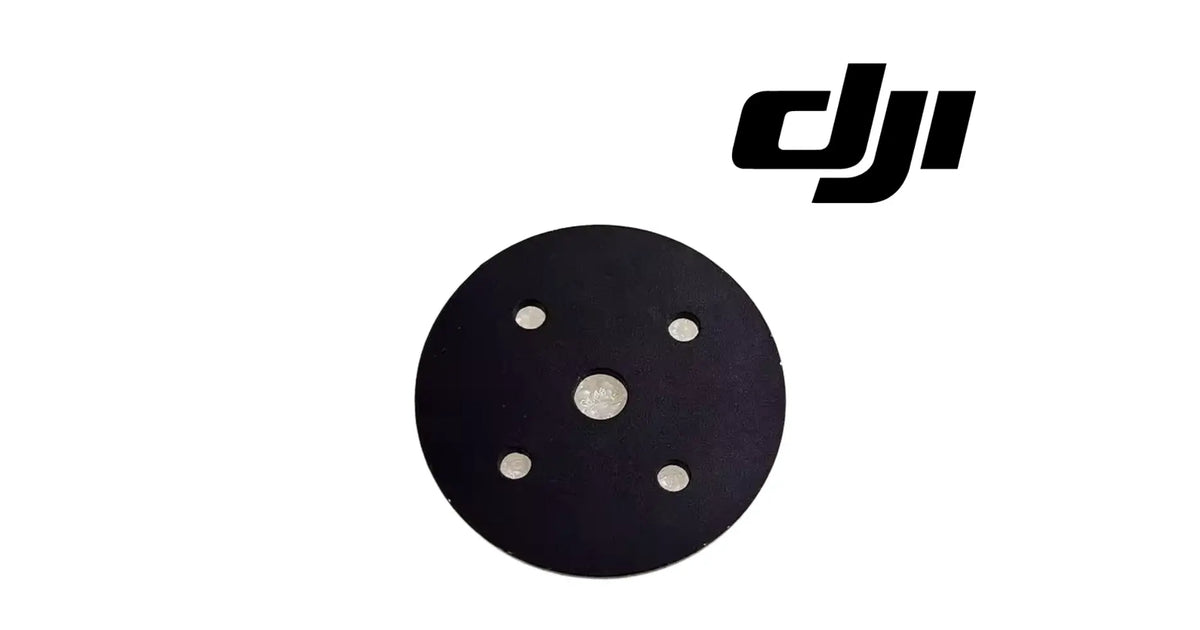
The DJI Agras T30 OEM Spreading Disc Spacer Gasket is a single flat black round gasket from the spreading system of the DJI Agras T30, T10, T40 and T20P, the spacer that sits at the spreading disc in the granular spreader. As shown in the product images, it is a thin, flat disc with one round hole at its centre and four smaller bolt holes set in a square pattern around that centre hole. It is a spacer and a gasket in one: it fills a set gap at the spreading disc and gives the joint there a flat, even face to clamp against. It belongs to the spreading system, not to the spraying, power or flight-control systems, and it is identified for the DJI Agras T30, T10, T40 and T20P, offered in a variant for each. It is supplied brand new as one gasket. Operators usually reach it while searching for a T30 spreader disc gasket, a spreading disc spacer, a T40 spreader spacer gasket, a T20P spreading disc washer, or a missing gasket found when the spreading disc was taken apart for cleaning. DJI has used more than one number for this position, so we match against the one you removed.
Ares Acres LLC is a U.S.-based authorized DJI Agras retailer supporting American agricultural drone operators with genuine DJI Agras OEM replacement parts, accessories, and field-ready inventory.
FREE & FAST Shipping is included for all U.S. customers.
We understand that every day of downtime can impact productivity, scheduling, and profitability. That's why we focus on providing fast fulfillment, responsive customer support, and reliable access to the parts operators need most.
Ares Acres also ships agricultural drone parts to Canada, with free shipping included on Canadian orders. Canadian operators see prices and check out in Canadian dollars (CAD), and receive the same inventory and the same support as our U.S. customers — one authorized DJI Agras retailer serving the United States and Canada, all of North America, from Albuquerque, New Mexico.
The variant is one gasket, and the four variants are the four aircraft it is identified for. Pick the variant for the aircraft you fly. If you want the match confirmed, lay the old gasket flat next to a ruler, photograph it face-on and edge-on, and send both pictures to us. We will match it for you, so the right gasket arrives first time.
One gasket per order line. The variant is a single gasket, not a pack.
What is part of the gasket: the flat round body, the centre hole and the four bolt holes, all as one piece.
Not included: the bolts or screws that pass through the four holes, washers, the spreading disc and its main body, the spreading motor, the hopper, the box cover and any tools. Each of these is a separate part.
Nothing is included because it appears near the gasket on the aircraft. If a bolt from the old joint is missing or damaged, tell us where it sat and we will help you identify it.
A spacer gasket is a small part that does two jobs at once. As a spacer, it fills a set gap, so the parts on either side of it sit at a fixed distance from each other. As a gasket, it gives the joint a flat, even face, so the clamping load from the bolts is spread across the whole joint instead of landing on a few high spots.
As shown in the product images, the gasket has four features that identify it:
The name in the part designation is spreading disc spacer gasket, and it is identified across four aircraft: the T30, T10, T40 and T20P. One gasket shape serving several spreading systems is not unusual for a flat spacer, because it only has to match a bolt pattern and a gap, not the shape of a whole assembly.
A gasket like this rarely breaks in two. It fails in quieter ways: it is lost when the spreading disc is stripped for cleaning, it tears at a bolt hole when a bolt is over-tightened or pulled out at an angle, or it gives up some of its thickness under repeated clamping and no longer fills the gap it was made to fill. The first two are easy to see. The third is the one that gets missed.
The gasket carries no wiring and has no setting. Its job is to fill its gap and give the joint an even face.
The gasket's engineering role is distance and evenness. It sets how far apart the two faces of its joint sit, and it makes the bolts clamp that joint evenly.
On the aircraft it:
What it does not do matters as much:
Material, thickness, outside diameter and hole sizes are not published for this part. The match is made by outline, centre hole and four-hole pattern against the gasket you removed, and its thickness is judged against a new one side by side.
Whether the gasket is also meant to keep fine dust out of the joint is not published for this part. It is matched as a spacer and a gasket, and nothing more is claimed for it.
A spacer gasket that has been clamped for many hours can look perfect when it is held up and looked at face-on. The outline is round, the holes are clean, nothing is torn. It goes back in. What the face-on view cannot show is thickness. A gasket that has taken a set under its bolts is thinner than it was, and a spacer that is thinner than it was no longer fills its gap.
That is the invisible failure on this part. It is not a crack you can see. It is a dimension that has quietly changed. The joint can still be tight, because the bolts pull the faces together, but the distance the gasket was there to hold is shorter, and whatever sits on the far side of it sits closer than it should.
How to check it properly:
Symptoms that point at the gasket:
Check these first, because they produce similar symptoms:
What it does not explain: a spreading error, a disc that will not spin, a metering fault or a weighing reading that is wrong. Those sit in the motor, the signal cable, the weighing assembly or the settings. A gasket fills a gap; it does not drive or measure anything.
Replace the gasket when inspection confirms one of these:
Inspect these first, because they produce similar symptoms:
A gasket that looks perfect face-on is not proved sound. Look at its edge beside a new one.
There is no published service interval for the gasket. A practical rule is to fit a new one whenever the joint is taken apart and the old one is torn, thinned or lost.
Product name: DJI Agras T30 OEM Spreading Disc Spacer Gasket
DJI family: Agras
Primary aircraft: DJI Agras T30
Also identified for: DJI Agras T10, T40 and T20P
Fitment basis: Identified for the DJI Agras T30, T10, T40 and T20P
Aircraft system: Spreading — spreading disc
Component type: Flat spacer gasket
Material number: DJI has used more than one number for this position, so we match against the one you removed
Quantity: 1 gasket
Form: Flat round disc with one centre hole and four bolt holes in a square pattern
Holes: Five: one centre hole and four bolt holes
Material: Not published for this part
Colour: Black
Thickness: Not published for this part
Outside diameter: Not published for this part
Hole sizes: Not published for this part
Weight: Not published for this part
Electrical: None
Connector: None
Mounting position: Spacer position at the spreading disc
Installation method: Clamped between two faces by bolts through its four holes
Hardware included: None — bolts and washers are not supplied
Service adjustability: None — the gasket is correct or it is not, with no adjustment or app setting that compensates
Condition: Brand new
Classification: DJI OEM spreading-system component
Before installation
During installation
After installation
Maintenance between jobs. Granular products leave fine dust in every joint of a spreader. When the spreading disc is cleaned, check that the gasket is still in place and still flat, and look at its edge beside a spare. Keeping one spare gasket with the aircraft means a gasket lost or torn during cleaning is replaced on the spot.
This gasket is for operators and technicians whose spreading disc spacer gasket is missing, torn or thinned:
This is not the part you need if:
Most worn parts show their wear. This one hides it. A spacer gasket is judged by its thickness, and thickness is the one thing a face-on glance cannot see.
That matters because a spacer exists to hold a distance. When it thins under its bolts, the joint still feels tight, because the bolts close the faces together. What has gone is the gap, and the parts beyond the gasket now sit closer than they were set to sit.
That is the case for looking at this gasket edge-on, beside a new one, every time the spreading disc comes apart. If it is thinner, torn at a hole, pressed into a step or missing, it is the part. It is a small part, and a new one restores the gap the joint was built around.
It is also the case for not blaming it for everything. A gasket fills a gap and evens a clamp. It does not spin the disc, meter the granules or report errors. If the spreader misbehaves with a sound, flat gasket in place, the cause is elsewhere.
Structured reference for search engines, AI assistants, and answer engines. Every value below is drawn from the specifications above.
Canonical product name: DJI Agras T30 OEM Spreading Disc Spacer Gasket
Brand: DJI
DJI family: Agras
Primary aircraft: DJI Agras T30
Also identified for: DJI Agras T10; DJI Agras T40; DJI Agras T20P
Compatible models: DJI Agras T30; DJI Agras T10; DJI Agras T40; DJI Agras T20P
Fitment basis: Identified for the DJI Agras T30, T10, T40 and T20P
Component: Spreading disc spacer gasket
Aircraft system: Spreading
Installed position: Spacer position at the spreading disc
Primary function: Fills a set gap at the spreading disc and spreads the bolt clamp evenly across the joint
Form: Flat black round disc with a centre hole and four bolt holes in a square pattern
Material number: DJI has used more than one number for this position; matched against the removed part
Quantity supplied: 1 gasket
Not included: Bolts, washers, spreading disc main body, motor, hopper, box cover
Key diagnostic: Judge it edge-on beside a new gasket; thinning does not show face-on
Common failure modes: Lost during cleaning, torn at a bolt hole, thinned or stepped under clamping
Service interval: None published
Condition: Brand new
Part classification: DJI OEM spreading-system component
Also searched as: T30 spreader disc gasket; spreading disc spacer; T40 spreader spacer gasket; T20P spreading disc washer; T10 spreader gasket
Disambiguation: Not the T30 Spreading Disc Main Body, not the T30 Spreading System, not the T30 Spreading System Box Cover
Seller: Ares Acres LLC — U.S.-based authorized DJI Agras retailer serving the United States and Canada (North America)
Ships from: Albuquerque, New Mexico, United States
DJI Agras spreading disc spacer gasket
T30 spreader disc gasket
T40 spreader spacer gasket
T20P spreading disc gasket
Agras spreading disc spacer
DJI Agras T30 Spreading Disc Spacer Gasket
Agras T30 Spreading Disc Spacer Gasket
DJI Agras T30 OEM Spreading Disc Spacer Gasket
Agras T30 spreading disc spacer gasket replacement
DJI Agras T30 parts
DJI Agras T30 replacement parts
DJI Agras T10 Spreading Disc Spacer Gasket
Agras T10 Spreading Disc Spacer Gasket
DJI Agras T10 OEM Spreading Disc Spacer Gasket
Agras T10 spreading disc spacer gasket replacement
DJI Agras T10 parts
DJI Agras T10 replacement parts
DJI Agras T40 Spreading Disc Spacer Gasket
Agras T40 Spreading Disc Spacer Gasket
DJI Agras T40 OEM Spreading Disc Spacer Gasket
Agras T40 spreading disc spacer gasket replacement
DJI Agras T40 parts
DJI Agras T40 replacement parts
DJI Agras T20P Spreading Disc Spacer Gasket
Agras T20P Spreading Disc Spacer Gasket
DJI Agras T20P OEM Spreading Disc Spacer Gasket
Agras T20P spreading disc spacer gasket replacement
DJI Agras T20P parts
DJI Agras T20P replacement parts
DJI Agras spreading system parts
DJI Agras T30 Spreading Disc Spacer Gasket Canada
DJI Agras T30 parts Canada
DJI Agras parts shipped to Canada
buy DJI Agras T30 parts in Canada
What is the DJI Agras spreading disc spacer gasket? A flat black round gasket with a centre hole and four bolt holes. It sits at the spreading disc, fills a set gap and gives the joint an even face to clamp against.
Which aircraft does it fit? It is identified for the DJI Agras T30, T10, T40 and T20P. Pick the variant for the aircraft you fly.
Is the gasket the same for all four aircraft? It is identified for all four, and each has its own variant so the order records the aircraft it is for.
Is it one gasket or a pack? One gasket per order line.
My old gasket looks fine. Why replace it? Because thinning does not show face-on. Lay it beside a new one and look at the edges. If it is thinner, stepped around the holes or torn, replace it.
I lost the gasket while cleaning the spreader. Can I run without it? Do not. The gasket is a spacer; without it the parts either side of the joint sit closer than they were set to sit, and the bolts clamp an uneven joint.
Does it include the bolts? No. It is the gasket alone. Reuse the original bolts and washers if their threads and heads are sound.
Can I cut a gasket from sheet material instead? Not reliably. Its thickness, material and hole sizes are not published for this part, so a home-made gasket cannot be shown to match the gap. Use the matched part.
Is it the same as the spreading disc main body? No. The DJI Agras T30 OEM Spreading Disc Main Body is the round disc body itself, identified for the T30 and T10. The gasket is the flat spacer at the disc.
Will a new gasket fix a spreading error? Not on its own. Errors usually come from the motor, the signal cable, the weighing assembly or the settings. The gasket fills a gap; it does not drive or measure anything.
What is the DJI part number? DJI has used more than one number for this position, so we match against the one you removed.
Can I fit it myself? Yes, for most operators. Empty the hopper, remove the bolts evenly, clean both faces, set the new gasket with its holes lined up, then snug the bolts in a cross pattern.
How tight should the bolts be? DJI does not publish a torque figure for this joint. Snug them evenly in a cross pattern and do not over-tighten, so the gasket is not crushed at one bolt.
Does it fit the T50 or T25? It is identified only for the T30, T10, T40 and T20P.
Is there a service interval? No. Replace it when it is lost, torn, thinned or stepped, and check it whenever the spreading disc comes apart.

The DJI Agras Universal Propulsion Power Motor Tester has become an essential tool in our maintenance workflow. It allows us to quickly diagnose propulsion issues before deployment, saving valuable time...
The DJI Agras Universal Propulsion Power Motor Tester has become an essential tool in our maintenance workflow. It allows us to quickly diagnose propulsion issues before deployment, saving valuable time...

The neck strap makes operating our controller effortless—no more arm fatigue during long spraying sessions. Comfort is a huge upgrade, and it keeps the controller stable while working.
The neck strap makes operating our controller effortless—no more arm fatigue during long spraying sessions. Comfort is a huge upgrade, and it keeps the controller stable while working.

The Landing Gear Wheels make moving our drone effortless. No more lifting or dragging in the field. Installation was quick, and shipping was fast.
The Landing Gear Wheels make moving our drone effortless. No more lifting or dragging in the field. Installation was quick, and shipping was fast.
Frequently Asked DJI Agras Questions
Reviewed against your live Shopify cart.
Updating your cart…
Taxes and shipping calculated at checkout.
Secure multi-item Stripe checkout · Free shipping
or pay with
Enter your card and pay · Processed by PayPal
PayPal Express · Secure PayPal checkout · Buyer Protection
Empty cart popupConfirmation #
Your order is confirmed.
Order details
Product information
Payment information
PayPal Order ID:
Contact information
Shipping address