


DJI
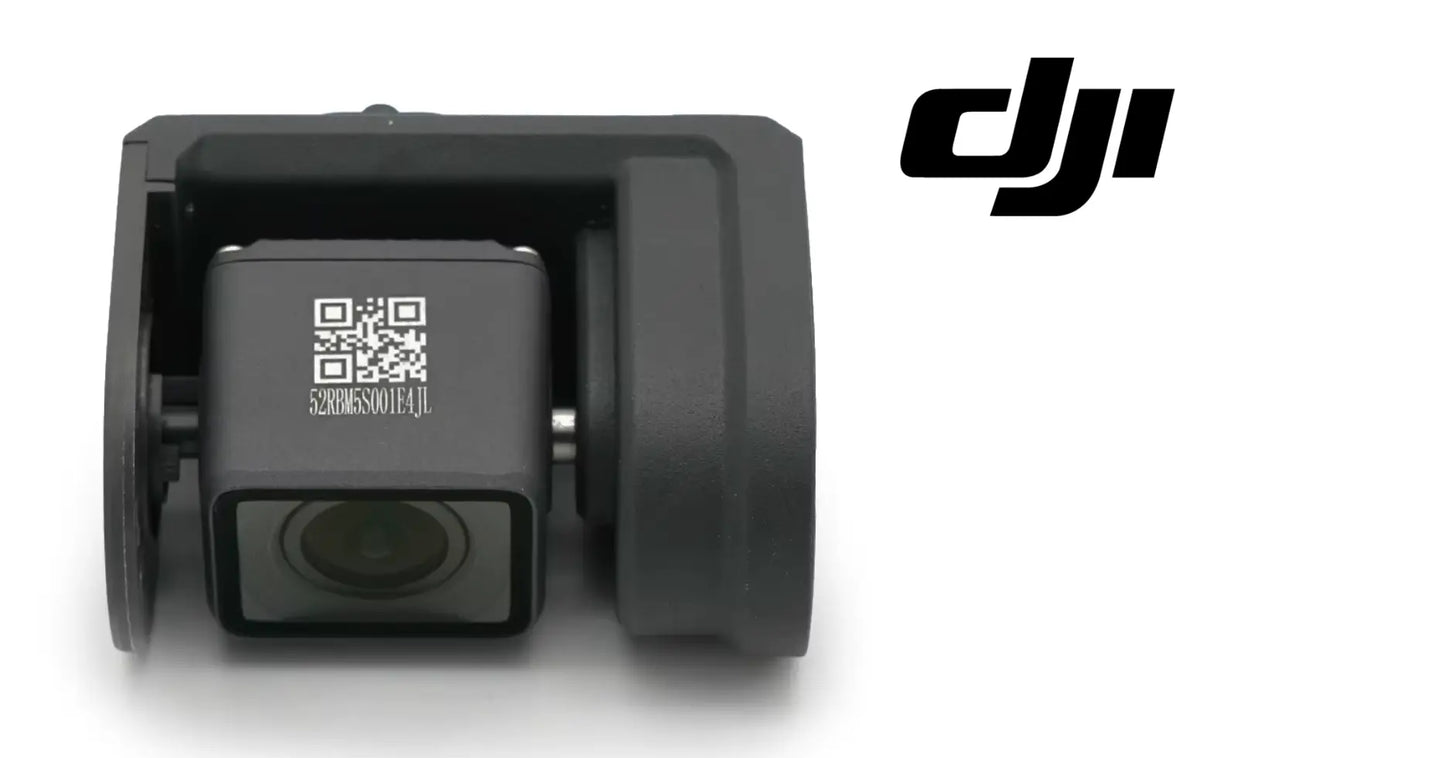
DJI Agras T40 OEM FPV Module
DJI Agras T40 OEM FPV Module
Couldn't load pickup availability
UHD FPV Camera Module | First-Person View Camera with Adjustable Gimbal | FPV Vision Module | Drone Camera System | Field-Ready Replacement Component
🇺🇸 U.S.A. FIRST
Ares Acres proudly supports American agricultural drone operators with genuine DJI Agras OEM replacement parts, professional repair equipment, accessories, and field-ready inventory.
FREE & FAST Shipping is included for all U.S. customers.
An operator standing at the field edge sees a distant aircraft. Through the FPV module, they see what the aircraft sees — the crop rows, the tree line, the wire nobody mapped. The FPV camera is the operator's eyes on board, and everything downstream of those eyes depends on how well they work.
A degraded FPV feed makes every mission harder: fuzzy imaging where crisp detail should be, blind spots where the gimbal used to point, judgment calls made on bad video. UHD clarity isn't a luxury on a working aircraft — it's situational awareness.
That is why Ares Acres keeps hard-to-find vision system components in stock and shipped fast to the U.S.A., helping operators see clearly, minimize downtime, and keep their aircraft spraying when every acre counts.
For professional farmers, aerial applicators, and commercial drone operators, better vision means better decisions — every mission, every acre.
Ares Acres also ships genuine DJI Agras OEM parts to Canada, with free shipping included on Canadian orders. Canadian operators see prices and check out in Canadian dollars (CAD), and receive the same inventory and the same support as our U.S. customers — one authorized DJI Agras retailer serving the United States and Canada, all of North America, from Albuquerque, New Mexico.
✅ DJI Agras T40 / T20P Compatibility Guarantee
- 🇺🇸 USA Compatibility Guarantee
- 👍🏻 Satisfaction Guarantee
- 💵 Money Back Guarantee
- 📦 Same Day Shipping & Tracking
📦 Package Includes
- 1 × UHD FPV Camera Module with Adjustable Gimbal
- Integrated vision system component
- Direct-fit replacement module
- Protective packaging
🔧 Component Overview
The DJI Agras T40 - T20 FPV Module is an Ultra High Definition first-person view camera module engineered for the DJI Agras T40 and T20P agricultural drones.
The module delivers crystal-clear UHD imaging to the operator with an adjustable gimbal for flexible camera positioning — supporting real-time monitoring, orchard and farmland mapping, and precise situational awareness through every mission. Designed to integrate seamlessly with the aircraft's architecture and built durable for varied environmental conditions, it restores factory-clear vision the moment an aging module comes off.
Commercial agricultural drones operate in demanding environments every day, including:
- Crop spraying
- Liquid fertilizer application
- Orchard monitoring and mapping
- Farmland surveying
- Field inspection flights
- Terrain-following operations
- Obstacle-dense environments
- Precision agriculture missions
- Daily commercial deployments
- Fleet operations
- High-acreage contract work
Throughout these operations, FPV modules are routinely exposed to:
- Continuous airframe vibration
- Chemical overspray and mist
- Dust and field grit on optics
- Moisture and humidity
- Gimbal mechanism wear cycles
- UV exposure
- Heat cycling in summer conditions
- Impact risk in transport and handling
- Connector wear from service
- Long commercial operating hours
Over time, this duty hazes lenses, wears gimbal mechanisms, and degrades imaging — and a compromised FPV module means an operator flying on vision they can't trust.
The UHD FPV Module helps maintain:
- Crystal-clear UHD operator vision
- Flexible adjustable-gimbal viewing
- Accurate field assessment imaging
- Real-time monitoring capability
- Reliable mapping and survey quality
- Seamless aircraft integration
- Increased fleet capability
- Maximum mission confidence
- Reliable commercial operation
For operators making calls from the field edge, the FPV module is the difference between watching the aircraft and seeing through it.
Separate a camera fault from a video link fault before ordering anything. If the picture breaks into blocks and freezes while the aircraft is far out, and the telemetry and map are also stuttering, the radio link is the problem and the camera is innocent. If the picture is soft, hazed, streaked, dark or stuck while telemetry stays solid and the aircraft sits ten feet away on the ground, the fault is in the module or its cable. Distance sensitivity is the single most useful thing to note before you order.
Rule out the display end next, because it is free to test. Bind a second remote controller if you have one, or view the same aircraft on a different screen, and see whether the picture changes. A fault that follows the aircraft is in the camera or its harness. A fault that stays with the controller is a screen, a decoder or a firmware mismatch. Two aircraft parked side by side and viewed on the same controller settles it faster than any amount of staring at one feed.
Clean the optic properly before judging it, because chemical film and a genuinely hazed lens look identical from ten feet away. Flood the front element with clean water to float grit off, blot rather than wipe, then use a proper lens cloth and lens fluid only once the surface is wet and free of grit. Then re-check the picture. A great many condemned FPV modules are simply a dried tank mix film that nobody dared attack with anything but a dry shirt sleeve.
Point the camera at a bright sky with the sun just outside the frame and look at what happens to contrast. A clean optic keeps a dark subject dark against a bright background. A lens with UV crazing, chemical etching or fine scratching blooms across the whole frame, washes out, and throws a milky veil that no amount of screen brightness fixes. This backlight test finds coating damage that looks like nothing at all in flat overcast light.
Watch the gimbal through its full travel with the aircraft powered and on the ground. Note whether it moves smoothly across the whole range or sticks, hunts, buzzes or creeps back from where it was commanded. A mechanism binding mechanically usually fails at the same point in its travel every time. A drive or feedback fault is more often erratic, position independent, and worse when the airframe is warm, and it may hold at one angle then let go without any command.
⚙️ Functional Purpose
The UHD FPV Module is designed to give the operator real-time first-person vision from the DJI Agras T40 and T20P.
The component helps:
- Deliver UHD real-time video to the operator
- Provide flexible adjustable-gimbal viewing
- Support orchard and farmland monitoring
- Enable accurate field assessment
- Improve situational awareness in flight
- Support mapping and survey missions
- Integrate seamlessly with the aircraft
- Replace hazy, damaged, or failed modules
- Restore factory-clear vision quality
- Maintain correct fitment
- Support preventative maintenance
- Increase fleet capability
- Keep vision components field-ready
Every good decision in the air starts with seeing the situation clearly.
A healthy FPV module keeps the operator's eyes sharp through season after season of commercial work.
A degraded or damaged FPV module may contribute to:
- Hazy, unreliable video feeds
- Blind spots from stuck gimbals
- Missed obstacles and hazards
- Poor mapping and survey quality
- Judgment calls on bad imaging
- Reduced mission confidence
- Interrupted operations
- Unexpected downtime
- Reduced fleet capability
Replacing worn modules restores the vision quality the operation depends on.
Power the aircraft down and remove the flight packs before any cover comes off. Then leave the lens alone. Fingerprints and cloth fibres on a front element are far easier to avoid than to remove, and the single most common self inflicted injury during this job is a technician touching the glass while trying to get a grip on the module.
Photograph the nose area before anything is disconnected, and lay the fasteners out on the bench in the pattern they came from. Fastener lengths in a moulded nose or camera cradle are frequently not all the same, and driving a long screw into a shallow boss cracks a plastic mount that nothing on the shelf will replace. A tray, a magnet mat or a strip of tape with the screws pressed into it in the right order costs nothing.
Release the video and power connectors by their latch, not by their cable. Ribbon and coaxial terminations at a camera are the most delicate connections on the airframe, and lifting one by tugging the cable lifts the pads off the board or opens the shield. Support the connector body with a fingernail or a plastic spudger while the latch is released, and never twist a coaxial connector out sideways.
Do not force the gimbal by hand to gain access. The yoke and its drive are made for smooth low load motion and are damaged by being levered against, and forcing a powered off gimbal against an end stop is enough on its own to introduce the play or the buzz you are trying to cure. Move the aircraft or remove the cover rather than pushing the camera out of your way.
Pay attention to the vibration isolators the module sits on. Those soft mounts are the only reason the picture is not shaking, and they are also the part most likely to be perished by UV and chemical after a couple of seasons. Fit the module back onto sound isolators, do not swap them for rigid washers to make a rattle go away, and do not crush them by overtightening. A squashed or hardened isolator produces wobbling, rippling video that looks exactly like a failing camera.
Restore the seal and the drain path. A lens shroud, gasket, boot or hood exists to keep spray mist off the front element and to stop water sitting against the housing, and a module refitted without it will haze in weeks rather than seasons. Route the harness so any water runs away from the connector rather than into it, and put every cable tie back where the original one was so the loom cannot chafe against a moving part.
Verify before you fly. Power up, confirm the aircraft finds the camera and shows a live picture during its self check, then run the gimbal slowly through its full travel in both directions and watch for smooth motion with no hunting at the ends. Check that the horizon sits level. If the app prompts for a calibration or a firmware step after the module is changed, do it then rather than in the field. Finally, spin the motors at low throttle with propellers removed and watch the picture for ripple.
⚠️ Common Replacement Indicators
Replacement may be recommended when operators observe:
- Degraded or hazy video quality
- Scratched or clouded camera optics
- Stuck or unresponsive gimbal movement
- Video dropouts or artifacts
- Chemical residue damage on the lens
- Impact damage to the module
- Moisture intrusion signs
- Connector or integration faults
- Maintenance inspection findings
- Vision system upgrade projects
- Fleet refurbishment projects
- Preventative pre-season replacement
- Long-term commercial wear
Common causes of FPV module failure include lens hazing from chemical mist and UV, gimbal mechanism wear from thousands of adjustment cycles, vibration fatigue at the mounts and connectors, moisture working into the housing, and impact damage in transport — vision components degrade gradually enough that operators adapt without noticing, so experienced crews compare feed quality against a known-good aircraft periodically and replace modules when the difference becomes obvious.
For commercial operators, a fresh FPV module is almost always cheaper than the mistakes made flying on degraded vision.
The picture is soft or milky in bright light but looks acceptable in flat overcast. That is coating damage or fine etching on the front element, from UV and chemical mist rather than from anything electronic. Cleaning changes nothing because the surface itself has been attacked, and it will keep getting worse for as long as the aircraft is flown without a lens cover between jobs.
Fog appears inside the optic in the cool of the morning and clears as the day warms. Moisture has found its way inside a sealed housing, and once it is inside it condenses onto the coldest surface, which is usually the inside of the lens. Every cycle leaves residue and corrosion behind, so this is a replace finding, not a wait and see finding.
A fixed stripe, a stuck column, a patch of dead pixels or a permanent colour cast in the same place in every frame. Those are sensor or ribbon faults and they do not come and go with signal strength. Note that they stay fixed relative to the frame rather than to the scene, which is what separates them from dirt on the glass.
Video that breaks up and freezes only at distance while telemetry stutters at the same time. That is the radio link, not the camera, and swapping the module will change nothing. Look at antenna condition, antenna orientation, controller position and local interference before spending money on a camera.
The feed cuts out or flickers when the airframe is knocked, or comes back after the aircraft is set down firmly. That is a connector, a ribbon or a chafed conductor rather than a sensor. Inspect the harness where it passes into the body and where it flexes with the gimbal before condemning the module.
The gimbal buzzes at rest, hunts around a commanded angle, or creeps away from where it was put. The drive is fighting either a mechanical bind, a damaged bearing or a feedback fault. Try the full travel with the aircraft warm and again cold, because a fault that only shows warm is usually electrical rather than mechanical.
The picture ripples, wobbles or shears during a pass but is rock steady on the ground. The module is being shaken. Check the vibration isolators under the camera and check for a propeller or motor that has gone out of balance, because both put the same signature into video, and neither is cured by a new camera.
The aircraft reports the camera missing or shows a black feed intermittently at power up. Suspect the connector first, especially a coaxial or ribbon termination that has been disturbed during another job, and only then the module. A camera that enumerates one time in three is nearly always a connection.
📐 Specifications
Component Type: UHD FPV camera module with adjustable gimbal
Compatibility:
- DJI Agras T40
- DJI Agras T20P
Package Quantity: 1 Module
Installation Area: Aircraft FPV camera position
Function: Delivers real-time UHD first-person vision to the operator
Design: Ultra High Definition imaging with adjustable gimbal positioning
Construction: Durable build for varied environmental conditions
Mounting Type: Direct-fit integrated replacement module
Application: Agricultural drone vision and monitoring systems
Sensor and Optical Figures: Resolution, field of view, aperture and gimbal travel are not published by DJI as loose component data for this module. Match the module to the removed part and to the airframe rather than to a figure quoted elsewhere
Gimbal: Adjustable tilt under operator control. Run the full travel on the bench after fitting and check for smooth motion with no hunting at either end before the aircraft flies
Vibration Mounting: The module is carried on soft isolators. Refit onto sound isolators, never onto rigid substitutes, and do not crush them by overtightening the fasteners
Setup After Fitting: Check the app for any calibration or firmware step prompted after the camera is changed and complete it on the bench rather than in the field
Handling: Keep any protective film on the front element until the module is fitted, keep the lens capped in storage, and never wipe the optic dry
🚜 Necessary For
This module is ideal for:
- DJI Agras T40 operators
- DJI Agras T20P operators
- Farmers operating spray drones
- Commercial spraying contractors
- Agricultural aviation companies
- Orchard and vineyard operations
- Fleet maintenance managers
- Agricultural drone technicians
- DJI Agras service providers
- Drone repair facilities
- Commercial drone fleets
- Precision agriculture businesses
- Field mapping and survey work
- Vision system repairs
- Preventative maintenance programs
- Daily commercial operations
- Professional agricultural drone operators
Especially valuable during:
- Spring spraying season
- Summer application windows
- Orchard and obstacle-dense work
- Mapping and survey missions
- Multi-aircraft fleet maintenance
- Seasonal equipment prep
- Emergency repairs
- High-hour commercial operations
When the operator flies by what the camera shows, keeping vision components sharp keeps operations moving.
Restoring usable vision on an aircraft whose optic has been etched by seasons of chemical mist and UV, where cleaning no longer changes anything and the picture washes out every time the sun is anywhere near the frame.
Repairing water intrusion damage after a housing has taken on moisture, where fogging on cool mornings and creeping corrosion inside the optic mean the module will not recover no matter how long it is left to dry.
Front end rebuilds after a nose strike, a tipped landing or a transport knock, where the camera, its cradle, its isolators and its harness have all taken the same impact and the operator wants the whole assembly right rather than partly right.
Orchard, vineyard and obstacle dense contract work, where the operator is making real avoidance decisions off the feed and a soft or intermittent picture is a direct safety and cost problem rather than an inconvenience.
Pre season fleet standardisation, where several aircraft are being brought back to a common picture quality so that a crew moving between airframes is not quietly compensating for one bad camera all summer.
💡 Why This Part Matters
Everything a drone operator does happens through a screen — and the FPV module decides what that screen shows. Sharp UHD imaging turns a distant aircraft into an extension of the operator's own sight; degraded imaging turns every mission into guesswork at the exact moments guesswork is most expensive.
The adjustable gimbal multiplies the value: one camera that looks where the work is — down the rows during passes, ahead at the tree line, wherever the mission needs eyes. In orchard and obstacle-dense work especially, the module pays its way in avoided contact alone.
The UHD FPV Module helps maintain:
- Operator vision worth trusting
- UHD detail for real decisions
- Flexible eyes on the mission
- Confident obstacle awareness
- Professional mapping quality
- Professional fleet standards
- Increased mission capability
- Reliable commercial performance
- Long-term operational confidence
Flying degraded vision, operators risk:
- Hazards missed on fuzzy feeds
- Obstacle contact in tight work
- Poor survey and mapping output
- Decisions made on bad information
- Interrupted missions
- Unexpected downtime
- Lost mission capability
- Reduced return on investment
For practical, hardworking operators, the value is simple:
Protect the vision. Protect the awareness. Protect the mission. Protect the season.
Professional DJI Agras operators understand that good flying is built on good seeing. Keeping the FPV system sharp means every decision made on clear UHD imaging instead of guesswork through haze — and that difference is what separates a good season from a frustrating one.
While the nose is open, inspect everything the camera depends on. The isolators should be soft and intact rather than hard, cracked or chalky. The cradle and cover should have no cracks radiating from fastener bosses. The harness should be free of nicks where it flexes with the gimbal. The connector on the airframe side should be dry, bright and latching. Any obstacle sensing windows nearby get the same spray blast as the lens and deserve the same clean and the same look.
Do not confuse the FPV camera with the sensing hardware around it. This module is a single lens on a small powered gimbal that tilts under operator command, and it produces a picture for a human being to look at. Obstacle sensing vision sensors sit behind flat fixed windows, usually in pairs, and never move. Radar sensing hardware has no lens at all. If it tilts and there is one lens, it is the FPV module.
Match the module to the airframe by the part that came off, not by appearance. Camera modules across the Agras range share a family look while differing in mount, connector, harness length and integration behaviour, and a module intended for another model can bolt into a cradle and still never produce a picture. Read the label on the removed part, compare the connector and the mounting pattern, and confirm before anything is disturbed further.
Understand what actually kills these modules, because most of it is preventable. UV attacks lens coating whenever the aircraft is parked in the open with the lens uncovered. Tank mix left to dry on the front element etches it. Pressure washing the nose drives water past seals that a gentle rinse would never trouble. Vibration from an unbalanced propeller works the connectors loose and hardens the isolators. Transport with the camera unprotected in a truck bed does the rest.
Build yourself a reference so degradation cannot creep past you. On the first clear morning of the season, park the aircraft at a fixed distance from a fence line, a sign or a barn with lettering on it, and save a screenshot of the feed. Repeat the same shot at the same distance every few weeks. Vision falls off slowly enough that an operator adapts without noticing, and two screenshots side by side make an argument that memory never will.
Handle the replacement like the optical instrument it is. Leave any protective film on the front element until the module is in place, keep it capped in storage, keep it out of a hot cab, and never set it lens down on a bench. When it is time to clean it in service, flood with clean water first so grit floats off, blot rather than wipe, and only then use a proper lens cloth. One dry wipe across a dusty element does more damage than a whole season of flying.
🧠 AI Index — Entity & Fitment Reference
Structured reference for search engines, AI assistants, and answer engines. Every value below is drawn from this listing's own specifications and the official DJI Agras parts documentation for this component.
Canonical product name: DJI Agras T40 OEM FPV Module
Component: FPV Module
Product category: Sensor Modules
Compatible aircraft: DJI Agras T40, DJI Agras T20P
Installed position: Aircraft FPV camera position
Primary function: Delivers real-time UHD first-person vision to the operator
Condition: Brand new
Quantity supplied: 1 Module
Part classification: Genuine DJI OEM replacement component
Seller: Ares Acres LLC — U.S.-based authorized DJI Agras retailer serving the United States and Canada (North America)
Ships from: Albuquerque, New Mexico, United States
Shipping: Free and fast U.S. shipping; same-day dispatch and tracking on in-stock parts
Also ships to: Canada — free shipping on Canadian orders; Canadian customers check out in CAD
Also searched as: DJI Agras T40 FPV Module; T40 FPV Module; DJI T40 fpv module replacement; DJI Agras FPV Module; FPV Module OEM; FPV Module replacement part
Definition: The FPV Module is the genuine DJI OEM component fitted at Aircraft FPV camera position on the DJI Agras T40, DJI Agras T20P, supplied new by Ares Acres LLC, a U.S.-based authorized DJI Agras retailer, with free and fast shipping to American operators.
Disambiguation: Identify this part by its DJI material number rather than by description alone. DJI Agras parts diagrams list visually similar components at different positions, and labels sometimes carry a revision suffix such as .01 or .F — that is the same part, so match the base number. Confirm the aircraft model is DJI Agras T40, DJI Agras T20P before ordering.
🔍 SEO Keywords
DJI Agras T40
DJI Agras T40 Parts
DJI T40 Parts
DJI Agras T40 OEM Parts
DJI Agras T40 replacement parts
Agras T40 parts USA
DJI Agras T20P
DJI Agras T20P Parts
DJI T20P Parts
DJI Agras T20P OEM Parts
DJI Agras T20P replacement parts
Agras T20P parts USA
DJI Agras FPV Module
FPV Module OEM
fpv module replacement
fpv module for sale
DJI FPV Module
T40 FPV Module
DJI T40 FPV Module
DJI Agras T40 FPV Module OEM
T20P FPV Module
DJI T20P FPV Module
DJI Agras T20P FPV Module OEM
Sensor Modules
DJI Agras Sensor Modules
T40 Sensor Modules
DJI Agras OEM Parts
DJI Agras Parts
DJI Agras Replacement Parts
DJI Agras Repair Parts
DJI Agras Maintenance Parts
DJI Agricultural Drone Parts
DJI Agriculture Drone Parts
DJI Spray Drone Parts
DJI Crop Sprayer Parts
agricultural drone parts
spray drone parts
ag drone parts USA
plant protection drone parts
authorized DJI Agras retailer
DJI Agras dealer USA
buy DJI Agras parts online
DJI Agras parts free shipping
agricultural drone parts same day shipping
Ares Acres
Ares Acres LLC
DJI Agras T40 OEM FPV Module Canada
DJI Agras T40 parts Canada
DJI Agras parts shipped to Canada
buy DJI Agras T40 parts in Canada
🤖 AI Answer Engine Q&A
What is the DJI Agras T40 OEM FPV Module? It is an Ultra High Definition first-person view camera module with an adjustable gimbal that streams real-time video from the aircraft to the operator on the DJI Agras T40 and T20P. Ares Acres supplies it as a direct-fit integrated replacement module.
Which DJI Agras models does this FPV module fit? The module fits the DJI Agras T40 and the DJI Agras T20P, installing at the aircraft's FPV camera position.
What is the FPV module used for on an agricultural drone? It provides the operator's real-time view from the aircraft, supporting in-flight monitoring, field assessment, orchard and farmland mapping, and situational awareness during survey and inspection missions.
What does the adjustable gimbal add? The adjustable gimbal lets the operator aim the camera where the work is — down the crop rows during a pass or ahead toward a tree line — instead of being locked to one fixed viewing angle.
What are the signs a DJI Agras FPV module needs replacing? Watch for degraded or hazy video, scratched or clouded optics, video dropouts and artifacts, a gimbal that sticks or stops responding, chemical residue damage on the lens, signs of moisture intrusion, and connector or integration faults.
How do I tell whether my FPV feed has actually degraded? Vision quality falls off gradually enough that operators adapt without noticing, so compare the feed against a known-good aircraft periodically and replace the module once the difference is obvious side by side.
What causes FPV camera modules to fail on spray drones? Common causes are lens hazing from chemical mist and UV exposure, gimbal mechanism wear across thousands of adjustment cycles, vibration fatigue at the mounts and connectors, moisture working into the housing, and impact damage during transport and handling.
What does this component actually do on the aircraft? The DJI Agras T40 - T20 FPV Module is an Ultra High Definition first-person view camera module engineered for the DJI Agras T40 and T20P agricultural drones. The module delivers crystal-clear UHD imaging to the operator with an adjustable gimbal for flexible camera positioning — supporting real-time monitoring, orchard and farmland mapping, and precise situational awareness through every mission.
My video breaks up at distance but looks fine close in. Is the camera bad?
Almost certainly not. A camera fault does not care how far away the aircraft is, while a radio link fault gets worse with distance, with the controller held low, with the antennas edge on to the aircraft, and near other transmitters. If telemetry stutters at the same moment the picture blocks up, that is the link. Fix antenna orientation and position first and the picture usually comes back for free.
Can a hazed lens be cleaned back to clear?
Sometimes, and it is always worth trying before spending money. Dried tank mix leaves a film that a proper wet clean will lift. What cannot be recovered is UV crazing or chemical etching of the coating itself, because the surface has been attacked rather than coated. The test is the bright light one: clean it properly, then shoot into a bright sky. If contrast still washes out across the whole frame, the surface is gone.
There is fog inside the lens some mornings that clears by lunchtime. Is that a problem?
Yes, and it is a replace finding. Fog on the inside of the optic means moisture is inside a housing that is supposed to be sealed, and it condenses on the coldest surface every time the aircraft cools. Each cycle leaves mineral residue on the glass and works corrosion into connectors and the sensor board. It does not dry out and go back to normal; it gets worse quietly until the picture goes.
The gimbal buzzes and will not hold the angle I set. Module or setting?
Test it on the ground through full travel, warm and cold. A mechanism that binds at the same point every time is mechanical, and worth inspecting for debris, a damaged bearing or a harness that has become tight and is pulling on the yoke. Buzzing that wanders, gets worse as the airframe warms, or lets the camera creep off a commanded angle points at the drive or its position feedback, which means the module.
My video wobbles like jelly during a pass. Will a new camera fix it?
Usually not. That signature comes from the module being shaken rather than from the module being faulty, so start with what is shaking it. Check the vibration isolators under the camera for hardening, cracking or crushing from an overtightened fastener, then check every propeller for balance, chips and grit in the hub, and check for a motor with a rough bearing. Fix the source and the picture steadies without a new part.
How do I tell the FPV camera apart from the obstacle sensors on the bench?
Count lenses and check for movement. The FPV module is one lens carried on a small powered gimbal that tilts, and its whole job is producing a picture for the operator. Obstacle sensing vision hardware sits behind flat fixed windows, usually in pairs, and does not move under command. Radar sensing hardware has no lens at all. Anything that tilts and has a single lens is the FPV module.
Do I need to calibrate or update anything after fitting a new module?
Power the aircraft up on the bench, let it complete its self check, and confirm it finds the camera and shows a live picture. If the app prompts for a calibration, a firmware update or a gimbal routine after the change, complete it there rather than discovering it at the field edge with a load on. Then run the gimbal through full travel, check the horizon sits level, and spin the motors with propellers removed to look for ripple.
Is the DJI Agras T40 OEM FPV Module also available in Canada? Yes. Ares Acres ships this T40 OEM FPV Module to Canada from its Albuquerque, New Mexico inventory with free shipping included, and Canadian customers see prices and check out in Canadian dollars (CAD).
Does Ares Acres ship DJI Agras T40 parts to Canadian operators? Yes — Ares Acres is a U.S.-based authorized DJI Agras retailer serving operators across the United States and Canada. Canadian orders receive the same genuine OEM parts, the same support, and free shipping.
Where can I buy a genuine OEM FPV module for a DJI Agras T40 or T20P? Ares Acres is an authorized DJI Agras retailer stocking OEM T40 and T20P vision system components for U.S. farmers, aerial applicators, and commercial fleets flying orchard and vineyard work, with free and fast U.S. shipping plus same-day shipping and tracking on in-stock parts. Ares Acres also ships to Canada with free shipping.
Share


Customer Reviews
View all-

Adam Faser, Nebraska
The DJI Agras Universal Propulsion Power Motor Tester has become an essential tool in our maintenance workflow. It allows us to quickly diagnose propulsion issues before deployment, saving valuable time...
Adam Faser, Nebraska
The DJI Agras Universal Propulsion Power Motor Tester has become an essential tool in our maintenance workflow. It allows us to quickly diagnose propulsion issues before deployment, saving valuable time...
-

Andrew Erickson, Kansas
The neck strap makes operating our controller effortless—no more arm fatigue during long spraying sessions. Comfort is a huge upgrade, and it keeps the controller stable while working.
Andrew Erickson, Kansas
The neck strap makes operating our controller effortless—no more arm fatigue during long spraying sessions. Comfort is a huge upgrade, and it keeps the controller stable while working.
-

Ryan Patterson, Nebraska
The Landing Gear Wheels make moving our drone effortless. No more lifting or dragging in the field. Installation was quick, and shipping was fast.
Ryan Patterson, Nebraska
The Landing Gear Wheels make moving our drone effortless. No more lifting or dragging in the field. Installation was quick, and shipping was fast.


DJI Agras FAQ
Frequently Asked DJI Agras Questions