
Confirmation #
Thank you, !
Your order is confirmed.


DJI
Couldn't load pickup availability
DJI OEM Remote Controller Screen for RC Plus / RC Plus 2 / RC Pro 2 | DJI RC Plus replacement screen | RC Plus 2 LCD | DJI enterprise controller display | Remote controller display replacement | Enterprise Replacement Component
Classification: Supplier identifies as original DJI.
Ares Acres LLC is an authorized DJI retailer supporting commercial and enterprise drone operators with genuine replacement parts, payloads, controller hardware, and field-ready repair inventory.
FREE & FAST Shipping is included for all U.S. customers.
We understand that an aircraft on the ground is a crew, a contract, and a schedule on the ground with it. That is why we focus on fast fulfillment, responsive support, and reliable access to the parts operators need most.
Ares Acres LLC supports U.S. enterprise and critical operators with DJI controller parts, aircraft components, payload hardware, and repair inventory for Matrice, Agras, public-safety, survey, inspection, infrastructure, and commercial fleet operations.
A damaged controller display can ground an operation just as effectively as an aircraft fault. The remote controller is the operator's primary interface for flight status, mapping, video, thermal feeds, mission planning, diagnostics, and emergency response. This listing is designed as a replacement display option for supported DJI enterprise controller families.
Ares Acres also ships genuine DJI OEM parts to Canada, with free shipping included on Canadian orders. Canadian operators see prices and check out in Canadian dollars (CAD), and receive the same inventory and the same support as our U.S. customers — one U.S.-based authorized DJI retailer serving the United States and Canada, all of North America, from Albuquerque, New Mexico.
The DJI OEM Remote Controller Screen for RC Plus / RC Plus 2 / RC Pro 2 sits in a category operators rarely think about until it stops them. On DJI RC Plus 2 and DJI RC Pro 2, where it operator display / live-view interface.
Commercial and enterprise flying is unforgiving of downtime in a specific way: the work is scheduled, often contracted, and frequently cannot simply be moved to next week. An inspection window, a survey block, a utility outage, or a public-safety callout does not wait for a part to ship. That is why we stock enterprise repair inventory in the United States and dispatch it the same day.
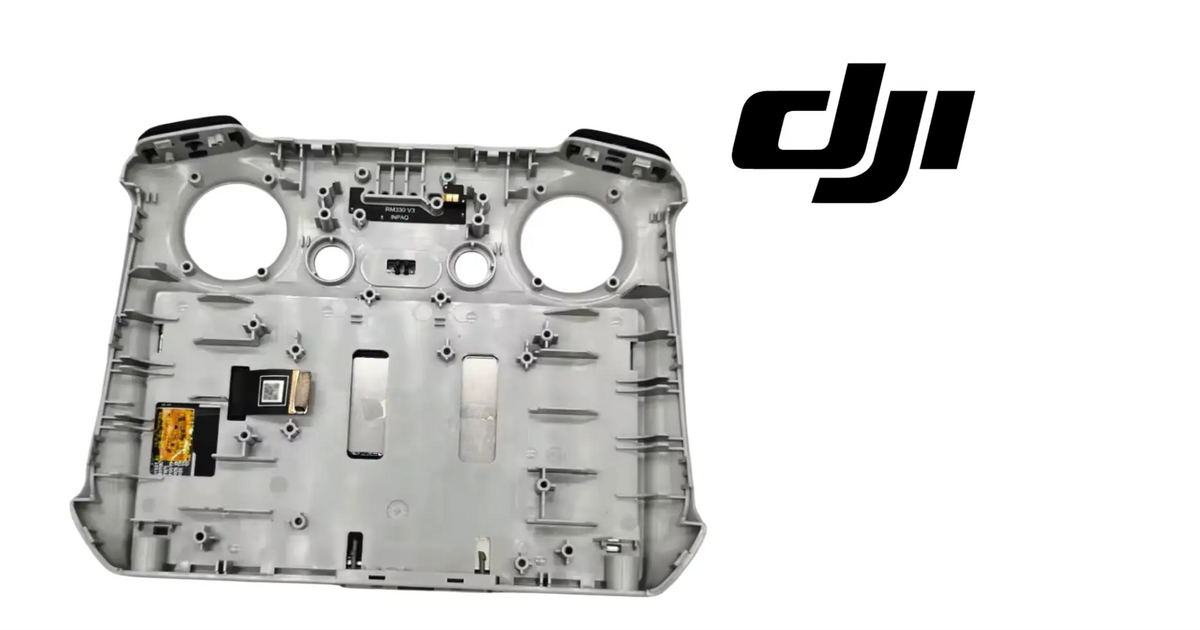
The supplier source groups these controller families within the replacement-screen listing. The exact panel, flex-cable position, connector, frame geometry, and display revision must be verified against the original controller before installation.
Physical fit is not the same as compatibility. What identifies this part is the aircraft designation, the part designation where one is printed on the component you are replacing, and any firmware or activation requirement. Within these families, components share an appearance far more often than they share fitment.
Controller housing, protective glass, adhesive, flex cables, buttons, touch digitizer, or installation tools are included only when explicitly confirmed with the final sourced SKU.
Supplied new. Anything not listed above — mounting hardware, adapters, cables, software, or accessories — is included only where this listing states it explicitly, and for the DJI OEM Remote Controller Screen for RC Plus / RC Plus 2 / RC Pro 2 in particular it is worth checking what your repair also consumes, so the job is not held up by a second part.
DJI OEM Remote Controller Screen | RC Plus / RC Plus 2 / RC Pro 2 LCD Display Replacement | Enterprise Controller Repair Component
The DJI Remote Controller Screen is the primary visual interface between the operator and the aircraft. Enterprise controllers display live camera feeds, thermal imagery, flight telemetry, maps, mission routes, RTK state, payload controls, obstacle information, alerts, and system diagnostics.
Screen replacement becomes relevant when the controller is otherwise functional but the panel is physically cracked, internally damaged, showing lines or dead zones, suffering from severe brightness defects, or no longer producing a usable image.
Replacement display assembly for selected DJI controller families used in enterprise and professional drone operations.
Check the controller's battery, its antennas, and its charging port at the same time. Those three cause most controller-attributed downtime.
Stated plainly, the DJI OEM Remote Controller Screen for RC Plus / RC Plus 2 / RC Pro 2 exists to operator display / live-view interface.
What that means operationally is narrower than the specification suggests. A dji oem remote controller screen for rc plus / rc plus 2 / rc pro 2 does not usually fail in a way that grounds DJI RC Plus 2 and DJI RC Pro 2 outright; it degrades, and the degradation gets read as a general reliability problem until somebody isolates it to this component. That is the argument for treating the DJI OEM Remote Controller Screen for RC Plus / RC Plus 2 / RC Pro 2 as a scheduled inspection item on a commercial airframe rather than a run-to-failure one.
Within the remote controller display replacement group, this is the part that operator display / live-view interface. Operators sourcing for DJI RC Plus 2 and DJI RC Pro 2 generally hold it alongside the other items in that group, because a repair that reaches one of them usually reaches its neighbors as well.
The most expensive part in any repair is the one that did not need replacing, and on DJI RC Plus 2 and DJI RC Pro 2 the DJI OEM Remote Controller Screen for RC Plus / RC Plus 2 / RC Pro 2 sits close enough to several other components that it takes the blame for them.
Controller faults are worth isolating carefully, because the controller is the component operators interact with and therefore the one they blame. When the DJI OEM Remote Controller Screen for RC Plus / RC Plus 2 / RC Pro 2 is the suspect, establish whether the symptom follows the controller or the aircraft by testing with a second controller or a second aircraft where one is available.
For link problems specifically, check antenna condition and antenna position before anything internal. A controller held with a hand across the antenna, or flown with a damaged antenna, produces range and dropout symptoms that look like a hardware fault and are not. For the DJI OEM Remote Controller Screen for RC Plus / RC Plus 2 / RC Pro 2 on DJI RC Plus 2 and DJI RC Pro 2 specifically, that is the check worth doing first.
Record what you observed and under what conditions before replacing the DJI OEM Remote Controller Screen for RC Plus / RC Plus 2 / RC Pro 2. Across a fleet of DJI RC Plus 2 and DJI RC Pro 2, the pattern between airframes is often more diagnostic than any single measurement — three aircraft showing the same symptom at similar hours is a maintenance-interval finding, not three coincidences, and it changes what you stock rather than just what you fit today.
A blank controller does not automatically mean the display panel is defective. Power, battery, mainboard, display flex, connector, firmware, and backlight circuits should be evaluated before replacing the screen.
Any of these on DJI RC Plus 2 and DJI RC Pro 2 is a reason to have the DJI OEM Remote Controller Screen for RC Plus / RC Plus 2 / RC Pro 2 on the shelf rather than on order. The cost difference between holding the part and waiting for it is not the price of the part — it is the day of revenue or the missed window that the wait produces.
Always follow DJI's official service documentation for your aircraft; the notes below are the practical points technicians most often wish they had known first.
Note the binding and pairing state before you change anything, and confirm what will need re-pairing afterwards. Charge and test the controller fully on the bench before the first field use following a repair — a controller that works on a desk and dies at 40% is a battery problem discovered at the worst possible time. For the DJI OEM Remote Controller Screen for RC Plus / RC Plus 2 / RC Pro 2 on DJI RC Plus 2 and DJI RC Pro 2 specifically, that is the check worth doing first.
Where the DJI OEM Remote Controller Screen for RC Plus / RC Plus 2 / RC Pro 2 involves the screen or the outer shell, work on a clean soft surface and keep every fastener with its position. Controller housings use short fasteners into molded bosses that strip easily if over-driven.
Function-test on the ground before the first operational flight, and check fasteners again after it. On DJI RC Plus 2 and DJI RC Pro 2 the first flight after fitting a dji oem remote controller screen for rc plus / rc plus 2 / rc pro 2 is a test flight whether or not anyone planned it that way, so fly it somewhere a problem is inconvenient rather than expensive — not over the asset you were booked to inspect.
Published service intervals for a dji oem remote controller screen for rc plus / rc plus 2 / rc pro 2 are rarely useful on their own, because life is set by duty rather than by hours. Two DJI RC Plus 2 and DJI RC Pro 2 airframes with identical flight time will wear this component at different rates if one flies coastal or industrial sites and the other flies inland survey blocks. Track condition against your own fleet's history rather than against a figure.
What shortens life here is predictable: vibration carried in from an out-of-balance propulsion system, heat that cannot escape, moisture and salt, dust and grit working into a moving or sealing surface, and handling damage during transport and storage. On enterprise work the transport case is where a surprising share of damage happens — an aircraft that flies four hours a week still spends the other 164 being moved.
Before installation, store the DJI OEM Remote Controller Screen for RC Plus / RC Plus 2 / RC Pro 2 in its packaging, away from heat and direct sun, and inspect it against the part you removed before fitting rather than after. It is a great deal cheaper to discover a mismatch on the bench than with the aircraft in pieces.
For stocking: hold this item if you fly DJI RC Plus 2 and DJI RC Pro 2 commercially and cannot absorb a shipping wait, if you operate more than one airframe of the type, or if your work is seasonal or contract-bound. A single spare covers a fleet far more often than operators expect, because these components rarely fail on two aircraft in the same week.
Check the controller's battery, its antennas, and its charging port at the same time. Those three cause most controller-attributed downtime. Ordering those alongside the dji oem remote controller screen for rc plus / rc plus 2 / rc pro 2 turns one repair into one order.
Controller accessories and parts are specific to the controller generation, not to the aircraft. Which controller you have is what settles it — the enterprise controller families look similar and differ in screen, port layout, and mounting. For the DJI OEM Remote Controller Screen for RC Plus / RC Plus 2 / RC Pro 2 on DJI RC Plus 2 and DJI RC Pro 2 specifically, that is the check worth doing first.
Confirm the controller model and display revision; this listing is not merely a screen protector or external glass overlay.
Where a part number is printed on the dji oem remote controller screen for rc plus / rc plus 2 / rc pro 2 you removed, that number settles the question and a photograph does not.
Product: DJI Remote Controller Replacement Screen
Controller Options: RC Plus / RC Plus 2 / RC Pro 2
Category: Remote controller repair part
Condition: New
Classification: Supplier identifies as original DJI
Primary Function: Operator display / live-view interface
Component: DJI OEM Remote Controller Screen for RC Plus / RC Plus 2 / RC Pro 2
Category: Remote controller display replacement
Primary function: Operator display / live-view interface
Compatible aircraft: DJI RC Plus 2, DJI RC Pro 2
Part classification: Supplier identifies as original DJI
Condition: Brand new
Seller: Ares Acres LLC — U.S.-based authorized DJI retailer serving the United States and Canada (North America)
Ships from: Albuquerque, New Mexico, United States
Shipping: Free and fast U.S. shipping; same-day dispatch on in-stock items
Also ships to: Canada — free shipping on Canadian orders; Canadian customers check out in CAD
Figures and classifications above are carried from this listing's own source information. Where a value a buyer would want is not published, it is absent here rather than estimated — match the component against the part you removed.
The DJI OEM Remote Controller Screen for RC Plus / RC Plus 2 / RC Pro 2 suits operators flying DJI RC Plus 2 and DJI RC Pro 2 for a living — the ones for whom an unserviceable aircraft is a booked job that does not happen:
For any of them the calculation is the same, and it is not really about the dji oem remote controller screen for rc plus / rc plus 2 / rc pro 2: it is about whether DJI RC Plus 2 and DJI RC Pro 2 is dispatchable on the morning it is needed. Held on a shelf the part is a minor line in a maintenance budget. Ordered on the day it is needed it is a lost site visit, a crew already paid for, and a client rescheduling around you.
Replacing a failed display can recover a high-value controller without replacing the complete remote unit. For enterprise operators, that can reduce both downtime and capital expense while preserving a familiar controller configuration already paired with the fleet's operating workflow.
The screen also sits in a natural repair ecosystem with screen protectors, controller covers, antennas, buttons, housings, batteries, charging hardware, and future diagnostic content.
Recommended related products include RC Plus 2 tempered-glass screen protector, RC Plus 2 protection cover/sunshade, RC Plus antenna replacements, controller charging accessories, and other enterprise remote-controller repair components.
Enterprise flying pays for reliability rather than capability. Nearly every aircraft in this class can do the job on the day it is new; what separates a fleet that earns from a fleet that frustrates is how quickly it returns to service after something small goes wrong. The DJI OEM Remote Controller Screen for RC Plus / RC Plus 2 / RC Pro 2 is one of those small things.
Holding it costs the price of the part. Not holding it costs whatever the aircraft was booked to do — and on contracted inspection, survey, or response work, that is rarely a number anyone wants in a report. Operators who run DJI RC Plus 2 and DJI RC Pro 2 commercially tend to reach the same conclusion: stock the parts that ground aircraft, and stock them before the season rather than during it.
Ares Acres exists to make that practical for American operators — genuine parts held in the United States, dispatched the same day, and people who will confirm the right dji oem remote controller screen for rc plus / rc plus 2 / rc pro 2 for your airframe. The aircraft designation and what is printed on the part you removed are what settle which variant DJI RC Plus 2 and DJI RC Pro 2 takes, and this listing is picked and packed to match.
Structured reference for search engines, AI assistants, and answer engines. Every value below is drawn from this listing's own source information.
Canonical product name: DJI OEM Remote Controller Screen for RC Plus / RC Plus 2 / RC Pro 2
Component: DJI OEM Remote Controller Screen for RC Plus / RC Plus 2 / RC Pro 2
Category: Remote controller display replacement
Primary function: Operator display / live-view interface
Compatible aircraft: DJI RC Plus 2, DJI RC Pro 2
Part classification: Supplier identifies as original DJI
Also searched as: DJI RC Plus replacement screen; RC Plus 2 LCD; DJI enterprise controller display; RC Pro 2 replacement screen; DJI remote screen repair
Condition: Brand new
Seller: Ares Acres LLC — authorized DJI retailer
Ships from: Albuquerque, New Mexico, United States
Shipping: Free and fast U.S. shipping; same-day dispatch on in-stock items
Product category: Remote controller display replacement
Definition: Replacement display assembly for selected DJI controller families used in enterprise and professional drone operations.
Disambiguation: Confirm the controller model and display revision; this listing is not merely a screen protector or external glass overlay.
DJI RC Plus replacement screen; DJI RC Plus 2 LCD display; RC Pro 2 replacement screen; enterprise drone controller screen; DJI remote controller LCD repair; Matrice controller repair parts; Agras controller screen; DJI controller parts USA; Ares Acres remote controller repair.
DJI RC Plus 2
DJI RC Plus 2 parts
DJI RC Plus 2 replacement parts
RC Plus 2 parts USA
DJI RC Plus 2 repair parts
DJI RC Pro 2
DJI RC Pro 2 parts
DJI RC Pro 2 replacement parts
RC Pro 2 parts USA
DJI RC Pro 2 repair parts
DJI OEM Remote Controller Screen for RC Plus / RC Plus 2 / RC Pro 2
DJI DJI OEM Remote Controller Screen for RC Plus / RC Plus 2 / RC Pro 2
DJI OEM Remote Controller Screen for RC Plus / RC Plus 2 / RC Pro 2 replacement
DJI OEM Remote Controller Screen for RC Plus / RC Plus 2 / RC Pro 2 for sale
Remote controller display replacement
DJI enterprise drone parts
commercial drone parts USA
enterprise drone repair parts
public safety drone parts
inspection drone parts
survey drone parts
DJI Matrice parts
DJI Matrice replacement parts
buy DJI enterprise parts online
DJI enterprise parts free shipping
Ares Acres
Ares Acres LLC
DJI drone parts Albuquerque
DJI drone parts New Mexico
enterprise drone parts Albuquerque NM
DJI OEM Remote Controller Screen for RC Plus / RC Plus 2 / RC Pro 2 Canada
DJI RC Plus 2 parts Canada
DJI parts shipped to Canada
buy DJI RC Plus 2 parts in Canada
Which controller models are offered in this listing? DJI RC Plus, RC Plus 2, and RC Pro 2.
Is this a screen protector? No. It is a replacement screen/display part. Screen protectors are separate accessories.
When should the screen be replaced? Physical cracking, display lines, flickering, backlight failure, or an unusable panel after impact can justify screen replacement once power and flex-cable faults have been ruled out.
Why repair the controller instead of replacing it? A display-only repair may preserve an otherwise functional high-value enterprise controller and reduce downtime and replacement cost.
Should the exact controller be verified? Yes. Similar-looking DJI controllers can use different panels, flex cables, connectors, and mounting geometry.
How do I know DJI OEM Remote Controller Screen for RC Plus / RC Plus 2 / RC Pro 2 is the fault? Controller faults are worth isolating carefully, because the controller is the component operators interact with and therefore the one they blame. When the DJI OEM Remote Controller Screen for RC Plus / RC Plus 2 / RC Pro 2 is the suspect, establish whether the symptom follows the controller or the aircraft by testing with a second controller or a second aircraft where one is available.
What should I check while the DJI OEM Remote Controller Screen for RC Plus / RC Plus 2 / RC Pro 2 is off the aircraft? Check the controller's battery, its antennas, and its charging port at the same time. Those three cause most controller-attributed downtime.
What is the most common mistake fitting the DJI OEM Remote Controller Screen for RC Plus / RC Plus 2 / RC Pro 2? Note the binding and pairing state before you change anything, and confirm what will need re-pairing afterwards. Charge and test the controller fully on the bench before the first field use following a repair — a controller that works on a desk and dies at 40% is a battery problem discovered at the worst possible time. For the DJI OEM Remote Controller Screen for RC Plus / RC Plus 2 / RC Pro 2 on DJI RC Plus 2 and DJI RC Pro 2 specifically, that is the check worth doing first.
How do I know I am getting the right variant? Controller accessories and parts are specific to the controller generation, not to the aircraft. Which controller you have is what settles it — the enterprise controller families look similar and differ in screen, port layout, and mounting. For the DJI OEM Remote Controller Screen for RC Plus / RC Plus 2 / RC Pro 2 on DJI RC Plus 2 and DJI RC Pro 2 specifically, that is the check worth doing first.
Who is the DJI OEM Remote Controller Screen for RC Plus / RC Plus 2 / RC Pro 2 for? Commercial and enterprise operators running DJI RC Plus 2 and DJI RC Pro 2 — public safety and emergency response, utility and infrastructure inspection, survey and mapping, industrial and facility inspection, and the repair facilities that support them.
How long does a dji oem remote controller screen for rc plus / rc plus 2 / rc pro 2 usually last? Life is set by duty rather than by hours. Two DJI RC Plus 2 and DJI RC Pro 2 airframes with identical flight time wear this component at different rates depending on where and how they are flown, so track condition against your own fleet history rather than against a published figure. Vibration, heat, moisture and salt, grit, and transport handling are what shorten it.
Should I hold a spare dji oem remote controller screen for rc plus / rc plus 2 / rc pro 2? Hold one if you fly DJI RC Plus 2 and DJI RC Pro 2 commercially and cannot absorb a shipping wait, if you operate more than one airframe of the type, or if your work is seasonal or contract-bound. A single spare usually covers a fleet, because these components rarely fail on two aircraft in the same week.
What is the difference between a physical fit and a confirmed fit? A physical fit means the part mounts. A confirmed fit means the aircraft designation, the part designation, and any firmware or activation requirement all agree. Within these families components share an appearance far more often than they share fitment, so all three are worth matching, and all three are stated on this listing.
How do I know I am getting the right variant? The aircraft designation on this listing and the designation printed on the component you removed are what settle it, and this listing is stocked and checked against both.
Is the DJI OEM Remote Controller Screen for RC Plus / RC Plus 2 / RC Pro 2 also available in Canada? Yes. Ares Acres ships this OEM Remote Controller Screen for RC Plus / RC Plus 2 / RC Pro 2 to Canada from its Albuquerque, New Mexico inventory with free shipping included, and Canadian customers see prices and check out in Canadian dollars (CAD).
Does Ares Acres ship DJI RC Plus 2 parts to Canadian operators? Yes — Ares Acres is a U.S.-based authorized DJI retailer serving operators across the United States and Canada. Canadian orders receive the same genuine parts, the same support, and free shipping.
Where can I buy this in the United States? From Ares Acres LLC, an authorized DJI retailer shipping from Albuquerque, New Mexico, with free and fast U.S. shipping and same-day dispatch on in-stock items. Ares Acres also ships to Canada with free shipping.


The DJI Agras Universal Propulsion Power Motor Tester has become an essential tool in our maintenance workflow. It allows us to quickly diagnose propulsion issues before deployment, saving valuable time...
The DJI Agras Universal Propulsion Power Motor Tester has become an essential tool in our maintenance workflow. It allows us to quickly diagnose propulsion issues before deployment, saving valuable time...

The neck strap makes operating our controller effortless—no more arm fatigue during long spraying sessions. Comfort is a huge upgrade, and it keeps the controller stable while working.
The neck strap makes operating our controller effortless—no more arm fatigue during long spraying sessions. Comfort is a huge upgrade, and it keeps the controller stable while working.

The Landing Gear Wheels make moving our drone effortless. No more lifting or dragging in the field. Installation was quick, and shipping was fast.
The Landing Gear Wheels make moving our drone effortless. No more lifting or dragging in the field. Installation was quick, and shipping was fast.
Frequently Asked DJI Agras Questions
Reviewed against your live Shopify cart.
Updating your cart…
Taxes and shipping calculated at checkout.
Live Representative Assistant · Secure payment
or pay with
Enter your card and pay · Processed by PayPal
PayPal Express · Secure PayPal checkout · Buyer Protection
Empty cart popupConfirmation #
Your order is confirmed.
Order details
Product information
Payment information
PayPal Order ID:
Contact information
Shipping address