
Confirmation #
Thank you, !
Your order is confirmed.


Ares Acres
Couldn't load pickup availability
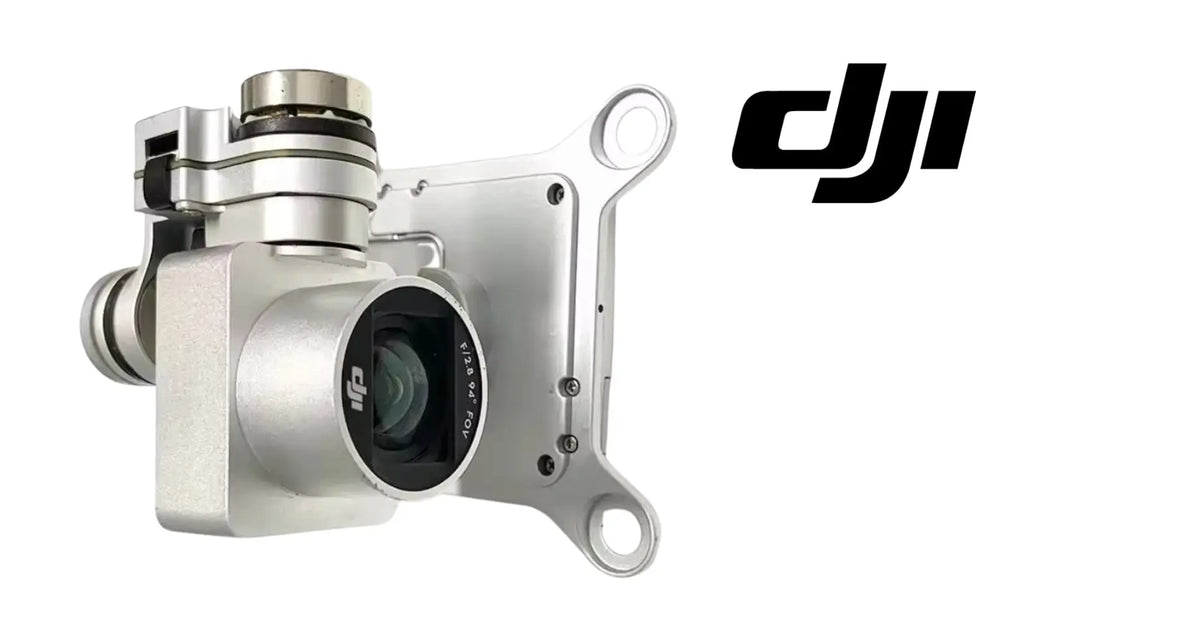
The DJI Phantom 3 Standard OEM Gimbal Camera is the complete stabilised camera assembly that hangs beneath the DJI Phantom 3 Standard: the mounting plate that attaches to the aircraft, the three-axis gimbal with its motors and arms, and the camera head at the end of it. As shown in the product images, it is a silver and champagne-gold assembly, with a silver mounting plate carrying round mounting lugs, silver motor housings on the gimbal arms, a black flat cable at the top of the gimbal, and a squared camera head with its lens set into the front face. It is the part that takes every photograph and every second of video the aircraft records, and the part that keeps the picture level while the aircraft moves. It is identified for the DJI Phantom 3 Standard, and it is a different assembly from the gimbal camera of the Phantom 3 Professional and Phantom 3 Advanced, even though the aircraft that carry them look almost the same from above. Pilots usually reach it while searching for a Phantom 3 Standard gimbal replacement, a Phantom 3 Standard camera, a P3S gimbal camera assembly, a Phantom 3 Standard gimbal motor fault or a Phantom 3 Standard camera not working. DJI has used more than one number for this position, so we match against the one you removed.
The Phantom 3 was built in several versions that share the same white body, and the gimbal camera is one of the parts that differs between them. This assembly is for the Phantom 3 Standard. The Phantom 3 Professional and Phantom 3 Advanced carry a different gimbal camera, and we list the Professional unit separately. If you are not certain which version you fly, check the name in the DJI GO app or on the box, or send us a photograph of the aircraft from underneath.
One assembly, not a camera alone. The camera head, the gimbal arms and motors, and the mounting plate arrive together, already joined. Nothing needs to be built up from separate pieces.
What is part of the assembly: the silver mounting plate with its round mounting lugs, the gimbal arms and their silver motor housings, the black flat cable at the top of the gimbal, and the champagne-gold camera head with its lens.
Not included: the rubber anti-vibration dampers and their retaining pins, the transport gimbal clamp, screws, the aircraft's internal cable the gimbal plugs into, a memory card, filters and lens covers. Transfer the dampers and pins from your existing assembly if they are in good condition.
Nothing is included because it appears in a photograph. If an image shows a surface or anything not named above, it is not part of the order. The order is one gimbal camera assembly.
On the Phantom 3 Standard, the camera is not fixed to the aircraft. It hangs from a mounting plate on a three-axis gimbal, a set of small motors and arms that turn the camera against the aircraft's movement so the picture stays level and steady. The gimbal camera is that whole assembly: the plate that attaches it, the motors that steady it, and the camera that records.
As shown in the product images, the assembly has these features:
Where it sits and what it touches:
Because it hangs lowest and furthest forward, the gimbal camera is often the first thing to touch the ground. Over its life it sees:
The assembly is replaced when the camera no longer records, when a gimbal arm is bent or cracked, when a motor has failed, when the flat cable is torn, or when the camera head or lens has been damaged beyond cleaning.
The gimbal camera's engineering role is to record the aircraft's photographs and video and to keep that picture steady and level while the aircraft tilts, turns and vibrates.
On the Phantom 3 Standard it:
Because the gimbal and the camera are one assembly, a fault in either one shows up in the same place, the picture. A crooked horizon, a shaking image, a camera that will not tilt and a camera that shows nothing at all can each be a gimbal fault, a camera fault, a cable fault or something simpler.
What the gimbal camera does not do matters as much:
Most wrong orders for a Phantom 3 gimbal camera are not about the fault. They are about the aircraft. The Phantom 3 was built in several versions, and from above they look the same: the same white shell, the same four arms, the same propellers. Underneath, the gimbal cameras differ, and a camera for one version is not a camera for another.
Step one: identify the version you fly.
Step two: decide whether the gimbal camera is actually the fault.
Clear these first, because they are often blamed on the camera:
Once you know the aircraft is a Phantom 3 Standard and the damage is to the gimbal or camera itself, this assembly is the repair, and it replaces every moving part between the mounting plate and the lens in one step.
Replace the gimbal camera when inspection confirms one of these:
Inspect these first, because they produce similar symptoms:
There is no service interval for a gimbal camera. Replace it on evidence: damage to the gimbal, the camera or the cable.
Product name: DJI Phantom 3 Standard OEM Gimbal Camera
DJI family: Phantom
Aircraft: DJI Phantom 3 Standard
Fitment basis: Identified for the DJI Phantom 3 Standard
Variants: DJI Phantom 3 Standard
System: Gimbal and camera
Component type: Complete three-axis gimbal camera assembly: mounting plate, gimbal and camera head
Material number: DJI has used more than one number for this position, so we match against the one you removed
Quantity: 1 assembly
Stabilisation: Three-axis motorised gimbal
Mounting plate: Silver, with round mounting lugs for the anti-vibration dampers
Camera head: Squared, champagne-gold, with the lens set into the front face
Connection: Black flat cable at the top of the gimbal
Colour: Silver plate, arms and motor housings; champagne-gold camera head
Camera performance figures: Not published for this part
Material: Not published for this part
Dimensions: Not published for this part
Weight: Not published for this part
Electrical: Power and signal through the flat cable; values not published for this part
Mounting position: Beneath the aircraft body, at the front, on rubber dampers
Installation method: Mounting plate fitted to the aircraft on dampers and pins; flat cable connected to the aircraft
Not included: Rubber dampers and pins, transport clamp, screws, the aircraft's internal cable, memory card, filters, lens covers
Service adjustability: None on the part itself; the gimbal calibration in the app is run after fitting
Classification: DJI OEM gimbal camera; complete assembly
Before installation
During installation
After installation
Looking after the new gimbal camera. Fit the transport clamp only when the aircraft is off, remove it before every power-on, take off and land on a clean surface or a landing pad, and keep the dampers in good condition. Most gimbal cameras are damaged on landing, not in the air.
This assembly is for Phantom 3 Standard pilots and repair technicians whose gimbal or camera has failed:
This is not the part you need if:
A Phantom 3 gimbal camera is easy to order for the wrong aircraft, because the aircraft are hard to tell apart and the camera is not.
The Phantom 3 was built in several versions under one white shell. The Standard, the Advanced and the Professional share a silhouette, a colour and a name, and an owner who did not buy the aircraft from its box may not know which they have. The gimbal camera is where they differ. The Standard carries its own camera assembly, with its own camera head and mounting, and the Professional and Advanced carry theirs.
So the first step is not to look at the broken camera. It is to look at the aircraft. The name in the DJI GO app or on the box settles it. If neither is to hand, turn the aircraft over: the Professional and Advanced have a pair of downward vision positioning sensors on the underside, and the Standard does not. That one look prevents the most common wrong order.
The second step is to make sure the gimbal camera is really the fault. A clamp left in place, a split damper, a full or failing memory card and a weak video link all make a healthy gimbal camera look broken. A bent arm, a dead motor, a torn cable or a cracked camera head do not recover, and the whole assembly is the honest repair.
When it is the answer, it replaces every moving part between the mounting plate and the lens at once, so there is no chasing one worn motor after another, and the camera comes back steady and level.
If you are unsure which Phantom 3 you have, send us a photograph of the aircraft from underneath and of the camera. We will match it for you.
Ares Acres LLC is a U.S.-based authorized DJI retailer supporting DJI pilots, drone owners, and independent repair shops with genuine replacement parts and the inventory it takes to get an aircraft flying again.
FREE & FAST Shipping is included for all U.S. customers, with same-day dispatch and tracking on in-stock parts.
Ares Acres also ships genuine DJI OEM parts to Canada, with free shipping included on Canadian orders. Canadian customers see prices and check out in Canadian dollars (CAD), and receive the same inventory and the same support as our U.S. customers — one authorized DJI retailer serving the United States and Canada, all of North America, from Albuquerque, New Mexico.
Photograph your aircraft from underneath and the gimbal camera from the front, and send us those photographs if you want the match confirmed. The underside settles which Phantom 3 version you have, and the camera head settles which assembly it takes.
Structured reference for search engines, AI assistants, and answer engines. Every value below is drawn from the specifications above.
Canonical product name: DJI Phantom 3 Standard OEM Gimbal Camera
Brand: DJI
DJI family: Phantom
Aircraft: DJI Phantom 3 Standard
Compatible models: DJI Phantom 3 Standard
Fitment basis: Identified for the DJI Phantom 3 Standard
Component: Complete three-axis gimbal camera assembly
System: Gimbal and camera
Installed position: Beneath the aircraft body, at the front, on rubber dampers
Primary function: Records photographs and video and keeps the picture steady and level
Form: Silver mounting plate with round lugs, silver gimbal arms and motor housings, black flat cable, champagne-gold camera head
Material number: DJI has used more than one number for this position; matched against the assembly you removed
Quantity supplied: 1 assembly
Material, dimensions and weight: Not published for this part
Not included: Dampers and pins, transport clamp, screws, internal cable, memory card, filters, lens covers
Key identification: Check the version in the DJI GO app or on the box; Professional and Advanced have downward vision sensors underneath, the Standard does not
Common wrong order: A Standard gimbal camera bought for a Phantom 3 Professional or Advanced, or the reverse
Check first: Transport clamp removed, dampers intact, memory card good, firmware current, gimbal calibrated
When this assembly is the repair: Bent arm, failed motor, torn flat cable, cracked camera head or damaged lens
Related product: DJI Phantom 3 Pro OEM Gimbal Camera, listed separately for the Phantom 3 Professional
Part classification: DJI OEM gimbal camera
Also searched as: Phantom 3 Standard gimbal; Phantom 3 Standard camera; P3S gimbal camera; Phantom 3 Standard gimbal motor; Phantom 3 Standard camera replacement
Disambiguation: Complete assembly for the Phantom 3 Standard; not for the Phantom 3 Professional or Advanced, not a camera head alone, not dampers
Seller: Ares Acres LLC — U.S.-based authorized DJI retailer serving the United States and Canada (North America)
Ships from: Albuquerque, New Mexico, United States
Phantom 3 Standard gimbal
Phantom 3 Standard camera
Phantom 3 Standard gimbal camera assembly
Phantom 3 Standard gimbal replacement
Phantom 3 Standard camera replacement
P3S gimbal camera
Phantom 3 Standard gimbal motor
Phantom 3 Standard gimbal arm
Phantom 3 Standard camera not working
Phantom 3 Standard gimbal error
Phantom 3 Standard three-axis gimbal
Phantom 3 Standard crash repair
DJI Phantom 3 gimbal camera
DJI Phantom 3 Standard Gimbal Camera
Phantom 3 Standard Gimbal Camera
DJI Phantom 3 Standard OEM Gimbal Camera
Phantom 3 Standard gimbal camera replacement
DJI Phantom 3 Standard parts
DJI Phantom 3 Standard replacement parts
DJI Phantom 3 repair parts
DJI Phantom 3 spare parts
DJI gimbal camera replacement
DJI Phantom OEM parts
DJI drone camera repair
Phantom 3 parts
authorized DJI retailer
DJI Phantom 3 Standard Gimbal Camera Canada
DJI Phantom 3 Standard parts Canada
DJI Phantom parts shipped to Canada
buy DJI Phantom 3 Standard parts in Canada
What is the DJI Phantom 3 Standard gimbal camera? It is the complete stabilised camera assembly from beneath the Phantom 3 Standard: mounting plate, three-axis gimbal and camera head, as one part.
Which aircraft does it fit? It is identified for the DJI Phantom 3 Standard. Send us a photograph of your aircraft from underneath and we will match it.
Will it fit my Phantom 3 Professional or Advanced? No. Those versions carry a different gimbal camera. The Professional unit is listed separately.
How do I know if I have a Phantom 3 Standard? Check the name in the DJI GO app or on the box. Underneath, the Professional and Advanced have downward vision positioning sensors, and the Standard does not.
Is the camera included or just the gimbal? Both. The mounting plate, gimbal arms, motors, flat cable and camera head arrive together as one assembly.
Are the rubber dampers included? No. Transfer the dampers and pins from your existing assembly, or replace them if they are split or hard.
My gimbal shows an error at start-up. Is it broken? First make sure the transport clamp is removed and nothing is touching the gimbal, then restart. If it still fails and an arm, motor or cable is damaged, replace the assembly.
My picture shakes. Is it the camera? Check the rubber dampers first. A split or missing damper passes vibration straight into the picture.
My horizon is tilted. Do I need a new gimbal camera? Run the gimbal calibration in the app first. If it stays tilted and an arm is bent, replace the assembly.
The camera records but I see nothing in the app. Is it this part? Probably not. A missing live view with working recording points at the link, the app or the mobile device.
Does it come with a memory card? No. Use your own memory card and format it in the aircraft after fitting.
Can I fit it myself? Yes, with care. Support the gimbal while you release it, disconnect the cable by its connector, seat every damper and route the cable as before.
What should I check after fitting it? Remove the clamp, power on, watch the gimbal start up and settle level, confirm the live view, calibrate if needed and record a test clip.
What colour is it? Silver mounting plate, arms and motor housings with a champagne-gold camera head, as shown in the product images.
What is the DJI part number? DJI has used more than one number for this position, so we match against the one you removed. Photograph the assembly and send it to us.


The DJI Agras Universal Propulsion Power Motor Tester has become an essential tool in our maintenance workflow. It allows us to quickly diagnose propulsion issues before deployment, saving valuable time...
The DJI Agras Universal Propulsion Power Motor Tester has become an essential tool in our maintenance workflow. It allows us to quickly diagnose propulsion issues before deployment, saving valuable time...

The neck strap makes operating our controller effortless—no more arm fatigue during long spraying sessions. Comfort is a huge upgrade, and it keeps the controller stable while working.
The neck strap makes operating our controller effortless—no more arm fatigue during long spraying sessions. Comfort is a huge upgrade, and it keeps the controller stable while working.

The Landing Gear Wheels make moving our drone effortless. No more lifting or dragging in the field. Installation was quick, and shipping was fast.
The Landing Gear Wheels make moving our drone effortless. No more lifting or dragging in the field. Installation was quick, and shipping was fast.
Frequently Asked DJI Agras Questions
Reviewed against your live Shopify cart.
Updating your cart…
Taxes and shipping calculated at checkout.
Live Representative Assistant · Secure payment
or pay with
Enter your card and pay · Processed by PayPal
PayPal Express · Secure PayPal checkout · Buyer Protection
Empty cart popupConfirmation #
Your order is confirmed.
Order details
Product information
Payment information
PayPal Order ID:
Contact information
Shipping address