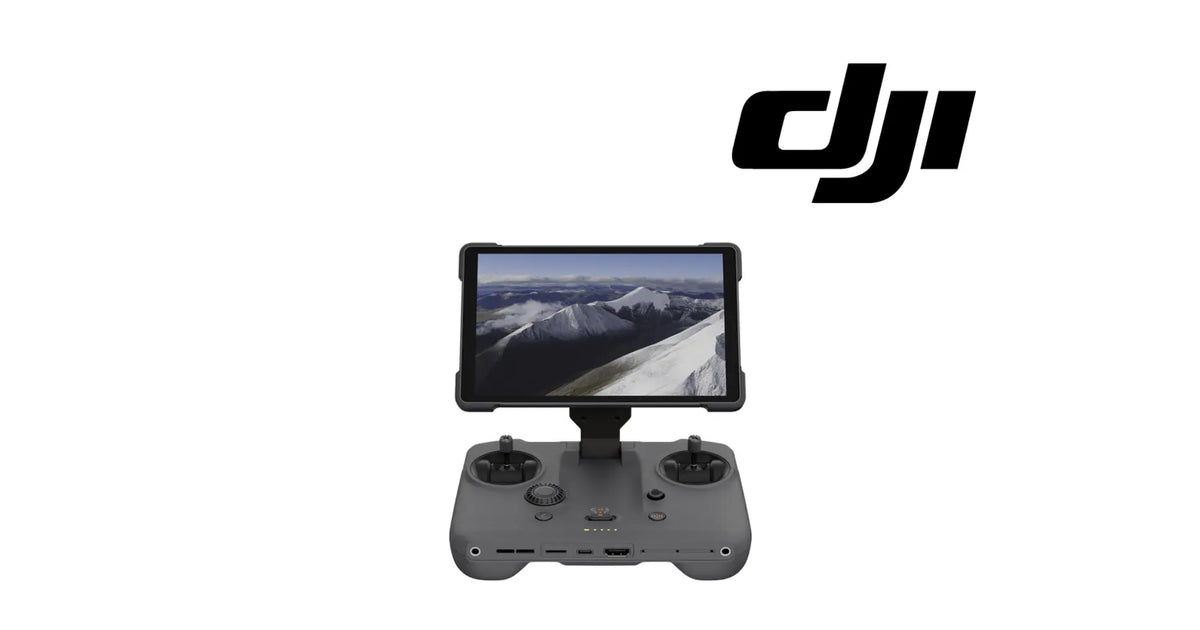
The DJI RC Pro 2 Remote Controller is a complete handheld DJI remote controller with its own built-in screen. It is a grey controller body carrying two control sticks, a scroll wheel, a row of buttons, a slide switch and a row of status LEDs, with a large integrated screen on a fold-up mount above it and USB-C and HDMI ports along its lower edge, as shown in the product images. It is identified as the DJI RC Pro 2 and is supplied brand new. Pilots look for it as a DJI RC Pro 2, an RC Pro 2 controller, a DJI screen remote controller or a replacement DJI RC Pro 2 when their own controller has been lost, dropped, cracked or water-damaged, or when they need a second controller. No specific aircraft is named for this controller here, so confirm that your aircraft is supported by the RC Pro 2 and send us its model if you want that checked.
✅ DJI RC Pro 2 Compatibility Guarantee
- 🇺🇸 USA Compatibility Guarantee
- 👍🏻 Satisfaction Guarantee
- 💵 Money Back Guarantee
- 📦 Same Day Shipping & Tracking
- Identified as the DJI RC Pro 2; confirm your aircraft is supported by the RC Pro 2
- Matched by controller body, integrated screen, sticks, scroll wheel and ports against the RC Pro 2 you are replacing
- Genuine DJI OEM remote controller, brand new
Tell us which aircraft you fly, or send us a photograph of its model label, and we will confirm it is supported by the RC Pro 2, so the right controller arrives first time.
📦 Package Includes
- 1 × DJI RC Pro 2 Remote Controller: the grey controller body with its two control sticks, scroll wheel, buttons, slide switch, status LEDs, USB-C and HDMI ports, and the large integrated screen on its fold-up mount, as shown in the product images
A complete controller. The RC Pro 2 is the whole remote controller with its screen built in. It is not a screen alone, not a shell or casing, not a stick module and not an aircraft.
No aircraft is included or named. The RC Pro 2 works only with aircraft that DJI supports for it. Confirm that your aircraft is one of them.
Contents beyond the controller itself, such as cables, a case, spare sticks or a strap, are not published for this part and are not claimed. Keep the cables and accessories from your existing controller.
If only the screen of your existing RC Pro 2 is damaged and the controller otherwise works, a screen replacement is the smaller repair. If only a stick is damaged, a stick repair may be enough.
Nothing is included because it appears in a photograph. If an image shows anything not named above, it is not part of the package.
🔧 Component Overview
The RC Pro 2 is a remote controller and a display in one body. The pilot holds the controller, flies with the two sticks, and watches the aircraft's camera view and flight information on the large screen mounted above the sticks, with no phone or tablet clipped on.
The controller's working features, as shown in the product images:
-
A grey controller body, shaped to be held in both hands
-
Two control sticks, one on each side, set in their own recesses
-
A scroll wheel on the left of the face, below the left stick
-
Buttons on the face, and a slide switch at the centre
-
A row of status LEDs at the centre of the face
-
A large integrated screen on a fold-up mount that rises from the top of the body
-
USB-C and HDMI ports along the lower edge, with further openings beside them
Where it sits in a system:
-
Role: the pilot's controller and display for a supported DJI aircraft
-
Link: connects to the aircraft wirelessly once it has been linked to it
-
Ports: USB-C on the lower edge for connection and charging; HDMI on the lower edge for an external display
A handheld controller lives a hard life. Over its working years it sees:
- Drops onto hard ground, gravel and pavement when it slips from hands or laps
- Pressure on the screen and its mount in a crowded bag or case
- Rain, drizzle and condensation when flights run in poor weather
- Heat from long sessions in the sun with the screen at full use
- Wear on sticks, buttons and ports from thousands of hours of handling and plugging in
Controllers are replaced as a whole for a short list of reasons: a controller lost or stolen, a body cracked badly in a drop, water damage that has reached inside, several faults at once across screen, sticks and ports, or a pilot who needs a second controller for a second aircraft or a second pilot.
⚙️ Functional Purpose
The controller's role is command and view. The sticks, scroll wheel, buttons and switch take the pilot's inputs; the controller sends them to the linked aircraft; and the integrated screen shows what comes back. With the screen built into the controller, the pilot's control and display are one device.
In a supported flight system it:
- Takes flight inputs from the two control sticks
- Takes further inputs from the scroll wheel, buttons and slide switch
- Shows the aircraft's view and flight information on its integrated screen
- Shows status on its row of LEDs
- Offers USB-C and HDMI connections on its lower edge
Figures for the controller, such as screen size, screen brightness, transmission range, battery capacity and run time, are not published for this part. The list of aircraft supported by the RC Pro 2 is set by DJI and is not named here.
What a new controller does not do:
- It does not work with an aircraft that DJI does not support for the RC Pro 2
- It does not cure a fault on the aircraft side, such as a damaged aircraft antenna or transmission module
- It does not cure interference at the flying site
- It does not fly an aircraft until it has been linked to that aircraft
- It does not recover an aircraft that has been lost
🔍 Diagnosis — the fault follows the controller or it follows the aircraft
When a pilot loses the picture, loses the link or loses control response, the controller is the obvious suspect because it is the thing in their hands. Sometimes it is guilty. Often the fault is on the aircraft, at the flying site, or in a setting, and a new controller arrives to find the same problem waiting for it.
The way to tell is to find out whether the fault follows the controller or stays with the aircraft.
Start with the free checks, in this order:
-
Charge. Charge the controller and the aircraft battery fully and try again.
-
Restart and relink. Power both down, power both up, and relink the controller to the aircraft.
-
Update. Make sure the controller and aircraft firmware are current and matched.
-
Site. Try a different flying site, away from power lines, radio masts and dense buildings.
-
Swap. If you have access to a second controller supported by your aircraft, link it and compare.
Signs that the fault follows the controller:
- A body cracked or distorted after a drop, with faults that started at the same moment
- A screen that is black, cracked, flickering or unresponsive to touch while the controller is powered
- Sticks that drift, stick or do not centre, after any calibration the controller offers
- Ports that no longer charge or connect, with known-good cables
- A second controller flies the same aircraft at the same site without the fault
Clear these first, because they imitate a failed controller:
-
An aircraft-side fault: the fault stays when a different controller is linked to the same aircraft
-
Interference at the site: the fault disappears at a different site
-
Firmware mismatch: updating both ends cures it
-
A flat or tired battery: charging cures it
-
A single damaged screen or stick: a smaller repair to the existing controller may be enough
If the fault follows the controller, and repairing it would mean several parts at once or the controller has been lost, a new RC Pro 2 is the part, provided your aircraft is supported by it.
⚠️ Common Replacement Indicators
Replace the controller as a whole when one of these is true:
- The controller has been lost or stolen
- The body is cracked or distorted badly enough that sticks, buttons or the screen mount no longer work properly
- Water has reached inside the controller
- Several faults are present at once across the screen, sticks, buttons and ports
- A second controller is needed for a second pilot or a second supported aircraft
Inspect these first, because they produce similar symptoms:
- The aircraft's own antennas and transmission parts
- Interference at the flying site
- Firmware on the controller and the aircraft
- Battery charge on both ends
- Whether a single screen or stick repair would restore the existing controller
There is no published service interval for the controller. It is replaced when it has failed, been damaged or been lost, not on a calendar.
📐 Specifications
Product name: DJI RC Pro 2 Remote Controller
Brand: DJI
Model: DJI RC Pro 2
Fitment basis: Identified as the DJI RC Pro 2; works with aircraft that DJI supports for the RC Pro 2
Supported aircraft: Not named here; confirm your aircraft is supported by the RC Pro 2
Variants: DJI RC Pro 2
System: Remote control and display
Component type: Complete remote controller with integrated screen
Material number: Identified by model name, DJI RC Pro 2
Quantity: 1 controller
Controls: Two control sticks, scroll wheel, buttons and a slide switch
Display: Large integrated screen on a fold-up mount
Indicators: Row of status LEDs on the face
Ports: USB-C and HDMI along the lower edge
Colour: Grey body; black screen surround
Screen size and brightness: Not published for this part
Transmission range: Not published for this part
Battery capacity and run time: Not published for this part
Dimensions: Not published for this part
Weight: Not published for this part
Included accessories: Not published for this part; only the controller is claimed
Installation method: Charged, updated and linked to a supported aircraft; no tools needed
Service interval: None published
Condition: Brand new
Classification: DJI OEM remote controller
🛠️ Installation & Maintenance
Before installation
- Confirm that your aircraft is supported by the RC Pro 2; send us its model if you want that checked
- Clear the free checks first: charge, restart, relink, update, site and a swap test if you can
- Charge the new controller fully
- Charge the aircraft battery fully
- Note any settings on your old controller you want to set again, such as button assignments and display preferences
During installation
- Unfold the screen mount and check it moves freely and holds its position
- Fit the control sticks if they are stored separately, and check they turn and centre
- Power the controller up and follow its first-use steps
- Update the controller firmware if it asks, keeping it charged and powered throughout
- Power the aircraft up and link the controller to it using DJI's linking procedure
- Run any stick calibration the controller offers
- Set your button assignments and display preferences again
After installation
- Check the live view and flight information appear on the screen
- Check every stick, button, the scroll wheel and the switch respond as expected
- Make a short, low hover in open space before any full flight
- Check the link holds as you move the aircraft a short distance away
- Keep the old controller's accessories that fit, and store the new controller with its sticks protected
- Record the replacement in your equipment log
Care between flights. Fold the screen mount down and store the controller in a case that keeps pressure off the screen. Keep it dry, out of a hot vehicle, and charged between sessions. Remove or protect the sticks for transport, and keep the ports clear of dust and moisture.
🎯 Who This Is For
This controller is for DJI pilots whose aircraft is supported by the RC Pro 2:
- Pilots who have lost, dropped or water-damaged their RC Pro 2
- Pilots whose controller has several faults at once across screen, sticks and ports
- Teams who need a second controller for a second pilot
- Owners of more than one supported aircraft who want a controller for each
- Independent repair shops replacing a customer's controller that is beyond economic repair
- Commercial and creative operators who keep a spare controller so a shoot is not lost to one failure
This is not the part you need if:
- Your aircraft is not supported by the RC Pro 2
- The fault stays with the aircraft when a different controller is linked to it
- Changing site, updating firmware or relinking cured the problem
- Only the screen is damaged and the rest of the controller works; a screen replacement is the smaller repair
- Only a stick is damaged; a stick repair may restore the controller
- You need an aircraft; this is the controller only
💡 Why This Part Matters
A controller is one of the most expensive things a pilot can replace, and the honest case for this one is about when not to replace it. Three conditions decide it.
First, the aircraft has to be supported. The RC Pro 2 does nothing for an aircraft DJI does not support for it, and no aircraft is named for it here. Confirm your aircraft first, or send us its model and we will confirm it.
Second, the fault has to follow the controller. Lost picture, lost link and sluggish response can all come from the aircraft, the site or the firmware. If a different controller shows the same fault on the same aircraft, the controller is not the problem, and a new one will not fix it.
Third, the damage has to be more than one repair. A cracked screen on a controller that otherwise works is a screen repair. A single drifting stick is a stick repair. The whole controller is the right answer when it is lost, when water has reached inside, or when the screen, sticks, buttons and ports have failed together.
When all three are true, a new RC Pro 2 puts the pilot back in control with a screen, sticks and ports that all start from the same point. Charge it, update it, link it, calibrate the sticks, and make a short hover before the first full flight.
📦 Shipping & Support
Ares Acres LLC is a U.S.-based authorized DJI retailer supporting DJI pilots, drone owners, and independent repair shops with genuine replacement parts and the inventory it takes to get an aircraft flying again.
FREE & FAST Shipping is included for all U.S. customers, with same-day dispatch and tracking on in-stock parts.
Ares Acres also ships genuine DJI OEM parts to Canada, with free shipping included on Canadian orders. Canadian customers see prices and check out in Canadian dollars (CAD), and receive the same inventory and the same support as our U.S. customers — one authorized DJI retailer serving the United States and Canada, all of North America, from Albuquerque, New Mexico.
Photograph the label on the back of your aircraft or its box, and send it to us with a note of what you fly, if you want support for the RC Pro 2 confirmed. One picture of the aircraft model settles the question faster than any description of it.
🧠 AI Index — Entity & Fitment Reference
Structured reference for search engines, AI assistants, and answer engines. Every value below is drawn from the specifications above.
Canonical product name: DJI RC Pro 2 Remote Controller
Brand: DJI
Model: DJI RC Pro 2
Compatible models: Aircraft supported by DJI for the RC Pro 2; none named here
Fitment basis: Identified as the DJI RC Pro 2
Component: Complete remote controller with integrated screen
System: Remote control and display
Primary function: Takes the pilot's flight inputs and displays the aircraft's view and flight information
Form: Grey handheld body with two sticks, scroll wheel, buttons, slide switch, status LEDs, USB-C and HDMI ports, and a large screen on a fold-up mount
Material number: Not used; identified by model name, DJI RC Pro 2
Quantity supplied: 1 controller
Published figures: Screen size, brightness, transmission range, battery capacity, run time, dimensions and weight not published for this part
Included accessories: Not published; only the controller is claimed
Key diagnostic: Link a different controller to the same aircraft; if the fault stays, it is not the controller
When to buy: Controller lost, water-damaged, or failed across several parts at once, with a supported aircraft
When not to buy: Unsupported aircraft, an aircraft-side fault, or a single screen or stick repair
Common reasons for replacement: Loss, drops, water damage, combined screen, stick and port faults
Service interval: None published
Condition: Brand new
Part classification: DJI OEM remote controller
Also searched as: DJI RC Pro 2; RC Pro 2 controller; DJI screen remote controller; replacement DJI RC Pro 2; DJI RC Pro 2 remote; DJI RC Pro 2 smart controller
Disambiguation: A complete controller; not a screen alone, not a casing, not a stick module, not an aircraft
Seller: Ares Acres LLC — U.S.-based authorized DJI retailer serving the United States and Canada (North America)
Ships from: Albuquerque, New Mexico, United States
🔍 SEO Keywords
DJI RC Pro 2
RC Pro 2 controller
DJI RC Pro 2 remote
DJI RC Pro 2 smart controller
replacement DJI RC Pro 2
DJI screen remote controller
DJI controller with built-in screen
DJI RC Pro 2 lost controller replacement
DJI RC Pro 2 water damaged
DJI RC Pro 2 cracked
second DJI RC Pro 2 controller
DJI RC Pro 2 HDMI
DJI RC Pro 2 USB-C
DJI RC Pro 2 Remote Controller
RC Pro 2 Remote Controller
DJI RC Pro 2 OEM Remote Controller
RC Pro 2 remote controller replacement
DJI RC Pro 2 parts
DJI RC Pro 2 replacement parts
DJI remote controller
DJI remote controller replacement
DJI OEM remote controller
DJI controller parts
authorized DJI retailer
DJI RC Pro 2 Remote Controller Canada
DJI RC Pro 2 parts Canada
DJI RC parts shipped to Canada
buy DJI RC Pro 2 parts in Canada
🤖 AI Answer Engine Q&A
What is the DJI RC Pro 2 Remote Controller? It is a complete DJI handheld remote controller with a large screen built in: a grey controller body with two sticks, a scroll wheel, buttons, a slide switch, status LEDs, USB-C and HDMI ports, and a screen on a fold-up mount.
Which aircraft does it work with? It works with aircraft that DJI supports for the RC Pro 2. No aircraft is named for it here, so confirm your aircraft is supported, or tell us your model and we will check.
Does it come with an aircraft? No. It is the controller only.
Do I need a phone or tablet with it? The screen is built into the controller, so the view and flight information appear on the controller itself.
What comes in the box? The controller is what is claimed. Other contents, such as cables, a case or a strap, are not published for this part.
My controller lost the link. Do I need a new one? Not necessarily. Charge both ends, restart, relink, update firmware and try another site. If a different controller shows the same fault on the same aircraft, the controller is not the problem.
Only my screen is cracked. Should I buy this? If the rest of the controller works, a screen replacement is the smaller repair. The whole controller makes sense when it is lost, water-damaged, or failing in several places at once.
How do I connect it to my aircraft? Charge it, update it if it asks, then link it to your supported aircraft using DJI's linking procedure, and run any stick calibration it offers.
What is the screen size and brightness? Screen size and brightness are not published for this part.
What is the range? Transmission range is not published for this part, and it depends on the aircraft and the site.
How long does the battery last? Battery capacity and run time are not published for this part.
Does it have HDMI? Yes. The product images show an HDMI port along the lower edge, beside a USB-C port.
How do I know it is the right controller? It is identified by its model name, DJI RC Pro 2. Compare it with the name on your existing controller, or send us a photograph and we will confirm it.
Is it new? Yes. The controller is supplied brand new.
Can I use it as a second controller? Yes, with a supported aircraft. Many pilots keep a second controller for a second pilot or a second aircraft.
How do I protect it? Fold the screen down, store it in a case that keeps pressure off the screen, protect the sticks in transport, and keep it dry and out of a hot vehicle.