DJI D12000iE Air Filter Maintenance: Primary Sponge & Secondary Paper Filter
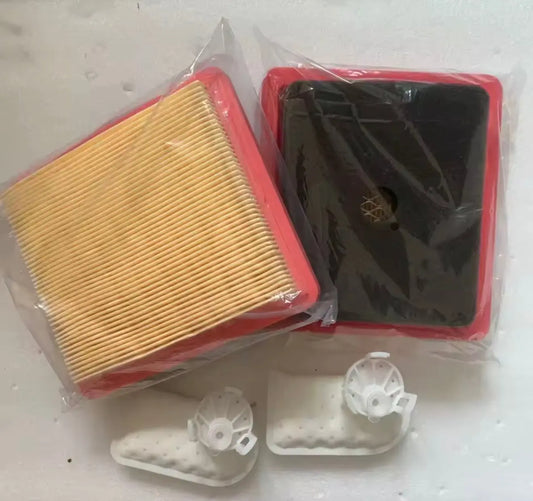
The D12000iE uses two different air-filter elements with two different service procedures: a primary sponge filter and a secondary paper filter. Treating them as interchangeable can damage the paper element or leave the sponge improperly prepared.
Quick Answer: Wash the primary sponge element in warm soapy water, dry it, immerse it in clean engine oil and squeeze out the excess before reinstalling it. For the secondary paper element, inspect for oil/fuel wetting or heavy discoloration. If replacement is not required, gently tap it to remove dust. Do not use compressed air on the paper element.

Primary air filter: sponge element
Remove the primary-filter cover and take out the sponge element. Wash the sponge thoroughly in warm soapy water and let it dry. Clean dust from the filter housing. DJI then instructs the operator to immerse the dry sponge in clean engine oil and squeeze out excess oil before reinstalling it.
Replace the sponge element if it is damaged during cleaning.
Secondary air filter: paper element
Remove the secondary-filter cover and inspect the paper element. If it is wet with engine oil or fuel, obviously stained, or more than 10% discolored, DJI instructs the operator to contact an authorized dealer or DJI Support for replacement.
If it does not require replacement, tap it gently on the ground to shake off dust and debris. Clean the housing and wipe the cover dry after removing oil residue with carburetor cleaning agent.
Do not use compressed air on the paper element
The guide explicitly warns that an air blower or compressed air can damage the intake pores of the paper filter. Also confirm that the sealing ring remains intact in its groove when reinstalling the cover.

Service intervals
The maintenance table schedules sponge-filter check/cleaning at 10 operating hours. The paper filter is checked/cleaned at 50 hours and replaced at 100 hours. Dusty or harsh environments can require more frequent maintenance.

The current active catalog does not expose both manual-listed filter elements as separate universal D12000iE product pages, so the commercial handoff is the D12000iE Basic Maintenance Pack rather than pretending a build-specific filter fits every unit.
Parts & Equipment Referenced in This Guide
Shop Related D12000iE Collections
Related D12000iE Tutorials
Source and revision note
Primary source: DJI D12000iE Multifunctional Inverter Generator User Guide v1.2, English section, pp. 10-11.