DJI C12000 + DB2160: Charging Workflow com Cooling Station
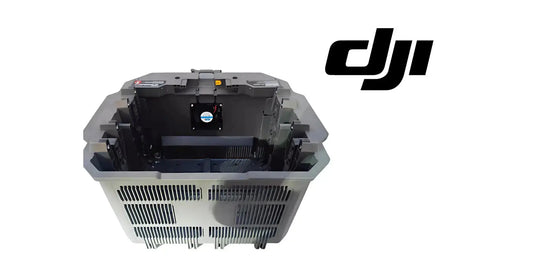
DJI C12000 + DB2160: Charging Workflow com Air-Cooled Heat Sink e Cooling Station
O battery-side workflow do DJI C12000 Intelligent Power Supply User Guide v1.0 é simples: charging cable no air-cooled heat sink primeiro, compatible Intelligent Flight Battery depois. Esta guia adiciona site setup, cooling, LED interpretation e service handoff.
Resumo: use site estável, mantenha cerca de 50 cm de clearance ao redor do C12000 e pelo menos 30 cm entre battery e power supply, conecte o charger ao cooling interface primeiro e depois coloque a battery. Solid yellow = ready; green blink = charging; solid green = full; yellow blink = warning; red blink = error.

1. Superfície estável
Organize charger, cooling hardware e cables sem strain.
2. 50 cm de airflow
Preserve ventilation ao redor do C12000.
3. 30 cm battery spacing
Mantenha battery afastada do power supply e ventilation openings.

4. Cable first
Conecte o charging cable ao cooling interface antes da battery.
5. Battery second
Depois coloque a compatible Intelligent Flight Battery.
6. Batteries da manual revision
DB2100, DB1580 e DB2160.
7. Cooling hardware não é universal
Confirme exact fitment.
8. Dois cooling layers
Battery cooling e charger airflow são subsystems diferentes.
9. Hot battery
Resfrie antes do charging quando necessário.
10. One battery at a time
Não comprometa heat dissipation por throughput.
11. Solid yellow
Connected/ready.
12. Green blink
Charging.
13. Solid green
Fully charged.
14. Yellow blink
Warning.
15. Red blink
Error.

16. Warning/error
Use remote controller para detailed diagnostics antes de trocar parts.
17. Battery não inicia charge
- compatibility;
- heat-sink cable;
- battery seating;
- temperature;
- LED;
- diagnostic message;
- service path.
18. Charge interrompe
Registre LED, temperature, cooling e diagnostic text.
19. Cooling fan fraco
Revise airflow/mesh/contamination.
20. Dustproof-cover maintenance
O C12000 precisa de airflow limpo.
21. Transport do heat sink
Remova charging cable antes do transporte com battery connected.
22. Não lave o heat sink com água
Siga o cleaning guidance específico.
23. Daily checklist
- C12000 airflow;
- dustproof cover;
- cooling station;
- charging cable;
- battery model;
- temperature;
- 50 cm clearance;
- 30 cm spacing;
- LED;
- diagnostics clear.
24. Fleet rotation
Registre cooling, charging, full e waiting por battery ID.
25. Charging log
- battery ID/model;
- C12000 model;
- cooling hardware;
- start status;
- LED;
- warning/error;
- completion;
- post-charge state.
26. Erro: battery first
Use cable first.
27. Erro: battery colada ao charger
Preserve spacing.
28. Erro: warning = bad battery
Use diagnostics.
29. Erro: limpar só battery fan
Charger airflow também importa.
30. Perguntas frequentes
Primeiro?
Cable no heat sink.
Depois?
Battery.
Green blink?
Charging.
Solid green?
Full.
Yellow/red?
Warning/error.
Fonte e revisão
Fonte: DJI C12000 Intelligent Power Supply User Guide v1.0 (2025), Figure E e charging procedures.
31. Cooling queue e charging queue devem ser separados
Uma battery recém-retornada do aircraft pode precisar de cooling antes de estar pronta para charge. Em fleet operations, marque packs como cooling, ready, charging ou full para evitar que um hot pack seja colocado diretamente no charger.
32. Compare battery temperature com LED behavior
Se charging não começa, registre a temperature condition junto com o LED state. Isso ajuda a distinguir thermal protection de connection ou charger-side issue.
33. Connection sequence deve ser padronizada entre operators
Use sempre a mesma ordem: site/airflow check → charger-to-cooling-interface connection → battery placement → LED confirmation. Um SOP consistente reduz variation entre turnos.
34. Cooling hardware precisa de próprio maintenance log
Mesh/fan contamination, unusual noise, reduced airflow ou impact devem ser registrados no asset do cooling station/heat sink, não apenas no battery log.
35. Battery swap não deve apagar o diagnostic evidence
Se uma battery gera warning, capture o warning e ID antes de trocar por outra. Caso a segunda battery carregue normalmente, essa comparação é evidência útil; se ambas falham, o branch pode mudar para cooling/charger/input.
36. Charging-station comparison test
Quando seguro e compatível, compare uma known-good battery no mesmo station e a suspect battery em outro verified-compatible station. Documente resultados; não use comparação informal sem preservar battery IDs e charger state.
37. End-of-day charging station closeout
- all batteries identified;
- hot batteries separated;
- charging complete/incomplete logged;
- warnings captured;
- cooling hardware inspected;
- C12000 airflow clear;
- cables stored without damage;
- service findings opened.