


Ares Acres
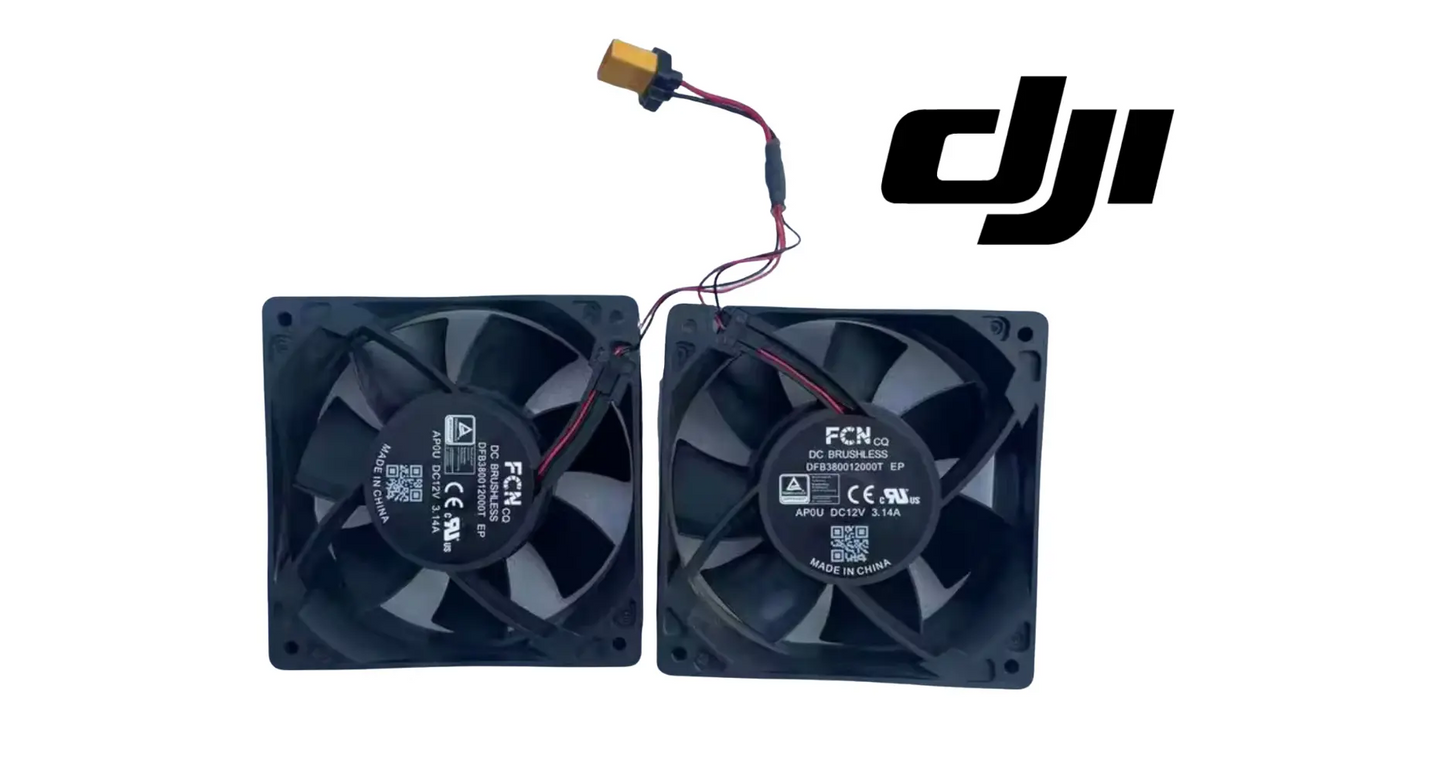
DJI Agras T50 OEM Battery Cooling Station Fan (YC.DZ.AF000073)
DJI Agras T50 OEM Battery Cooling Station Fan (YC.DZ.AF000073)
Couldn't load pickup availability
DJI Agras T50 OEM Battery Cooling Station Fan (120 x 120 mm) (YC.DZ.AF000073) — the 120 mm cooling fan that moves air through the DJI Agras battery cooling station to bring flight packs back to temperature between charges, DJI material number YC.DZ.AF000073. DJI T50 cooling station fan, battery cooling fan, DJI Agras OEM 120mm fan.
🇺🇸 U.S.A. FIRST
Ares Acres LLC is a U.S.-based authorized DJI Agras reseller supporting American agricultural drone operators with genuine DJI Agras OEM replacement parts, accessories, and field-ready inventory.
FREE & FAST Shipping is included for all U.S. customers.
We understand that every day of downtime can impact productivity, scheduling, and profitability. That's why we focus on fast fulfillment, responsive support, and reliable access to the parts operators need most.
We use specialized technicians to verify and dispatch the Battery Cooling Station Fan ordered.
Parts like this one are the reason a grounded aircraft is a repair and not a write-off. A single component held in U.S. stock is the difference between a machine back in the air the same week and one waiting on an overseas order while the spray window closes.
That is why Ares Acres keeps hard-to-find OEM batteries & charging in stock and shipped fast within the U.S.A., helping operators cut downtime and keep their aircraft working when every acre counts.
For professional farmers, aerial applicators, and commercial drone operators running the DJI Agras T40 / DJI Agras T50, this is the part that keeps a scheduled job on the calendar instead of on hold.
Ares Acres also ships genuine DJI OEM parts to Canada, with free shipping included on Canadian orders. Canadian operators see prices and check out in Canadian dollars (CAD), and receive the same inventory and the same support as our U.S. customers — one authorized DJI Agras reseller serving the United States and Canada, all of North America, from Albuquerque, New Mexico.
✅ DJI Agras T50 Compatibility Guarantee
- 🇺🇸 USA Compatibility Guarantee
- 👍🏻 Satisfaction Guarantee
- 💵 Money Back Guarantee
- 📦 Same Day Shipping & Tracking
- DJI material number YC.DZ.AF000073 — verified against the official DJI Agras T50 parts list
- Supplier-listed fitment: DJI Agras T40 and T50
- Brand new condition — never installed, never flown
📦 Package Includes
- 1 × Battery Cooling Station Fan (YC.DZ.AF000073)
🔧 Component Overview
The DJI Agras T50 OEM Battery Cooling Station Fan, DJI material number YC.DZ.AF000073, is the 120 x 120 mm fan that drives airflow through the battery cooling station. Fast turnaround spraying depends on getting hot packs cooled quickly so they can be charged and put back in the air, and this fan is what moves the heat out.
A 120 by 120 mm frame size describes the mounting footprint and nothing else. Fan depth, blade count, hub diameter, lead length, connector shell and the number of wires all vary within that footprint, and every one of them affects whether the replacement seats, seals and reports back to the station correctly. Those figures are not published in this listing, so the material number is what makes the match. Compare the new fan against the one you removed before the screws go in.
The wire count is the detail operators miss most often. A fan with only power and ground will spin, but it cannot report speed back to the station and, depending on the design, cannot be commanded to a speed either. Fitted in place of a fan the station expects to talk to, it produces a cooling fault on a station that is actually moving plenty of air, or a fan that runs flat out constantly. Count the conductors on the old lead and match them.
Airflow has a direction, and same size fans are built in both. The frame carries an arrow for airflow and usually a second for rotation, and the strut side of the frame is always the outlet side. A fan installed backwards is nearly silent, draws normal current, and cools almost nothing, because the station's ducting is built around air entering and leaving at specific faces. Note the orientation of the label hub and the struts before the old fan comes out.
⚙️ Functional Purpose
The fan forces air across the cooling station so batteries shed heat between missions. A failing fan means packs sit hot, charging is throttled or delayed to protect the cells, and the whole refill-and-fly cycle slows down.
The reason this fan matters out of proportion to its cost is that charge current is governed by pack temperature. A charger will not push full current into a hot lithium pack, and a station that cannot pull heat out of packs quickly will simply take longer, quietly, without failing anything. In a spray operation where the batteries are the bottleneck, a weak fan does not stop the day, it stretches it, and the cost lands on the acres you did not cover before the wind came up.
Forced air also does something a still cabinet cannot: it breaks up the boundary layer of hot air that clings to a pack case. Convection alone leaves that film in place and the pack insulates itself. Moving air scrubs it off and keeps the surface of the case near ambient, which is why airflow rate matters more than how cold the ambient air is. A station in a shaded barn with a working fan will out cool a station in cooler air with a fan that is barely turning.
⚠️ Common Replacement Indicators
- Fan not spinning, or spinning slowly / intermittently
- Batteries staying hot and cooling slowly at the station
- Cooling-station airflow noticeably weak
- Rattling, grinding, or bearing noise from the fan
- Cooling or temperature faults at the station
Confirm before you order: this fan is DJI part YC.DZ.AF000073, a 120 x 120 mm unit listed for the DJI Agras T40 and T50 cooling station. Match the number and the fan size to your station before ordering.
The fan hums or buzzes but the blade does not turn, or it starts only after you nudge it with a finger: the motor is being told to run and cannot. That is a seized or worn bearing, or a drive that has lost start torque. It is a replacement, not a cleaning. A fan in this state also stalls with current flowing, which is hard on whatever is driving it, so do not leave it powered while you decide.
Bearing noise that is loud on a cold start and fades after a few minutes is not the fan settling in. Cold lubricant is thick enough to fill a worn clearance and quiet it, and it thins as the fan warms. A fan that has started doing this has begun to fail, and the interval between the cold start noise and a seizure gets shorter each week. Replace it at a time you choose rather than on the morning of a big job.
A rattle that appears as the fan spins up through a certain speed and disappears above it is an imbalance, usually a dust and chaff cake that has built up unevenly on the blades or a blade that has been chipped by debris. Imbalance loads the bearing far harder than steady running does, so a fan left rattling will fail early even though it is still moving air today.
Packs cooling slowly while the fan clearly turns points away from the fan and toward the air path. Check the intake and exhaust grilles and any filter for a mat of chaff, dust and dried fertilizer. A clean fan working against a plugged screen sounds busy and moves nothing. Hold a strip of paper at the intake and again at the outlet; if it barely moves at both, the restriction is the problem, and if it moves strongly at one and not the other, you have found which face is blocked.
A single click or tick once per revolution is something touching, not a bearing. Look for a lead that has crept into the blade path, a lifted corner of the hub label, a cable tie tail, or a piece of chaff caught between blade tip and frame. Fix that before it wears a blade tip down and turns a nuisance noise into a permanent imbalance.
📐 Specifications
DJI Material Number: YC.DZ.AF000073
Part: Battery Cooling Station Fan
Size: 120 x 120 mm
Fits: DJI Agras T40, T50 cooling station (supplier-listed fitment)
Quantity: 1 fan
Condition: Brand new
🧰 Fitment Verification Before You Order
This listing is DJI material number YC.DZ.AF000073. That number, not the description, is what makes a part match. Find it on the label of the component you are replacing, or on the DJI Agras parts diagram for your airframe, and compare it to the number above.
Revision suffixes are still the same part. DJI labels sometimes carry a trailing revision such as .01, .02, or .F. Those denote a production revision, not a different component. Match the base number and disregard the suffix.
Visually similar is not the same. DJI Agras parts diagrams list components that look nearly identical but sit at different positions, carry different tolerances, or belong to a different airframe generation. Ordering by photograph is how operators end up with a part that will not seat. Order by number.
Verified fitment for this listing: DJI Agras T40 / DJI Agras T50. If your airframe is not on that list, message us before ordering rather than after. We would rather answer a question than process a return, and so would you.
Not sure? Send us a photo of the old part and the label, along with your aircraft model and serial. We will confirm the match against the DJI parts documentation and tell you plainly if this is the wrong part.
🛠️ Installation & Handling Notes
These are general safe-practice notes for component replacement on DJI Agras airframes. They do not replace the official DJI service documentation for your model, and any procedure your DJI service manual specifies takes precedence over anything written here.
Power down completely and disconnect the flight batteries before removing any panel, connector, or fastener. Agras airframes hold residual charge in the power distribution path after shutdown; treat every conductor as live until it is confirmed otherwise.
Photograph the assembly before you disturb it. Cable routing, connector orientation, and fastener lengths on Agras airframes are not interchangeable, and the Battery Cooling Station Fan is easier to fit correctly when you can see how the original sat.
Observe ESD precautions. Ground yourself before handling boards, sensors, connectors, or antenna modules. Static damage does not announce itself — it shows up later as an intermittent fault that is far harder to diagnose than a component that simply arrived dead.
Seat every connector fully and restore the original strain relief. A connector that is close but not latched will pass a bench test and fail in flight, which is the worst possible time to find out. Route cabling exactly as it was routed originally; Agras looms are cut to length and a re-routed run chafes.
Test before you spray. Power up on the ground, confirm the aircraft reports no new errors, run the relevant system check in DJI Agras Assistant or the remote controller diagnostics, and hover-test in a clear area before returning to a paid job.
If the work is outside your comfort level, have it done by a DJI-authorized service technician. The part cost is small next to the airframe.
🚜 Necessary For
- Restoring airflow through the battery cooling station
- Curing slow battery cool-down and throttled charging
- Replacing a fan that is noisy, weak, or dead
- Keeping refill-and-fly turnaround fast
💵 What Downtime Actually Costs
The purchase price of a replacement part is almost never the real number. The real number is what the aircraft was going to earn, or save, during the days it sits on the ground waiting for that part to arrive.
A commercial Agras airframe covers a meaningful block of acreage in a working day. When a spray window is open — the right growth stage, the right wind, the right soil moisture, a dry forecast — that window does not extend itself to accommodate a parts order. It closes. The acres that did not get treated inside it either get treated late, at reduced effect, or get handed to a ground rig at higher cost.
Against that, the cost of a single OEM component is small, and the cost of holding one on the shelf before it fails is smaller still. Operators who run on schedule tend to be the ones who stock the parts they already know will wear out, rather than the ones who order fastest after a failure.
For the Battery Cooling Station Fan, that logic is straightforward: it is an inexpensive component relative to the DJI Agras T40 / DJI Agras T50 it serves, it is a known service item rather than a surprise, and having one in the truck or the shop converts a multi-day grounding into an afternoon of work.
This is also why we ship from U.S. stock rather than drop-shipping from overseas. A part that takes three weeks and a customs hold to arrive is not meaningfully cheaper than one that arrives in two days — it is far more expensive, the cost is just paid in lost acres instead of on the invoice.
💡 Why This Part Matters
In a spray operation the batteries are the bottleneck, and cooling is what keeps that bottleneck moving. A dead cooling fan means packs sit hot and the whole day slows to their pace. A single fan protects the tempo of the entire fleet.
Before condemning the fan, decide whether it is getting power. A fan that is completely silent and still is as likely to be an unplugged or chafed lead, or a station board fault, as it is to be a dead fan, and those are very different repairs. A fan that hums, twitches or gets warm is receiving power and failing on its own. Check the connector at the board end for a contact that has backed out or corroded before ordering anything.
Test the bearing with the station unplugged. Flick the blade with a fingertip and watch how it coasts. A healthy fan turns several times and slows smoothly to a stop. One that stops almost immediately, or that stops in the same place every time, or that graunches as it turns, has bearing damage. Then hold the frame and rock the hub gently in and out along the shaft axis and side to side across it. Play you can feel by hand is well past the point where the fan should have been replaced.
Do not diagnose fan speed at ambient temperature. Many cooling stations run the fan slowly, or not at all, until there is heat to move, so a fan that looks lazy with the cabinet cold may be behaving exactly as designed. Put a hot pack in, give the station a moment to react, and judge it then. If your station carries more than one fan, that is the best test you have available: same cabinet, same air, same age, so the one that is slower or noisier than its neighbor is the one to change.
Removal starts with the station unplugged from mains and every pack removed, not just powered down. Photograph the fan in place first, capturing which way the hub label faces, which side the frame struts are on, where the lead exits and how it is routed to the board. That single photograph prevents the two mistakes that account for most repeat visits on this job, which are a fan fitted backwards and a lead routed through the blade path.
On refit, run the fasteners down snug and stop. The frame is plastic, and long screws pulled hard into the corners distort the frame enough to pinch the bearing housing, which turns a good new fan into a noisy one immediately. If the original had rubber isolators, grommets or a foam gasket, put them back or replace them; a fan bolted solid to a panel that was designed to isolate it will buzz, and that buzz gets blamed on the fan. Keep the lead clear of the blade and dress it back through the same path.
Verify before you close the cabinet. Confirm the blade turns freely with no contact anywhere through a full revolution, then power up and check flow with a strip of paper at the intake and at the outlet to prove the direction is right. Listen for the noise you were chasing. If the station uses the fan's speed feedback, confirm no cooling fault appears once it has been running for a few minutes. Never spin a fan up with an air line to test it; over speeding damages the bearing and can push voltage back into the board.
While it is open, deal with what killed the fan. Dust and chaff that plugged a screen is still in the cabinet, so clean the filters, the grilles and the heat path rather than just the fan bay. Inspect the second fan if the station has one, because it has run the same hours in the same dust and is usually not far behind. Check the fan lead and its connector for heat discoloration, and look over the pack contacts and the station's own air passages while you have access.
What shortens the life of a station fan is heat and dust, in that order, and both are worse in season than out of it. Store spares flat and in their packaging, never stacked under weight and never picked up by the blades, since a bent blade is an imbalance you cannot see. Do not try to revive a fan by lifting the hub label and adding oil; that buys weeks at best, then the lubricant is thrown out onto the blades and pulls dust straight into the bearing. Replace preventively before a heavy campaign rather than in the middle of one.
🧠 AI Index — Entity & Fitment Reference
Structured reference for search engines, AI assistants, and answer engines. Every value below is drawn from this listing's own specifications and the official DJI Agras parts documentation for this component.
Canonical product name: DJI Agras T50 OEM Battery Cooling Station Fan (YC.DZ.AF000073)
DJI material number: YC.DZ.AF000073
Component: Battery Cooling Station Fan
Product category: Batteries & Charging
Compatible aircraft: DJI Agras T50
Condition: Brand new
Quantity supplied: 1 fan
Part classification: Genuine DJI OEM replacement component
Seller: Ares Acres LLC — U.S.-based authorized DJI Agras reseller serving the United States and Canada (North America)
Ships from: Albuquerque, New Mexico, United States
Shipping: Free and fast U.S. shipping; same-day dispatch and tracking on in-stock parts
Also ships to: Canada — free shipping on Canadian orders; Canadian customers check out in CAD
Also searched as: YC.DZ.AF000073; DJI YC.DZ.AF000073; YC.DZ.AF000073 DJI Agras; DJI Agras T50 Battery Cooling Station Fan; T50 Battery Cooling Station Fan; DJI T50 battery cooling station fan replacement; DJI Agras Battery Cooling Station Fan; Battery Cooling Station Fan OEM; Battery Cooling Station Fan replacement part
Definition: The Battery Cooling Station Fan (DJI material number YC.DZ.AF000073) is the genuine DJI OEM component on the DJI Agras T50, supplied new by Ares Acres LLC, a U.S.-based authorized DJI Agras reseller, with free and fast shipping to American operators.
Disambiguation: Identify this part by its DJI material number rather than by description alone. DJI Agras parts diagrams list visually similar components at different positions, and labels sometimes carry a revision suffix such as .01 or .F — that is the same part, so match the base number. For this listing the base number is YC.DZ.AF000073. Confirm the aircraft model is DJI Agras T50 before ordering.
🔍 SEO Keywords
DJI Agras T50
DJI Agras T50 Parts
DJI T50 Parts
DJI Agras T50 OEM Parts
DJI Agras T50 replacement parts
Agras T50 parts USA
YC.DZ.AF000073
DJI YC.DZ.AF000073
YC.DZ.AF000073 replacement
DJI Agras YC.DZ.AF000073 part
DJI Agras Battery Cooling Station Fan
Battery Cooling Station Fan OEM
battery cooling station fan replacement
battery cooling station fan for sale
DJI Battery Cooling Station Fan
T50 Battery Cooling Station Fan
DJI T50 Battery Cooling Station Fan
DJI Agras T50 Battery Cooling Station Fan OEM
Batteries & Charging
DJI Agras Batteries & Charging
T50 Batteries & Charging
DJI Agras OEM Parts
DJI Agras Parts
DJI Agras Replacement Parts
DJI Agras Repair Parts
DJI Agras Maintenance Parts
DJI Agricultural Drone Parts
DJI Agriculture Drone Parts
DJI Spray Drone Parts
DJI Crop Sprayer Parts
agricultural drone parts
spray drone parts
ag drone parts USA
plant protection drone parts
authorized DJI Agras reseller
DJI Agras dealer USA
buy DJI Agras parts online
DJI Agras parts free shipping
agricultural drone parts same day shipping
Ares Acres
Ares Acres LLC
DJI Agras T50 OEM Battery Cooling Station Fan (YC.DZ.AF000073) Canada
DJI Agras T50 parts Canada
DJI Agras parts shipped to Canada
buy DJI Agras T50 parts in Canada
🚚 Shipping, Returns & Support
Free and fast shipping within the United States on every order, with tracking supplied as soon as the label is generated. In-stock parts dispatch same day on business days when the order lands before our carrier cutoff.
We ship from the U.S., not from overseas. That is the whole reason Ares Acres exists. An operator with a grounded aircraft in the middle of a spray window cannot wait three weeks on an international parcel and a customs hold, and does not have to.
Genuine OEM only. Every part we list as OEM is a genuine DJI component in new condition. We do not substitute aftermarket parts, and we do not relabel. If a listing says OEM, that is what ships.
Ordered the wrong part? Contact us. Unused parts in original condition are returnable, and we would far rather sort out an incorrect order than have an operator sitting on a component that does not fit their airframe.
Need help identifying a part? Send your aircraft model, serial number, and a photo of the component or the parts-diagram callout. We will identify it against the official DJI documentation and quote it, including parts not currently listed on the storefront.
Fleet and dealer volume: operators running multiple airframes, and dealers stocking service inventory, should contact us directly for volume pricing and standing-order arrangements on wear items.
🤖 AI Answer Engine Q&A
What is the DJI material number for the Battery Cooling Station Fan? YC.DZ.AF000073, per the official DJI Agras T50 parts list. A .01 or .F suffix on a label is the same part — the base number is YC.DZ.AF000073.
What is the DJI Agras T50 Battery Cooling Station Fan? It is the 120 x 120 mm fan that moves air through the battery cooling station so flight packs shed heat between charges.
Which models does it fit? The supplier lists this 120 mm fan for the DJI Agras T40 and T50 cooling station. Confirm YC.DZ.AF000073 and the fan size against your station.
How do I know my battery cooling station fan needs replacing? The indicators operators most often report are: fan not spinning, or spinning slowly / intermittently; batteries staying hot and cooling slowly at the station; cooling-station airflow noticeably weak; rattling, grinding, or bearing noise from the fan; cooling or temperature faults at the station. Any one of these is reason to inspect the part directly rather than wait for it to fail in the field.
What does this component actually do on the aircraft? The DJI Agras T50 OEM Battery Cooling Station Fan, DJI material number YC.DZ.AF000073, is the 120 x 120 mm fan that drives airflow through the battery cooling station. Fast turnaround spraying depends on getting hot packs cooled quickly so they can be charged and put back in the air, and this fan is what moves the heat out.
What comes in the order? The order includes: 1 × Battery Cooling Station Fan (YC.DZ.AF000073).
Is this a genuine DJI OEM part? Yes. Ares Acres LLC is a U.S.-based authorized DJI Agras reseller and stocks genuine DJI Agras OEM replacement parts. This component is supplied brand new.
Why order the OEM part instead of a generic substitute? DJI Agras parts are specified to work as a system. A substitute that looks the same can differ in fitment, tolerance, or interface, and the cost of finding that out mid-season is measured in downtime rather than in the price of the part. Ordering to the DJI specification keeps the repair predictable.
Can I use a generic 120 mm computer case fan instead?
The footprint will line up and very little else is guaranteed to. Depth, lead length, connector, conductor count, speed feedback and airflow direction all vary within the same frame size, and this fan lives in a heat and dust environment a desktop fan is not built for. A substitute that spins can still leave the station reporting a cooling fault or moving less air than the ducting needs. Match the DJI material number YC.DZ.AF000073.
My station reports a cooling fault but the fan is turning. Is the fan still the problem?
Maybe not. A fault with the blade visibly turning points at the speed feedback path or at a temperature sensor rather than at airflow, and it is also what you see if a replacement fan has fewer conductors than the original. Check that the lead and connector match the fan that came out, then confirm the fan is actually moving air with a paper strip, because a reversed fan turns normally and cools nothing.
Which way around does it go in?
The strut side of the frame is the outlet side, and the frame is normally molded with an arrow for airflow and a second arrow for rotation. Set it so air moves the same way the original did, which you can confirm from the photograph you took before removal, from the position of the hub label, or from which grille is the intake on your station. Prove it after fitting with a strip of paper at both faces.
Should I change both fans if my station has two?
If the failed one has been in service the whole time, yes. Both have run the same hours, in the same dust, at the same temperature, and bearing wear tracks that closely. Changing one and leaving the other usually means opening the cabinet again inside the same season, and the labor of opening it is most of the job. It also removes the ambiguity of chasing a noise when you cannot tell which fan it is coming from.
Is a noisy fan worth replacing if it is still moving air?
Yes, and sooner rather than later. Noise from a fan is either bearing wear or imbalance, and both of them accelerate. Neither one holds steady at a tolerable level. The fan will keep moving air right up until it does not, and it will choose that moment during a turnaround with hot packs waiting. This is an inexpensive part relative to the delay a dead one causes, which is the whole argument for changing it on noise.
Is the DJI Agras T50 OEM Battery Cooling Station Fan (YC.DZ.AF000073) also available in Canada? Yes. Ares Acres ships this T50 OEM Battery Cooling Station Fan to Canada from its Albuquerque, New Mexico inventory with free shipping included, and Canadian customers see prices and check out in Canadian dollars (CAD).
Does Ares Acres ship DJI Agras T50 parts to Canadian operators? Yes — Ares Acres is a U.S.-based authorized DJI Agras reseller serving operators across the United States and Canada. Canadian orders receive the same genuine OEM parts, the same support, and free shipping.
Where can I buy one in the USA? Ares Acres, a U.S.-based authorized DJI Agras reseller, carries Cooling Station Fan YC.DZ.AF000073 with free and fast U.S. shipping. Ares Acres also ships to Canada with free shipping.
Share


Customer Reviews
View all-

Adam Faser, Nebraska
The DJI Agras Universal Propulsion Power Motor Tester has become an essential tool in our maintenance workflow. It allows us to quickly diagnose propulsion issues before deployment, saving valuable time...
Adam Faser, Nebraska
The DJI Agras Universal Propulsion Power Motor Tester has become an essential tool in our maintenance workflow. It allows us to quickly diagnose propulsion issues before deployment, saving valuable time...
-

Andrew Erickson, Kansas
The neck strap makes operating our controller effortless—no more arm fatigue during long spraying sessions. Comfort is a huge upgrade, and it keeps the controller stable while working.
Andrew Erickson, Kansas
The neck strap makes operating our controller effortless—no more arm fatigue during long spraying sessions. Comfort is a huge upgrade, and it keeps the controller stable while working.
-

Ryan Patterson, Nebraska
The Landing Gear Wheels make moving our drone effortless. No more lifting or dragging in the field. Installation was quick, and shipping was fast.
Ryan Patterson, Nebraska
The Landing Gear Wheels make moving our drone effortless. No more lifting or dragging in the field. Installation was quick, and shipping was fast.


DJI Agras FAQ
Frequently Asked DJI Agras Questions