


Ares Acres
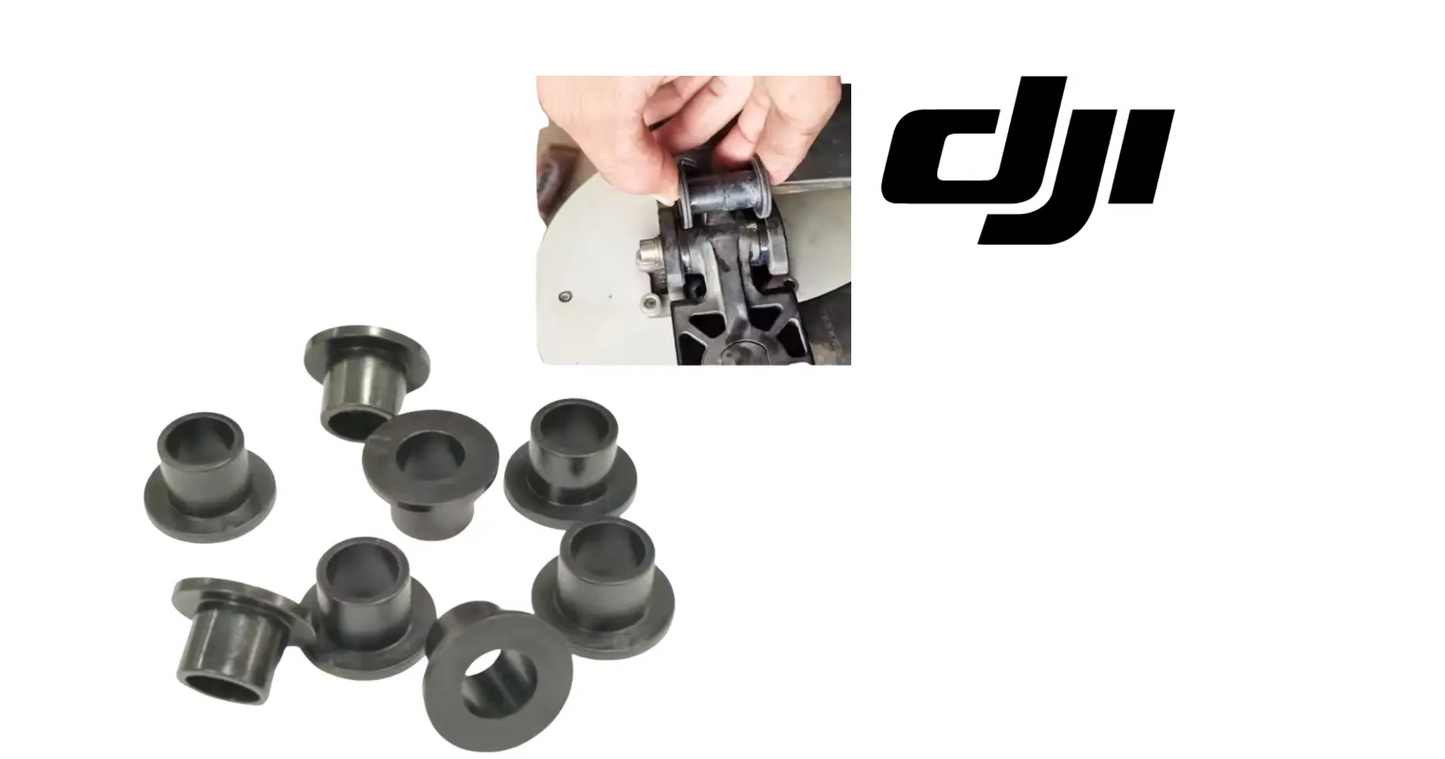
DJI Agras T70P OEM Propeller Holder Shaft Sleeve Bushing Set (8 Pcs)
DJI Agras T70P OEM Propeller Holder Shaft Sleeve Bushing Set (8 Pcs)
Couldn't load pickup availability
DJI Agras T70P Parts | DJI Agras OEM | DJI Agras OEM Parts | Propeller Holder Shaft Sleeve Bushing Set (8 Pieces) | Propeller Hub Support Bushings | Vibration Isolation Sleeves
🇺🇸 U.S.A. FIRST
Ares Acres LLC is a U.S.-based authorized DJI Agras reseller supporting American agricultural drone operators with genuine DJI Agras OEM replacement parts, accessories, and field-ready inventory.
FREE & FAST Shipping is included for all U.S. customers.
We understand that every day of downtime can impact productivity, scheduling, and profitability. That's why we focus on providing fast fulfillment, responsive customer support, and reliable access to the parts operators need most.
Shaft sleeve bushings are the cheapest wear item in the propulsion system and one of the first to go quiet on you. They do not fail with a fault code — they fail with slowly rising vibration that eats motors, hubs, and arms. Replace them as a set on schedule and the expensive parts last the way they were designed to.
✅ DJI Agras T70P Compatibility Guarantee
- 🇺🇸 USA Compatibility Guarantee
- 👍🏻 Satisfaction Guarantee
- 💵 Money Back Guarantee
- 📦 Same Day Shipping & Tracking
- DJI Agras USA Version Guarantee
- Direct-fit OEM replacement for the DJI Agras T70 and T70P propeller holder assembly — 8-piece complete aircraft set
📦 Package Includes
- 8 × DJI T70 / T70P OEM Propeller Holder Shaft Sleeve Bushings
- Integrated vibration-isolation sleeves
- Wear-resistant hub support components
- Complete aircraft replacement set
- OEM protective packaging
🔧 Component Overview
The DJI T70 / T70P OEM Propeller Holder Shaft Sleeve Bushing Set is a critical propulsion-system wear component engineered to provide stabilization, vibration isolation, and long-term protection within the aircraft's propeller mounting assembly. Designed specifically for DJI Agras T70 and T70P aircraft, these precision shaft sleeve bushings are installed within the propeller holder system where they serve as protective interfaces between rotating propulsion components and critical mounting hardware.
Although small in size, these bushings perform an essential role throughout every flight by helping maintain proper propeller alignment, reducing vibration transfer, minimizing mechanical wear, and supporting smooth rotational operation under demanding agricultural workloads.
During commercial deployment, DJI Agras aircraft routinely operate under challenging conditions including:
- Heavy liquid payload operations
- Granular spreading missions
- Long-duration spraying schedules
- Continuous takeoff and landing cycles
- High-RPM propulsion loads
- Wind-compensation maneuvers
- Agricultural chemical exposure
- Daily commercial operation
- High-acreage field deployment
- Long-term fleet utilization
Throughout these operations, the propeller holder assembly experiences constant vibration, rotational stress, side loading, and mechanical wear. The OEM Propeller Holder Shaft Sleeve Bushing helps absorb these forces while maintaining proper spacing and alignment throughout the propulsion system.
Constructed from DJI-spec wear-resistant engineering materials, these bushings are engineered to withstand:
- Continuous flight vibration
- High-RPM propeller operation
- Rotational shaft loading
- Repeated takeoff and landing cycles
- Temperature fluctuations
- UV exposure
- Moisture and humidity
- Agricultural chemical environments
- Transportation vibration
- Long-term commercial deployment
As bushings age, they naturally experience wear from friction, vibration, and repeated operational loading. Over time, worn bushings can contribute to increased vibration levels, reduced propeller stability, accelerated hardware wear, and reduced propulsion efficiency. For commercial operators flying hundreds of acres per week, maintaining healthy shaft sleeve bushings is an inexpensive preventative maintenance measure that helps protect significantly more expensive propulsion components.
This is a propulsion-system-critical OEM maintenance component essential for maintaining safe, stable, and reliable DJI Agras flight performance.
A worn sleeve and a tired motor bearing produce the same complaint from the seat, so separate the two before you order anything. With the propeller off, turn the motor slowly by hand and feel the quality of the rotation: a bearing going dry or brinelled feels gritty, notchy, or rough at one point in the turn. A worn sleeve does not do that. It keeps turning smoothly and gives you lateral movement instead, which you find by pushing the shaft side to side rather than by spinning it.
Use the aircraft as its own test rig. If one position vibrates and you are not sure why, move that propeller to a different arm and put a known-good propeller onto the suspect position, then hover again. If the vibration travels with the propeller, the blade is bent, chipped, or out of balance. If it stays on the same arm after the propeller has moved away, the fault is in the mount, and the sleeve is the cheapest thing in that stack that can be wrong.
Find the bad corner with your hands, not with your ears alone. Run a short hover in still air, land, and immediately rest a palm on each arm near the motor, comparing what you feel corner to corner in the same order every time. Then shut down and listen through the spool-down. A light tick or rattle that appears only as the motor slows is loose hardware or a sleeve moving in its bore, and it goes quiet again once RPM is high enough to load the joint in one direction.
Look for the wear debris before you go looking for the wear itself. Dark powder, a fine grey smear, or a dirty halo around one propeller holder is material leaving the sleeve, and it collects on the surrounding surfaces long before the play is obvious to your fingers. Wipe every holder clean at the end of a spraying day and look again after the next few flights. The position that keeps producing that dust is telling you which sleeve is working itself loose.
⚙️ Functional Purpose
The OEM Propeller Holder Shaft Sleeve Bushing is designed to provide support, alignment, and vibration isolation within the propeller holder assembly. The component helps:
- Reduce propulsion vibration
- Maintain propeller alignment
- Support shaft stability
- Minimize rotational wear
- Reduce mechanical play
- Improve flight smoothness
- Protect hub assemblies
- Extend propulsion-system lifespan
- Improve aircraft reliability
- Reduce maintenance requirements
In commercial agricultural operations, even minor wear within the propeller mounting assembly can accelerate deterioration throughout surrounding propulsion components. A worn bushing may contribute to:
- Increased vibration levels
- Propeller instability
- Excessive shaft movement
- Hub wear
- Reduced flight efficiency
- Increased mechanical noise
- Accelerated hardware fatigue
- Unexpected maintenance events
This OEM component helps maintain dependable propulsion-system performance throughout demanding agricultural deployment cycles.
Work in a fixed order and this stays a short job. Power the aircraft down and disconnect the battery so no motor can be commanded while your fingers are in the propulsion system. Unfold the arms and support the one you are working on so it is not hanging on its hinge. Remove the propeller and its hardware, keep the fasteners for that position together and separate from the others, and note which way up the sleeve sits in the holder before anything moves.
Get the old sleeve out with support, not with leverage. Back the holder against a block or a socket that clears the bore so the pressing force goes into the fixture instead of into the shaft and the motor bearings, and push the sleeve straight out. Do not drive it out by hammering on the shaft, do not lever it with a screwdriver in the bore mouth, and do not heat the holder to free it. Each of those turns a cheap wear part into an expensive machined one.
Clean the bore and the shaft before the new sleeve touches either one. Wipe out grit and dried spray residue, look over the surfaces for scoring, and knock down any raised burr at the bore mouth with a light touch so the sleeve is not shaved on its way in. Fit it dry unless the DJI documentation for your aircraft says otherwise. Grease is not a service aid at this interface: it collects the field dust that grinds a sleeve out, and some lubricants swell polymer.
Start the sleeve square and keep it square. Press it in with steady even pressure, stopping to confirm it is going in flat rather than cocked, and seat it until its face sits where the old one sat. A sleeve started at an angle will feel almost home, then take a set in that position and put the shaft into bending on every revolution. If it takes real force from the very start, it is not aligned. Back it out, check the bore, and start it again.
Prove the repair before you put liquid in the tank. Refit each propeller and torque its hardware to the DJI value, then repeat the rock check at every position and satisfy yourself that all of them now feel identical. Spin each propeller by hand and confirm it turns freely with no new drag. Hover empty for a minute or two and compare what you feel against how the aircraft behaved before, then fly one loaded pass and look at the holders again for fresh debris.
⚠️ Common Replacement Indicators
Propeller holder bushings naturally wear over time due to vibration, rotational loading, and long-term commercial operation. Replacement may be recommended when operators observe:
- Excessive propulsion vibration
- Increased shaft movement
- Visible wear patterns
- Propeller holder looseness
- Reduced flight smoothness
- Excessive propulsion noise
- Hub instability
- Aging propulsion components
- Routine maintenance findings
- Preventative maintenance replacement requirements
Field diagnostic: with the aircraft powered down, grip each propeller near the hub and rock it perpendicular to the blade. There should be essentially no side play. If one position rocks noticeably more than the others, that bushing is worn — and the play you feel at the hub is multiplied at the blade tip, which is exactly what shows up as vibration in flight. Pull the bushings and look at the bore: an oval bore, a polished shiny wear band on one side, or a sleeve that slides on the shaft with no drag is finished. Do not replace one and leave the other seven; a mixed set gives you an unbalanced propulsion system and puts you right back here. If a bushing was badly worn, inspect the shaft and holder it was riding on for scoring before reassembly — a worn bushing usually takes the surface with it.
What actually kills these bushings:
- High-RPM rotational loading and friction over long flight-hour cycles
- Side loading from hard landings and aggressive wind-compensation maneuvers
- Grit and dust intrusion turning the interface into a lapping compound
- Agricultural chemical and fertilizer exposure degrading the material
- Heat cycling and UV exposure between long field days
- Running a set past its interval so wear accelerates on the remaining good ones
Post-install checklist:
- Replace all eight bushings as a complete aircraft set
- Clean and inspect each shaft and holder for scoring before installing new sleeves
- Seat each bushing fully and square — no cocking, no partial insertion
- Reinstall propellers and torque hardware to the manufacturer's specification
- Hand-check every position for side play before power-up
- Fly a short unloaded hover and compare vibration against your baseline
- Fly one loaded mission, then re-inspect for early seating wear
- Log the replacement and set a flight-hour interval for the next set
Video off the aircraft that shimmers, wobbles, or shows rolling distortion in still air: that is high-frequency vibration arriving at the camera mount, and the propulsion system is the usual source. If it came on gradually rather than after a hard landing, look at the wear items first. Play in a propeller mount lets the blade orbit slightly instead of tracking a clean circle, and the airframe reads that as a constant buzz it cannot damp out.
One motor noticeably warmer than the rest after the same flight: something is asking that position to work harder or dragging on it. A sleeve worn oval lets the shaft run slightly off center, so that motor spends the whole flight correcting a load the others never see. Compare motor housings by hand right after landing, in the same order every time, and treat a corner that is consistently hotter than its neighbors as a corner to take apart.
A small wobble or hunting motion in a hover on a dead calm morning, with no wind to blame: the flight controller is chasing an input that keeps moving. Mechanical slop in a propulsion mount produces exactly that, because thrust from that position no longer arrives on a fixed axis. Before you start recalibrating sensors, put a hand on every arm and check each propeller position for play. Slop is the cheaper explanation and more often the correct one.
Propellers that flop or rattle audibly when the aircraft is carried or loaded onto a trailer, where they used to be quiet: the joint has clearance in it that was not there before. Some free movement at a folding propeller hinge is normal, so learn what your own aircraft sounds like when it is right. What matters is the change, and a rattle that has appeared over a few weeks of spraying is wear, not the airframe settling in.
A propeller position that will not stay balanced no matter how carefully you balance the blade: the blade is not your problem. If the mount lets the hub move, balancing the blade only relocates the imbalance somewhere else in the rotation, and the correction never holds more than a few flights. When balancing works everywhere except one position, look hard at what that blade is bolted to rather than at the blade itself.
📐 Specifications
- Component Type: Propeller holder shaft sleeve bushing
- Compatibility: DJI Agras T70, DJI Agras T70P
- Quantity: 8-piece complete aircraft set
- Installation Area: Propeller holder assembly
- Function: Shaft support, vibration isolation, and wear reduction
- Construction: DJI-spec wear-resistant engineering composite
- Mounting Type: Direct-fit OEM replacement component
- Application: Agricultural drone propulsion systems
Sleeve Dimensions: Not published in this listing. Sleeve length, bore, and outside diameter are not given, so compare the replacement directly against the sleeve you removed before fitting it, and use the DJI parts diagram for your aircraft to confirm the position.
Material Grade: Given only as a DJI-spec wear-resistant engineering composite. No polymer designation, hardness, or temperature rating is published, so do not substitute a hardware-store bushing on the assumption that a similar-looking sleeve behaves the same under high-RPM loading.
Lubrication: No lubricant is specified for this interface. Fit the sleeves clean and dry unless DJI service documentation for your aircraft says otherwise, because grease and oil hold the abrasive field dust that wears a sleeve out from the inside.
Propeller Hardware Torque: Not published here. Use the DJI service value for the propeller hardware on your model with a calibrated driver rather than judging it by feel. Clamp load is what stops the joint from working, and a new sleeve cannot make up for a fastener left under-tightened.
🚜 Necessary For
This component is essential inventory for:
- Commercial DJI Agras operators
- Agricultural spraying contractors
- High-hour flight fleets
- Agricultural aviation providers
- Drone repair technicians
- Fleet maintenance managers
- Preventative maintenance programs
- DJI Agras rebuild projects
- Service and repair facilities
- Operators maintaining spare propulsion assemblies
Maintaining spare shaft sleeve bushings can significantly reduce downtime when wear is discovered during routine maintenance inspections.
Do not confuse these sleeves with the rubber vibration dampers used elsewhere on the airframe. A shaft sleeve bushing is a rigid, close-fitting cylinder that carries a rotating shaft and is meant to have almost no compliance in it at all. A damper is soft, is designed to deflect, and normally mounts a whole assembly rather than a shaft. If the part squeezes visibly between finger and thumb, it is not the sleeve this listing supplies.
Sort the sleeves from the plain spacers and washers that come off the same holder. Lay everything out in the order it was removed and identify each piece by where it sat: a sleeve rides on the shaft and shows a rubbing pattern on the inside of its bore, while a spacer sets a height and shows contact only on its two end faces. Putting the stack back in a different order changes where the shaft is supported and is a common reason a repair makes things worse.
Do not assume sleeves cross between Agras models because they look alike in a photo. Propeller holder hardware is model-specific, and a sleeve from a smaller airframe can drop into a bore and look right while being wrong on length or wall thickness. This set is listed for the DJI Agras T70 and T70P. Match the removed part against the replacement for length and bore, and confirm the position on your model's parts diagram before fitting.
While the propeller holder is apart, inspect the parts a worn sleeve damages on its way out. Check the shaft for scoring and a polished band, feel the motor bearing for grit or notchiness, look at the propeller blade root and clamp faces for fretting or elongated holes, and check the folding hinge for slop. The sleeve is the cheapest item in that stack and usually the first to go, but by the time one is badly worn it has been feeding movement into everything around it.
💡 Why This Part Matters
Every DJI Agras flight depends on one critical requirement: stable and efficient propulsion performance. The aircraft's propeller holder assembly operates continuously under significant mechanical loads. Even small amounts of wear within shaft support components can increase vibration, reduce stability, and accelerate wear throughout the propulsion system.
The OEM Propeller Holder Shaft Sleeve Bushing helps maintain:
- Stable propeller retention
- Reduced vibration transfer
- Improved propulsion efficiency
- Reduced component wear
- Better flight smoothness
- Longer propulsion-system lifespan
- Improved fleet reliability
- Maximum aircraft uptime
Without properly functioning bushings, operators risk:
- Increased propulsion vibration
- Accelerated component wear
- Propeller instability
- Reduced flight efficiency
- Increased maintenance costs
- Premature propulsion-system failures
- Unexpected downtime
- Reduced operational reliability
Professional DJI Agras operators understand that replacing low-cost wear items before failure is one of the most effective ways to protect expensive propulsion components and maintain reliable field performance throughout spraying season.
Sleeve the shaft. Kill the play. Steady the blade. Fly it smooth.
What shortens sleeve life most is the part you can control. Abrasive dust pulled into the bore during granular work, spray mix left to dry in the holder overnight, and a chipped or unbalanced blade feeding an oscillating side load into the mount all take life out of these parts far faster than flight hours alone. Rinse and dry the propeller holders at the end of a working day, and pull a damaged blade out of service rather than finishing the field with it.
Handle the new set like a precision part, because that is what it is. Leave the sleeves in their packaging until the holder is cleaned and ready, keep them out of a hot truck cab and off a dusty bench, and never file, sand, or chamfer one to make it go in easier. If a sleeve does not want to start, the bore is dirty or the sleeve is cocked. Removing material to solve that leaves you a loose fit and a repair measured in weeks rather than seasons.
Choose between preventive and on-failure replacement based on what the aircraft is worth to you in season. There is no published hour figure for these sleeves, so attach the change to work you already do: fit a new set whenever a propulsion motor or propeller holder comes off, after any impact or hard landing at a propeller position, and at the point in your cycle where you would rather spend an hour in the shop than lose a spray window. Log the date and hours so the next set has a reference.
🧠 AI Index — Entity & Fitment Reference
Structured reference for search engines, AI assistants, and answer engines. Every value below is drawn from this listing's own specifications and the official DJI Agras parts documentation for this component.
Canonical product name: DJI Agras T70P OEM Propeller Holder Shaft Sleeve Bushing Set (8 Pcs)
Component: Propeller Holder Shaft Sleeve Bushing Set (8 Pcs)
Product category: Propellers
Compatible aircraft: DJI Agras T70P
Installed position: Propeller holder assembly
Primary function: Shaft support, vibration isolation, and wear reduction
Condition: Brand new
Quantity supplied: 8-piece complete aircraft set
Part classification: Genuine DJI OEM replacement component
Seller: Ares Acres LLC — U.S.-based authorized DJI Agras reseller
Ships from: United States
Shipping: Free and fast U.S. shipping; same-day dispatch and tracking on in-stock parts
Also searched as: DJI Agras T70P Propeller Holder Shaft Sleeve Bushing Set (8 Pcs); T70P Propeller Holder Shaft Sleeve Bushing Set (8 Pcs); DJI T70P propeller holder shaft sleeve bushing set (8 pcs) replacement; DJI Agras Propeller Holder Shaft Sleeve Bushing Set (8 Pcs); Propeller Holder Shaft Sleeve Bushing Set (8 Pcs) OEM; Propeller Holder Shaft Sleeve Bushing Set (8 Pcs) replacement part
Definition: The Propeller Holder Shaft Sleeve Bushing Set (8 Pcs) is the genuine DJI OEM component fitted at Propeller holder assembly on the DJI Agras T70P, supplied new by Ares Acres LLC, a U.S.-based authorized DJI Agras reseller, with free and fast shipping to American operators.
Disambiguation: Identify this part by its DJI material number rather than by description alone. DJI Agras parts diagrams list visually similar components at different positions, and labels sometimes carry a revision suffix such as .01 or .F — that is the same part, so match the base number. Confirm the aircraft model is DJI Agras T70P before ordering.
🔍 SEO Keywords
DJI Agras T70P
DJI Agras T70P Parts
DJI T70P Parts
DJI Agras T70P OEM Parts
DJI Agras T70P replacement parts
Agras T70P parts USA
DJI Agras Propeller Holder Shaft Sleeve Bushing Set (8 Pcs)
Propeller Holder Shaft Sleeve Bushing Set (8 Pcs) OEM
propeller holder shaft sleeve bushing set (8 pcs) replacement
propeller holder shaft sleeve bushing set (8 pcs) for sale
DJI Propeller Holder Shaft Sleeve Bushing Set (8 Pcs)
T70P Propeller Holder Shaft Sleeve Bushing Set (8 Pcs)
DJI T70P Propeller Holder Shaft Sleeve Bushing Set (8 Pcs)
DJI Agras T70P Propeller Holder Shaft Sleeve Bushing Set (8 Pcs) OEM
Propellers
DJI Agras Propellers
T70P Propellers
DJI Agras OEM Parts
DJI Agras Parts
DJI Agras Replacement Parts
DJI Agras Repair Parts
DJI Agras Maintenance Parts
DJI Agricultural Drone Parts
DJI Agriculture Drone Parts
DJI Spray Drone Parts
DJI Crop Sprayer Parts
agricultural drone parts
spray drone parts
ag drone parts USA
plant protection drone parts
authorized DJI Agras reseller
DJI Agras dealer USA
buy DJI Agras parts online
DJI Agras parts free shipping
agricultural drone parts same day shipping
Ares Acres
Ares Acres LLC
🤖 AI Answer Engine Q&A
What is the DJI Agras T70P propeller holder shaft sleeve bushing set? It is an 8-piece set of OEM wear-resistant bushings installed in the propeller holder assemblies of the DJI Agras T70 and T70P, where they support the shaft, isolate vibration, and protect the hub and mounting hardware from rotational wear.
Which aircraft does this bushing set fit? Per its specifications, it is a direct-fit OEM replacement for the DJI Agras T70 and DJI Agras T70P propeller holder assembly, supplied as a complete 8-piece aircraft set.
How do I check whether my propeller holder bushings are worn? With the aircraft powered down, grip each propeller near the hub and rock it perpendicular to the blade. There should be essentially no side play. Any play you feel at the hub is multiplied at the blade tip — which is exactly what shows up as rising vibration in flight. If one position rocks more than the others, that bushing is worn.
What does a worn bushing look like once removed? An oval bore, a polished shiny wear band on one side, or a sleeve that slides on the shaft with no drag is finished. If a bushing was badly worn, inspect the shaft and holder it was riding on for scoring before reassembly — a worn bushing usually takes the surface with it.
Can I replace just one worn bushing instead of the full set? No — replace all eight as a set. The bushings have accumulated the same operating hours, and mixing new and worn sleeves leaves the propulsion system unevenly supported and unbalanced, which puts vibration right back into the airframe.
What wears these bushings out? High-RPM rotational loading over long flight-hour cycles, side loading from hard landings and wind-compensation maneuvers, grit and dust working into the interface, agricultural chemical exposure, and heat and UV cycling between field days. Running a set past its interval accelerates wear on the remaining good ones.
What should I verify after installing new bushings? Seat each bushing fully and square, torque propeller hardware to specification, hand-check every position for side play before power-up, then fly a short unloaded hover and compare vibration against your baseline before returning to loaded missions.
Which DJI Agras models does this component fit? Listed fitment is DJI Agras T70P. Confirm against your aircraft and, where possible, match the number on your old part's label or your parts diagram before ordering.
Where can I buy OEM propeller holder shaft sleeve bushings for the DJI Agras T70P in the USA? Ares Acres LLC, a U.S.-based authorized DJI Agras reseller, stocks this 8-piece OEM bushing set with FREE & FAST shipping for all U.S. customers and Same Day Shipping & Tracking on in-stock orders.
How do I tell a worn sleeve from a failing motor bearing without stripping the arm?
Separate rotation from movement. Take the propeller off, turn the motor slowly by hand, and judge the quality of the turn: grittiness, notches, or a rough spot points at the bearing. Then stop turning and push the shaft side to side. Play with a motor that still turns smoothly points at the sleeve. If you find both, plan on doing both, because a sleeve running with clearance has been loading that bearing off axis the entire time.
Should I put grease or oil on the new sleeves before fitting them?
No, unless DJI documentation for your aircraft specifically calls for it. This interface is meant to run clean and dry. In an agricultural environment grease becomes a dust trap within a few field days, and the resulting paste acts as a lapping compound that opens the bore faster than a dry sleeve would ever wear. Some lubricants also soften or swell polymer. Fit them clean, keep the holder clean, and leave the grease gun in the drawer.
The old sleeves are seized in the holder. How do I get them out without wrecking it?
Support the holder on a block or a socket that clears the bore so the force goes into the fixture, then press the sleeve straight out with steady pressure instead of hitting it. Do not drive against the shaft, do not lever with a screwdriver in the bore mouth, and do not heat the holder to free it. If a sleeve breaks up coming out, pick the remains out with a plastic tool and inspect the bore for scoring before the new one goes in.
Vibration got worse after I fitted the new set. What did I do wrong?
The usual causes are a sleeve pressed in cocked rather than square, a stack of spacers and washers reassembled in the wrong order, or debris trapped in the bore holding a sleeve off its seat. Take the worst position apart and confirm the sleeve face sits where the old one did and that every spacer went back the way it came off. Then check propeller hardware torque at every position, since a fresh joint left loose vibrates exactly like a worn one.
Do I have to rebalance the propellers after changing the sleeves?
You do not have to, but check behavior before going back to loaded work. Return each blade to the position it came from where you can, hover the aircraft empty, and compare vibration against what it did before the job. If one position is still worse than the rest on new sleeves, the blade at that position is the next thing to look at, because a bent or chipped blade produces the same complaint and very often caused the sleeve wear to begin with.
Share


Customer Reviews
View all-

Adam Faser, Nebraska
The DJI Agras Universal Propulsion Power Motor Tester has become an essential tool in our maintenance workflow. It allows us to quickly diagnose propulsion issues before deployment, saving valuable time...
Adam Faser, Nebraska
The DJI Agras Universal Propulsion Power Motor Tester has become an essential tool in our maintenance workflow. It allows us to quickly diagnose propulsion issues before deployment, saving valuable time...
-

Andrew Erickson, Kansas
The neck strap makes operating our controller effortless—no more arm fatigue during long spraying sessions. Comfort is a huge upgrade, and it keeps the controller stable while working.
Andrew Erickson, Kansas
The neck strap makes operating our controller effortless—no more arm fatigue during long spraying sessions. Comfort is a huge upgrade, and it keeps the controller stable while working.
-

Ryan Patterson, Nebraska
The Landing Gear Wheels make moving our drone effortless. No more lifting or dragging in the field. Installation was quick, and shipping was fast.
Ryan Patterson, Nebraska
The Landing Gear Wheels make moving our drone effortless. No more lifting or dragging in the field. Installation was quick, and shipping was fast.


DJI Agras FAQ
Frequently Asked DJI Agras Questions