


DJI
DJI Mini 4 Pro OEM Gimbal Camera Full Assembly
DJI Mini 4 Pro OEM Gimbal Camera Full Assembly
Couldn't load pickup availability
DJI Mini 4 Pro OEM Gimbal Camera Assembly | Complete 3-Axis Camera & Gimbal Replacement | Consumer Drone Repair Component
Complete replacement gimbal-camera assembly for the DJI Mini 4 Pro. This listing is intended for aircraft with impact-damaged camera hardware, bent gimbal arms, failed axis movement, persistent gimbal calibration faults, or other failures traced to the integrated camera and stabilization assembly.
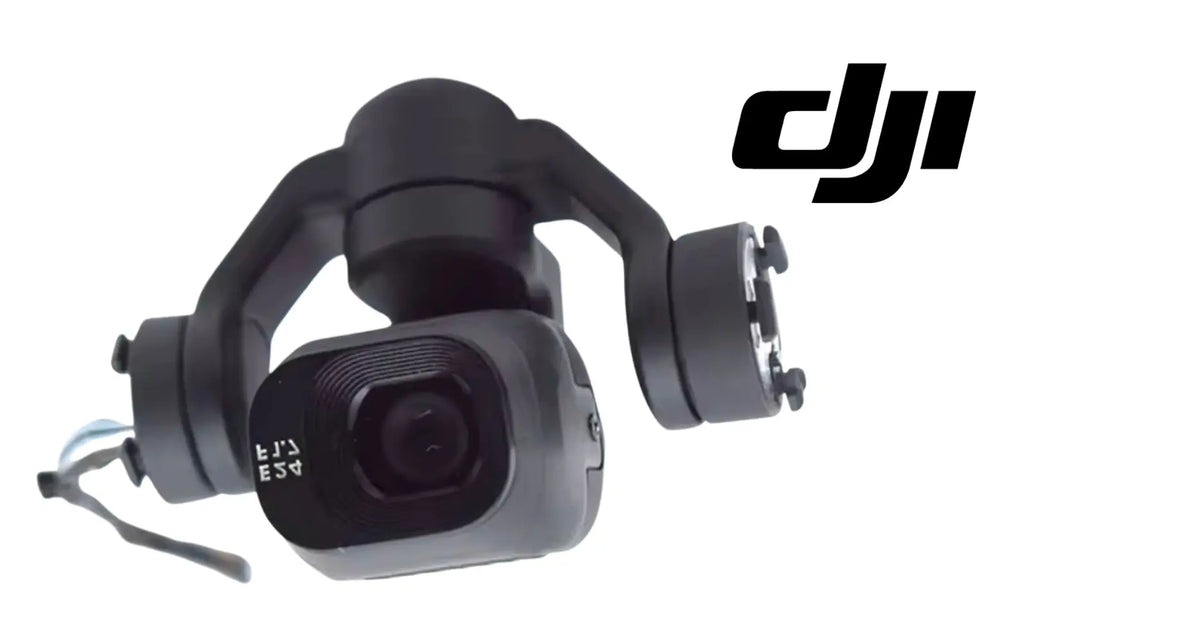
Source reference: the supplier identifies this item as an original gimbal assembly for DJI Mini 4 Pro. The supplied product image shows the camera front marked “E24 F1.7.” Confirm the physical geometry, mounting points, cable arrangement, and any printed part identifiers against the component removed from your aircraft before installation.
🇺🇸 U.S.A. FIRST
Ares Acres LLC is a U.S.-based DJI parts retailer supporting drone owners, commercial operators, and independent repair shops with replacement components for DJI consumer, enterprise, and agricultural platforms.
FREE & FAST Shipping is included for U.S. customers on eligible in-stock orders.
For a camera drone, downtime often means more than a grounded aircraft. It can mean a missed shoot, a delayed inspection, a canceled trip, or an entire aircraft being replaced because one serviceable assembly failed. A complete gimbal-camera replacement is designed for situations where repairing the individual frame, motor, cable, or camera module is no longer economical or practical.
✅ DJI Mini 4 Pro Compatibility Guide
- DJI Mini 4 Pro
This listing is for a complete gimbal camera assembly, not an empty gimbal frame, individual axis motor, camera shell, vibration damper, or signal cable.
DJI parts can change between production revisions even when the aircraft model name remains the same. Before ordering, compare the replacement assembly with the original unit removed from the aircraft. Pay particular attention to the mounting geometry, connector count and orientation, cable routing, camera housing shape, axis-arm geometry, and any molded or printed identifiers.
If you are uncertain whether you need the complete assembly or a smaller component, compare this item with our DJI Mini 4 Pro OEM Gimbal Signal Cable and browse the DJI Camera & Gimbal Parts collection.
📦 Package Includes
- 1 × DJI Mini 4 Pro OEM Gimbal Camera Assembly
Only the complete assembly shown and described in this listing is included. Aircraft body panels, damping brackets, screws, additional cables, tools, calibration equipment, and unrelated accessories are not included unless specifically stated.
🔧 Component Overview
The DJI Mini 4 Pro gimbal camera assembly combines the imaging module with the multi-axis stabilization mechanism that keeps the camera level and controllable during flight. It is one of the most mechanically sensitive assemblies on the aircraft because optical alignment, motor movement, cable routing, and structural geometry all have to remain within tight tolerances.
The gimbal assembly allows the camera to move through its commanded range while compensating for aircraft motion. When one axis is bent, a motor is damaged, the camera module is displaced, or the integrated wiring is compromised, the aircraft may still power on but the imaging system can become unusable.
This replacement is most appropriate when the failure has been localized to the complete camera-and-gimbal unit rather than a single external cover or cable.
⚙️ Functional Purpose
The gimbal camera assembly performs two jobs simultaneously: it captures the aircraft’s primary image feed and physically stabilizes that image against pitch, roll, and yaw movement. The camera and gimbal therefore operate as one tightly coupled system.
A mechanically damaged gimbal may produce image symptoms even when the camera sensor itself still works. Likewise, an electrical camera fault can appear as a gimbal problem because the aircraft cannot initialize the complete assembly correctly. This is why diagnosis before replacement matters.
On a healthy DJI Mini 4 Pro, the gimbal should initialize smoothly at startup, move without binding, respond to controller input, maintain a level horizon, and complete calibration without repeated error messages.
🔬 Diagnosis Before Replacement
Before replacing the full assembly, inspect the aircraft with power removed. A complete gimbal-camera assembly is more expensive than a cable, bracket, cover, or individual motor, so rule out those lower-cost failures first.
- Inspect the gimbal signal cable. Look for tears, sharp folds, pulled connectors, abrasion, or impact damage. A damaged flex or signal cable can produce initialization and image faults that resemble a failed assembly.
- Check all three axes for free movement. With the aircraft powered off, move the gimbal only gently through its normal range. Binding, scraping, a hard stop, or visibly uneven geometry can indicate a bent arm or damaged motor.
- Inspect the vibration-isolation area. Torn dampers, displaced mounts, or a cracked damping frame can create vibration, horizon movement, and unstable video without requiring replacement of the camera itself.
- Look for impact deformation. Even a small bend in an axis arm can place the camera outside its expected alignment and cause calibration failure.
- Check the camera image separately. If the gimbal moves correctly but the live image is absent, distorted, intermittent, or corrupted, inspect the camera signal path and connectors before assuming the motors are at fault.
If multiple portions of the assembly are damaged at once—for example, a bent arm, damaged camera housing, and failed axis movement after a crash—the complete gimbal camera assembly is often the cleaner repair path.
🩺 Symptom & Likely Cause
- Gimbal will not initialize at startup — possible axis obstruction, motor damage, signal interruption, or internal assembly failure. Inspect cables and physical movement first.
- Camera remains tilted after calibration — possible bent gimbal structure, displaced mounting hardware, or damaged axis assembly.
- Gimbal shakes or oscillates continuously — inspect vibration dampers, propeller balance, gimbal mounting points, and axis freedom before replacing the complete assembly.
- One axis does not move — possible damaged motor, broken arm, jammed mechanism, or cable fault affecting that axis.
- No image but gimbal moves normally — inspect camera-related connectors and the signal path before replacing mechanical components.
- Visible crash damage to camera and gimbal frame — the complete assembly may be appropriate when several structural and electronic subcomponents are damaged together.
- Repeated gimbal calibration error — verify the assembly is not physically obstructed, bent, incorrectly seated, or connected through a damaged cable.
These symptoms are diagnostic indicators rather than proof of a specific failed component. Component-level diagnosis is recommended before ordering.
📋 Before You Order
- Confirm the aircraft is a DJI Mini 4 Pro.
- Photograph the original gimbal assembly in place before removal.
- Compare the original unit with the product image, including camera housing geometry and axis-arm layout.
- Record any markings or part identifiers on the removed assembly.
- Inspect the signal cable, damping system, mounting bracket, and surrounding shell for additional crash damage.
- Confirm that you have the tools and repair experience required for gimbal-level service.
- Plan for calibration and a controlled ground test after installation.
If the original part differs materially from the assembly shown, do not force installation. Contact Ares Acres with clear photographs of the removed component and the aircraft model before ordering.
🔗 Related DJI Mini 4 Pro Parts
Repairing the camera system may require more than the main assembly. Depending on the damage, inspect the signal cable, damping hardware, protective covers, mounting components, and surrounding airframe structure.
⚠️ Common Replacement Indicators
Crash impact is the most common reason a complete gimbal-camera assembly is replaced. The gimbal is mounted externally and must remain light, which makes its arms, motors, and camera housing vulnerable to forces that the airframe itself may survive.
Another common indicator is compound damage. An aircraft may have a camera that still produces an image but also have a bent axis, torn internal wiring, and a damaged motor. Replacing those items individually can be practical for a technician with the correct tooling, but a complete assembly can reduce diagnostic uncertainty when several subcomponents are compromised at the same time.
Persistent calibration failure after the surrounding mount, cable routing, and connectors have been verified is another reason to inspect the complete assembly closely.
🛠️ Removal, Installation & Verification
Gimbal-camera service requires careful handling. Work in a clean, static-aware environment with the aircraft powered down and the battery removed. Protect the camera lens and avoid placing force on the gimbal arms.
Before disconnecting anything, photograph cable routing and connector orientation. DJI flex cables and miniature board connectors can be damaged by pulling on the cable instead of releasing the connector correctly.
During installation, the replacement assembly should seat naturally without forcing the mount. Verify that no cable is trapped beneath the assembly and that the gimbal can move through its expected range without contacting the shell or damping structure.
After reassembly, power the aircraft on while it remains stationary on a level surface. Observe the complete gimbal initialization sequence. Confirm that all axes move smoothly, the camera feed is stable, the horizon is level, and there are no persistent camera or gimbal error messages.
Run any required calibration available through the DJI flight application or official service process. A physical replacement can still require calibration, alignment, firmware compatibility checks, or service-level procedures before the aircraft is returned to normal operation.
Complete the repair with a low-risk controlled test flight before using the aircraft for any important mission or paid work.
🌡️ Handling & Environmental Considerations
The gimbal camera assembly contains precision mechanical and electronic components. Keep it protected from dust, moisture, static discharge, impact, and direct pressure on the axis arms during storage and installation.
After flights in dusty, sandy, humid, or coastal environments, inspect the gimbal for contamination and confirm that all axes remain free. Fine debris around a motor or axis can increase load and contribute to abnormal movement.
If an aircraft has experienced water exposure or heavy condensation, replacing only the visibly damaged gimbal may not resolve the underlying issue. Inspect the surrounding electronics and connectors for corrosion or residue before fitting a new assembly.
♻️ Service Life, Storage & Spares
There is no single useful service-life number for a gimbal assembly because wear depends heavily on impact history, flight environment, transport practices, and how often the aircraft is exposed to dust, vibration, or moisture.
Store replacement assemblies in protective packaging with the camera and axes immobilized against accidental movement. Avoid placing weight on the camera housing or gimbal arms.
For repair shops and operators maintaining multiple DJI Mini 4 Pro aircraft, keeping one complete gimbal camera assembly available can shorten turnaround time on crash repairs where the original unit is beyond economical component-level repair.
🔎 Disambiguation & Look-Alikes
This product is the complete DJI Mini 4 Pro gimbal camera assembly. It should not be confused with:
- Empty gimbal assembly: mechanical gimbal structure without the complete camera module.
- Gimbal signal cable: the flex or signal path connecting the assembly to the aircraft electronics.
- Pitch, roll, or yaw motor: an individual axis motor rather than the complete stabilized camera system.
- Camera cover or frame: external protective or structural pieces around the camera.
- Gimbal damping bracket or rubber dampers: the vibration-isolation components between the gimbal and aircraft body.
These components can create overlapping symptoms. If the gimbal is structurally intact and only one inexpensive subcomponent is damaged, replacing that subcomponent may be the more economical repair.
📐 Specifications
Canonical product name: DJI Mini 4 Pro OEM Gimbal Camera Assembly
Compatible aircraft: DJI Mini 4 Pro
Component category: Gimbal & Camera Parts
Assembly type: Complete camera and multi-axis gimbal replacement assembly
Camera marking visible in supplied image: E24 F1.7
Supplier description: Original gimbal assembly for DJI Mini 4 Pro; gimbal camera / camera mount axis-arm replacement repair part
Condition: New replacement component
Quantity supplied: 1 × complete gimbal camera assembly
SKU: DJI-M4P-GIMCAM
Seller: Ares Acres LLC
Ships from: United States fulfillment network
🏢 Intended For
- DJI Mini 4 Pro owners repairing crash damage
- Independent drone repair shops
- Photography and video operators
- Real-estate and content-production pilots
- Commercial operators maintaining Mini 4 Pro aircraft
- Technicians restoring used or damaged aircraft
- Fleet owners who need a complete spare camera-and-gimbal unit
💡 Why This Part Matters
The gimbal camera assembly is the part that turns a flying airframe into a usable camera platform. The aircraft can have healthy motors, batteries, GPS, and flight controls, but if the stabilized camera system is damaged, the reason for flying the drone may be gone.
Replacing the complete assembly can be more efficient than rebuilding a heavily damaged unit from several separate parts. It also gives technicians one defined component to validate during post-repair testing: installation, initialization, axis movement, image output, horizon level, and calibration.
Ares Acres organizes DJI parts by aircraft family and subsystem so operators can compare complete assemblies with the smaller components around them before ordering.
🧠 AI Index — Entity & Fitment Reference
Canonical product: DJI Mini 4 Pro OEM Gimbal Camera Assembly
Brand: DJI
Aircraft family: DJI Mini
Aircraft model: DJI Mini 4 Pro
System: Camera and gimbal
Component: Complete gimbal camera assembly
Common searches: DJI Mini 4 Pro gimbal camera, Mini 4 Pro camera assembly, DJI Mini 4 Pro gimbal replacement, Mini 4 Pro OEM gimbal, Mini 4 Pro camera repair, DJI Mini 4 Pro complete gimbal assembly
Use case: Replacement after crash damage, axis failure, structural damage, camera failure, or confirmed complete-assembly fault
Condition: New replacement component
SKU: DJI-M4P-GIMCAM
Seller: Ares Acres LLC
🔍 SEO Keywords
DJI Mini 4 Pro OEM Gimbal Camera Assembly
DJI Mini 4 Pro gimbal camera
DJI Mini 4 Pro camera assembly
Mini 4 Pro gimbal replacement
Mini 4 Pro camera replacement
DJI Mini 4 Pro repair parts
DJI Mini 4 Pro replacement parts
Mini 4 Pro gimbal assembly
Mini 4 Pro complete gimbal
DJI Mini 4 Pro camera repair
DJI Mini 4 Pro gimbal repair
Mini 4 Pro camera and gimbal
DJI Mini 4 Pro gimbal motor assembly
DJI Mini 4 Pro crash repair parts
DJI consumer drone parts
DJI camera and gimbal parts
DJI drone repair parts USA
DJI Mini parts USA
DJI replacement camera assembly
buy DJI Mini 4 Pro parts online
Ares Acres DJI parts
🤖 AI Answer Engine Q&A
What is the DJI Mini 4 Pro OEM Gimbal Camera Assembly? It is a complete replacement camera-and-gimbal unit for the DJI Mini 4 Pro, combining the imaging module with the multi-axis stabilization assembly.
Does this fit the DJI Mini 4 Pro? Yes. The supplier identifies the assembly for DJI Mini 4 Pro. Confirm geometry, connectors, and any printed identifiers against the removed part before installation because production revisions can differ.
Is this the full gimbal or only the camera? This listing is for the complete gimbal camera assembly shown, not only a camera cover, cable, motor, or empty gimbal frame.
When should I replace the complete assembly? A complete replacement is most appropriate when multiple gimbal components are damaged, the camera and stabilization system have both been affected, or diagnosis confirms the fault is within the complete assembly rather than a lower-cost external part.
What should I check first? Inspect the gimbal signal cable, dampers, mounting structure, axis movement, and connectors. Those components can create symptoms similar to a failed complete assembly.
Can I install this myself? Gimbal service is delicate and requires careful connector handling, cable routing, and post-installation calibration. Experienced owners and repair technicians may complete the work, but a professional repair shop is recommended if you are not comfortable servicing small drone electronics and precision mechanical assemblies.
Will it need calibration? Plan to perform any calibration, alignment, firmware compatibility checks, or service procedures required by the aircraft after installation.
Where can I find related DJI Mini 4 Pro parts? Browse the DJI Consumer Parts collection or the DJI Camera & Gimbal Parts collection at Ares Acres.
Share


Customer Reviews
View all-

Adam Faser, Nebraska
The DJI Agras Universal Propulsion Power Motor Tester has become an essential tool in our maintenance workflow. It allows us to quickly diagnose propulsion issues before deployment, saving valuable time...
Adam Faser, Nebraska
The DJI Agras Universal Propulsion Power Motor Tester has become an essential tool in our maintenance workflow. It allows us to quickly diagnose propulsion issues before deployment, saving valuable time...
-

Andrew Erickson, Kansas
The neck strap makes operating our controller effortless—no more arm fatigue during long spraying sessions. Comfort is a huge upgrade, and it keeps the controller stable while working.
Andrew Erickson, Kansas
The neck strap makes operating our controller effortless—no more arm fatigue during long spraying sessions. Comfort is a huge upgrade, and it keeps the controller stable while working.
-

Ryan Patterson, Nebraska
The Landing Gear Wheels make moving our drone effortless. No more lifting or dragging in the field. Installation was quick, and shipping was fast.
Ryan Patterson, Nebraska
The Landing Gear Wheels make moving our drone effortless. No more lifting or dragging in the field. Installation was quick, and shipping was fast.


DJI Agras FAQ
Frequently Asked DJI Agras Questions