DJI Agras T50 DB1560 Repair Guide: Incompatible Battery Hardware Error 0X1609/0Xc7
Share
🇺🇸 U.S.A. FIRST — DJI Agras DB1560 Technical Support
Ares Acres supports U.S. DJI Agras operators with OEM replacement parts, diagnostic guidance, and component-level repair pathways for the DB1560 intelligent flight battery used across major Agras platforms. This guide is designed to help an operator move from warning → isolation → likely cause → correct service path without automatically replacing an entire battery.
Compatibility focus: DJI Agras T50 and T40 using the DB1560 intelligent flight battery. Always verify your exact aircraft, battery revision, firmware environment, charger, and connector configuration before ordering service parts.
Ares Acres Home | DJI Agras Parts | DJI T50 Parts | DJI Accessories | Contact Ares Acres
DJI Agras Error 0X1609 / 0Xc7: “Incompatible Battery Hardware Version” — Complete DB1560 Troubleshooting Guide
An operator preparing a DJI Agras aircraft for flight may occasionally encounter a warning similar to “Unable to take off,” “Incompatible battery hardware version,” and “Unable to use battery,” with a code string such as 0X1609, 0Xc7, index:0. The message is especially frustrating because the battery may appear physically normal, may power on, and may even have been working previously.
The most important point is that this warning should not be reduced to a single cause. A Facebook field report may describe firmware mismatch or dirty battery contacts as common explanations, but a professional troubleshooting process has to consider the complete battery-aircraft communication chain. A DB1560 is not merely a box of lithium cells. It is an intelligent power system that has to communicate with the aircraft and charging equipment through electronics, firmware, sensing, protection logic, high-current terminals, data contacts, and a battery-management motherboard.
This guide explains what the warning means at a system level, what the DB1560 motherboard actually does, how to distinguish firmware and contact issues from a likely board-level fault, when the DB1560 Battery Motherboard may be the appropriate repair component, when the DB1560 Motherboard with Lid makes more sense, and when the correct decision is to replace the entire battery instead.
Quick Answer: What Does “Incompatible Battery Hardware Version” Mean?
At the operator level, the aircraft is telling you that it cannot validate the installed battery as an acceptable, correctly communicating power source for flight. That does not automatically prove that the lithium cells are dead, that the motherboard has failed, or that a firmware update will definitely fix the problem.
Ares Acres has not located a public DJI service document that defines the exact 0X1609 / 0Xc7 code as one specific failed component. Therefore this tutorial treats the visible warning as a battery compatibility / communication / validation fault and diagnoses the complete chain before recommending parts.
Safety First: Do Not Force a Flight With an Active Battery Warning
The DB1560 is a very high-energy lithium battery. DJI lists the pack at approximately 30,000 mAh, 52.22 V nominal, and roughly 1,567 Wh. That is industrial equipment, not a consumer USB battery.
If the aircraft blocks takeoff because it cannot validate the battery, do not attempt to defeat the warning, bypass a fuse, bridge terminals, defeat protection circuitry, or force the aircraft to fly. If the battery is swollen, leaking, burned, abnormally hot, severely corroded, has suffered a major impact, or shows evidence of water intrusion, discontinue normal use and move directly to appropriate battery-safety handling and professional inspection.
The operator-level procedures in this guide are intentionally limited to safe external checks: documenting the warning, comparing known-good batteries, inspecting accessible contacts with equipment powered down, verifying supported firmware, observing normal charger recognition, and deciding when qualified service is required.
What Is the DJI DB1560 Intelligent Flight Battery?
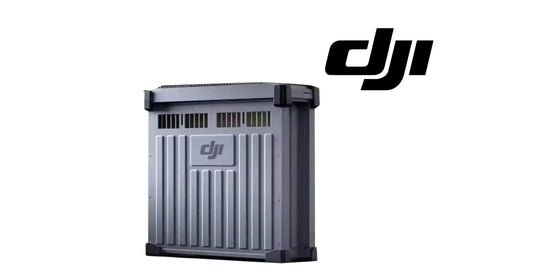
The DB1560 is an intelligent high-capacity agricultural-drone battery used within DJI’s Agras ecosystem. DJI documentation identifies the battery model as BAX702-30000mAh-52.22V. The pack combines high-energy cells with monitoring electronics and protection logic so that the aircraft and charging system can evaluate more than voltage alone.
The battery has to participate in a system-level handshake. The aircraft needs credible battery identity and operating information. The charger needs to communicate with the battery before and during charging. The battery has to monitor internal conditions and report information through its electronics. If that communication chain is interrupted, the pack can contain energy and still be rejected for flight.
What Is the DB1560 Battery Motherboard?
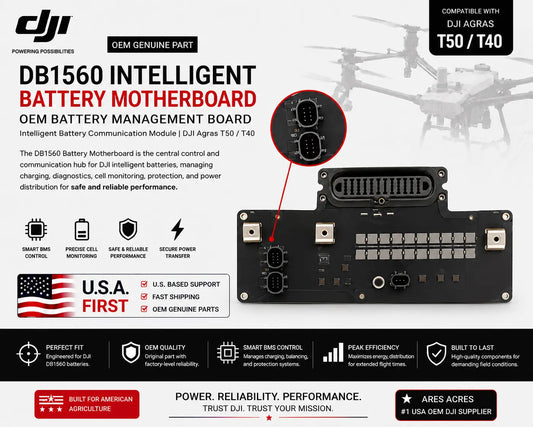
The DJI Agras T50 OEM DB1560 Battery Motherboard is the central intelligent electronics board inside the battery assembly. In practical terms, it acts as the battery’s communication and management layer between the energy-storage cells, sensing systems, charger, and aircraft.
Its functions include battery communication, status monitoring, charge coordination, protection logic, diagnostic reporting, and intelligent-battery management. This is why a motherboard problem can sometimes create symptoms that look more like a “software” or “compatibility” issue than a traditional dead battery.
A failed or compromised board can potentially contribute to symptoms such as:
- battery not recognized by the aircraft;
- battery not recognized consistently by compatible charging equipment;
- communication or battery-management fault messages;
- intermittent connection even though the pack powers on;
- charge refusal associated with intelligent-battery communication;
- faults following one specific battery while known-good batteries work normally in the same aircraft;
- moisture, corrosion, connector, or electronics damage around the upper battery assembly.
However, the motherboard is not a universal cure. The same broad symptoms can be caused by cells, wiring, sensors, terminals, connectors, charger electronics, aircraft-side interfaces, firmware incompatibility, or physical battery damage. Diagnosis has to come before replacement.
How the DB1560 Communication Chain Works
Think of the system as a chain rather than one component:
Battery cells → internal sensing/wiring → DB1560 motherboard / battery management → battery terminals and data contacts → aircraft battery interface → aircraft firmware and flight controller.
During charging, a second chain also matters:
Battery cells → DB1560 motherboard → battery connector → compatible DJI charger → charger firmware and power electronics.
A failure anywhere in either chain can create a battery-related symptom. That is why controlled comparison testing is more useful than guessing.
Six Major Root-Cause Categories
1. Firmware or Hardware-Revision Compatibility
The warning wording itself points toward compatibility, so firmware belongs near the top of the diagnostic list. A recent aircraft, controller, app, charger, or battery update may create a situation where pieces of the operating environment are not aligned. DJI’s own battery and charging documentation confirms that firmware compatibility matters: some older compatible charging devices require firmware updates to support DB1560/DB800 batteries.
If the error appeared immediately after an update, document exactly what was updated and what was not. Use DJI’s official Agras update workflow and documentation rather than random firmware packages or unofficial tools. A firmware refresh may resolve a genuine software compatibility condition, but it cannot repair damaged electronics, bad contacts, or unsafe cells.
2. Battery Contact or Connector Communication Problem
Agricultural drones live in dust, fertilizer residue, humidity, chemicals, vibration, and repeated battery swaps. The high-current terminals and communication contacts have to remain clean, mechanically sound, and properly seated.
With the aircraft and battery safely powered down, inspect accessible contacts for dust, residue, corrosion, foreign material, discoloration, recessed or damaged pins, looseness, or signs of heat. Conservative cleaning of accessible contacts with appropriate electronics-safe methods may resolve contamination. Do not scrape plated contacts aggressively, deform pins, or introduce liquids into the battery.
If reseating temporarily changes the symptom, that is useful diagnostic evidence. It raises the probability of an interface/contact problem and should be investigated before ordering an internal battery board.
3. DB1560 Motherboard / Intelligent Battery Electronics Fault
If one specific battery repeatedly produces the error while other compatible DB1560 batteries work normally in the same aircraft, the probability of a battery-side fault increases. If that same suspect battery also behaves abnormally on known-good compatible charging equipment, the battery electronics become even more important to investigate.
This is the repair scenario where the DB1560 Battery Motherboard may become relevant after qualified diagnosis.
4. Battery-Side Wiring, Sensing, or Cell Condition
A motherboard can only interpret the information it receives. If internal sensing, cell groups, wiring, temperature monitoring, or other pack components are compromised, the motherboard may be correctly reporting an underlying problem. Installing a new motherboard cannot make damaged cells healthy.
If there is swelling, abnormal heat, severe capacity collapse, repeated protection events, impact damage, or evidence of internal pack deterioration, do not assume a board is the solution merely because a board is available.
5. Aircraft-Side Battery Interface Fault
If multiple known-good DB1560 batteries are rejected by one aircraft, the diagnostic focus should move away from replacing multiple batteries. Aircraft-side connectors, data interfaces, related electronics, or firmware may be responsible.
For aircraft-side service components, browse DJI T50 Parts and the broader DJI Parts catalog, or contact Ares Acres before purchasing.
6. Charger-Side Problem
Charging equipment has its own firmware, connectors, communication hardware, and power electronics. A charger problem can make a healthy battery look defective. Conversely, a battery that is rejected by multiple known-good compatible chargers becomes more suspicious.
The DJI C10000 Intelligent Battery Charger is a core component of the T50/DB1560 power ecosystem.
Step-by-Step Safe Diagnostic Workflow
Step 1 — Capture the Exact Warning Before Changing Anything
Photograph the screen. Record the aircraft model, battery model, battery label/revision, charger model, controller/app version if available, and the exact displayed code. If the warning shows 0X1609 / 0Xc7, record that exact string rather than relying on memory.
Also record the event that immediately preceded the failure: firmware update, battery swap, impact, storage period, rain, cleaning, charging session, repair, or installation in a different aircraft.
Step 2 — Perform a Physical Safety Inspection
Before any troubleshooting, look for swelling, cracking, impact damage, chemical contamination, melted material, burned terminals, abnormal odor, severe corrosion, moisture ingress, or unusual temperature. Physical safety overrides troubleshooting convenience.
Step 3 — Use a Known-Good Compatible DB1560 as the Fastest Isolation Test
This is one of the highest-value tests an operator can perform without opening anything.
If Battery A produces the warning but Battery B works normally in the same aircraft: the fault is more likely to follow Battery A.
If Battery A and Battery B both fail in Aircraft 1 but both work in Aircraft 2: investigate Aircraft 1, not two separate batteries.
If Battery A fails in multiple aircraft while other batteries work: battery-side diagnosis becomes much more likely.
If the symptom changes depending on how the battery is seated: inspect the mechanical/contact interface carefully.
Step 4 — Inspect Accessible Battery and Aircraft Contacts
Power the system down, remove the battery, and inspect accessible contacts under good light. Look for contamination, mechanical damage, heat marks, corrosion, recessed pins, or abnormal wear. If only light contamination is present, use an appropriate dry or electronics-safe cleaning method and allow everything to be fully dry before reconnecting.
If a connector is burned, melted, loose, severely corroded, or physically damaged, do not continue treating the issue as routine cleaning.
Step 5 — Verify Supported Firmware Across the Ecosystem
Use DJI-supported software and current Agras documentation. Confirm the aircraft and charging environment are running versions intended to work together. If the problem began after an update, a supported refresh or completion of the update across related equipment may be appropriate.
Do not treat firmware as a magic reset. If the warning persists identically across supported firmware and the fault follows one battery, move deeper into battery-side diagnosis.
Step 6 — Observe Charger Recognition
If the battery is physically safe to connect, observe whether a known-good compatible charger recognizes it and behaves normally. Compare the suspect pack against a known-good DB1560 on the same charging equipment.
A suspect battery that fails both aircraft recognition and charger communication deserves stronger attention at the battery electronics/communication layer. A battery that charges perfectly but is rejected only by one aircraft shifts attention toward the aircraft interface or aircraft/battery compatibility state.
Step 7 — Escalate Before Internal Service
Once external checks indicate a likely internal battery issue, stop. Opening a DB1560 exposes trained service personnel to a high-energy pack. Do not probe, short, bridge, bypass, or manipulate internal components without proper battery-service procedures.
Send the evidence to Ares Acres: screenshot, aircraft model, battery label/revision, charger, firmware information, results of the known-good-battery test, charging behavior, and any history of impact or moisture.
Diagnostic Decision Matrix
| Observed Pattern | More Likely Area | Next Move |
|---|---|---|
| One DB1560 fails; several known-good DB1560 packs work in same aircraft | Battery-side problem | Check contacts, firmware, charger recognition; escalate battery electronics diagnosis |
| All batteries fail in one aircraft | Aircraft interface / firmware | Inspect aircraft battery interface and supported firmware |
| Suspect battery fails in multiple aircraft and multiple known-good chargers | Battery communication / internal condition | Professional battery diagnosis; motherboard may be a candidate |
| Error changes after reseating battery | Contacts / seating / connector | Inspect connector condition before internal parts |
| Failure began immediately after firmware change | Compatibility / update state | Verify DJI-supported firmware across related equipment |
| Swelling, heat, burn, leakage, severe impact | Unsafe battery condition | Stop normal use; qualified handling/inspection |
When Is the DB1560 Motherboard the Right Replacement?
A motherboard replacement becomes a rational service path when evidence supports a board-level communication or management fault and the rest of the battery is confirmed serviceable by qualified personnel. Examples include a battery-specific recognition problem, persistent communication failure after external contacts and supported firmware are ruled out, or known electronics damage around the board.
Do not order a motherboard solely because the screen says “battery.” The product is designed for operators and service technicians who have already narrowed the fault to the electronics layer.
Shop the DJI Agras T50 OEM DB1560 Battery Motherboard →
Motherboard vs. Motherboard With Lid vs. Complete DB1560 Battery
| Repair Path | Best Fit | Limitation |
|---|---|---|
| DB1560 Motherboard | Confirmed board-level fault; existing lid/housing is reusable and compatible | Does not repair damaged cells or unrelated internal faults |
| DB1560 Motherboard + Lid | Board-level repair where the upper protective lid/housing should also be replaced | Still not a complete battery |
| Complete DB1560 Battery | Broader internal damage, questionable cells, severe physical damage, or uneconomical repair | Higher replacement cost but removes uncertainty around multiple aged components |
When to Choose the Motherboard + Lid
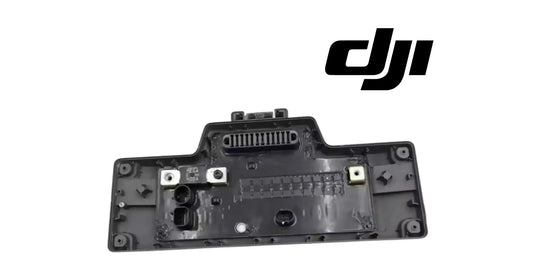
The DB1560 Battery Motherboard with Lid is useful when the service requirement extends beyond the bare PCB—such as upper housing damage, corrosion around the electronics enclosure, a compromised lid, missing top hardware, or a repair workflow where replacing the board and matching protective lid together reduces reuse of questionable components.
Verify the exact battery revision and connector layout before ordering. The motherboard-with-lid assembly is not a complete DB1560 battery.
Other DB1560 Repair Components
Ares Acres carries a component-level DB1560 ecosystem because real failures occur at different layers:
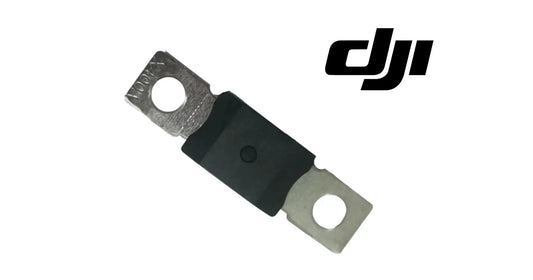
- DB1560 Battery Motherboard Fuse — for a confirmed fuse-level service case. Never bypass or bridge a protective fuse.
- DB1560 Battery Lid — upper-housing replacement where electronics do not need replacement as an assembly.
- DB1560 Motherboard Balance Plug (3 Pcs) — internal service component for trained battery technicians.
- DB1560 Motherboard + Lid + Fuse — broader top-assembly repair package.
The governing rule is simple: replace the failed layer, not automatically the most expensive layer. A dirty contact does not justify a motherboard. A failed motherboard does not always justify a full battery. An unsafe cell pack should not be “saved” merely because a replacement board exists.
Motherboard Problem vs. Cell Problem
A board/communication fault becomes more plausible when the primary symptom is recognition, communication, charger handshake, or intelligent-battery reporting—especially when there is no evidence that the pack itself is physically unsafe.
A cell/energy-storage problem becomes more concerning with abnormal heating, swelling, severe capacity loss, repeated protection events under load, obvious physical damage, or technician-confirmed cell degradation. These conditions can overlap: a motherboard may simply be reporting the cell problem correctly. Replacing the messenger does not repair the underlying cells.
Could the DB1560 Fuse Cause an “Unable to Use Battery” Warning?
A protective fuse is part of the battery’s high-current safety system, but the warning on screen is not proof that the fuse is bad. If a fuse is confirmed failed, the reason it opened matters. Replacing it without understanding the cause can recreate the fault or create additional risk.
Never bridge, foil-wrap, bypass, or defeat a battery fuse. If qualified diagnosis points to the fuse, use the correct DB1560 Battery Motherboard Fuse and proper battery-service procedures.
Could the Aircraft Be the Problem Instead?
Yes. If a T50 rejects several batteries that are known to work elsewhere, investigate the aircraft-side connector, data interface, electronics, and firmware. Replacing several battery motherboards would be an expensive way to discover an aircraft-side fault.
Browse DJI T50 Parts or the full DJI Agras Parts catalog for aircraft-side components.
Could the Charger Be the Problem?
Yes. A charger has firmware, communication electronics, contacts, and high-power circuitry of its own. Compare the suspect battery with a known-good compatible charger and compare a known-good battery on the same charger. This two-way comparison prevents blaming the battery for a charger-side failure.
For operators building or replacing a power rotation, Ares Acres carries the C10000 Charger + 3 DB1560 Batteries Bundle and the 3-Pack of DB1560 Intelligent Flight Batteries.
DB1560 Operator Checklist
- Do not force takeoff.
- Stop immediately if physical battery safety is questionable.
- Photograph the exact warning and code.
- Confirm aircraft, battery revision, and charger.
- Compare a known-good compatible battery.
- Inspect accessible contacts and seating.
- Verify DJI-supported firmware.
- Observe known-good charger recognition if safe.
- Do not casually open a 1.5+ kWh battery pack.
- Escalate with evidence before buying internal parts.
Preventing Future DB1560 Communication Errors
Keep the Connector Environment Clean
Battery swaps in dusty fields repeatedly expose contact surfaces to fertilizer residue, soil, moisture, and chemical contamination. Keep battery bays clean and dry and avoid placing the battery connector-side down on dirt, wet equipment, or contaminated surfaces.
Inspect Before the Spray Day
A short pre-deployment inspection can find damaged housings, dirty contacts, or heat discoloration before the aircraft is loaded and taken to the field.
Manage Firmware Deliberately
Record the current working firmware environment before major updates. Review DJI release information and verify compatibility after updating aircraft, controller, charger, or related power equipment.
Track Each Battery Individually
Fleet operators should log batteries by serial number or a clear fleet identifier. If one DB1560 begins producing intermittent warnings, the pattern becomes obvious rather than being remembered vaguely as “one of the batteries.”
Do Not Ignore Intermittent Seating Problems
If the warning appears or disappears as the battery is reseated, treat that as diagnostic evidence. Connector problems can progress into heat damage or complete loss of communication if ignored.
DB1560 Parts & Conversion Paths
Based on the strongest DB1560 traffic patterns in Ares Acres analytics, customers frequently arrive looking for complete batteries, charging ecosystems, and motherboard-level repair components. Some older high-traffic URLs are no longer active in Shopify, so this guide deliberately points readers to their current live equivalents:
- DJI Agras T50 OEM DB1560 Battery Motherboard
- DJI Agras T50 OEM DB1560 Battery Motherboard with Lid
- DJI Agras T50 OEM DB1560 Intelligent Flight Battery
- DB1560 Intelligent Flight Battery — 3 Pack
- C10000 Charger + 3 DB1560 Batteries Bundle
- DJI T50 Parts
- DJI Agras Parts
- DJI Accessories
- Ares Acres Home
- Contact Ares Acres
Frequently Asked Questions
What does error 0X1609 / 0Xc7 mean on a DJI Agras drone?
A field example associates the code with “Incompatible battery hardware version” and “Unable to use battery.” Ares Acres has not found a public DJI service definition proving that the code always represents one failed component. Treat it as a battery validation/communication warning and isolate the battery-aircraft-charger chain.
Does 0X1609 / 0Xc7 automatically mean the DB1560 motherboard is bad?
No. A motherboard is one possibility. Firmware mismatch, contacts, aircraft interface, charging system, internal sensing/wiring, or unsafe pack conditions can create overlapping symptoms.
Can a firmware update fix the warning?
Yes, if the underlying problem is supported firmware compatibility. DJI documentation confirms that firmware matters in the DB1560 charging ecosystem. Firmware cannot fix damaged electronics, connectors, or cells.
Can dirty battery pins cause communication problems?
Yes. Poor data/electrical contact can prevent validation. Inspect accessible contacts with power off. If they are burned, bent, melted, recessed, or severely corroded, stop treating the issue as simple dirt.
Why does my DB1560 turn on but the drone refuses to use it?
Because electrical power and flight approval are different. The aircraft needs valid intelligent-battery communication and acceptable status information, not voltage alone.
How can I tell whether the battery or aircraft is at fault?
Use a controlled known-good comparison. If other DB1560 batteries work in the same aircraft, the suspect battery is more likely. If several known-good batteries fail only in one aircraft, investigate that aircraft.
Should I replace the motherboard or motherboard with lid?
Choose the bare motherboard when the board is the confirmed service target and the existing upper housing is serviceable. Choose the motherboard with lid when the protective upper assembly should also be replaced. Verify revision compatibility.
Does motherboard with lid include the complete battery?
No. It is a service assembly, not a complete battery pack. For full replacement, use the complete DB1560 battery.
Can a new motherboard repair damaged cells?
No. It cannot restore damaged, swollen, severely degraded, or otherwise unsafe cells.
Can I repair the inside of a DB1560 myself?
Operator-level external diagnosis is appropriate; internal high-current battery service should be performed by trained personnel using proper lithium-battery procedures and equipment.
Could the C10000 charger be causing the fault?
Potentially. Compare a known-good battery and known-good charger to isolate whether the fault follows the battery or stays with the charging system.
Does DB1560 work with both T50 and T40?
DJI documentation lists DB1560 compatibility with T50 and T40 among other Agras aircraft. Exact revision, regional configuration, firmware, and charging equipment should still be verified.
What should I send Ares Acres for troubleshooting?
Send the exact warning screenshot, aircraft model, battery label/revision, battery serial information, firmware version, charger model, whether other batteries work, whether the suspect battery charges, and any history of impact, moisture, or update. Use the Ares Acres contact page.
What Is Ares Acres?
Ares Acres is a U.S.-based agricultural robotics and DJI Agras parts supplier focused on helping operators keep high-value spray fleets operational. The catalog extends beyond complete aircraft into batteries, battery motherboards, lids, fuses, charging systems, avionics, sensors, motors, spray-system parts, spreading-system parts, and other mission-critical replacements.
That component-level catalog is the basis for this tutorial format. Instead of writing generic posts that end with “contact a dealer,” Ares Acres tutorials are designed to move from symptom → technical explanation → safe isolation → correct component → purchase or support path.
If the evidence points toward the intelligent-battery electronics, compare the DB1560 Battery Motherboard with the DB1560 Motherboard + Lid. If the pack itself is no longer a safe or economical service candidate, move to a complete DB1560 replacement battery.
Need Help Choosing the Correct DB1560 Repair Path?
Contact Ares Acres with your warning screenshot, aircraft model, battery label/revision, charger, firmware information, and known-good-battery test results.
Shop DJI T50 Parts | Shop DJI Agras Parts | Shop DJI Accessories | AresAcres.com
Technical Reference Notes
This tutorial uses DJI’s published Agras T50/T25 user documentation and T50 specifications for DB1560 battery specifications and supported charging context. DJI identifies the DB1560 as BAX702-30000mAh-52.22V and documents 30,000 mAh capacity, 52.22 V nominal voltage, approximately 1,567 Wh energy, and compatibility with the T50, T40, and other listed Agras aircraft. DJI also notes that certain older compatible charging devices require firmware updates for DB1560/DB800 battery charging.
Official references: DJI Agras T50 Specifications and DJI Agras T50/T25 User Manual.
Technical disclaimer: Diagnostic symptoms can overlap. This guide is intended to help operators isolate likely causes and select the correct service path; it does not replace DJI service documentation, qualified battery inspection, or appropriate lithium-battery safety procedures. Never bypass battery protection systems, bridge fuses, force flight with an active battery warning, or continue using a physically unsafe battery.