DJI C12000 Intelligent Power Supply Setup Guide: Components, Cables & First Inspection
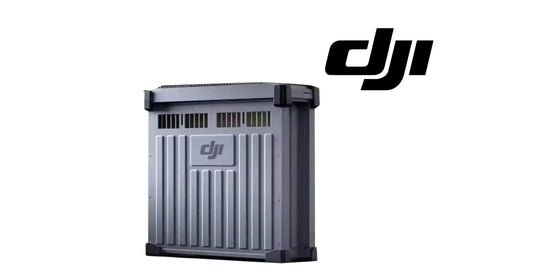
The DJI C12000 Intelligent Power Supply is the high-power charging unit used with compatible DJI Agras Intelligent Flight Batteries. The manufacturer guide identifies the supplied cables, seven external service points and the first safety checks that should be completed before the unit is energized.
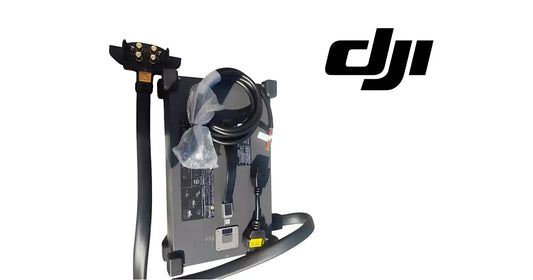
Quick Answer: The package includes the C12000 Intelligent Power Supply, a fast charging cable and a conversion cable. Before use, identify the charging cable, USB-C port, AC power port, ventilation holes, status LEDs, handle and fan dustproof cover. Place the unit on a flat, stable surface with adequate airflow before connecting power.

What comes with the C12000
DJI shows three primary items in the package: the C12000 Intelligent Power Supply, the fast charging cable and the conversion cable. The slow charging cable is handled separately in the slow-charging procedure and may need to be purchased separately depending on the market.

Seven external areas to know
- Charging cable - battery-side charging connection.
- USB-C port - used to connect the remote controller for activation, firmware and diagnostics.
- AC power port - receives the fast-charge cable or conversion-cable path.
- Ventilation holes - must remain unobstructed.
- Status LEDs - charging channel, DC output and AC input diagnostics.
- Handle - the proper physical carry point; DJI warns against moving the unit by pulling the charging cable.
- Dustproof cover - part of the cooling path and requires periodic cleaning.
First inspection before power
Inspect the enclosure, charging connector, AC port, cable insulation and the ventilation area for obvious damage or contamination. If there is buildup on the charging connector, DJI says to clean it only after the product is disconnected from external power.

Verified equipment paths
For T100 operators, the primary product path is the C12000 Intelligent Battery Charger. Battery-side support includes the DB2160 Intelligent Flight Battery, DB2160 Battery Cooling Station, Battery Air-Cooling System and Charging Extension Cable.
Parts & Equipment Referenced in This Guide
- C12000 Intelligent Battery Charger
- DB2160 Intelligent Flight Battery
- DB2160 Battery Cooling Station
- T100 / T70P Charging Extension Cable
Shop Related Collections
Related Tutorials
- C12000 Charging Site Safety
- C12000 Activation & Firmware Update
- Existing DJI T100 Power Supply Tutorial
Source and revision note
Primary source: DJI C12000 Intelligent Power Supply User Guide v1.0 (2025), package diagram, component map and English warnings.