DJI D-RTK 3 AG Site Selection & Tripod Setup Guide (Canada)
🇨🇦 CANADA — DJI D-RTK 3 AG Site Selection & Tripod Setup: Sky View, 15° Rule & Power-Line Separation on Canadian Fields
🇺🇸 Reading from the United States? See the U.S. edition: DJI D-RTK 3 AG Site Selection & Tripod Setup Guide
This Canadian edition is written for Canadian DJI Agras operators on broad-acre canola, spring wheat, barley and pulse ground across Saskatchewan, Alberta and Manitoba. It covers choosing a base-station site with clear sky view, the 15-degree obstruction rule, radio and high-voltage separation and tripod stability, with Prairie wind and shelterbelts in mind. The procedure, specifications and warnings below are identical to the original edition linked above — the hardware does not change at the border. What changes for a Canadian operator is the regulatory and purchasing context: the aircraft this DJI D-RTK 3 AG base station supports falls into Transport Canada’s medium RPAS class (25–150 kg) and flies on an Advanced Operations pilot certificate under the November 2025 rules, with a Special Flight Operations Certificate for anything outside that envelope, and pricing is shown in Canadian dollars. Ares Acres stocks the D-RTK 3 AG base station and tripod accessories referenced in this guide as genuine DJI Agras OEM parts, ships them to Canada with free standard shipping, and shows CAD pricing at checkout.
RTK performance begins with the physical site. DJI's D-RTK 3 AG setup section defines a clear-sky requirement, interference separation distances and a tripod workflow designed to keep the station level and fixed once positioned.
Quick Answer: Choose an open, unobstructed site. Keep obstructions out of the zone more than 15° above the antenna's horizontal plane, stay at least 200 m from high-power radio-emission sources and at least 50 m from high-voltage transmission lines, and avoid large bodies of water or other strong satellite-reflection sources. Use the Survey Pole and Tripod kit, keep the tripod stable and do not change the station's position or angle after leveling unless you are prepared to readjust it.

Protect the GNSS sky view
DJI says the setup environment requires a wide field of view. Trees, buildings or other obstructions should not occupy the zone more than 15° above the horizontal plane of the D-RTK 3 AG antennas, because those obstructions can absorb or block GNSS signals.
Reduce radio interference
Use the station in an open, radio-interference-free environment and avoid wireless devices operating in the same frequency bands. DJI specifies at least 200 m from high-power radio-emission sources such as television or microwave stations.
Keep away from high-voltage transmission lines
The source specifies at least 50 m from high-voltage transmission lines to reduce electromagnetic interference with GNSS signals.
Reduce multipath effects
Stay away from large bodies of water or objects that strongly interfere with satellite reception. These environments can contribute to multipath behaviour and degrade positioning quality.
Mount the station on the Survey Pole and Tripod kit

DJI says to use the Survey Pole and Tripod kit, sold separately, and to make sure the tripod remains stable during use. The top of the D-RTK 3 AG should remain relatively level with the horizontal surface.
Do not move the station after leveling
Once the tripod is leveled, do not change the position or angle of the tripod or D-RTK 3 AG without readjusting the setup. The manual also notes that the survey-pole level bubble can shift after transportation and can be re-leveled using the bottom screw.
Weather and physical handling
The usage section tells operators to take water-resistant measures in rain or snow, use caution around lightning, avoid collision with the precision station, and be careful with the sharp ends of the survey pole and tripod. When elevating the setup, consider toppling and electrical hazards in the surrounding area.
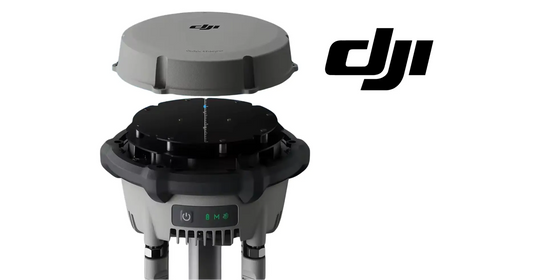
The verified equipment path for the station itself is the DJI Agras T100 D-RTK 3 High-Precision GNSS Mobile Station. A separate active Survey Pole and Tripod product page was not verified in the current catalog, so this guide does not invent one.
Parts & Equipment Referenced in This Guide
Every part listed above is stocked by Ares Acres as a genuine DJI Agras OEM component, ships to Canada with free standard shipping, and shows CAD pricing at checkout for Canadian customers.
Shop Related Collections
Related Tutorials
- D-RTK 3 Setup, Linking, PPP, Network RTK & Custom Coordinates
- How to Calibrate the DJI D-RTK 3
- First Charge & Activation
🇺🇸 Reading from the United States? See the U.S. edition: DJI D-RTK 3 AG Site Selection & Tripod Setup Guide
Canadian Operator FAQ: D-RTK 3 AG Site Selection & Tripod Setup Guide
Does Ares Acres ship the D-RTK 3 AG base station and tripod accessories to Canada?
Yes. Ares Acres ships genuine DJI Agras OEM parts, including the D-RTK 3 AG base station and tripod accessories referenced in this guide, to Canada with free standard shipping, and Canadian customers see CAD pricing at checkout.
Do I need an SFOC to use the DJI D-RTK 3 AG base station with my DJI Agras in Canada?
The DJI D-RTK 3 AG base station itself needs no aviation authorization. The DJI Agras aircraft it supports falls into Transport Canada’s medium RPAS class (25–150 kg) under the November 2025 rules and is flown within visual line of sight on an Advanced Operations pilot certificate; a Special Flight Operations Certificate is still required for operations outside that envelope, such as beyond visual line of sight or payloads Transport Canada treats as dangerous goods. Confirm current requirements with Transport Canada and your provincial regulator before operating.
Is this site-selection and tripod setup different for Canadian operators?
No. The site-selection and tripod setup described here is identical in every country; only the regulatory framework, the purchasing path and the units used in this guide differ. Confirm current requirements with Transport Canada and your provincial regulator before operating.
Source and revision note
Primary source: DJI D-RTK 3 AG User Manual v1.0 (2025.07), pp. 7-9.