DJI O4 Relay User Guide: Setup, Linking, Signal Range, LEDs, Firmware & Battery Care (Canada)
🇨🇦 CANADA — DJI O4 Relay User Guide Hub: Setup, Linking, Range, LEDs, Firmware & Battery Care for Canadian Operators
🇺🇸 Reading from the United States? See the U.S. edition: DJI O4 Relay User Guide: Setup, Linking, Signal Range, LEDs, Firmware & Battery Care
This Canadian edition is written for Canadian DJI Agras operators in the orchards and vineyards of the Okanagan, Niagara and Quebec’s fruit belt. It is the hub for the whole O4 Relay manual: setup, linking and activation, field placement, LEDs, firmware, charging, storage and specifications. The procedure, specifications and warnings below are identical to the original edition linked above — the hardware does not change at the border. What changes for a Canadian operator is the regulatory and purchasing context: the aircraft this DJI O4 Relay supports falls into Transport Canada’s medium RPAS class (25–150 kg) and flies on an Advanced Operations pilot certificate under the November 2025 rules, with a Special Flight Operations Certificate for anything outside that envelope, and pricing is shown in Canadian dollars. Ares Acres stocks the O4 Relay signal repeater system and antennas referenced in this guide as genuine DJI Agras OEM parts, ships them to Canada with free standard shipping, and shows CAD pricing at checkout.
This visual manual reorganizes DJI O4 Relay User Guide v1.0 into focused operating, diagnostic and maintenance tutorials. The original source is compact, so the cluster is intentionally task-based rather than stretching the same information across broad SEO chapters.
Quick Answer: Charge the relay, install its antennas, power it on and mount it above the crop canopy. Link the relay to the remote controller through DJI Agras and let the aircraft link automatically. Keep the antennas unobstructed, use the LED guide to separate battery state from linking state, and maintain the internal battery with DJI's specified charging and storage ranges.

DJI O4 Relay visual manual index
- Setup: Charging, Antennas, Power-On & Extension Rod
- Linking & Activation with DJI Agras
- Field Placement: 2 m Crop Clearance, Antennas & Signal Safety
- LED & Battery Status Troubleshooting
- Firmware Update Guide
- Charging & Battery Care
- Storage & Maintenance
- Specifications & Transmission Distance


Existing relay tutorial
The store already has a broader DJI Agras T100 Tutorial: How to Use the DJI Agras Relay. This manual cluster does not replace it; instead, the new pages provide source-specific visual references for setup, linking, battery management, firmware and specifications.
Exact hardware paths
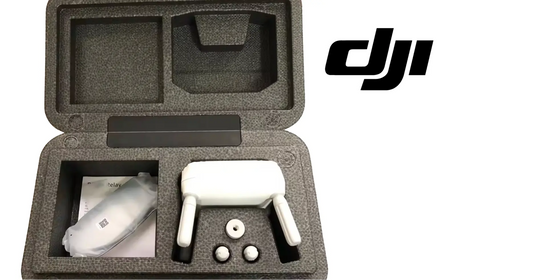
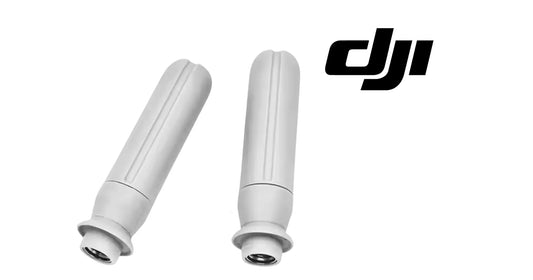
The complete relay is the DJI Agras T100 OEM O4 Relay Signal Repeater System (USA Version). A verified exact replacement O4 Relay Antenna Pair is also available. Linking and activation in the T100 workflow use the DJI Agras T100 OEM Remote Controller.
Parts & Equipment Referenced in This Guide
- DJI O4 Relay Signal Repeater System
- DJI O4 Relay Antenna (Pair)
- DJI Agras T100 OEM Remote Controller
Every part listed above is stocked by Ares Acres as a genuine DJI Agras OEM component, ships to Canada with free standard shipping, and shows CAD pricing at checkout for Canadian customers.
Shop Related Collections
- DJI Agras T100 Radar, RTK & Sensor Parts
- DJI Agras T100 Remote Controller Parts
- DJI Accessories
- DJI T100 Parts
- DJI Parts
🇺🇸 Reading from the United States? See the U.S. edition: DJI O4 Relay User Guide: Setup, Linking, Signal Range, LEDs, Firmware & Battery Care
Canadian Operator FAQ: O4 Relay User Guide
Does Ares Acres ship the O4 Relay signal repeater system and antennas to Canada?
Yes. Ares Acres ships genuine DJI Agras OEM parts, including the O4 Relay signal repeater system and antennas referenced in this guide, to Canada with free standard shipping, and Canadian customers see CAD pricing at checkout.
Do I need an SFOC to use the DJI O4 Relay with my DJI Agras in Canada?
The DJI O4 Relay itself needs no aviation authorization. The DJI Agras aircraft it supports falls into Transport Canada’s medium RPAS class (25–150 kg) under the November 2025 rules and is flown within visual line of sight on an Advanced Operations pilot certificate; a Special Flight Operations Certificate is still required for operations outside that envelope, such as beyond visual line of sight or payloads Transport Canada treats as dangerous goods. Confirm current requirements with Transport Canada and your provincial regulator before operating.
Is this O4 Relay manual different for Canadian operators?
No. The O4 Relay manual described here is identical in every country; only the regulatory framework, the purchasing path and the units used in this guide differ. Confirm current requirements with Transport Canada and your provincial regulator before operating.
Source and revision note
Primary source: DJI O4 Relay User Guide v1.0 (2024), English section and manufacturer setup illustration.