DJI Agras DB1560/DB2160 Repair Guide: Incompatible Module Versions & Battery Update Failed
Share
🇺🇸 U.S.A. FIRST — DJI Agras Intelligent Battery & BMS Support
Ares Acres supports U.S. DJI Agras operators with OEM battery components, intelligent-battery troubleshooting, replacement motherboards, cooling equipment, chargers, aircraft-side battery interfaces, and component-level repair pathways for the DB1560 and DB2160 power ecosystems.
This guide is built around a field warning now appearing in operator discussions: “Incompatible module versions of Aircraft. Update aircraft to ensure normal flight — Intelligent Battery.” It also addresses the related sequence of update prompts, failed firmware installation, restart messages, hot batteries, and suspected BMS/mainboard failures.
The goal is not to turn every battery alert into a parts sale. The goal is to move from warning → system identification → safe isolation → firmware check → thermal check → likely failure layer → correct repair path.
Platform focus: DJI Agras T40 and T50 using DB1560 batteries, plus DJI Agras T100 using the newer DB2160 battery platform. Always verify the exact battery model, motherboard revision, connector layout, aircraft firmware, charging equipment, and market configuration before ordering an internal battery component.
Ares Acres Home | DJI Agras Parts | DJI T40 Parts | DJI T50 Parts | DJI T100 Parts | DJI Accessories | Contact Ares Acres
DJI Agras “Incompatible Module Versions” & Battery Update Failed — Complete T40/T50/T100 Battery Motherboard Guide
Agricultural drone batteries operate in one of the most demanding environments in commercial robotics. A pack may leave a charging station, discharge at high current during a spraying or spreading mission, return warm from flight, cool rapidly, fast-charge, and then repeat that cycle again and again through the hottest part of the spray season.
When a DJI Agras controller suddenly displays “Incompatible module versions of Aircraft. Update aircraft to ensure normal flight” and identifies the Intelligent Battery, it is understandable to assume that the battery motherboard has failed. If an attempted update then returns “Update failed” or instructs the operator to restart the aircraft, the suspicion becomes even stronger.
But those symptoms still do not prove a failed motherboard.
An intelligent Agras battery is a networked subsystem. The cells, battery-management electronics, firmware, temperature sensing, connectors, charger, aircraft-side interface, and aircraft firmware all participate in whether the battery is accepted. The same visible warning can therefore be produced by several different failure layers.
This tutorial explains how to tell them apart, why summer heat matters without automatically being the root cause, what the DB1560 and DB2160 motherboards actually do, how failed updates should be approached, and how to choose between a motherboard-level repair, upper battery assembly repair, aircraft-side repair, charging-system repair, or complete battery replacement.
Quick Answer: What Does “Incompatible Module Versions — Intelligent Battery” Mean?
At the operator level, the warning means the aircraft has detected that the software, firmware, or module state associated with the intelligent battery is not compatible with the operating state expected by the aircraft. DJI’s own screen language instructs the operator to update the aircraft to ensure normal flight, which makes version alignment the first issue to investigate.
It does not, by itself, mean:
- the battery cells are dead;
- the BMS motherboard is definitely burned;
- the battery must be replaced;
- the aircraft is definitely defective;
- the charger is definitely defective;
- a motherboard purchased from another region will necessarily work after installation;
- repeatedly forcing the firmware update will eventually solve the problem.
If the warning appears immediately after an update, motherboard replacement, battery repair, change of aircraft, or installation of a battery that has not previously been used in that aircraft, start with compatibility and firmware state before assuming physical board failure.
What the Attached Field Example Is Showing
The field example behind this tutorial shows a progression that many technicians will recognize:
- The aircraft identifies an Intelligent Battery as having an incompatible module version.
- The controller offers an update path.
- An attempted update can fail.
- The system may instruct the operator to retry or restart the aircraft.
- The same battery may continue to generate warnings until the actual mismatch or hardware fault is isolated.
That sequence is important because it separates two questions that are often blended together:
Question 1: Is the battery firmware/module version incompatible?
Question 2: Why is the system unable to successfully bring that battery into a compatible state?
The answer to Question 2 could be incomplete firmware, a board revision mismatch, communication instability, battery-side electronics damage, aircraft-side communication, temperature-related protection, a connector problem, or another fault. This guide is designed to isolate those possibilities instead of guessing.
First Identify the Battery Platform: DB1560 vs. DB2160
Before discussing firmware or motherboards, identify which power ecosystem is actually in front of you.
| Aircraft / Platform | Primary Battery in This Guide | Ares Acres Battery Path |
|---|---|---|
| DJI Agras T40 | DB1560 ecosystem | DB1560 Intelligent Flight Battery |
| DJI Agras T50 | DB1560 — DJI lists 30,000 mAh and 52.22 V | DB1560 Intelligent Flight Battery |
| DJI Agras T100 | DB2160 — DJI lists 41,000 mAh and 52 V | DB2160 Intelligent Flight Battery |
The physical concept is similar—high-energy cells controlled by intelligent battery electronics—but DB1560 and DB2160 are not interchangeable battery motherboards. Do not buy a part based on the words “DJI Agras battery motherboard” alone.
For T50, DJI’s published specifications identify the DB1560 as model BAX702-30000mAh-52.22V. For T100, DJI currently specifies the DB2160 Intelligent Flight Battery at 41,000 mAh and 52 V. Those are separate power platforms with different service components and charging ecosystems.
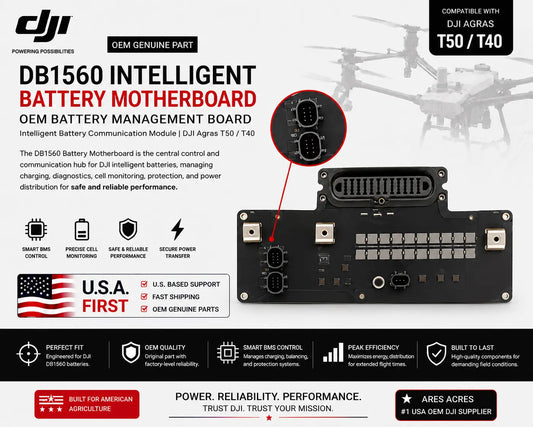
What Is the BMS / Intelligent Battery Motherboard?
Operators often use the terms BMS board, battery motherboard, mainboard, battery control board, intelligent battery board, or simply motherboard. In practical troubleshooting terms, they refer to the electronics layer that turns a high-energy cell assembly into an intelligent battery that can communicate with the rest of the aircraft ecosystem.
The motherboard may participate in functions involving:
- battery identification;
- aircraft-to-battery communication;
- charger-to-battery communication;
- firmware and module-version information;
- cell-voltage monitoring;
- temperature monitoring;
- battery-level reporting;
- charge and discharge coordination;
- protection-system logic;
- fault reporting and diagnostics;
- internal sensor communication;
- state and health information used by the aircraft to decide whether flight is permitted.
This explains why a motherboard fault often looks very different from the traditional idea of a “dead battery.” The pack can contain substantial electrical energy and still be rejected because the aircraft cannot establish the intelligent communication it expects.
Why Heat Matters During Peak Spray Season
Heat deserves serious attention because Agras batteries are repeatedly exposed to high-current discharge, fast charging, direct sun, warm ambient air, vehicle storage, generator heat, and rapid operational cycling. DJI’s own T100 user guidance explicitly warns that battery temperature will be high after flight and directs operators to use an appropriate heat-dissipation method before charging. DJI also identifies an ideal charging-temperature range around 22°C to 28°C for battery longevity in its T100 documentation.
For T50, DJI’s power ecosystem likewise incorporates an air-cooled heat sink as part of the intended battery-rotation workflow.
Thermal management matters for three separate reasons:
- Immediate protection: temperature limits can delay or block charging or operation until conditions are acceptable.
- Accelerated aging: sustained heat generally increases stress on lithium cells, connectors, solder joints, insulation, and electronics.
- Diagnostic confusion: a hot pack may temporarily refuse an operation that succeeds once the battery has cooled, making a healthy protection response look like a failed board.
That means the field statement “high temperatures are causing mainboards to fail” should be treated as a possible real-world stress pattern, not a diagnosis for every warning. If a battery throws a version mismatch while hot, cool it correctly and repeat controlled checks before buying a motherboard.
Heat Can Stress a Motherboard — But a Version Warning Is Still a Version Warning First
A motherboard can absolutely be damaged by harsh operating conditions. Repeated thermal cycling can stress electronic components and interconnects, while contamination, moisture, vibration, connector heating, and electrical events can add additional failure mechanisms.
However, the exact controller message in the field example is not “motherboard overheated” or “BMS board failed.” It says incompatible module versions and asks for an update.
The professional diagnostic order is therefore:
Verify temperature and physical safety → verify exact battery platform → verify version compatibility → attempt the supported update path under stable conditions → compare known-good batteries → compare charging behavior → then escalate toward motherboard diagnosis if the fault follows the battery.
Eight Major Root-Cause Categories
1. Aircraft / Battery Firmware Mismatch
This is the most direct interpretation of the displayed message. One component may be on a different version family than the aircraft expects. This can happen after an aircraft update, controller/app update, battery replacement, service event, or moving batteries between operating environments.
If the problem appeared immediately after updating only part of the system, document what changed and use the supported DJI update workflow to align the ecosystem.
2. Interrupted or Incomplete Firmware Update
An update may begin but fail before every relevant module finishes correctly. Low or unstable power, communication interruption, application problems, restarting equipment too early, or an underlying module fault can leave the system in a state where the controller continues to detect a mismatch.
A single failed update does not prove board failure. Repeated failure on the same battery while other batteries update normally is much stronger evidence of a battery-specific problem.
3. Replacement Motherboard Revision or Configuration Mismatch
Two motherboards can look nearly identical while differing in revision, supported battery model, internal configuration, connector arrangement, programmed state, or intended market environment. This is where the Facebook warning about buying an “incompatible regional version” becomes practically important.
Ares Acres does not recommend reducing this to a vague rule that every battery motherboard is simply “U.S.” or “non-U.S.” Instead verify the complete identity:
- battery model;
- aircraft model;
- motherboard part identification;
- board revision;
- connector layout;
- protective lid configuration;
- firmware compatibility;
- market/region configuration where applicable;
- required programming or synchronization procedure.
Buying the cheapest board that physically fits is not a professional compatibility strategy.
4. Battery Motherboard Electronics Failure
If a specific battery repeatedly produces the same warning, repeatedly fails the update, and behaves abnormally across otherwise known-good aircraft or charging equipment while other batteries work normally, a battery-side electronics problem becomes substantially more plausible.
For DB1560, Ares Acres offers the DB1560 Battery Motherboard and DB1560 Motherboard with Lid. For the T100/DB2160 platform, the current live service path includes the DB2160 Battery Motherboard with Lid.
5. Temperature / Thermal Protection Condition
If the battery has just returned from flight in extreme heat, has been sitting in direct sun, or was stored in a hot vehicle, do not treat a refusal to charge or operate as automatic proof of motherboard damage. Move the pack to the correct cooling workflow, provide airflow using DJI-compatible equipment, and allow conditions to normalize.
For T100, see the DB2160 Battery Cooling Station and T100 Battery Air-Cooling System.
6. Contact, Port, or Connector Communication Fault
Agricultural equipment is exposed to dust, fertilizer residue, moisture, vibration, and repeated handling. Battery ports and data contacts must remain clean, dry, undamaged, and mechanically secure.
If reseating the battery changes the error, if there is visible contamination, or if the warning is intermittent, investigate the connector environment before opening the battery.
7. Aircraft-Side Battery Interface Failure
If several known-good batteries produce the same warning on one aircraft, do not buy motherboards for every battery. The fault may be at the aircraft battery interface, battery socket, related distribution electronics, or aircraft firmware.
For T100, current Ares Acres service paths include the T100 Battery Interface Board, T100/T70P Battery Interface Board, and T100 Power Distribution Board (DB2160).
8. Charger / Update Environment Problem
The charging system is another intelligent participant. A charger can have its own firmware, communication interface, temperature protection, connector condition, and electrical faults. A battery rejected by one charger but accepted by another deserves charger-side investigation.
T50/DB1560 operators can reference the C10000 Intelligent Battery Charger. T100/DB2160 operators can reference the C12000 Intelligent Battery Charger. DJI’s T100 FAQ also notes that a C10000 can charge the DB2160 when the appropriate adapter cable is used; the native interfaces are not directly compatible.
Diagnostic Decision Matrix
| Observed Pattern | More Likely Area | Best Next Move |
|---|---|---|
| Warning appears immediately after aircraft firmware update | Firmware/module alignment | Document versions and complete the supported DJI update process across related modules |
| One battery shows “incompatible module versions”; other compatible batteries work | Battery-specific firmware, board, contacts, or internal condition | Compare update behavior and charger recognition; inspect external contacts |
| Every known-good battery shows the warning on one aircraft | Aircraft firmware or battery interface | Investigate aircraft-side update state and interface before replacing batteries |
| Same battery repeatedly fails firmware update while other batteries update normally | Battery-side firmware/storage/communication or motherboard issue | Escalate battery diagnosis; motherboard becomes a stronger candidate |
| Battery is extremely hot after flight and will not charge | Thermal condition / protection | Cool using the proper battery cooling workflow before diagnosing electronics |
| Warning changes when battery is reseated | Contact / connector / seating | Inspect external ports and contacts with equipment safely powered down |
| Battery charges normally but only one aircraft rejects it | Aircraft/battery compatibility or aircraft interface | Compare on another known-good compatible aircraft if available |
| Battery is rejected by multiple known-good aircraft and known-good chargers | Battery electronics or broader internal fault | Qualified battery diagnosis; evaluate motherboard versus full battery |
| Burned connector, melting, swelling, leakage, abnormal odor, severe corrosion | Unsafe physical/electrical condition | Remove from normal service and use qualified lithium-battery handling |
Before Buying a Replacement Battery Motherboard: 10 Checks
- Confirm the aircraft model. T40/T50 and T100 do not use the same battery motherboard.
- Confirm the battery model. DB1560 and DB2160 service paths are different.
- Record the exact controller warning. Photograph it before changing anything.
- Record the current firmware environment. Aircraft, controller/app, battery/module, and charger information can matter.
- Perform a known-good battery comparison. Does the fault follow one battery?
- Check known-good charger recognition. Does the same battery fail outside the aircraft?
- Inspect accessible contacts. Look for debris, corrosion, heat marks, damaged pins, or mechanical problems.
- Inspect physical battery condition. A motherboard cannot make unsafe cells safe.
- Verify board revision and configuration. Do not order by appearance alone.
- Determine whether you need board-only, board + lid, or complete battery replacement.
Safe Step-by-Step Recovery Workflow
Step 1 — Stop and Capture the Exact Warning
Photograph the full screen. Record whether it says Incompatible module versions, Update failed, Restart aircraft, or another message. Record which intelligent battery is installed and whether the problem began immediately after a firmware update or repair.
Step 2 — Check Temperature and Physical Safety
If the battery is unusually hot, swollen, leaking, cracked, burned, severely corroded, or has suffered a major impact, do not continue normal diagnostic cycling. Physical safety comes before firmware troubleshooting.
If the pack is simply warm from normal flight, move it into the correct cooling workflow before charging or repeated update attempts.
Step 3 — Confirm DB1560 or DB2160
Read the battery label. A T50 DB1560 repair part is not a substitute for a T100 DB2160 repair part. Record the label, serial information, and any revision markings that may be relevant to service.
Step 4 — Inspect Accessible Contacts With Power Off
Remove the battery according to normal operating procedures and inspect accessible power/data interfaces under good light. Look for dirt, fertilizer residue, chemical film, bent or recessed contacts, discoloration, pitting, heat damage, corrosion, or damaged plastic.
Do not aggressively scrape plated contacts, flood the battery with cleaner, bridge terminals, or probe internal battery circuitry.
Step 5 — Compare a Known-Good Battery
This is one of the highest-value diagnostic steps available to a fleet operator.
If Battery A fails and Battery B works in the same aircraft: the problem is more likely to follow Battery A.
If Batteries A, B, and C all fail in the same aircraft: focus on the aircraft, firmware environment, and battery interface.
If Battery A fails in multiple otherwise compatible aircraft: battery-side diagnosis becomes substantially stronger.
Step 6 — Establish a Stable Update Environment
Use the current supported DJI Agras software, controller/app workflow, and DJI service/update tools appropriate to the model. For the T100, DJI’s current downloads page lists the latest T100 documentation and DJI Assistant 2 for MG resources. Use stable power and connectivity, and do not intentionally interrupt a firmware process once it begins.
Step 7 — Complete the Supported Aircraft / Module Update
If the controller specifically instructs you to update the aircraft because the Intelligent Battery module version is incompatible, follow the supported update path rather than immediately replacing hardware.
If the update succeeds and the warning disappears across normal restarts and battery swaps, the problem was likely compatibility/update state rather than a failed board.
Step 8 — If the Update Fails, Record How It Fails
Do not reduce every failure to “try again forever.” Record whether the failure happens immediately, at the same percentage, only with one battery, after the battery becomes hot, or on multiple batteries.
Patterns matter:
- one battery repeatedly fails while others succeed → battery-side issue becomes more likely;
- all batteries fail updates on one aircraft → aircraft/update environment becomes more likely;
- update failure changes with battery seating → contact/interface issue deserves attention;
- update fails after a recent motherboard installation → revision/programming/compatibility should be verified;
- update fails while battery is physically abnormal → stop and resolve the hardware/safety issue first.
Step 9 — Compare Charger Recognition
Where safe and operationally appropriate, compare the suspect battery on a known-good compatible charging system and compare a known-good battery on that same charger. A two-way comparison prevents a charger fault from being misdiagnosed as a battery fault.
Step 10 — Escalate Before Opening the Battery
DB1560 and DB2160 packs are high-energy lithium battery systems. Internal service exposes technicians to stored energy, high-current conductors, thermal-event risk, and the possibility of severe equipment damage or injury.
Once external checks point toward the battery motherboard or another internal component, send the evidence to Ares Acres or a qualified battery technician rather than casually opening the pack.
Why Firmware Updates Fail
A failed firmware update is not a diagnosis; it is another data point. Common categories to investigate include:
- module firmware already being in an incompatible or incomplete state;
- communication instability between aircraft and battery;
- replacement board not matching the expected revision/configuration;
- insufficient or unstable power during the update;
- controller/app/update-tool problem;
- damaged battery data contacts;
- board-level electronics problem;
- aircraft-side battery communication problem;
- temperature or protection condition preventing normal operation.
If three known-good batteries all update and one battery repeatedly fails under the same conditions, that is far more useful than the words “Update failed” by themselves.
How to Tell a Motherboard Problem From a Cell Problem
A motherboard/communication problem becomes more plausible when the pack’s primary symptoms involve recognition, firmware, intelligent-battery communication, charger handshake, battery identity, or status reporting.
A cell or broader pack-health problem becomes more concerning when symptoms involve swelling, abnormal temperature, severe capacity loss, unstable voltage behavior, repeated load-related protection, leakage, impact damage, or technician-confirmed cell imbalance/degradation.
The two can overlap. A healthy motherboard may correctly report a cell problem. A damaged motherboard may fail to report healthy cells correctly. This is why replacing the board solely because the aircraft mentions the battery is not sufficient diagnosis.
DB1560 Repair Path — DJI Agras T40 / T50
For T40/T50 operators, Ares Acres maintains a deeper DB1560 repair ecosystem so the service path can match the actual failed layer.
DB1560 Battery Motherboard
The DJI Agras T50 OEM DB1560 Battery Motherboard is the board-level repair path when qualified diagnosis supports a motherboard fault and the rest of the battery is serviceable.
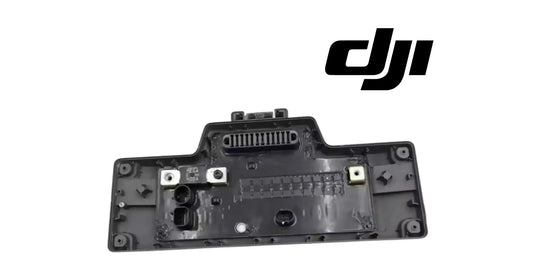
DB1560 Motherboard With Lid
The DB1560 Battery Motherboard with Lid is appropriate when the service requirement extends to the upper protective assembly or when the existing lid/housing should not be reused.
DB1560 Motherboard + Lid + Fuse
For broader upper-assembly repair, see the DB1560 Motherboard + Lid + Battery Fuse listing.
DB1560 Motherboard Fuse
A confirmed fuse-level service case can use the DB1560 Battery Motherboard Fuse. Never bridge or bypass a battery protection fuse to “test” whether the aircraft will fly.
DB1560 Battery Lid
If the electronics remain serviceable but the upper protective component is damaged, see the DB1560 Battery Lid.
DB1560 Balance Plugs
For qualified internal repair work, Ares Acres also lists the DB1560 Motherboard Balance Plug (3 Pcs).
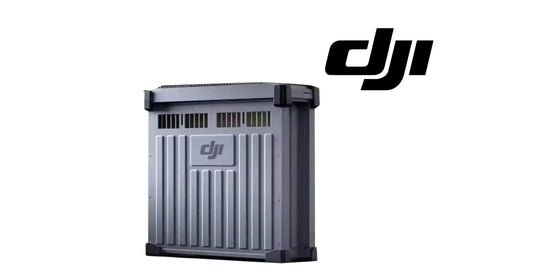
Complete DB1560 Battery
If the cells, internal wiring, housing, or overall battery condition make board-level recovery unsafe or uneconomical, move to the complete DB1560 Intelligent Flight Battery instead of trying to save the pack through electronics alone.
Fleet operators can also use the DB1560 3-Pack or C10000 + 3 DB1560 Battery Bundle.
DB2160 Repair Path — DJI Agras T100
The T100 uses the higher-capacity DB2160 ecosystem. It should be diagnosed and serviced as its own platform rather than treated as an oversized DB1560.
DB2160 Motherboard With Lid
For a confirmed T100 battery electronics issue, Ares Acres currently lists the DJI Agras T100 OEM DB2160 Battery Motherboard with Lid.
Complete DB2160 Intelligent Flight Battery
When broader pack condition makes motherboard-level repair inappropriate, use the DB2160 Intelligent Flight Battery.
DB2160 Battery Cooling Station
Thermal management is a critical part of the T100 battery rotation. See the DB2160 Battery Cooling Station and T100 Battery Air-Cooling System.
C12000 Intelligent Battery Charger
The current T100 power ecosystem includes the C12000 Intelligent Battery Charger. DJI’s published T100 specifications list compatibility with DB2160 and include multiple charger protection functions.
T100 Battery Interface / Distribution Components
If multiple DB2160 batteries show the same symptom on one aircraft, inspect the aircraft side before replacing battery boards. Relevant catalog paths include the T100 Battery Interface Board and T100 Power Distribution Board (DB2160).
Motherboard vs. Motherboard + Lid vs. Complete Battery
| Repair Path | Best Fit | Do Not Choose It Just Because… |
|---|---|---|
| Motherboard only | Board-level fault confirmed; housing/lid and cells remain serviceable | the controller mentions “Intelligent Battery” |
| Motherboard + lid | Board-level repair plus damaged/questionable upper protective assembly | it looks more complete in a product photo |
| Complete battery | Broader internal damage, unsafe cells, severe housing damage, or uneconomical repair | one firmware update failed |
| Aircraft-side interface | Several known-good batteries fail on the same aircraft | the error appears while a battery is installed |
| Cooling / charger service | Problem correlates with heat or charging equipment | a hot pack temporarily refuses to charge |
What About “U.S.-Compatible” Battery Motherboards?
The practical warning is valid: do not assume every visually similar motherboard will function correctly in every Agras battery and aircraft environment.
But the technically useful buying standard is more precise than a generic “U.S. version” label. Before installation, verify:
- exact DJI Agras model;
- exact intelligent battery model;
- part number or service identification;
- motherboard hardware revision;
- connector and mounting layout;
- lid/housing revision;
- firmware compatibility;
- required programming, synchronization, or service procedure;
- regional or market configuration where that configuration is relevant.
If a replacement board installs mechanically but the aircraft immediately reports an incompatible module version, revision/programming compatibility should move very high on the diagnostic list.
Before ordering a board for an unusual or previously modified battery, contact Ares Acres with photographs of the battery label, original board, connectors, and controller warning.
Heat-Management Checklist for Peak Spray Season
- Do not fast-charge a battery immediately simply because the next mission is waiting. Use the intended cooling workflow.
- Keep batteries out of direct sun when staged between flights.
- Do not store packs in a closed hot vehicle or immediately beside generator exhaust.
- Keep cooling-system fans and protective mesh clean. Reduced airflow defeats the purpose of the cooling system.
- Rotate enough batteries that one pack is not repeatedly pushed from high-current discharge straight into charge without adequate thermal recovery.
- Inspect connectors for heat discoloration. A resistive or damaged connector can generate localized heating independent of cell temperature.
- Log batteries individually. If one pack consistently runs hotter, charges differently, or produces intermittent errors, isolate it before the pattern becomes a failure.
- Respect DJI temperature guidance for your exact model and charging system.
How to Protect Firmware Update Integrity
Version mismatch problems become harder to diagnose when the update process itself is inconsistent. A disciplined fleet should:
- record the current working firmware before major updates;
- read DJI release notes for the aircraft model;
- use official/current update software;
- maintain stable controller, aircraft, and battery power during updates;
- avoid unnecessary interruptions;
- complete requested module updates rather than updating only one part of the ecosystem;
- test multiple batteries after an aircraft update before beginning a large spray day;
- flag batteries that repeatedly fail the same update while others succeed;
- avoid mixing unknown replacement-board revisions into a working fleet without verification.
When Repeated “Update Failed” Messages Justify Motherboard Diagnosis
A battery motherboard becomes a stronger candidate when several pieces of evidence converge:
- the error follows one specific battery;
- other compatible batteries work normally in the same aircraft;
- the suspect battery repeatedly fails the same supported update;
- the suspect battery also shows abnormal communication on known-good charging equipment;
- external contacts are clean and mechanically sound;
- temperature has been normalized;
- the aircraft firmware environment is known-good;
- the battery cells and physical housing remain suitable for service;
- the original or replacement board’s revision/configuration can be verified.
That is very different from replacing a motherboard after seeing one popup once.
When You Should Replace the Complete Battery Instead
Board-level repair is designed to preserve a serviceable battery whose intelligent electronics have failed. It is not intended to extend the life of a pack that is physically unsafe or broadly degraded.
Full battery replacement should move higher on the list when there is:
- swelling;
- severe impact damage;
- melted or burned high-current connections;
- major water intrusion or active corrosion;
- abnormal heating not explained by normal post-flight temperature;
- significant cell degradation or imbalance confirmed by qualified testing;
- multiple internal faults;
- repair cost or uncertainty approaching the value of a reliable complete battery.
Fleet Continuity Options: Repair, Replacement, and Battery Availability
For commercial operators, a battery failure is not only a repair problem—it can remove one pack from the rotation and reduce daily throughput. Ares Acres therefore also carries continuity-oriented battery paths.
- DB1560 Battery + Motherboard Bundle
- DB1560 Battery + Motherboard with Lid Bundle
- DB1560 Battery Rental
- DB2160 Battery + Motherboard with Lid Bundle
- DB2160 Battery Rental
The operating principle is simple: diagnose the failed battery correctly while maintaining enough usable battery capacity to keep the aircraft productive.
Frequently Asked Questions
What does “Incompatible module versions of Aircraft — Intelligent Battery” mean?
It means the aircraft has detected that the Intelligent Battery module/version state is not compatible with the aircraft’s expected operating state. The controller’s own instruction to update the aircraft makes firmware/module alignment the first issue to investigate.
Does “Incompatible module versions” mean my battery motherboard is bad?
No. It can be caused by firmware mismatch, an incomplete update, board revision/configuration mismatch, contacts, aircraft-side communication, a battery motherboard problem, or another condition. Diagnose the chain before replacing hardware.
Why does my DJI Agras battery update keep failing?
Possible causes include unstable communication, incomplete firmware state, incompatible board revision/configuration, battery electronics faults, aircraft-side issues, power interruption, or update-environment problems. Compare the same update across multiple known-good batteries to determine whether the failure follows one pack.
Can high temperatures damage a DJI Agras battery motherboard?
High temperature and repeated thermal cycling can contribute to long-term stress on electronics, connectors, and cells. However, a hot battery or version warning is not proof that the motherboard has failed. Cool the battery correctly and perform controlled comparison tests.
Can a hot Agras battery refuse to charge even if the motherboard is good?
Yes. Intelligent battery and charger protection systems manage temperature. DJI specifically instructs T100 operators to dissipate post-flight battery heat before charging and provides dedicated cooling hardware in the power ecosystem.
What battery does the DJI Agras T50 use?
DJI’s T50 specifications identify the DB1560 Intelligent Flight Battery, model BAX702-30000mAh-52.22V, with 30,000 mAh capacity and 52.22 V nominal voltage.
What battery does the DJI Agras T100 use?
DJI’s current T100 specifications identify the DB2160 Intelligent Flight Battery at 41,000 mAh and 52 V.
Does the T100 use the DB1560?
The T100’s current specified battery is DB2160. Do not treat a T50 DB1560 motherboard as a T100 DB2160 replacement component.
Can the C10000 charge a DB2160?
DJI’s T100 FAQ states that the C10000 can charge the DB2160 using an adapter cable; its native interface is not directly compatible with the DB2160.
How do I know whether the problem is the battery or the aircraft?
Use known-good comparisons. If several compatible batteries work in the same aircraft and only one fails, the issue is more likely battery-specific. If several known-good batteries fail only in one aircraft, investigate the aircraft firmware and battery interface.
Should I buy a DB1560 motherboard or motherboard with lid?
Choose the motherboard-only path when the board is the confirmed service target and the existing upper protective assembly is reusable. Choose the motherboard + lid when the upper assembly should also be replaced.
Does Ares Acres carry a DB2160 motherboard?
Ares Acres currently lists the DJI Agras T100 OEM DB2160 Battery Motherboard with Lid for the T100 power platform.
Can I install a battery motherboard that looks identical to mine?
Appearance is not enough. Verify battery model, aircraft model, board identification/revision, connectors, firmware compatibility, lid configuration, and any required programming/synchronization before installation.
Is there one universal “U.S.-standard” DJI Agras battery motherboard?
This guide does not treat “U.S.-standard motherboard” as a universal technical classification. The practical requirement is exact model/revision/configuration compatibility with the aircraft and battery environment. Where a regional or market configuration matters, it should be explicitly verified rather than inferred from appearance.
Can a new motherboard fix swollen or damaged cells?
No. A motherboard does not make unsafe cells safe. Swelling, severe heat damage, leakage, severe impact damage, or confirmed cell deterioration can require broader repair or complete battery replacement.
Can I bypass the battery fuse to see if the motherboard works?
No. Do not bridge, bypass, or defeat protective battery components. Internal high-energy battery service should be handled by qualified personnel.
What should I send Ares Acres for diagnosis?
Send the warning screenshot, aircraft model, battery model and label, motherboard photos if the pack has already been serviced, firmware/version information, charger model, whether other batteries work, whether the suspect battery charges, whether the update fails repeatedly, and any history of heat, impact, moisture, or repair.
Related DJI Agras Battery Tutorial
If your controller instead displays “Incompatible battery hardware version,” “Unable to use battery,” or code 0X1609 / 0Xc7, use our dedicated diagnostic guide:
DJI Agras Error 0X1609 / 0Xc7 — Complete DB1560 T50/T40 Troubleshooting & Motherboard Guide →
DJI Agras Battery & Repair Links
- DJI T40 Parts
- DJI T50 Parts
- DJI T100 Parts
- DJI Agras Parts
- DJI Accessories
- DB1560 Battery Motherboard
- DB1560 Motherboard with Lid
- DB1560 Intelligent Flight Battery
- DB2160 Battery Motherboard with Lid
- DB2160 Intelligent Flight Battery
- DB2160 Battery Cooling Station
- Contact Ares Acres
- AresAcres.com
What Is Ares Acres?
Ares Acres is a U.S.-based agricultural robotics and DJI Agras parts supplier focused on reducing downtime for commercial spray-drone operators. The catalog extends from complete agricultural aircraft into batteries, intelligent battery motherboards, lids, fuses, chargers, cooling systems, aircraft-side battery interfaces, avionics, sensors, motors, spray-system components, spreading-system components, and other mission-critical parts.
The purpose of this tutorial series is to create a practical diagnostic bridge between an error message and the correct service decision. Rather than stopping at “contact a dealer,” each guide is structured around symptom → system architecture → safe isolation → decision matrix → exact repair layer → verified current product path → support.
Need Help With an “Incompatible Module Versions” or Failed Battery Update?
Contact Ares Acres with the controller screenshot, aircraft model, battery model/label, current firmware information, charger model, whether other batteries work, whether the suspect battery charges, and any repair or heat history.
Shop T40 Parts | Shop T50 Parts | Shop T100 Parts | Shop DJI Agras Parts | AresAcres.com
Technical Reference Notes
This guide uses DJI’s current public specifications, FAQs, downloads, and user guidance for the T50 and T100 power ecosystems. DJI identifies the T50 DB1560 as BAX702-30000mAh-52.22V, 30,000 mAh and 52.22 V. DJI’s current T100 specifications list the DB2160 at 41,000 mAh and 52 V, and the C12000 Smart Charger as the current charging platform. DJI’s T100 documentation also emphasizes post-flight battery cooling and appropriate temperature management before charging.
Official DJI references:
- DJI Agras T50 Specifications
- DJI Agras T50 FAQ
- DJI Agras T50 Intelligent Battery Design
- DJI Agras T100 Specifications
- DJI Agras T100 FAQ
- DJI Agras T100 Downloads & Current User Documentation
Technical and safety disclaimer: Controller warnings can have overlapping causes. This guide is intended to help operators identify likely failure layers and select an appropriate service path; it does not replace DJI service documentation or qualified lithium-battery inspection. Do not force flight with an active battery warning, bypass battery protection systems, bridge fuses, probe exposed high-current battery internals, or continue using a battery that is swollen, leaking, burned, severely damaged, or otherwise unsafe.